
CAMECHO A8039A3662H1MI2
CAMECHO 4+64GB Car Stereo Instruction Manual
Model: A8039A3662H1MI2
ブランド: CAMECHO
1. はじめに
This manual provides detailed instructions for the installation, operation, and maintenance of your CAMECHO 4+64GB Car Stereo. This unit is designed for specific Honda Acura MDX models from 2007-2013 (Low-End Version, without Canbus). Please read this manual thoroughly before installation and use to ensure proper functionality and safety.

Image: CAMECHO Car Stereo main interface in a vehicle dashboard.
2. 車両の互換性
This CAMECHO car stereo is compatible with Honda Acura MDX models manufactured between 2007 and 2013. It is specifically designed for the Low-End Version without Canbus. Please verify your vehicle's console type before installation.

Image: Visual guide for compatible Honda Acura MDX console types (A and B with AUX) and incompatible types (C, D with HDD, E).
対応機種: 2007-2013 Honda Acura MDX (Low-End Version, Without Canbus).
重要: Consoles with HDD (Hard Disk Drive) are not supported. Ensure your vehicle's console matches types A or B shown in the image for proper installation.
3. 箱の中身
パッケージの内容を以下のリストと照らし合わせてご確認ください。
- Android ヘッドユニット x 1
- AHDバックアップカメラ1台
- 1x外部マイク
- 1 x Small Microphone
- GPSアンテナ x 1
- 電源ケーブル x 1
- 1 x Voice-frequency Adapter
- 1 x RCAケーブル
- USBケーブル1本
- リアカメラ入力ケーブル x 1
- アクセサリー x 1
- 1 xインストールツール
- 取扱説明書 x 1
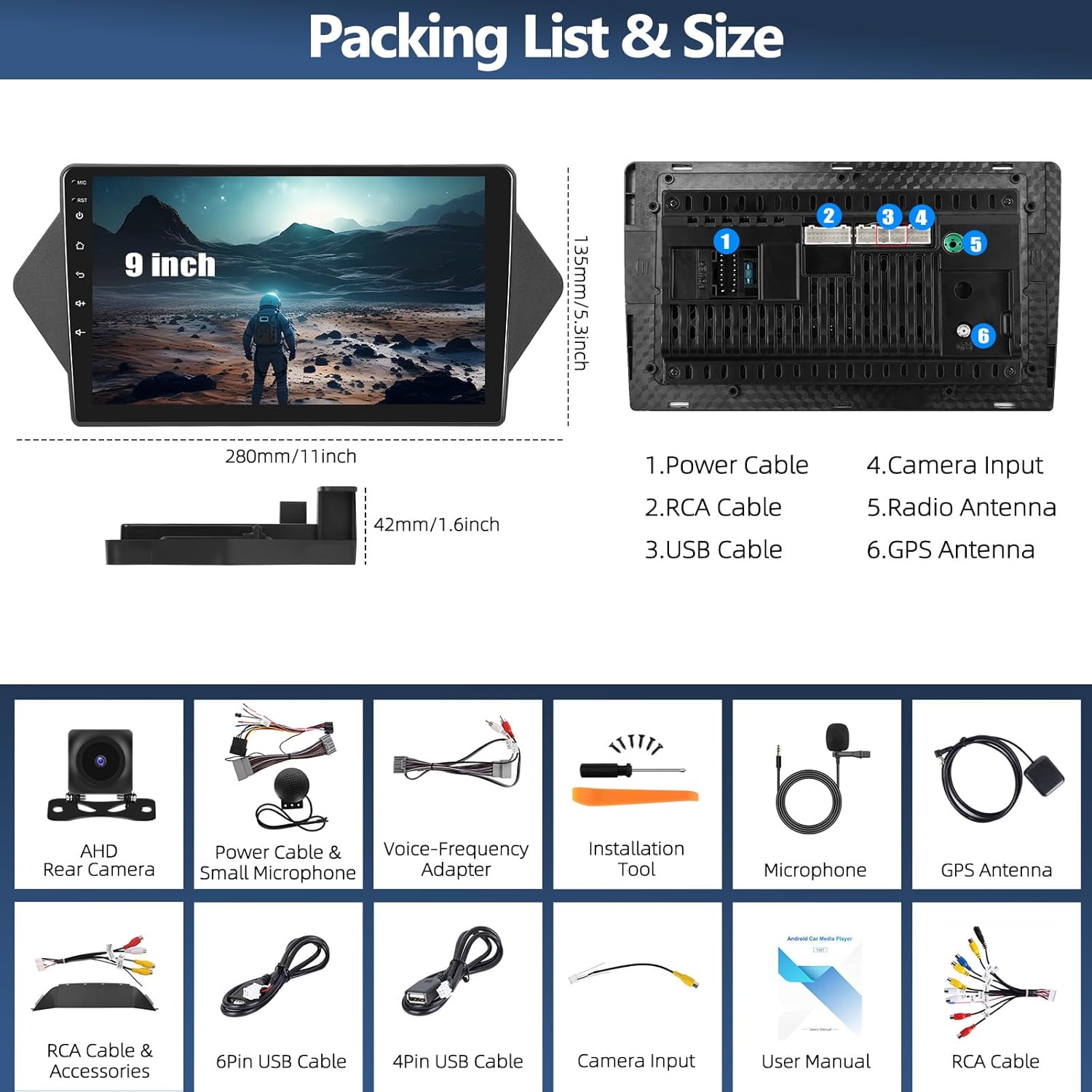
Image: Packing list and size diagram, illustrating the head unit dimensions and all included components.
4. セットアップとインストール
4.1 一般的なインストール
Professional installation is recommended. Ensure the vehicle's power is disconnected before beginning installation. Refer to your vehicle's service manual for specific dashboard removal procedures.
4.2 バックカメラの取り付け
The reversing input must be connected even if the reversing camera is not used, to ensure proper functionality of the head unit.
- Connect the red wire (positive) of the camera to the positive pole of the car's reversing light.
- Connect the black wire (negative) of the camera to the negative pole of the car's reversing light.
- The reversing trigger is controlled by the stereo; therefore, the third wire (trigger wire) does not require a separate connection.
注記: The white plug from the camera input cable must be connected to the main device for Bluetooth and Wi-Fi signals to function correctly.

Image: Reversing Camera Installation wiring diagram.
4.3 ステアリングホイールコントロールの設定
After connecting the power cable, you need to configure the steering wheel controls. Navigate to the "SWC" application on the head unit. Follow the on-screen instructions to learn and assign the steering wheel buttons. If the learning process fails, repeat the steps.

Image: Steering Wheel Control (SWC) application interface.
5. 操作手順
5.1 ワイヤレス Apple CarPlay & Android Auto
The head unit supports both wireless Apple CarPlay and Android Auto, allowing seamless integration with your smartphone for navigation, calls, messages, and music.

Image: Wireless Apple CarPlay and Android Auto interfaces.
5.1.1 ワイヤレス Apple CarPlay 接続
- iPhone で Bluetooth を有効にして、カーラジオとペアリングします。
- カーステレオで「Zlink」アプリケーションを開きます。
- If connection fails, connect your iPhone to the car radio's hotspot, then click the "Zlink" app again.
Maintain both Bluetooth and hotspot connections for stable CarPlay operation.

Image: Wireless Apple CarPlay in use.
5.1.2 ワイヤレス Android Auto 接続
- 携帯電話に「Android Auto」アプリがインストールされていることを確認してください。
- Android スマートフォンで Bluetooth を有効にし、カーラジオとペアリングします。
- カーステレオで「Zlink」アプリケーションを開きます。

Image: Wireless Android Auto in use.
5.2 GPSナビゲーションとWiFi接続
The unit features a built-in GPS module for both online and offline navigation. Connect to a Wi-Fi hotspot to access online maps, download third-party apps, and browse the internet.
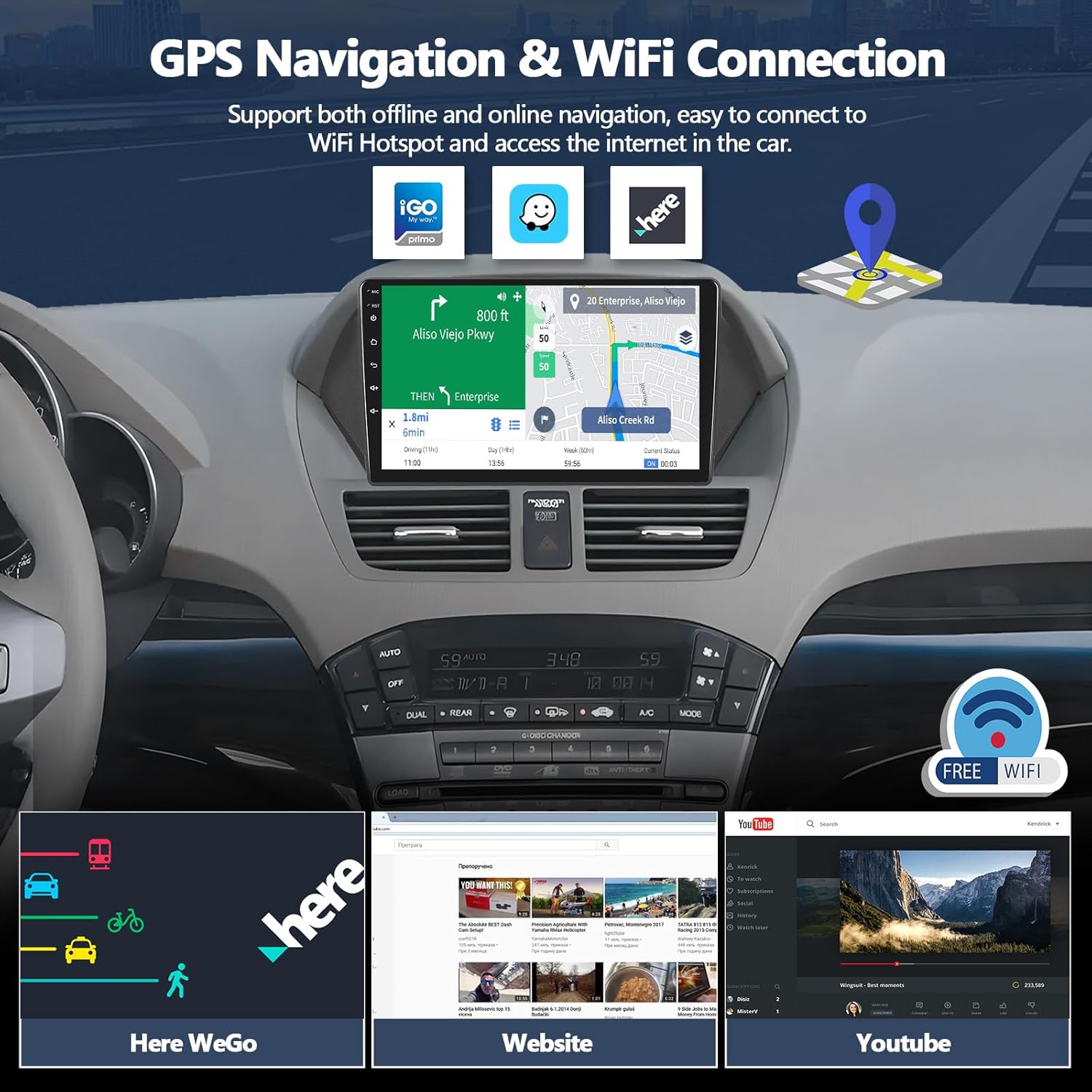
画像: GPS ナビゲーションと WiFi 接続機能。
5.2.1GPSナビゲーション
Run real-time navigation or offline map navigation on the head unit at any time. Various navigation applications are available for download from the Google Play Store.

画像: GPS ナビゲーション インターフェース。
5.2.2 WiFi接続
Connect to Wi-Fi or a mobile hotspot to download applications, stream videos, access offline maps, and more.

Image: WiFi Connection capabilities and app exampレ。
5.3 Bluetooth 5.0 & FM RDSラジオ
Enjoy hands-free calls and wireless audio streaming via Bluetooth 5.0. The built-in FM/RDS radio offers 18-station presets for live broadcasting.

Image: Bluetooth and FM RDS Radio interfaces.
5.3.1 ブルートゥース 5.0
Connect your phone for hands-free calls and wireless audio streaming from services like Spotify or Pandora.

画像: Bluetooth 5.0 の機能。
5.3.2 FM RDSラジオ
Listen to real-time radio broadcasts with RDS information.

Image: FM RDS Radio features.
5.4 16バンドイコライザー(EQ)
Customize your audio experience with the built-in 16-band equalizer. Adjust sound fields for strong bass, soft midrange, and bright treble to achieve your preferred audio quality.

Image: 16-Band Equalizer interface.
5.4.1 32バンドイコライザー
The system also features a 32-band equalizer for more precise audio tuning, ideal for various musical styles.

Image: 32-Band Equalizer interface.
5.5 Optional Home Page APP Display
Customize your home page by selecting and rearranging the application icons you want to display. This allows for a personalized and efficient user experience.

Image: Optional Home Page APP customization.
5.6 分割画面機能
分割画面機能を使用すると、ナビゲーションと音楽再生などの 2 つのアプリケーションを同時に実行できるため、マルチタスク機能が強化されます。

画像: 分割画面機能。
5.7 ミラーリンク機能
Synchronize your iOS or Android phone screen to the head unit. Android supports two-way operation, while iOS supports one-way operation (display only).

Image: iOS/Android Mirror Link feature.
6. メンテナンス
カーステレオの寿命を延ばし、最適なパフォーマンスを確保するには、次のメンテナンス ガイドラインに従ってください。
- 画面のクリーニング: 柔らかく糸くずの出ない布でタッチスクリーンを優しく拭いてください。頑固な汚れには、軽く拭いてください。amp布を水またはスクリーンに安全なクリーナーで拭いてください。刺激の強い化学薬品や研磨剤は使用しないでください。
- 一般的な清掃: 本体を埃やゴミから守ってください。通気口やボタン周辺は柔らかいブラシか圧縮空気で清掃してください。
- ソフトウェアアップデート: 最新の機能とバグ修正が適用されていることを確認するために、定期的にソフトウェアアップデートを確認してください。メーカーの website or the unit's settings for update procedures.
- 極端な温度を避ける: 電子部品に影響を及ぼす可能性があるため、ユニットを長時間極端な高温または低温にさらさないでください。
7。 トラブルシューティング
7.1 オーディオ出力なし
If you experience no audio from the car stereo, check the following connections:
- Ensure the AUX IN R/L on the Voice-Frequency Adapter is correctly connected to the Audio Out R/L on the RCA cable (red to red, white to white).
- Verify that the small speaker (included in the package) is connected to the power cable.

Image: Solutions for no audio output.
7.2 ステアリングホイールのコントロールが反応しない
If your steering wheel controls are not functioning, ensure they have been properly configured. Refer to section 4.3 "Steering Wheel Control Setup" for detailed instructions. Re-learn the buttons if necessary.
7.3 GPS信号の問題
Ensure the GPS antenna is properly installed and has a clear line of sight to the sky. Obstructions or poor placement can affect signal reception.
7.4 Wi-Fi/Bluetooth Connectivity Problems
Check that the white plug from the camera input cable is securely connected to the main device, as this connection is crucial for Wi-Fi and Bluetooth signals.
8. 仕様
| 特徴 | 詳細 |
|---|---|
| モデル番号 | A8039A3662H1MI2 |
| オペレーティング·システム | アンドロイド15 |
| ラム | 4GB |
| ロム | 64GB |
| 画面サイズ | 9インチ |
| 接続技術 | Bluetooth 5.0、Wi-Fi、GPS |
| 特集 | Wireless Apple CarPlay, Android Auto, 16-Band EQ, FM RDS Radio, HD Backup Camera Support, Split Screen, Mirror Link |
| 対応デバイス | Honda Acura MDX 2007-2013 (Low-End Version, Without Canbus) |
| 製品寸法 | 1.6 x 11 x 5.3インチ |
| アイテム重量 | 2.86ポンド |
| オーディオ出力モード | ステレオ |
| サラウンドサウンドチャンネル構成 | 5.1 |
| ビデオエンコーディング | H.264、H.265/HEVC |
9. 保証情報
For specific warranty details regarding your CAMECHO car stereo, please refer to the warranty card included in your product packaging or contact the seller directly. Protection plans may be available for purchase separately to extend coverage.
10. カスタマーサポート
If you require further assistance, have questions about installation, or encounter any issues not covered in this manual, please contact CAMECHO customer support.
メールアドレス: CAMECHOVIP@126.com

Image: CAMECHO Customer Support contact information.
Ask a question about this manual
Ask about setup, troubleshooting, compatibility, parts, safety, or missing instructions. Manuals+ will review the question and use this page’s manual context to help answer it.