
1. はじめに
This manual provides comprehensive instructions for the DAREU EK87PROTKL Wireless Mechanical Gaming Keyboard and the DAREU A950 4K Polling Rate Wireless Gaming Mouse. Please read this manual carefully before using the products to ensure proper setup and operation. Keep this manual for future reference.
2. Keyboard Features Overview (EK87PROTKL)
- Gasket Mount & PCB Single Key Slotting: Features a gasket structure with a 1.2mm thick FR4 PCB and single key slotted design for enhanced resilience, stability, and a softer, more responsive feel. Six-layer padding reduces noise and provides a focused, crisp sound.
- トライモード接続: Supports Bluetooth 5.1, 2.4GHz wireless, and USB-C wired connections. Connects to up to five devices simultaneously.
- ホットスワップ可能: Equipped with a hot-swappable PCB supporting almost all 3-pin or 5-pin mechanical switches on the market. Comes with pre-lubed Cloud linear switches.
- 南向きのRGB照明: Offers up to 26 backlight modes and 16.8 million colors. Brightness and speed are adjustable via the driver software.
- 長いバッテリー寿命: Features a 4000mAh battery, providing up to 45 days of playtime in lights-off mode.

Figure 2.1: Keyboard Gasket Structure Diagram. This image details the layered construction of the keyboard, highlighting components that contribute to its sound and feel.

Figure 2.2: Keyboard Tri-Mode Connection. This image illustrates the three available connection methods and how to switch between them using Fn key combinations.

Figure 2.3: Keyboard RGB Lighting Controls. This image shows various RGB lighting modes and the Fn key combinations for adjusting brightness and color.
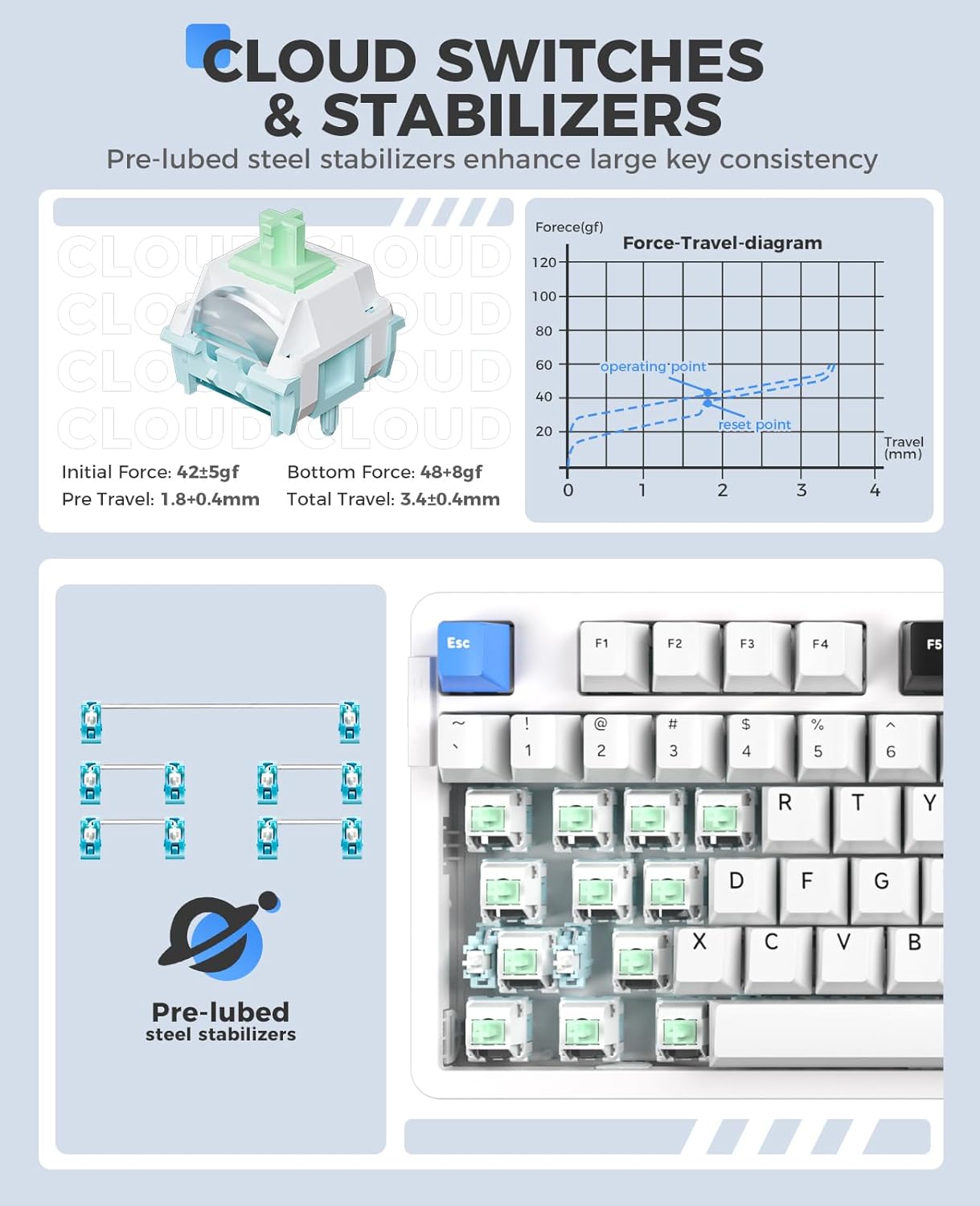
Figure 2.4: Cloud Switches and Stabilizers. This image details the characteristics of the pre-lubed Cloud linear switches and steel stabilizers.

Figure 2.5: Hot-Swappable PCB Socket. This image illustrates the hot-swappable design, allowing users to easily change switches.
3. Mouse Features Overview (A950)
- 4Kポーリングレート: Equipped with a 4KHz receiver, sending signals to the computer in 0.25ms, which is four times faster than standard gaming mice.
- PAW 3395 光学センサー: Features a high-precision PAW 3395 sensor with up to 26000 DPI, 650 IPS tracking speed, and 50G acceleration for accurate tracking.
- Kailh Black GM8.0 スイッチ: Utilizes durable Kailh black GM8.0 mouse switches, rated for 80 million clicks.
- Tri-Mode Connection & Programmable: Supports multiple connection methods and offers programmable buttons via software.
- 軽量設計: Weighs 54g for comfortable and agile use.
- 急速充電: 300mAh battery with 30-minute fast charging to reach 90% power. Provides approximately 37 days of use in BT5.1 mode and 6 days in 2.4G mode (based on 4 hours of connection per day).

Figure 3.1: Mouse 4K Report Rate. This image shows the mouse and its 4K receiver, emphasizing the high report rate for responsiveness.

Figure 3.2: Mouse PAW3395 Optical Sensor. This image focuses on the mouse's sensor capabilities, including its high DPI and tracking speed.

Figure 3.3: Mouse Fast Charging Technology. This image provides details on the mouse's battery life and quick charging feature.
4. セットアップ手順
4.1 Keyboard (EK87PROTKL)
- 有線接続: 付属のUSB-Cケーブルを使用してキーボードをコンピューターに接続します。キーボードは自動的に認識されます。
- 2.4GHzワイヤレス接続:
- 2.4GHz USB レシーバーを見つけます。
- レシーバーをコンピューターの使用可能な USB ポートに接続します。
- Turn on the keyboard and switch it to 2.4GHz mode (refer to the keyboard's mode switch or Fn key combination). The keyboard should connect automatically.
- Bluetooth 5.1 接続:
- Ensure the keyboard is in Bluetooth mode (refer to the keyboard's mode switch or Fn key combination, typically Fn + 1/2/3).
- コンピューターまたはデバイスで、Bluetooth 設定に移動し、新しいデバイスを検索します。
- Select "DAREU EK87PROTKL" from the list of available devices to pair.
- The keyboard can store up to three Bluetooth connections. Switch between them using Fn + 1, Fn + 2、 または Fn + 3.
4.2 Mouse (A950)
- 有線接続: Connect the mouse to your computer using the provided USB-C cable. The mouse will function immediately.
- 2.4GHzワイヤレス接続:
- Plug the 4K USB receiver into an available USB port on your computer.
- Turn on the mouse and switch it to 2.4GHz mode. The mouse should connect automatically.
- Bluetooth接続:
- マウスが Bluetooth モードになっていることを確認します。
- コンピューターまたはデバイスで、Bluetooth 設定に移動し、新しいデバイスを検索します。
- Select "DAREU A950" from the list of available devices to pair.
- 充電: Connect the mouse to a computer USB port using the USB-C cable for charging. The mouse supports fast charging.
5. 操作手順
5.1 Keyboard (EK87PROTKL)
- RGB照明コントロール:
- Fn + 上矢印: 明るさを上げます。
- Fn + 下矢印: 明るさを下げます。
- Fn + { : バックライトの色を変更します。
- Fn + } : バックライトモードを変更します。
- オペレーティング システム スイッチ: 使用 Fn + 1 (Windowsの場合)または Fn + 2 (for Mac) to switch between operating system layouts.
- ドライバーソフトウェア: For advanced customization of RGB lighting, macros, and key assignments, download and install the official DAREU driver software from the DAREU webサイト。
5.2 Mouse (A950)
- DPI 調整: The mouse typically has a dedicated DPI button or can be adjusted via software. Refer to the DAREU driver software for precise DPI settings.
- プログラム可能なボタン: Utilize the DAREU driver software to customize button functions, create macros, and adjust other performance settings.
6. メンテナンス
6.1一般的なクリーニング
- 掃除する前に、キーボードとマウスの両方をコンピューターから取り外してください。
- 柔らかく糸くずの出ない布で軽く拭き取ってください。amp表面を水または中性洗剤で拭いてください。
- キーボードの場合は、圧縮空気を使用してキーキャップ間のほこりやゴミを取り除きます。
- 強力な化学薬品や研磨剤を使用したり、デバイスに液体を直接吹きかけたりしないでください。
6.2 Keyboard Switch Replacement
- キーボードが電源から切断されていることを確認してください。
- Use a keycap puller to carefully remove the desired keycap.
- Use a switch puller to gently grip and pull the switch vertically out of the PCB.
- 新しい 3 ピンまたは 5 ピンのメカニカル スイッチのピンを PCB の穴に合わせます。
- 新しいスイッチをカチッと音がするまでしっかりと押し込みます。正しく固定され、曲がっていないことを確認してください。
- キーキャップを交換します。
7。 トラブルシューティング
7.1 Keyboard Issues
| 問題 | 考えられる解決策 |
|---|---|
| キーボードが反応しない(有線) | Check USB-C cable connection. Try a different USB port or cable. |
| キーボードが接続されない (2.4GHz) | Ensure the keyboard is in 2.4GHz mode. Re-insert the USB receiver. Try a different USB port. Ensure the keyboard battery is charged. |
| キーボードが接続されない(Bluetooth) | Ensure the keyboard is in Bluetooth pairing mode (Fn + 1/2/3). Forget the device on your computer and re-pair. Ensure the keyboard battery is charged. |
| RGB照明が機能しない/正しくない | Adjust brightness/mode using Fn key combinations. Check settings in the DAREU driver software. Ensure the keyboard battery is charged. |
| キーが登録されない | Check if the switch is properly seated. If hot-swappable, try re-seating or replacing the switch. |
7.2 Mouse Issues
| 問題 | 考えられる解決策 |
|---|---|
| マウスが反応しない(有線) | Check USB-C cable connection. Try a different USB port or cable. |
| Mouse not connecting (2.4GHz) | Ensure the mouse is in 2.4GHz mode. Re-insert the 4K USB receiver. Try a different USB port. Ensure the mouse battery is charged. |
| マウスが接続されない(Bluetooth) | Ensure the mouse is in Bluetooth pairing mode. Forget the device on your computer and re-pair. Ensure the mouse battery is charged. |
| マウスカーソルが不安定または動かない | Clean the optical sensor. Ensure the mouse pad or surface is clean and suitable. Check DPI settings. |
| マウスが充電されない | Ensure the USB-C cable is properly connected. Try a different USB port or charging cable. Use a computer USB port for charging, not a wall adapter. |
8. 仕様
8.1 DAREU EK87PROTKL Keyboard
- 構造: Gasket Mount, PCB Single Key Slotting
- 基板: FR4 material, 1.2mm thick, hot-swappable (3/5 pin switches)
- スイッチ: Pre-lubed Cloud Linear Switch
- 安定剤: Pre-lubed Steel Stabilizers
- 繋がり: Bluetooth 5.1 / 2.4GHz Wireless / USB-C Wired (Tri-Mode)
- バッテリー: 4000mAh
- 点灯: South-Facing RGB, 26 modes, 16.8 million colors
- キー: 87 keys, N-key rollover (all keys conflict-free)
8.2 DAREU A950 Mouse
- センサー: PAW 3395 光学センサー
- ポーリングレート: 4KHz(4K受信機付き)
- 解像度: 最大26000DPI
- 追跡速度: 650 IPS
- 加速度: 50G
- スイッチ: Kailh Black GM8.0 (80 million clicks)
- 重さ: 54グラム
- 繋がり: Bluetooth / 2.4GHz Wireless / USB-C Wired (Tri-Mode)
- バッテリー: 300mAh, 30-minute fast charging (90% power)
9. 保証とサポート
DAREU products come with a standard manufacturer's warranty. For specific warranty terms and conditions, please refer to the warranty card included with your product or visit the official DAREU website. For technical support, troubleshooting assistance, or driver downloads, please visit the DAREU official support page or contact DAREU customer service.
公式DAREU Webサイト: www.dareu.com