
1. はじめに
The JCHICI HDMI Splitter 1x4 is designed to distribute a single HDMI input signal to four HDMI output devices simultaneously. It supports 4K resolution at 60Hz with HDR10 and Dolby Vision, ensuring high-quality video and audio transmission. This device is ideal for various applications including home theaters, conference rooms, and office setups where multiple displays are required from a single source.
2. パッケージ内容
- HDMIスプリッター×1
- USB電源ケーブルx1
- 電源アダプター x 1
- ユーザーマニュアル x 1
- 滑り止めゴムパッド×4
3.製品オーバーview
Familiarize yourself with the ports and indicators on your JCHICI HDMI Splitter.
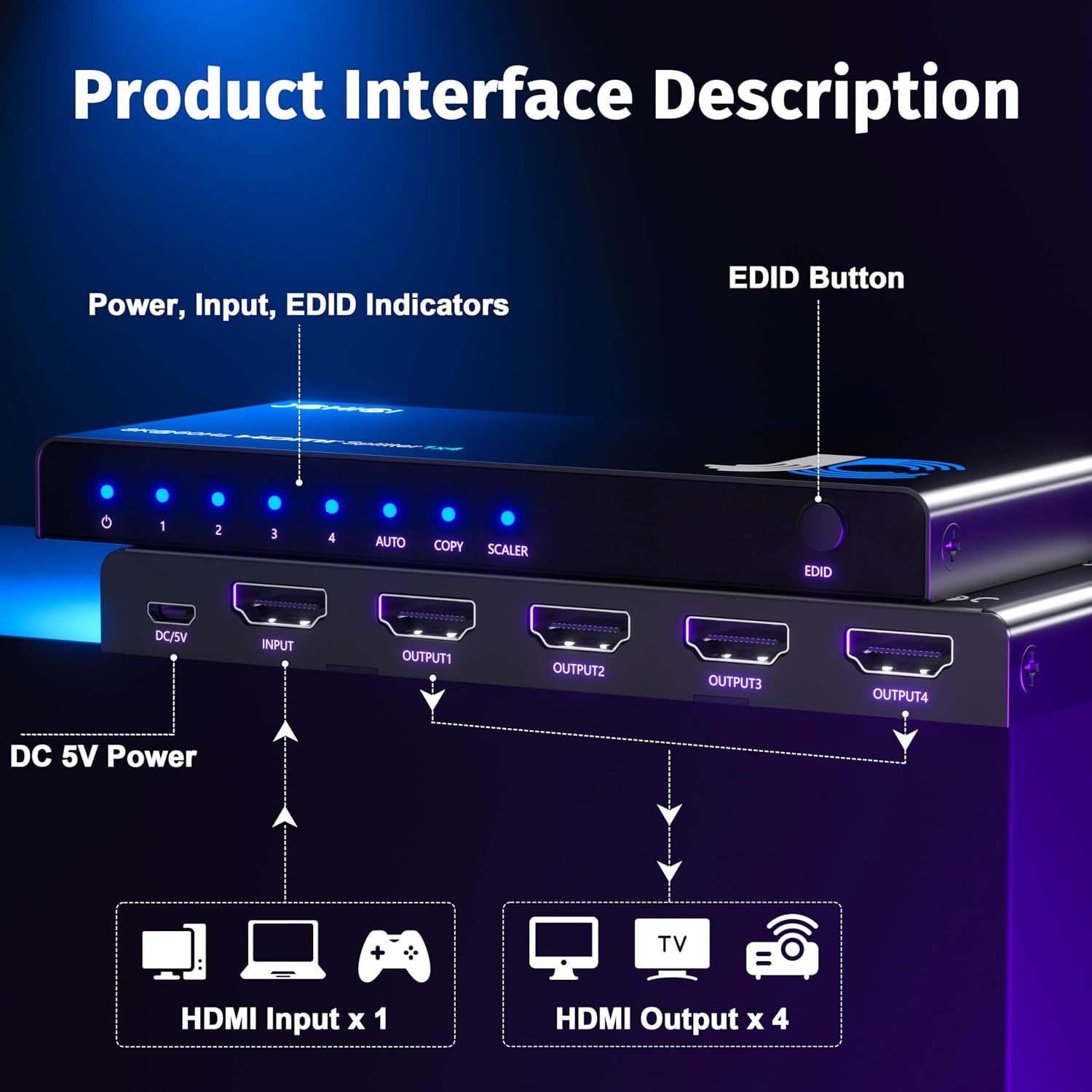
フロントパネル:
- 電源インジケーター: デバイスの電源がオンになると点灯します。
- 入力インジケータ(1~4): Show which HDMI output ports are active.
- EDID Indicators (AUTO/COPY/SCALER): Indicate the currently selected EDID mode.
- EDID ボタン: Used to cycle through the EDID modes (Auto, Copy, Scaler).
後面パネル:
- DC 5V電源入力: 付属の電源アダプターをここに接続します。
- HDMI入力: Connect your single HDMI source device (e.g., PS5, Xbox, Apple TV).
- 出力1-4: Connect up to four HDMI display devices (e.g., TVs, projectors, monitors).
4. セットアップ手順
- Ensure all devices (source, displays, and splitter) are powered off before making connections.
- Connect your HDMI source device (e.g., gaming console, laptop) to the HDMI IN port on the splitter using a high-quality HDMI cable.
- Connect up to four HDMI display devices (e.g., TV, monitor, projector) to the 出力1~4 高品質の HDMI ケーブルを使用してスプリッターのポートに接続します。
- 付属のUSB電源ケーブルを DC5V port on the splitter and then to the power adapter. Plug the power adapter into a wall outlet.
- Power on the HDMI splitter. The power indicator LED should illuminate.
- Power on your HDMI source device and all connected display devices.
- The splitter will automatically detect the optimal resolution for all connected displays. If issues arise, adjust EDID modes as described in the Operating Instructions.

5. 操作手順
The JCHICI HDMI Splitter features three EDID (Extended Display Identification Data) modes to ensure compatibility and optimal performance across various display setups. Use the EDIDボタン on the front panel to cycle through these modes.
- 自動モード: The splitter automatically detects the resolution of all connected displays and outputs the lowest common resolution and audio format possible. This ensures signal compatibility with all devices.
- COPY Mode: The input device will output a signal according to the resolution and audio format of HDMI Output 1. If other output displays have a lower resolution than HDMI Output 1, the refresh rate will be automatically lowered to accommodate, while maintaining the audio format, HDR, and Deep Color settings.
- SCALER Mode (Downscale): Converts 4K@60Hz signals to 1080p for Full HD displays. 4K-compatible displays can continue to display 4K content. This mode is ideal for mixed 4K and 1080p setups.

6. 特徴
- 4K@60Hz ウルトラHD & HDR サポート: Compliant with HDMI 2.0 standards, this splitter delivers stunning 4K resolution at 60Hz with HDR compatibility (HDR10 & Dolby Vision).
- 1-Input 4-Output HDMI Splitter: Distributes one HDMI input signal to four HDMI output devices simultaneously without signal loss.
- 3 EDID Modes: AUTO/COPY/SCALER modes optimize output settings for connected displays, maintaining stable video output even with mixed resolutions.
- True Plug-and-Play Operation: No drivers or software required for instant use with most mainstream devices.
- High-Fidelity Audio Transmission: Supports premium audio formats including DTS-HD, Dolby TrueHD, LPCM7.1, DTS, Dolby-AC3, and DSD.
- 外部電源: Includes a power adapter for stronger, more stable HDMI signal transmission.

7. 互換性
The JCHICI HDMI Splitter is compatible with a wide range of HDMI source and display devices, including but not limited to:
- ソースデバイス: PS5, Xbox, Apple TV, Blu-ray players, DVD players, PCs, laptops, streaming boxes, cable boxes, video cameras.
- 表示デバイス: HDTVs, monitors, projectors, VR headsets.

8. 使用シナリオ
This HDMI splitter is versatile and can be used in various settings:
- ホームシアター: Duplicate your movie or game content to multiple TVs in different rooms.
- 会議室: Share presentations or video content from a single laptop to several screens.
- 小売ディスプレイ: Showcase product information or advertisements on multiple screens from one source.
- ゲームのセットアップ: Mirror your gameplay to a capture card and a monitor simultaneously.
9。 トラブルシューティング
問題が発生した場合は、次の一般的なトラブルシューティング手順を参照してください。
- 信号なし/画面のちらつき:
- すべての HDMI ケーブルがしっかりと接続されていることを確認します。
- Try using different HDMI cables, especially high-quality ones rated for 4K@60Hz.
- Verify that the power adapter is correctly connected and the power indicator is on.
- Cycle through the EDID modes (AUTO/COPY/SCALER) using the EDID button on the splitter.
- Restart all connected devices (source, splitter, displays).
- 解決の問題:
- If using mixed resolution displays, try SCALER mode to downscale 4K to 1080p for compatible screens.
- Ensure your source device's output resolution is compatible with all connected displays.
- オーディオの問題:
- Check audio settings on your source device and displays.
- Ensure HDMI cables support the desired audio formats.
10. 仕様
| 特徴 | 詳細 |
|---|---|
| モデル番号 | US1-HS104L-4K-BS |
| HDMI準拠 | HDMI 2.0 |
| HDCP準拠 | 2.2 の |
| ビデオ解像度 | 最大4K@60Hz |
| データレート | 18Gbps |
| HDR サポート | HDR10、ドルビービジョン |
| オーディオフォーマット | DTS-HD, Dolby TrueHD, LPCM7.1, DTS, Dolby-AC3, DSD |
| EDID モード | AUTO, COPY, SCALER (Downscale) |
| 入力ポート | HDMI x 1 |
| 出力ポート | HDMI x 4 |
| 電源 | DC 5V (via USB power cable and adapter) |
| 製品寸法 | 2 x 0.6 x 5インチ |
| アイテム重量 | 10.5オンス |
11. 保証とサポート
The JCHICI HDMI Splitter comes with a 2-year warranty and lifetime customer support. For any technical assistance or warranty claims, please contact our dedicated technical team.
12. 公式製品ビデオ
HDMI 550BN Switch New (Preview)
このビデオでは、view of the HDMI switch, demonstrating its compact design and basic functionality. While it's a preview, it offers a quick visual reference for the product's physical aspects and how it might integrate into a setup.
8K 3x1 HDMI Switch - How to use
This video demonstrates the setup and usage of an 8K 3x1 HDMI switch. Although it's a 3x1 switch and not the 1x4 model, the general connection principles and operation of an HDMI switch are similar and can be helpful for understanding the JCHICI splitter's functionality.