
導入
The darkFlash DG360 is an all-in-one liquid CPU cooler designed to provide efficient thermal management for your computer's processor. It features a high-performance pump, ARGB synchronization capabilities, and PWM daisy-chain connection fans. This manual provides detailed instructions for installation, operation, maintenance, and troubleshooting to ensure optimal performance and longevity of your cooler.
パッケージ内容
インストールを続行する前に、パッケージにすべてのコンポーネントが含まれていることを確認してください。
- DG360 AIO Liquid CPU Cooler (Radiator, Pump/Water Block, Tubing)
- 120mm ARGB PWMファン x 3
- Mounting Hardware for Intel Sockets (LGA 1200/115X/1700/1851)
- AMDソケット(AM4/AM5)用取り付けハードウェア
- サーマルペースト
- ユーザーマニュアル
セットアップとインストール
Follow these steps carefully to install your darkFlash DG360 AIO Liquid CPU Cooler. Ensure your system is powered off and unplugged before beginning installation.
1. CPUソケットの準備
Identify your CPU socket type (Intel or AMD) and select the appropriate mounting brackets and backplate. Attach the standoffs to the motherboard according to your CPU socket type.

Image: Intel and AMD CPU mounting brackets. The image displays two circular mounting brackets, one labeled 'Intel' and the other 'AMD', indicating compatibility for different CPU platforms.
2. ラジエーターとファンを取り付ける
Mount the fans to the radiator using the provided screws. Ensure the fan airflow direction is appropriate for your case (typically exhausting air out or drawing air in). Install the radiator assembly into your PC case in an available mounting location (e.g., top, front, or rear).
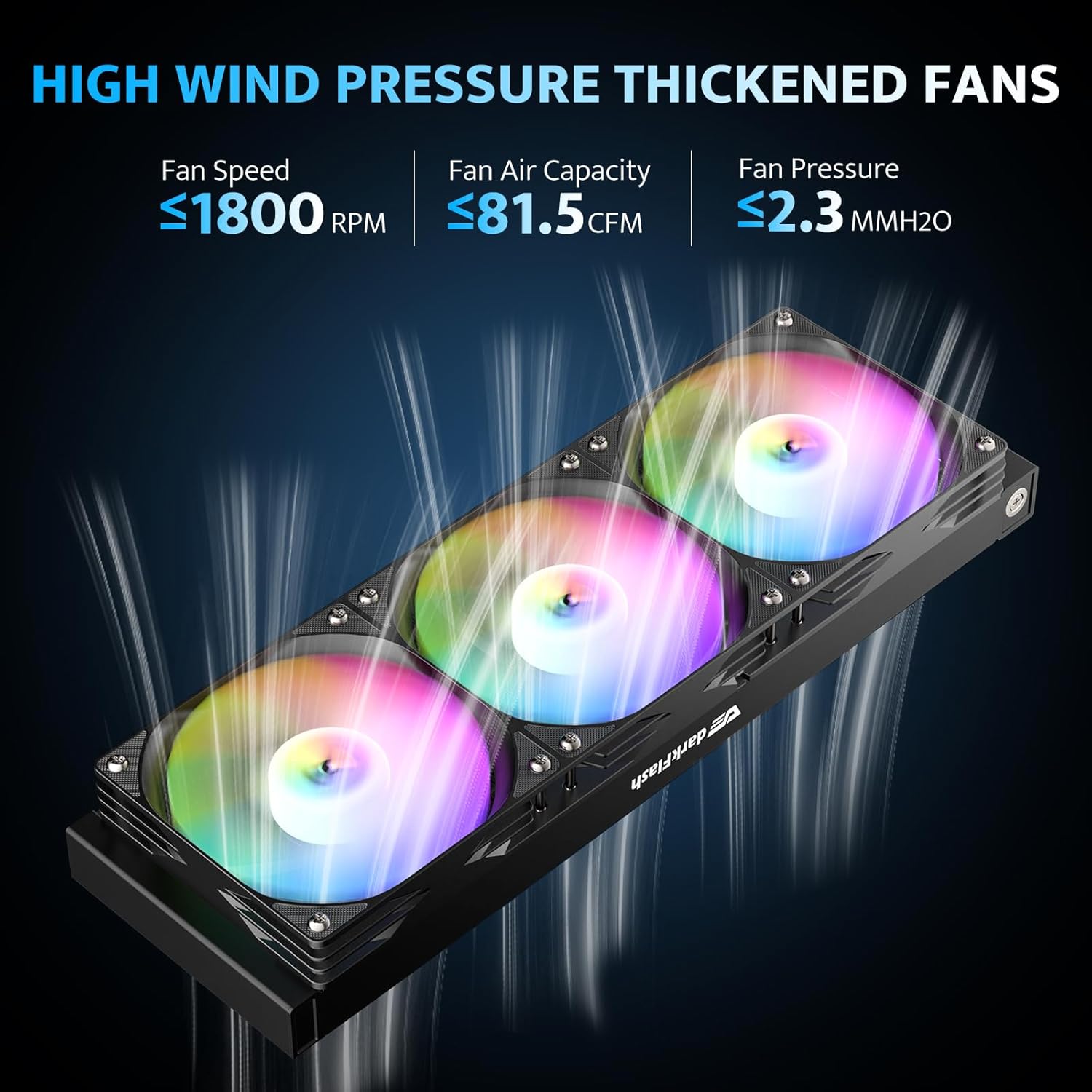
Image: Radiator with three ARGB fans. This image shows the darkFlash DG360 radiator with three illuminated ARGB fans attached, highlighting their high wind pressure design.
3. Apply Thermal Paste and Mount Water Block
Clean the CPU surface and apply a small amount of thermal paste to the center of the CPU. Carefully place the water block onto the CPU, aligning it with the standoffs. Secure the water block with the appropriate screws, tightening them in a cross pattern until snug.

Image: Optimized copper cooling plate of the water block. This image illustrates the design of the water block's copper cold plate, emphasizing its 57x57mm surface area and 1.5mm micro-channel spacing for improved heat transfer.
4.ケーブルを接続します
Connect the pump's 3-pin power cable to the CPU_FAN or AIO_PUMP header on your motherboard. Connect the fan PWM cables to the CPU_FAN or other fan headers. For ARGB lighting, connect the 3-pin ARGB cables from the fans and pump to a compatible 5V ARGB header on your motherboard or an ARGB controller. The fans support daisy-chain connection for simplified wiring.
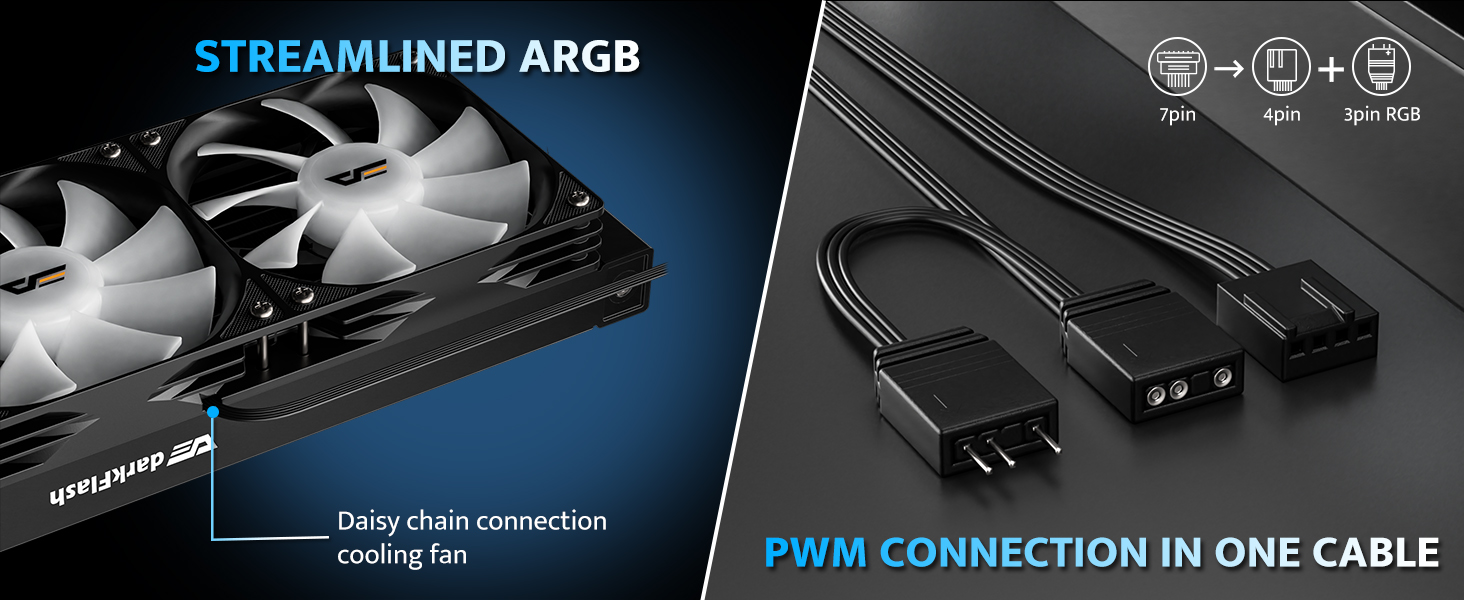
Image: ARGB and PWM connection cables. This image shows the streamlined ARGB and PWM connection cables, indicating how they can be connected in a single cable for easier management.
操作手順
PWMファン制御
The DG360's fans feature PWM (Pulse Width Modulation) control, allowing their speed to be adjusted automatically based on CPU temperature. This ensures efficient cooling when needed and quiet operation during lighter loads. Configure fan curves in your motherboard's BIOS/UEFI settings or through compatible software.
ARGB照明同期
The pump head and fans are equipped with 5V 3-pin Addressable RGB (ARGB) lighting. This allows for dynamic and customizable lighting effects. Connect the ARGB cables to a compatible motherboard header (e.g., ASUS Aura Sync, Gigabyte RGB Fusion, MSI Mystic Light Sync, ASRock Polychrome RGB) to synchronize lighting effects across your system. Use your motherboard's software to control the lighting patterns and colors.

Image: ARGB Sync compatibility with motherboards. This image displays the darkFlash DG360 cooler's ARGB lighting in a PC build, alongside logos of compatible motherboard ARGB sync technologies like ASUS Aura Sync, MSI Mystic Light Sync, Gigabyte RGB Fusion, and ASRock Polychrome RGB.
メンテナンス
定期的なメンテナンスを行うことで、液体 CPU クーラーの寿命が長くなり、最適なパフォーマンスが確保されます。
- ダストクリーニング: ラジエーターフィンとファンブレードは、空気の流れを妨げて冷却効率を低下させる可能性のある埃の蓄積を防ぐため、定期的に清掃してください。圧縮空気または柔らかいブラシを使用してください。
- チューブと接続を確認します。 Inspect the tubing for any signs of kinks, leaks, or damage. Ensure all cable connections (power, PWM, ARGB) are secure.
- ポンプ操作: Listen for any unusual noises from the pump. A properly functioning pump should operate quietly.
トラブルシューティング
darkFlash DG360 クーラーで問題が発生した場合は、次の一般的な問題と解決策を参照してください。
| 問題 | 考えられる原因 | 解決 |
|---|---|---|
| 高いCPU温度 | Poor thermal paste application, loose water block, insufficient airflow, pump failure. | Reapply thermal paste, ensure water block is securely mounted, clean radiator/fans, check pump connection. |
| Fans Not Spinning/ARGB Not Lighting Up | Incorrect cable connection, faulty fan/ARGB header, software conflict. | Verify all PWM and ARGB cables are correctly connected to the motherboard or controller. Check motherboard BIOS/software settings. |
| ポンプの騒音 | Air bubbles in the loop, pump running at maximum speed, faulty pump. | Gently tilt the PC case to dislodge air bubbles. Adjust pump speed in BIOS. If noise persists, contact support. |
| ARGB cable too short (as noted in a review) | Limited cable length for specific PC case layouts or motherboard header locations. | Consider using an ARGB extension cable if the pump's ARGB cable cannot reach the desired header. |
仕様
Detailed technical specifications for the darkFlash DG360 AIO Liquid CPU Cooler:
- 製品寸法: 長さ15.51インチ x 幅4.72インチ x 高さ1.06インチ(ラジエーター)
- 冷却方法: 液体(水)
- 対応デバイス: デスクトップPC
- 騒音レベル: 33デシベル(最大)
- 材料: アルミニウム(ラジエーター)、銅、マイクロスカイブフィン(コールドプレート)
- Maximum Rotational Speed (Fans): 1800 回転
- Air Flow Capacity (Fans): 81.5 立方フィート/分 (CFM)
- ポンプ速度: 最大3000 RPM
- TDP Support: 最大315W
- 電源コネクタのタイプ: 5-Pin (Fans), 3-Pin (Pump)
- 巻tage: 12ボルト
- ワットtage: 1.8ワット
- CPUソケットの互換性: インテル LGA 1200/115X/1700/1851、AMD AM4/AM5
- 商品の重量: 4.6ポンド
保証とサポート
darkFlash provides a 3-year assurance for the DG360 AIO Liquid CPU Cooler. This warranty covers defects in materials and workmanship under normal use. For warranty claims, technical assistance, or any product-related inquiries, please contact darkFlash customer support through their official web製品を購入したサイトまたは小売店。
For additional resources and support, visit the official darkFlash store: AmazonのdarkFlashストア