
Bemi BRCT5
Bemi Cognita Tab 5 E-Reader User Manual
Model: BRCT5
1. はじめに
This manual provides essential instructions for the setup, operation, and maintenance of your Bemi Cognita Tab 5 E-Reader. The Cognita Tab 5 is a lightweight e-reader designed for comfortable reading, featuring a 5.76-inch e-paper display, Android 8.1 operating system, and Wi-Fi connectivity. Please read this manual thoroughly to ensure proper use and to maximize your device's potential.
2. パッケージ内容
Upon unpacking your Bemi Cognita Tab 5, please verify that all the following items are included:
- Bemi Cognita Tab 5 E-Reader
- USB充電ケーブル
- クイックスタートガイド
- ユーザーマニュアル(このドキュメント)
- 保証書

Image: Contents of the Bemi Cognita Tab 5 E-Reader package, including the device, charging cable, and documentation.
3.デバイスオーバーview
Familiarize yourself with the physical components of your Bemi Cognita Tab 5.
3.1フロント View
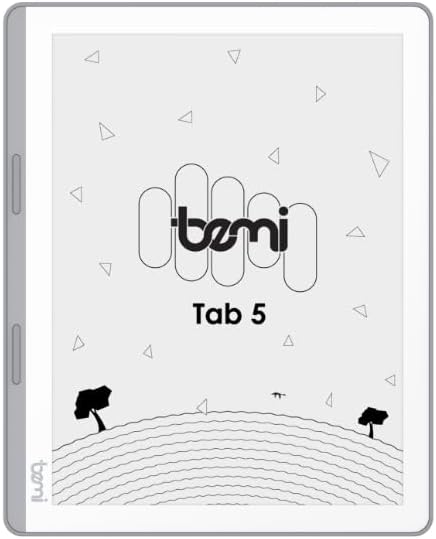
画像: 正面 view of the Bemi Cognita Tab 5 E-Reader, showing the e-paper display and side buttons.
- 電子ペーパーディスプレイ: 5.76-inch screen with 920x680 resolution (198 ppi) and anti-glare coating.
- ページめくりボタン: Located on the side for convenient navigation through content.
3.2 戻る View

画像: 裏面 view of the Bemi Cognita Tab 5 E-Reader, highlighting its textured surface and branding.
- Rubberized Casing: Provides a secure grip and durability.
3.3 ポートとボタン
- 電源ボタン: デバイスの電源をオン/オフにしたり、スリープ状態にしたりするために使用します。
- USBポート: 充電やデータ転送に。
- MicroSDカードスロット: ストレージを最大64GBまで拡張します。
- ヘッドフォンジャック: オーディオ出力用。
4. セットアップ
4.1 初期充電
Before first use, fully charge your Bemi Cognita Tab 5. Connect the provided USB cable to the device's USB port and plug the other end into a compatible USB power adapter (not included) or a computer's USB port. The charging indicator will show the charging status.
4.2 電源オン/オフ
- 電源を入れるには: 画面がアクティブになるまで電源ボタンを押し続けます。
- 電源を切るには: 電源ボタンを長押しし、画面に表示されるオプションから「電源オフ」を選択します。
- 寝る/起きる: 電源ボタンを短く押すと、デバイスがスリープ状態になったり、起動したりします。
4.3 基本的なナビゲーション
The Cognita Tab 5 features a responsive touchscreen for navigation. Tap to select items, swipe to scroll, and use pinch-to-zoom where applicable. The dedicated page-turn buttons on the side can also be used for navigating through e-books.
4.4 Wi-Fi接続
To access online content, transfer files wirelessly, or update software, connect your device to a Wi-Fi network:
- へ移動 設定 メインメニューから。
- 選択 Wi-Fi.
- Wi-Fiの切り替え On.
- リストから希望のネットワークを選択し、プロンプトが表示されたらパスワードを入力します。
5. 操作手順
5.1 電子書籍を読む
The Bemi Cognita Tab 5 supports various e-book formats including PDF, EPUB, and MOBI. To start reading:
- に移動 書籍 section on your device.
- Tap on the cover of the e-book you wish to read.
- Use the touchscreen or the physical page-turn buttons to navigate through pages.

Image: A person holding the Bemi Cognita Tab 5 E-Reader, demonstrating the reading experience on its e-paper display.
5.2 バックライトの調整
The adjustable screen backlight allows for comfortable reading in various lighting conditions. Access backlight settings through the quick settings panel or the main Settings menu to adjust brightness levels.
5.3 File 移行
転送できます files to your Cognita Tab 5 via USB or Wi-Fi.
- USB転送: Connect the device to your computer using the USB cable. The device will appear as a removable storage drive, allowing you to drag and drop files.
- Wi-Fi転送: Ensure both your device and the transmission device are on the same local area network (LAN). On your Cognita Tab 5, navigate to the Wi-Fi Transfer option (often found in the 'Storage' or 'Settings' menu). An IP address will be displayed (e.g., http://172.20.10.8:12580). Enter this address into a web browser on your computer or phone to access the device's storage and transfer files. Do not close this page during transmission.

Image: Screenshots showing the Wi-Fi transfer interface with an IP address and a file management screen on the Bemi Cognita Tab 5 E-Reader.
5.4 Installing Additional Applications
Running on Android 8.1, the Cognita Tab 5 allows for the installation of additional reading applications. You can typically install apps by transferring their APK files to the device and installing them through a file manager, or by using a pre-installed app store if available.
5.5 オーディオ機能
デバイスはオーディオをサポートしています files and features text-to-speech functionality. Connect headphones to the headphone jack to listen to audiobooks or have your e-books read aloud.
5.6 Special Reading Features
The Cognita Tab 5 includes features to enhance your reading experience:
- PDF Reflow: Optimizes PDF documents for better readability on the smaller screen.
- 辞書: Look up definitions of words directly from your e-book.
- 翻訳者: Translate words or phrases within your reading material.
6. メンテナンス
6.1 クリーニング
画面を清掃するには、柔らかく糸くずの出ない布を使用してください。頑固な汚れには、軽くampen the cloth with water or a screen cleaner specifically designed for electronics. Avoid harsh chemicals or abrasive materials. For the device body, use a dry, soft cloth.
6.2バッテリーケア
To prolong battery life, avoid exposing the device to extreme temperatures. Charge the device regularly, but avoid leaving it fully discharged for extended periods. If storing the device for a long time, ensure it has a partial charge (around 50%).
6.3 ストレージ
Store your Bemi Cognita Tab 5 in a cool, dry place away from direct sunlight and moisture. Protect the screen from scratches by using a protective cover or case when not in use.
7。 トラブルシューティング
If you encounter issues with your Bemi Cognita Tab 5, refer to the following common solutions:
- デバイスの電源が入らない: Ensure the battery is charged. Connect the device to a power source and try again. If unresponsive, perform a hard reset by holding the power button for 10-15 seconds.
- 画面が反応しない: デバイスを再起動してください。問題が解決しない場合は、画面に汚れやゴミがないことを確認してください。
- Wi-Fi 接続の問題: Verify your Wi-Fi password. Restart your router and the Cognita Tab 5. Ensure the device is within range of the Wi-Fi signal.
- パフォーマンスが遅い: Close unused applications. Clear cache if available in settings. Consider performing a factory reset (this will erase all data).
- バッテリーの消耗が早い: 画面の明るさを下げてください。使用していないときはWi-Fiをオフにしてください。バックグラウンドアプリケーションを閉じてください。
ここで説明されていない問題が解決しない場合は、カスタマー サポートにお問い合わせください。
8. 仕様
| 特徴 | 仕様 |
|---|---|
| モデル名 | Cognita Tab 5 (BRCT5) |
| 画面 | 5.76-inch E-Paper, 920x680 resolution (198 ppi), Anti-glare |
| プロセッサ | Cortex-A7 Quad-Core |
| ラム | 1ギガバイト |
| 内部ストレージ | 16ギガバイト |
| 拡張可能なストレージ | 最大64GBのMicroSDカード |
| オペレーティング·システム | アンドロイド8.1 |
| 接続性 | Wi-Fi、USB |
| 特集 | Text-to-speech, Smart Reading, Headphone Jack, Scratch Resistant, Card Support |
| サポートされている電子書籍形式 | PDF, EPUB, MOBI, and others |
| バッテリー寿命 | 最大2週間(通常の使用) |
| 重さ | 135グラム |
| 厚さ | 8mm |
9. 保証とサポート
9.1 保証情報
Your Bemi Cognita Tab 5 E-Reader comes with a warranty. Please refer to the included Warranty Card for specific terms, conditions, and duration of the warranty. Keep your proof of purchase for warranty claims.
9.2 カスタマーサポート
For technical assistance, troubleshooting beyond this manual, or warranty inquiries, please contact the seller or manufacturer directly. Contact information may be available on the product packaging or the official Bemi webサイト。
Ask a question about this manual
Ask about setup, troubleshooting, compatibility, parts, safety, or missing instructions. Manuals+ will review the question and use this page’s manual context to help answer it.