
デヴァイス ASJZ032
DEVAISE 48x24 Inch Electric Standing Desk with Drawers (Model ASJZ032) User Manual
組み立て、操作、メンテナンスに関する包括的な手順。
重要な安全情報
組み立ておよびご使用の前に、すべての説明書をよくお読みください。このマニュアルは、今後の参考のために保管してください。
- Always ensure that the total weight on the desk does not exceed 180 lbs (81.6 kg).
- Be cautious of obstructions when adjusting the desk height to avoid potential damage or injury.
- Utilize the anti-collision feature to prevent collisions with objects or people during height adjustments.
- 操作中は子供やペットをデスクから遠ざけてください。
- ご使用前に、すべてのネジとボルトがしっかりと締められていることを確認してください。接続部に緩みがないか定期的に確認してください。
- 机の上に座ったり立ったりしないでください。
- 清掃またはメンテナンスの前に電源を切ってください。
パッケージ内容
組み立てを始める前に、すべての部品が揃っていることを確認してください。部品の視覚的な識別については、組み立てビデオをご覧ください。
Video: "Fast Assembly for DEVAISE Standing Desk with Drawers" - This video provides a visual guide to all included parts and the assembly process.
パッケージには以下が含まれている必要があります。
- デスクトップ(1個)
- 脚(2本)
- クロスバー/フレームコンポーネント
- Motor and control box
- コントロールパネル
- 電源アダプタとケーブル
- Drawers (2 pieces)
- 収納棚
- Headphone hooks (2 pieces)
- 組み立て用ハードウェア(ネジ、ボルト、六角レンチ)
- 取扱説明書
組み立て手順
Follow these steps carefully for proper assembly. All parts are clearly labeled, and pre-drilled holes are provided for convenience. An Allen wrench is included for assembly.
- Step 1: Attach the Drive Rod to the Motor.
Insert the drive rod (part 4 in video) into the motor (part 5 in video). Ensure it is securely seated.

画像: 分解図 view of desk components, illustrating the quick installation process with labeled parts.
- Step 2: Assemble the Desk Legs.
Attach the foot supports to the bottom of each leg (parts 3 and 10 in video) using the provided screws (A) and Allen wrench (E).
- Step 3: Connect Legs with Crossbar.
Position the legs upright and connect them using the main crossbar (part 1 in video). Secure with screws (B) and Allen wrench (E).
- Step 4: Install Side Brackets.
Attach the side brackets (part 2 in video) to the top of the leg assembly, securing them with screws (B) and Allen wrench (E).
- Step 5: Prepare the Desktop.
Place the desktop (parts 7 and 18 in video) face down on a soft, clean surface. Attach the connecting plates (N) and wooden dowels (H) to join the desktop sections if applicable.
- Step 6: Attach Leg Assembly to Desktop.
Carefully align the assembled leg frame with the pre-drilled holes on the underside of the desktop. Secure the frame to the desktop using screws (C) and Allen wrench (E).
- Step 7: Connect Control Box and Cables.
Mount the control box (G) and connect all motor and control panel cables (F) as shown in the diagram. Ensure all connections are firm.
- Step 8: Assemble the Storage Shelf.
Assemble the storage shelf components (parts 11, 12, 13, 14, 15 in video) using screws (I), wooden dowels (H), and the provided tools (E, K, L).
- Step 9: Attach Storage Shelf to Desktop.
Carefully place the assembled storage shelf onto the desktop, aligning it with the designated holes. Secure it with screws (I) and wooden dowels (H).
- Step 10: Install Drawers and Hooks.
Insert the fabric drawers (part 16 in video) into their compartments. Attach the headphone hooks (part 8 in video) to the sides of the desk.

Image: Fully assembled DEVAISE Electric Standing Desk with two monitors, a laptop, and various office accessories, highlighting its functional design.
操作手順
This section details how to use the electric height adjustment and integrated features of your DEVAISE standing desk.
電動高さ調整
The desk features a smooth electric height adjustment system, allowing you to switch between sitting and standing positions effortlessly. The height range is from 28.35 inches to 46.45 inches.
- 使用 上へ(▲) そして 下へ(▼) コントロール パネルの矢印を使用して、デスクの高さを手動で調整します。
- LED ディスプレイに現在の高さがインチ単位で表示されます。
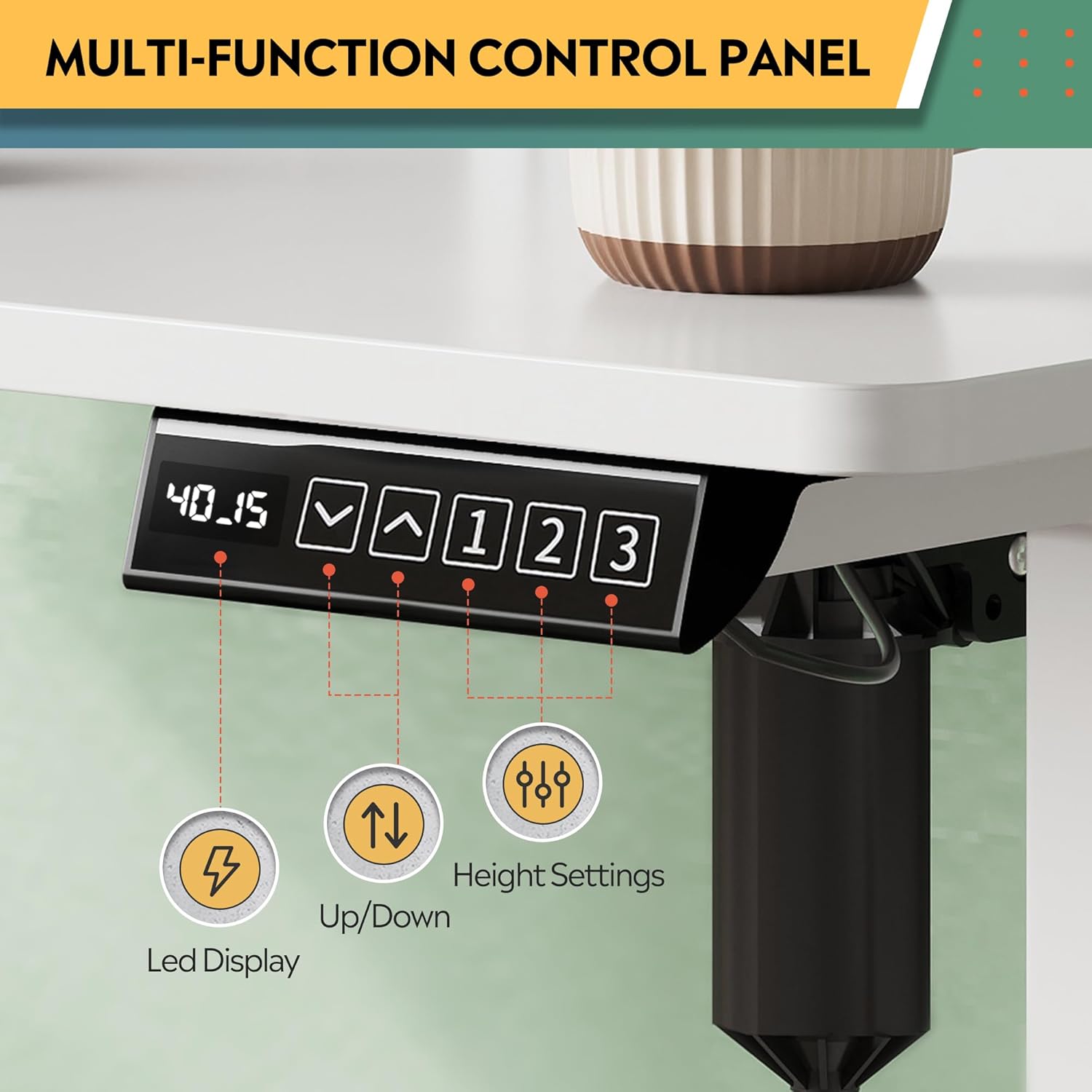
Image: Multi-function control panel showing LED display, up/down arrows, and memory preset buttons.
メモリプリセット
The desk includes three programmable height settings for quick, one-touch adjustments to your preferred sitting or standing heights.
- 上/下矢印を使用して、デスクを希望の高さに調整します。
- を押す 「M」 ボタン(または同様のメモリ設定ボタンがある場合はそれ)を押し、その後に番号付きプリセットボタン(1、2、または3)をクリックして現在の高さを保存します。
- 保存した高さを呼び出すには、対応する番号のプリセットボタン(1、2、または3).
統合型電源コンセントとUSBポート
The desk is equipped with 2 AC outlets and 2 USB ports (12A, 110~125V) for convenient power access for your devices.
- Plug your monitors, laptops, and other devices directly into the AC outlets.
- Use the USB ports to charge smartphones, tablets, and other USB-powered accessories.
Video: "DEVAISE Standing Desk with S" - Demonstrates the integrated power outlets, USB ports, and headphone hooks.
衝突防止機能
The smart anti-collision feature automatically stops and reverses the desk's movement if an obstruction is detected, protecting both the desk and your belongings.
Video: "DEVAISE Electric Standing Desk for Home Office" - Illustrates the sit-to-stand functionality and the anti-collision system.
メンテナンス
定期的なメンテナンスにより、スタンディング デスクの寿命が長くなり、最適なパフォーマンスが確保されます。
- クリーニング: 机の表面を柔らかくて乾いた布で拭きます。amp 布で拭いてください。仕上げを傷める可能性のある、刺激の強い化学薬品や研磨剤入りの洗剤は使用しないでください。
- 検査: すべてのネジと接続部がしっかりと締まっているか定期的に確認してください。必要に応じて締め直してください。
- ケーブル管理 Ensure cables are neatly organized and not interfering with the desk's movement. Use the provided cable management features.
- モーターケア: The motor system is designed for maintenance-free operation. Do not attempt to open or service the motor or control box.
トラブルシューティング
If you encounter any issues with your DEVAISE standing desk, refer to the following common problems and solutions.
| 問題 | 考えられる原因 | 解決 |
|---|---|---|
| 机は動きません。 | 電源ケーブルが外れている、モーターケーブルが緩んでいる、コントロールボックスにエラーがある。 | Check all power and motor connections. Unplug the desk for 10 seconds, then plug it back in to reset. |
| 机の動きが不均一であったり、異常な音がしたりします。 | 荷物の偏り、ネジの緩み、障害物。 | Ensure weight is evenly distributed. Check and tighten all assembly screws. Clear any obstructions. |
| 衝突防止機能が頻繁に作動します。 | Sensitivity setting too high, minor obstruction. | Check the area for any subtle obstructions. Refer to the control panel manual for adjusting anti-collision sensitivity (if available). |
| メモリプリセットが機能しません。 | プリセットが正しく保存されませんでした。 | Re-program the memory presets following the "Memory Presets" instructions in this manual. |
問題が解決しない場合は、カスタマー サポートにお問い合わせください。
仕様
| 特徴 | 詳細 |
|---|---|
| ブランド | デヴァイス |
| モデル番号 | ASJZ032 |
| デスクデザイン | スタンディングデスク |
| 製品寸法(奥行き×幅×高さ) | 奥行き27.6インチ x 幅47.24インチ x 高さ28.35インチ (奥行き70.1cm x 幅120cm x 高さ72cm) |
| 色 | 白 |
| 最小高さ | 28.35インチ(72 cm) |
| 最大高さ | 46.45インチ(118 cm) |
| 最大重量容量 | 180ポンド(81.6kg) |
| ベース素材 | Iron, Alloy Steel Frame |
| 上部の材質の種類 | エンジニアリングウッド |
| 引き出しの数 | 2 |
| 電源コンセント | 2 AC Outlets, 2 USB Ports (12A, 110~125V) |
| 特集 | Adjustable Height, Electric, Headphone Hooks, Storage Shelf |
| 組み立てが必要 | はい |
保証とサポート
Your DEVAISE Electric Standing Desk comes with a limited warranty. For specific details regarding the warranty period and coverage, please refer to the warranty card included in your package or contact DEVAISE customer support.
カスタマーサポート: Should you require assistance with assembly, product operation, or any other inquiries, our U.S.-based customer support team is available to help. Please refer to the contact information provided in your product packaging or on the official DEVAISE webサイト。
Optional protection plans are available for purchase, offering extended coverage for 2-year or 3-year durations, or a monthly complete protect plan. Details can be found where the product was purchased.