
OYAYO FP88DW
OYAYO FP88DW 折りたたみピアノキーボード ユーザーマニュアル
Model: FP88DW
1. はじめに
This manual provides detailed instructions for the setup, operation, maintenance, and troubleshooting of your OYAYO FP88DW Folding Piano Keyboard. Please read this manual thoroughly before using the instrument to ensure proper function and longevity.
2. パッケージ内容
以下にリストされているすべてのアイテムがパッケージに含まれていることを確認してください。
- OYAYO FP88DW Folding Piano Keyboard
- 電源アダプター(充電器)
- オーディオケーブル
- サスティンペダル
- 譜面台
- ギグバッグ
- ユーザーマニュアル(このドキュメント)

Image: OYAYO FP88DW Folding Piano Keyboard and its accessories, including the power adapter, audio cable, sustain pedal, music stand, gig bag, and user manual.
3.製品オーバーview
3.1 主な特徴
- 88個のセミウェイテッドキー: Designed to provide a responsive playing experience with adjustable touch sensitivity.
- 折りたたみ式デザイン: The keyboard folds 180 degrees for portability and compact storage.
- 内蔵スピーカー: Enhanced sound quality through built-in speakers.
- Bluetooth接続: Wireless connection to educational apps.
- MIDI/USB-B Interface: Connects to computers or smart devices for music editing and creation.
- デュアルパワーモード: Operates on a built-in rechargeable lithium battery or via wired charging.
- 複数の機能: Includes 129 tones, 128 rhythms, 60 demo songs, recording, metronome, transposition, and teaching mode.
3.2 コンポーネントとポート
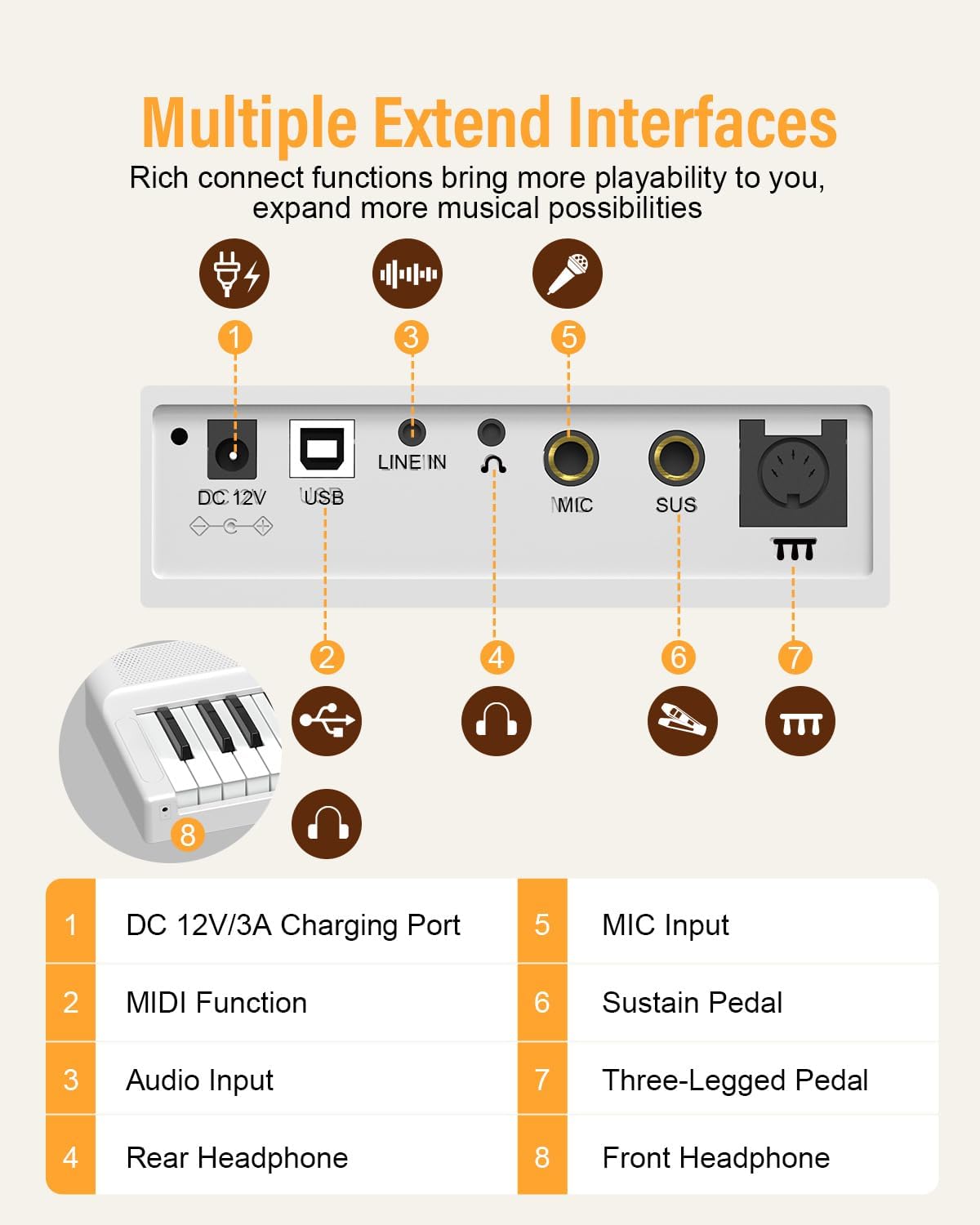
Image: Rear panel diagram illustrating the DC 12V/3A Charging Port, USB (MIDI) port, LINE IN (Audio Input), Rear Headphone jack, MIC Input, SUS (Sustain Pedal) jack, and Three-Legged Pedal jack. A Front Headphone jack is also indicated.
- DC 12V/3A Charging Port: ここに電源アダプターを接続します。
- USB (MIDI) Port: Connects to computers or smart devices for MIDI functionality.
- ライン入力(オーディオ入力): 外部オーディオソースを接続します。
- Rear Headphone Jack: ヘッドホン接続用。
- マイク入力: マイクを接続します。
- SUS (Sustain Pedal) Jack: For connecting the included sustain pedal.
- Three-Legged Pedal Jack: For connecting an optional three-pedal unit.
- フロントヘッドフォンジャック: An additional headphone jack located at the front for convenience.
4. セットアップ
4.1 キーボードの展開
To unfold the keyboard, place it on a flat, stable surface. Gently open the two halves until they lock into place. Ensure the locking mechanism is secure before use.

Image: The folding mechanism of the OYAYO FP88DW piano, demonstrating how to unfold it for use.
4.2電源オン
The FP88DW can be powered by its internal rechargeable battery or by the included AC adapter.
- バッテリー電源: The internal battery provides approximately 10 hours of playtime on a full charge.
- AC電源: Connect the power adapter to the DC 12V/3A charging port on the rear panel and plug it into a wall outlet. The keyboard will charge while in use or when turned off.

Image: A visual representation of the 10-hour battery life of the OYAYO FP88DW piano.
4.3 サスティンペダルの接続
Insert the plug of the sustain pedal into the 'SUS' jack on the rear panel of the keyboard.
5. 操作手順
5.1 電源のオン/オフと音量調節
- 力: Press the power button to turn the keyboard on or off.
- 音量: Use the rotary knob on the control panel to adjust the master volume.

画像: クローズアップ view of the control panel, showing the display and the rotary knob for volume and selection.
5.2 音色、リズム、デモ曲の選択
- トーン: Press the 'Tone' button, then use the rotary knob to select from 129 available tones.
- リズム: Press the 'RHY' button, then use the rotary knob to select from 128 rhythms.
- デモ曲: Press the 'Demo' button to cycle through 60 built-in demo songs.
5.3 Bluetooth接続
The keyboard supports Bluetooth for wireless connection to compatible learning applications.
- スマート デバイス (携帯電話、タブレット) で Bluetooth が有効になっていることを確認します。
- On your device, search for available Bluetooth devices and select 'OYAYO FP88DW'.
- Once connected, you can use the keyboard with compatible music apps.

Image: The OYAYO FP88DW piano demonstrating MIDI and Bluetooth connectivity with external devices like tablets and smartphones for educational apps.
5.4 MIDI/USB-B Connection
Connect the keyboard to a computer or iPad using a USB-B cable for MIDI functionality. This allows for music editing, recording, and interaction with digital audio workstations (DAWs).
5.5 録音機能
The keyboard includes a recording feature to capture your performances. Refer to the on-screen display and control panel buttons for specific recording and playback instructions.
5.6 Metronome and Transposition
- メトロノーム: メトロノーム機能を有効にして、タイミングとリズムの練習をサポートします。
- 転置: Adjust the pitch of the keyboard up or down to play in different keys without changing your finger positions.
5.7 ヘッドホンの使用
Connect headphones to either the front or rear 3.5mm headphone jack for private practice. The internal speakers will automatically mute when headphones are connected.

Image: The OYAYO FP88DW piano's sound output options, including wired headphones, mobile/iPad connection, and wired speakers, highlighting the upgraded sound effect.
6. メンテナンス
6.1 クリーニング
- キーボードの表面を柔らかく乾いた布で拭いてください。
- 頑固な汚れには、軽くamp布を水と中性石鹸水で湿らせ、すぐに拭いて乾かしてください。
- 研磨剤入りの洗剤、溶剤、ワックスは仕上げを傷める可能性があるため、使用しないでください。
6.2 ストレージ
- When not in use, fold the keyboard and store it in the provided gig bag to protect it from dust and damage.
- 直射日光や極端な温度を避け、涼しく乾燥した場所に保管してください。
7。 トラブルシューティング
| 問題 | 考えられる原因 | 解決 |
|---|---|---|
| スピーカー/ヘッドホンから音が出ません。 | 音量が低すぎる、ヘッドフォンが接続されている、電源に問題がある。 | Increase volume. Disconnect headphones if using speakers. Ensure keyboard is powered on and charged. |
| キーボードの電源が入りません。 | Battery depleted; power adapter not connected correctly. | Connect the power adapter and allow the battery to charge. Ensure the adapter is securely plugged in. |
| Bluetooth 接続に失敗します。 | Bluetooth not enabled on device; device out of range; interference. | Ensure Bluetooth is active on your device. Move device closer to the keyboard. Restart both devices. |
| キーが反応しない、または不安定に感じます。 | Dust or debris under keys; touch sensitivity setting. | Gently clean around keys. Check the touch sensitivity settings in the keyboard menu. |
| Keyboard unexpectedly shuts off. | バッテリー残量が少なくなりました。 | This can indicate a critically low battery. Connect the power adapter immediately to charge the keyboard. |
8. 仕様
| 特徴 | 詳細 |
|---|---|
| モデル名 | FP88DW |
| キーの数 | 88 |
| キータイプ | セミウェイト |
| トーン | 129 |
| リズム | 128 |
| デモソング | 60 |
| 接続性 | Bluetooth, MIDI/USB-B |
| 電源 | バッテリー駆動とコード式電気 |
| バッテリー寿命 | 約10時間(フル充電) |
| ヘッドフォンジャック | 3.5mm Jack (Front & Rear) |
| その他の機能 | Recording, Metronome, Transposition, Teaching Mode |
| アイテム重量 | 15.12ポンド(約6.86kg) |
| 折りたたみ時の寸法(長さ x 幅 x 高さ) | 約 630mm×245mm×140mm |
| 展開時の寸法(長さ x 幅 x 高さ) | 約 1260mm×245mm×70mm |

Image: Detailed dimensions of the OYAYO FP88DW piano, including its length, width, height, and weight in both folded and unfolded configurations.
9. 保証とサポート
9.1 保証情報
For specific warranty details, please refer to the warranty card included with your product or contact the retailer from whom you purchased the OYAYO FP88DW Folding Piano Keyboard. Warranty terms typically cover manufacturing defects for a specified period from the date of purchase.
9.2 カスタマーサポート
If you encounter any issues or have questions regarding your OYAYO FP88DW, please contact OYAYO customer support or your authorized dealer. Have your model number (FP88DW) and purchase information ready when contacting support.
Ask a question about this manual
Ask about setup, troubleshooting, compatibility, parts, safety, or missing instructions. Manuals+ will review the question and use this page’s manual context to help answer it.