
1. はじめに
The FNIRSI 2C53T is a versatile 3-in-1 handheld device designed for electronic testing and measurement. It integrates the functionalities of a digital oscilloscope, a true RMS multimeter, and a signal generator into a single, portable unit. This manual provides detailed instructions for the safe and effective use of your device.

図1.1: The FNIRSI 2C53T handheld device, showcasinコンパクトなデザインと統合されたディスプレイが特徴です。
2.製品オーバーview
The FNIRSI 2C53T combines three essential tools for electrical and electronic work:
- デジタルオシロスコープ: 2 channels, 50MHz bandwidth, 250MS/s real-time sampルレート。
- 真の実効値マルチメーター: 4.5 digits, 19999 counts, capable of measuring voltage, current, resistance, capacitance, diode, continuity, and temperature.
- 信号発生器: Outputs 13 types of waveforms with adjustable frequency (0-50KHz), amp電圧(0~3V)、デューティサイクル(0~100%)です。
The device features a robust hardware architecture (ARM + FPGA + ADC) for enhanced performance and flexibility. It also includes a 2.8-inch wide-angle display for clear readability.

図2.1: フロント view of the FNIRSI 2C53T, showing the display, control buttons, and input terminals.
含まれるコンポーネント:
- FNIRSI 2C53T 本体
- P6100 高容量tageプローブ(x2)
- Alligator Clip (x1)
- Test Probe (x1)
- Type-C充電ケーブル(1本)
- 収納バッグ(×1)
- 取扱説明書 (x1)
- 梱包箱(1個)
3. セットアップ
3.1デバイスの充電
The 2C53T has a built-in rechargeable lithium polymer battery. Before first use, fully charge the device using the provided Type-C charging cable and a compatible USB power adapter (not included). The charging port is located on the side of the device.
- Connect the Type-C cable to the device's charging port.
- ケーブルのもう一方の端を USB 電源に接続します。
- 画面上のバッテリーインジケーターに充電状態が表示されます。
- A full charge provides approximately 6 hours of standby time.
3.2 電源のオン/オフ
電源ボタン (通常は電源記号が付いています) を長押しして、デバイスの電源をオンまたはオフにします。
3.3 プローブの接続
Depending on the function you intend to use (oscilloscope or multimeter), connect the appropriate probes to the designated input terminals on the device. Ensure connections are secure.

図3.1: Illustrations of the Type-C charging port, internal battery, and the integrated stand for convenient placement.
4. 操作手順
The FNIRSI 2C53T offers three primary operating modes: Oscilloscope, Multimeter, and Signal Generator. Please note that these three functions cannot be used simultaneously.
4.1 オシロスコープ機能
The oscilloscope mode allows for the visualization and analysis of electrical signals.
- チャンネル: The device features 2 input channels.
- 帯域幅: 50MHz。
- Sampルレート: 250MS/s real-time.
- トリガーモード: Select from Auto, Normal, or Single trigger modes to stabilize waveforms.
- 垂直感度: Adjustable from 200mv/div to 10v/div.
- 最大入力ボリュームtage: 400V。
- 表示モード: Choose between Y-T (standard time-domain display), Roll (for slow-changing signals), and X-Y (for Lissajous figures).
- 高度な機能: Includes mathematical operations, cursor measurement, FFT spectrum analysis, and persistence display for detailed waveform analysis.

図4.1: Examples of oscilloscope display features, including mathematical operations, cursor measurements, persistence display, and X-Y mode for Lissajous figures.
4.2 マルチメーター機能
The multimeter mode provides precise digital measurements of various electrical parameters.
- 画面: 4.5 digits with 19999 counts.
- 真の実効値: 非正弦波形の正確な読み取りを提供します。
- 測定機能: DC / AC Voltage, DC/AC Current, Resistance, Capacitance, Diode, Continuity Check, and Temperature.
- Maximum Measurements: AC 750V, DC 1000V.
- 自動範囲設定: Automatically selects the appropriate measurement range; simply press the AUTO button.

図4.2: The multimeter interface displaying various measurement options such as voltage, current, resistance, and capacitance.
4.3 信号発生器機能
The signal generator mode allows you to output various waveforms for testing circuits.
- 波形の種類: Outputs 13 types of parameter-variable waveforms, including Sine, Square, Pulse, Ramp, Noise, and DC.
- 出力周波数: Adjustable from 0 to 50KHz.
- 出力 Ampリチュード: Adjustable from 0 to 3V.
- 出力デューティサイクル: 0% から 100% まで調整可能です。
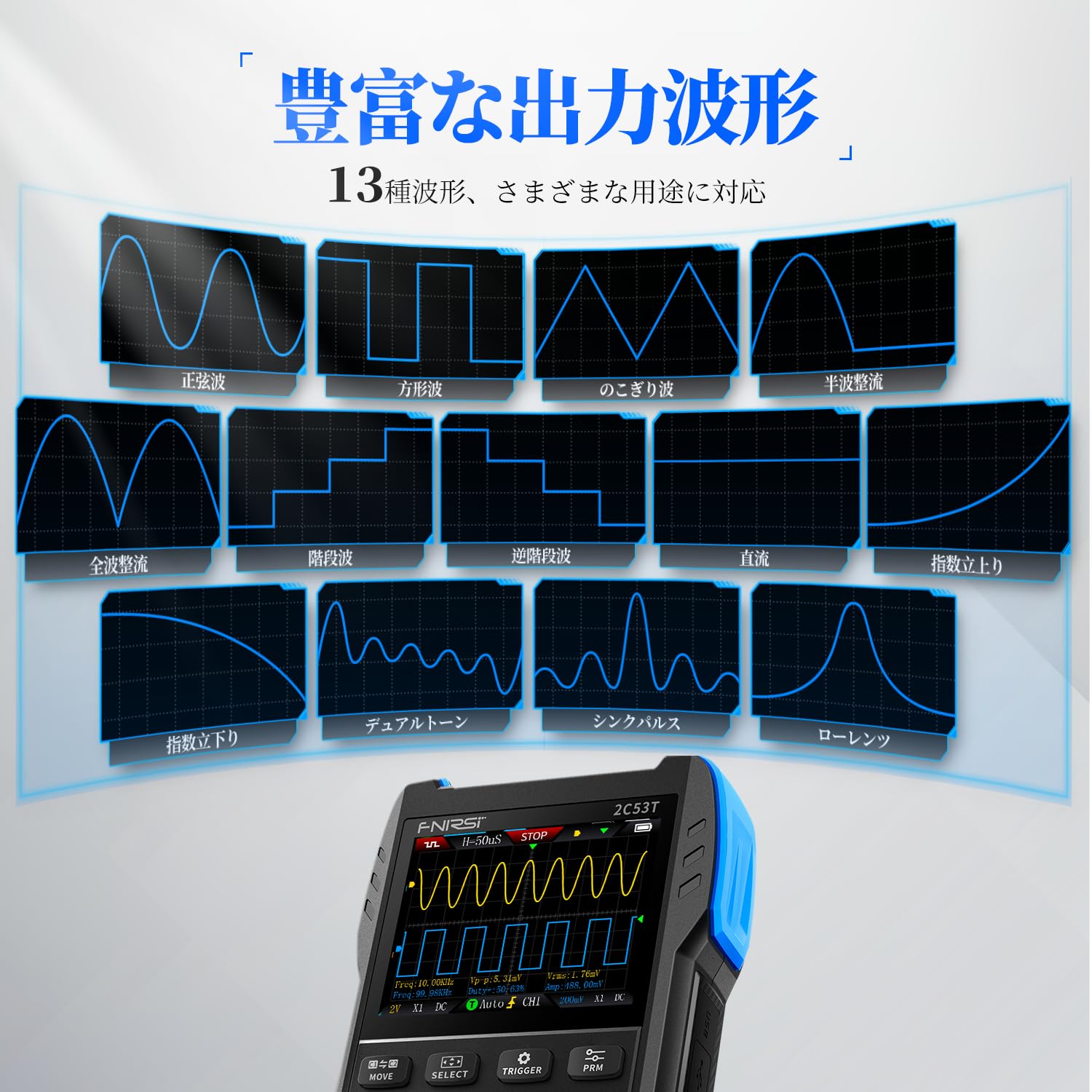
図4.3: The signal generator interface showing examples of different output waveforms such as sine, square, and pulse waves.
5. メンテナンス
適切なメンテナンスを行うことで、FNIRSI 2C53T の寿命と精度が確保されます。
- クリーニング: Use a soft, dry cloth to clean the device. Do not use abrasive cleaners or solvents. Ensure no liquids enter the device.
- バッテリーのケア: バッテリーの寿命を延ばすため、デバイスを頻繁に完全に放電することは避けてください。長期間保管する場合は、バッテリーを約50%まで充電し、数ヶ月ごとに再充電してください。
- ストレージ: Store the device in a cool, dry place away from direct sunlight, extreme temperatures, and high humidity. Use the provided storage bag to protect it from dust and physical damage.
- プローブのお手入れ: Inspect probes and cables regularly for any signs of wear or damage. Replace damaged components immediately to ensure safety and accurate measurements.

図5.1: 爆発した view illustrating the internal components and the durable ABS+silicon construction of the FNIRSI 2C53T, designed for stable performance and protection.
6。 トラブルシューティング
If you encounter issues with your FNIRSI 2C53T, refer to the following common troubleshooting steps:
- デバイスの電源が入っていない: バッテリーが十分に充電されていることを確認してください。Type-Cケーブルを使用してデバイスを電源に接続し、もう一度お試しください。
- 間違った読み方: Verify that probes are correctly connected and not damaged. Ensure the correct measurement mode is selected for the task. Check probe compensation for oscilloscope measurements.
- 不安定な波形: Adjust the trigger settings (level, mode) in oscilloscope mode. Ensure the input signal is within the device's specifications.
- Functions Not Working Simultaneously: Remember that the oscilloscope, multimeter, and signal generator functions cannot be used at the same time. Switch between modes as needed.
- PC 接続の問題: Ensure the Type-C cable is properly connected. Check your computer's device manager to see if the device is recognized.
永続的な問題や、ここで説明されていない問題については、カスタマー サポートにお問い合わせください。
7. 仕様
| 特徴 | 仕様 |
|---|---|
| メーカー | FNIRSI |
| モデル番号 | 2C53T |
| アイテム重量 | 300グラム |
| 製品寸法(長さ x 幅 x 高さ) | 8.9 x 3.5 x 16.7 cm |
| 電池のタイプ | 1 リチウムポリマー電池 (付属) |
| 測定精度 | +/-5% |
| オシロスコープの帯域幅 | 50MHz |
| オシロスコープSampルレート | 250MS / s |
| マルチメーターカウント | 19999 |
| 信号発生器の周波数範囲 | 0-50KHz |
| 初回利用可能日 | 2024年11月28日 |
8. 保証とサポート
FNIRSI Technology Co., Ltd. is committed to providing high-quality measuring instruments. For any inquiries, technical assistance, or warranty claims, please contact our support team.
- カスタマーサポートEメール: support@fnirsi.com
- オンラインリソース: A PDF user manual may be available for download on the product's detail page or the official FNIRSI webサイト。
- ブランドストア: Visit the official FNIRSI store for more products and information: FNIRSI Amazon Store