
1. はじめに
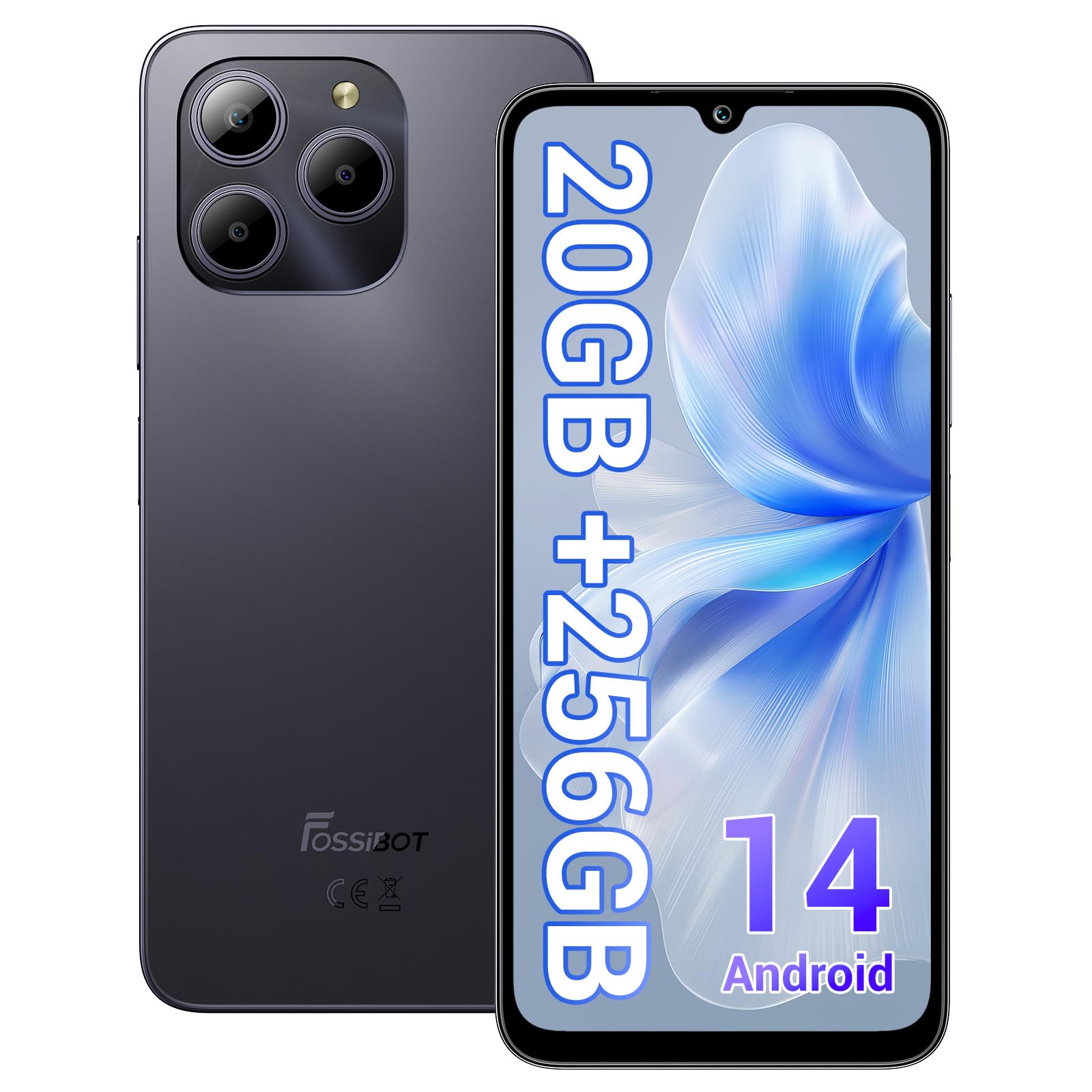
Welcome to the FOSSIBOT S2 Smartphone user manual. This guide provides essential information for setting up, operating, maintaining, and troubleshooting your new device. The FOSSIBOT S2 is an unlocked smartphone featuring Android 14, a 6.72-inch FHD+ display, a 50MP main camera, a 5000mAh battery, and advanced security features like Face ID and a fingerprint sensor.
2. 安全情報
- バッテリーの安全性: Do not attempt to replace the battery yourself. Use only FOSSIBOT-approved chargers and cables. Avoid exposing the device to extreme temperatures or direct sunlight.
- 耐水性: このデバイスは防水ではありません。液体に濡らさないでください。
- 聴覚保護: 聴覚障害を防ぐため、大音量で長時間聴くことは避けてください。
- 安全運転: 運転中は携帯電話を使用しないでください。常に交通安全を最優先にしてください。
- 廃棄: 本製品および付属品は、地域の規制に従って責任を持って廃棄してください。家庭ごみと一緒に廃棄しないでください。
3. パッケージ内容
製品パッケージにすべてのアイテムが揃っていることを確認します。
- FOSSIBOT S2 Smartphone
- SIMカードピン
- タイプCのUSBケーブル
- 18W充電器
- ユーザーマニュアル/保証書
- TPUケース

4.デバイスオーバーview
Familiarize yourself with the physical components of your FOSSIBOT S2 smartphone.

- フロント: 6.72インチ FHD+ ディスプレイ、16MP フロントカメラ、イヤピース。
- 後方: 50MP main camera, LED flash, fingerprint sensor (side-mounted).
- サイド: Power button, volume buttons, SIM/SD card tray, USB Type-C port, 3.5mm audio jack.
5. セットアップ
5.1 SIMカードとSDカードの挿入
- デバイスの側面にある SIM カード トレイを見つけます。
- 付属の SIM イジェクタ ツールをトレイの横にある小さな穴に挿入し、トレイが飛び出すまで軽く押します。
- Place your Nano-SIM cards (up to two) and/or a microSD card (for storage expansion up to 1TB) into the designated slots on the tray. Ensure the gold contacts face downwards.
- カチッと音がするまでトレイを慎重に電話機に差し込みます。

5.2 電源投入と初期設定
- FOSSIBOT ロゴが表示されるまで電源ボタンを押し続けます。
- 画面上の指示に従って言語を選択し、Wi-Fi ネットワークに接続し、Google アカウントを設定します。
- You will be guided through setting up security features such as a PIN, pattern, fingerprint, and Face ID.
6. デバイスの操作
6.1 ディスプレイ
The FOSSIBOT S2 features a 6.72-inch FHD+ In-cell display with a resolution of 1080 x 2400 pixels, providing clear and vibrant visuals.

6.2 パフォーマンス
Powered by the MediaTek G85 Octa-Core processor and 20GB RAM (8GB physical + 12GB virtual), the FOSSIBOT S2 delivers smooth performance for multitasking, gaming, and streaming. It includes 256GB of internal storage, expandable up to 1TB with a TF card.

6.3 カメラ
Capture high-quality photos and videos with the 50MP AI main camera and take clear selfies with the 16MP front camera. The camera system supports various modes for different shooting scenarios.

6.4バッテリーと充電
The FOSSIBOT S2 is equipped with a 5000mAh battery, providing extended usage time. It supports 18W fast charging via the Type-C port.
6.5セキュリティ機能
Unlock your device securely using the side-mounted fingerprint sensor or Face ID recognition.

6.6 接続性
The FOSSIBOT S2 supports dual 4G SIM cards for reliable network coverage. It also includes NFC for contactless payments and GPS/GLONASS/Galileo/Beidou for accurate navigation.

6.7 Android 14 オペレーティング システム
Experience the latest features and security enhancements with Android 14, offering improved privacy controls, smarter battery management, and a customizable user interface.

7. メンテナンス
- ソフトウェアアップデート: 最適なパフォーマンスとセキュリティを確保するために、システム アップデートを定期的に確認してインストールしてください。
- クリーニング: 画面と本体の清掃には、柔らかく糸くずの出ない布をご使用ください。刺激の強い化学薬品は使用しないでください。
- バッテリーのケア: To prolong battery life, avoid fully discharging the battery frequently. Charge the device before it drops below 20%.
- ストレージ管理: 定期的に不要なものをクリアする files とアプリを使用してデバイスの速度を維持し、ストレージを解放します。
8。 トラブルシューティング
FOSSIBOT S2 で問題が発生した場合は、次の一般的な解決策を参照してください。
- デバイスの電源が入らない: バッテリーが充電されていることを確認してください。携帯電話を充電器に少なくとも15分間接続してから、再度電源を入れてみてください。
- アプリがクラッシュ/フリーズする: Close background apps. Clear the cache of the problematic app or reinstall it. If the issue persists, perform a factory reset (back up data first).
- ネットワーク信号が弱い: SIMカードが正しく挿入されているかご確認ください。ネットワークの通信圏内であることを確認してください。デバイスを再起動してください。
- バッテリーの消耗が早い: Reduce screen brightness, disable unused features like Wi-Fi, Bluetooth, and GPS when not needed. Check battery usage in settings to identify power-hungry apps.
- 指紋/顔IDが機能しない: Ensure your fingers are clean and dry for fingerprint recognition. For Face ID, ensure your face is well-lit and unobstructed. Re-register your fingerprint or face if necessary.
For more complex issues, please contact FOSSIBOT customer support.
9. 仕様
| 特徴 | 仕様 |
|---|---|
| モデル名 | S2 |
| オペレーティング·システム | アンドロイド14 |
| プロセッサ | MediaTek Helio G85 オクタコア (2 GHz) |
| ラム | 20 GB (物理 8 GB + 仮想 12 GB) |
| 内部ストレージ | 256ギガバイト |
| 拡張可能なストレージ | TFカード経由で最大1TB |
| 表示サイズ | 6.72インチ FHD+ インセル |
| ディスプレイ解像度 | 1080 x 2400 ピクセル |
| リアカメラ | 50MP |
| フロントカメラ | 16MP |
| バッテリー容量 | 5000mAh |
| 充電 | 18W急速充電(Type-C) |
| 接続性 | Dual 4G SIM, Wi-Fi, Bluetooth, NFC |
| ナビゲーション | GPS、GLONASS、ガリレオ、北斗 |
| 安全 | 指紋センサー、顔ID |
| オーディオジャック | 3.5ミリメートル |
| 寸法 | 6.57 x 3.03 x 0.34インチ |
| 重さ | 1.04ポンド |
10. 保証とサポート
Your FOSSIBOT S2 smartphone comes with a standard manufacturer's warranty. Please refer to the included Warranty Card in your package for specific terms and conditions, including warranty duration and coverage details.
For technical support, service inquiries, or to access additional resources, please visit the official FOSSIBOT website or contact their customer service department. Contact information can typically be found on the Warranty Card or the FOSSIBOT brand store page.
オンラインサポート: Visit the FOSSIBOT Store on Amazon