
導入
This manual provides detailed instructions for the setup, operation, and maintenance of your Akimart 15.6 inch Wall Planner Digital Calendar & Chore Chart. Please read this manual thoroughly before using the device to ensure proper functionality and to maximize your experience with its features. This interactive display is designed to help organize family schedules, manage chores, plan meals, and serve as a digital picture frame.
安全情報
- Ensure the device is placed on a stable surface or securely mounted to a wall to prevent accidental falls.
- デバイスを水、湿気、極端な温度から遠ざけてください。
- 付属の電源アダプターのみを使用してください。
- ご自身でデバイスを開けたり修理したりしないでください。すべての修理は資格のある専門家にご依頼ください。
- 損傷や怪我を防ぐため、小さなお子様の手の届かないところに保管してください。
パッケージ内容
パッケージにすべてのアイテムが揃っていることを確認します。
- Akimart 15.6 inch Digital Calendar Display
- 電源アダプター
- デスクスタンド(付属または別売)
- 壁取り付け用ハードウェア(該当する場合)
- ユーザーマニュアル(このドキュメント)
製品終了view
The Akimart 15.6 inch Digital Calendar is an interactive touchscreen display designed for family organization and digital photo display.

図1: フロント view of the Akimart 15.6 inch Digital Calendar displaying a weekly schedule with color-coded events and tasks.

図2: The Akimart 15.6 inch Digital Calendar with its approximate dimensions of 15.8 inches width and 9.9 inches height, highlighting its Full HD touchscreen.
設定
1. 物理的な設置
- デスクスタンド: If using the desk stand, ensure it is securely attached to the back of the device. Place the device on a flat, stable surface.
- 壁掛け: For wall mounting, use the provided hardware and follow standard wall mounting procedures. The device supports both landscape and portrait orientations.

図3: The digital calendar can be auto-rotated and wall-mounted, allowing for flexible placement in either landscape or portrait orientation.
2. 電源接続
Connect the power adapter to the device's power port and then plug it into a standard electrical outlet. The device will power on automatically.
3。 Wi-Fi接続
Upon first startup, the device will guide you through the initial setup process, including connecting to your Wi-Fi network. Select your network and enter the password.
4。 ソフトウェアの更新
It is recommended to update the software to the latest version for optimal performance and access to all features. Navigate to Settings > About > Version > Check for updates.

図4: The device offers easy setup, allowing users to mount it, plug it in, connect to Wi-Fi, and sync calendars for a unified family schedule.
操作手順
1. Calendar Features
- カレンダーの同期: The device can synchronize with various online calendars including Google Calendar, iCloud Calendar, Outlook Calendar, Cozi, and Yahoo. Access the settings to link your accounts.
- Adding Events and Chores: Events and chores can be added directly on the device's touchscreen or through the free mobile application.
- Family Member Assignment: Assign unique colors to each family member to easily identify their respective events and tasks on the calendar display.

図5: The Akimart Digital Calendar seamlessly auto-syncs events with popular services like Apple, Cozi, Google, Yahoo, and Outlook.

図6: The device offers all-in-one organization features including calendar syncing, custom lists, routines, chore charts, meal planning, and free app access.
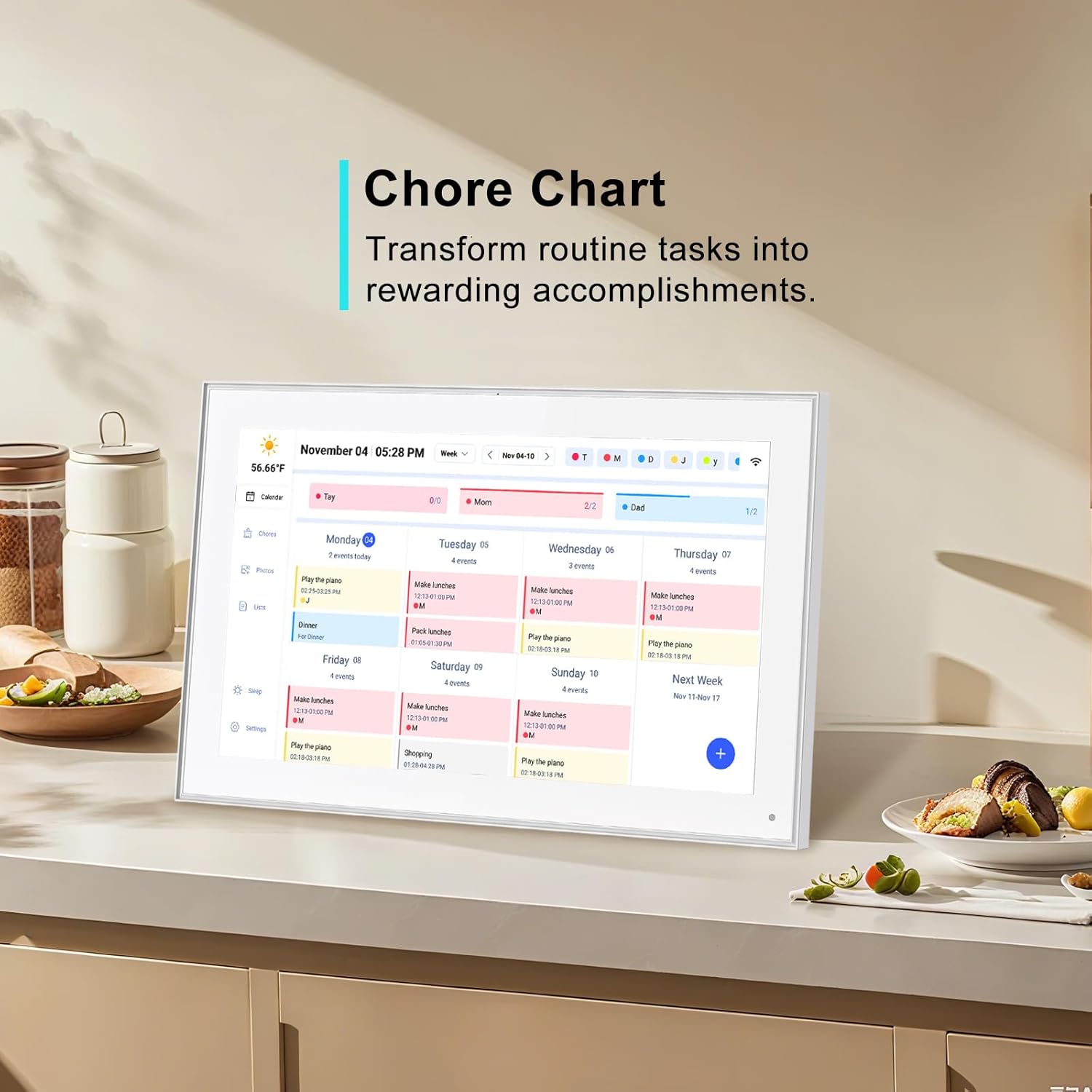
図7: The free eCalendar app allows everyone to stay updated on schedules and tasks, regardless of their location, with real-time synchronization.
2. 家事表
Create and manage household chores for family members. The system allows for assigning chores and tracking completion. A reward system can be integrated to motivate task completion.

図8: The chore chart feature helps transform routine tasks into rewarding accomplishments, visible on the digital calendar.
3. Meal Planning & Recipes
Utilize the device to create meal plans, access various recipes, and view cooking tutorials directly on the screen.
4. Digital Picture Frame
The device functions as a digital picture frame. Use the companion mobile application to send photos and videos to the display, sharing cherished moments with family and friends from any location.

図9: The built-in digital picture frame allows sharing photos and videos via a free app, displaying precious moments on the screen.
5. スマートホーム統合
Access compatible smart home applications directly from the touchscreen to control other smart devices in your home.
6. 設定とカスタマイズ
- 自動明るさ: The display features an auto-brightness function that adjusts screen illumination based on ambient light conditions.
- スリープモード: Configure sleep and wake times to conserve energy and prevent disturbance during resting hours.
- 方向オプション: Switch between landscape and portrait display modes as desired.
- 天気表示: The device can show current weather conditions and forecasts for upcoming events.
メンテナンス
- 画面の掃除: 柔らかく糸くずの出ない布でタッチスクリーンを優しく拭いてください。頑固な汚れには、軽くamp布を水またはスクリーンに安全なクリーナーで拭いてください。刺激の強い化学薬品は避けてください。
- ソフトウェアアップデート: 最適なパフォーマンス、セキュリティ、新機能へのアクセスを確保するために、ソフトウェア アップデートを定期的に確認してインストールしてください。
- 電源サイクル: デバイスが応答しなくなった場合は、電源アダプターを外し、10 秒待ってから再度接続し、電源サイクルを実行します。
トラブルシューティング
| 問題 | 考えられる原因 | 解決 |
|---|---|---|
| デバイスの電源が入らない | 電源アダプターが接続されていないか、コンセントに障害があります。 | 電源アダプターがしっかりと接続され、コンセントが正常に機能していることを確認してください。別のコンセントをお試しください。 |
| Wi-Fiに接続できません | パスワードが間違っているか、範囲外か、ネットワークの問題です。 | Verify Wi-Fi password. Move device closer to router. Restart router. |
| カレンダーが同期されない | Incorrect account credentials or network connectivity issues. | Check linked calendar account settings. Ensure stable Wi-Fi connection. Manually refresh sync. |
| タッチスクリーンが反応しない | 一時的なソフトウェアの不具合。 | 電源サイクルを実行します (電源を切断して再接続します)。 |
| Photos/videos not appearing | App not connected, incorrect frame ID, or network issue. | Ensure the mobile app is correctly linked to the device. Check Wi-Fi connection on both devices. |
仕様
| 特徴 | 詳細 |
|---|---|
| 製品寸法 | 9.99 x 15.8 x 0.99インチ |
| アイテム重量 | 3.74ポンド |
| 画面サイズ | 15.6インチ(39.6センチメートル) |
| 解決 | 1080p (Full HD 1920x1080 IPS) |
| 色 | 白 |
| 対応デバイス | スマートフォン(アプリ制御用) |
| 接続性 | Wi-Fi |
保証とサポート
This Akimart product comes with a standard manufacturer's warranty. For specific warranty details, please refer to the warranty card included in your product packaging or visit the official Akimart website. For technical support, troubleshooting assistance, or any inquiries regarding your device, please contact Akimart customer service through their official channels. Contact information can typically be found on the product packaging or the Akimart brand store on Amazon.
オンラインサポート: Visit the Akimart Store on Amazon