
1. はじめに
ご購入ありがとうございますasing the MLWSHR Digital LED Alarm Clock Model 8808. This device combines a digital alarm clock with a thermo-hygrometer, offering dual alarms, snooze function, date and year display, 12/24 hour switch, weekday settings, Daylight Saving Time (DST) functionality, auto-dimmable display with three brightness levels, and a convenient 5V1A USB output for charging other devices. Please read this manual carefully to ensure proper use and maintenance of your new alarm clock.
2. 安全情報
- デバイスを水や湿度の高い環境に置かないでください。
- デバイスを極端な温度や直射日光に長時間さらさないでください。
- Use only the provided USB Type-C cable for power.
- ご自身でデバイスの分解や修理を試みないでください。問題が発生した場合は、カスタマーサポートにお問い合わせください。
- Ensure proper ventilation when using the USB output to charge other devices.
3. パッケージ内容
- MLWSHR Digital LED Alarm Clock Model 8808
- USBType-C電源ケーブル
- ユーザーマニュアル
4.製品オーバーview
目覚まし時計の主なコンポーネントとコントロールについて理解しておきましょう。
This image displays the front of the MLWSHR Digital LED Alarm Clock, highlighting the time display, weekday indicators, temperature in Celsius, humidity percentage, and dual alarm icons. It also points to the Daylight Saving Time (DST) indicator.

This image illustrates the side and back of the alarm clock, detailing the USB Type-C input for primary power, the battery compartment for 3x AAA backup batteries (not included), and the USB-A output (5V1A) for charging other devices. It also shows the control buttons located on the top edge.
コントロール:
- SETボタン: Enters setting mode for time, date, and alarms.
- 上(+)ボタン: Increases values during setting, adjusts brightness.
- 下(-)ボタン: Decreases values during setting, adjusts brightness.
- スヌーズ/ライトボタン: スヌーズを有効にし、ディスプレイの明るさを調整します。
- アラーム1ボタン: Activates/deactivates Alarm 1, enters Alarm 1 setting.
- アラーム2ボタン: Activates/deactivates Alarm 2, enters Alarm 2 setting.
- 12/24時間ボタン: 12 時間形式と 24 時間形式を切り替えます。
- °C/°F ボタン: 摂氏と華氏の温度表示を切り替えます。
5. セットアップ
5.1 電源
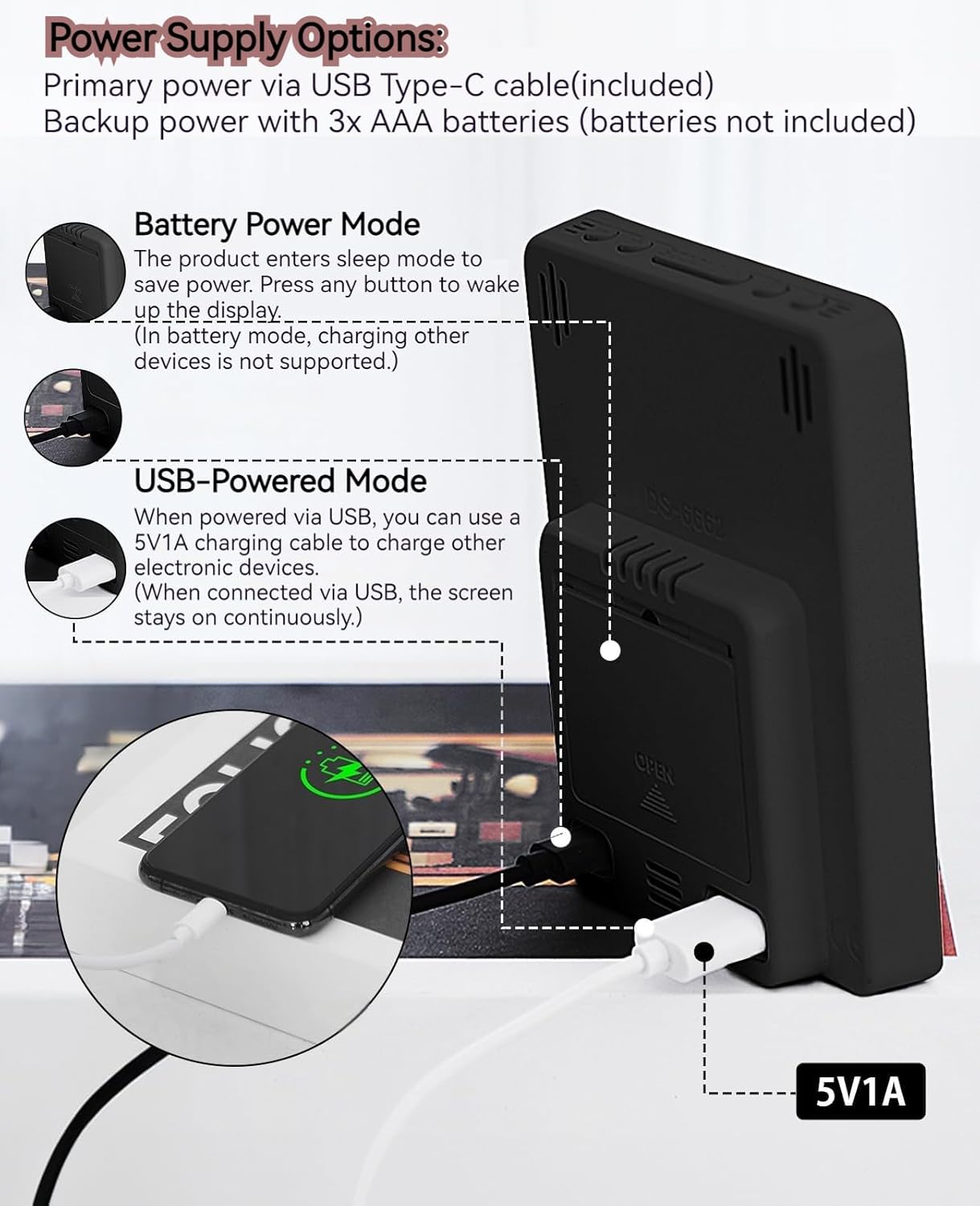
The MLWSHR Digital LED Alarm Clock can be powered in two ways:
- Primary Power (USB Type-C): Connect the provided USB Type-C cable to the clock's input port and plug the other end into a 5V1A USB power adapter (not included). When powered via USB, the display will remain continuously on.
- Backup Power (3x AAA Batteries): Insert 3 AAA batteries (not included) into the battery compartment on the back of the clock. In battery-only mode, the display will enter sleep mode to conserve power. Press any button to temporarily activate the display. Note that the USB output for charging other devices is not supported when operating on battery power alone.
5.2 初期時刻と日付の設定
After connecting power, the clock will typically display a default time. To set the correct time and date:
- を押し続けます セット ボタンを3秒間押し続けると、時刻設定モードになります。「時」の数字が点滅します。
- 使用 上(+) or ダウン(-) 時間を調整するボタン。
- プレス セット もう一度押して時間を確定し、分の設定に移ります。分の数字が点滅します。
- 使用 上(+) or ダウン(-) 分を調整するためのボタン。
- 押し続ける セット to cycle through and set the Year, Month, and Day using the 上(+) or ダウン(-) 調整用のボタン。
- After setting the Day, press セット 最後にもう一度押して設定モードを終了します。
6. 操作手順
6.1 12/24時間形式スイッチ
を押す 12/24時間 12 時間形式 (AM/PM インジケーター付き) と 24 時間形式を切り替えるボタン。
This video demonstrates various features of the MLWSHR Digital LED Alarm Clock, including the time, temperature, humidity, weekday display, auto/manual brightness adjustment, 12/24 hour switch, and the easy-to-use buttons and USB-C input/USB-A output.
6.2 アラームの設定(アラーム1とアラーム2)
The clock features two independent alarms. Each alarm can be set for specific days of the week (Monday-Friday, Monday-Saturday, or Monday-Sunday).

This image illustrates the dual alarm functionality, showing how each alarm can be customized to ring on specific days of the week: Monday to Friday, Monday to Saturday, or every day. It highlights the alarm icons and weekday indicators on the display.
- を押す アラーム1 or アラーム2 ボタンを押して希望のアラームを選択します。アラームアイコンがディスプレイに表示されます。
- 選択したものを長押しします アラーム ボタンを3秒間押し続けると、アラーム設定モードになります。時間の数字が点滅します。
- 使用 上(+) or ダウン(-) ボタンでアラーム時間を調整します。
- を押す アラーム もう一度ボタンを押すと時間が確定し、分の設定に移ります。
- 使用 上(+) or ダウン(-) アラームの分数を調整するボタン。
- を押す アラーム button again to set the alarm frequency (e.g., Mon-Fri, Mon-Sat, Mon-Sun). Use 上(+) or ダウン(-) 選択します。
- を押す アラーム 最後にもう一度ボタンを押すと、アラーム設定モードが終了します。
- To turn an alarm ON or OFF, simply press the corresponding アラーム1 or アラーム2 button briefly. The alarm icon will appear (ON) or disappear (OFF) from the display.
6.3スヌーズ機能
When an alarm sounds, you can activate the snooze function for a temporary delay.

This image shows the clock's snooze button and how it functions. When the alarm rings, a brief press of the snooze button will delay the alarm for 5 minutes. Holding the button for more than two seconds will turn off the alarm for that day.
- アラームが鳴ったら、を押します スヌーズ/ライト button briefly. The alarm will pause and ring again after 5 minutes.
- To turn off the alarm for the current day, press and hold the スヌーズ/ライト button for more than 2 seconds, or press any other button (except スヌーズ/ライト).
6.4 明るさ調整
The clock features an auto-dimmable display and three manual brightness levels.
- 自動調光可能: The built-in light sensor automatically adjusts the display brightness based on ambient light conditions. This is the default setting.
- 手動明るさ: 短く押すと スヌーズ/ライト button to cycle through 3 manual brightness levels (L-01, L-02, L-03).
- To return to auto-dimmable mode, continue pressing the スヌーズ/ライト button until 'L-AU' appears on the display.
6.5 Thermometer & Hygrometer
The clock displays indoor temperature and humidity levels.

This image highlights the temperature and humidity readings on the clock's display. It also provides guidance on ideal humidity levels and suggests actions (humidifier/dehumidifier) if levels are too low or too high. The temperature detection range is 23°F to 122°F (-5°C to 50°C) with an error margin of ±2°F.
- 温度単位スイッチ: を押す °C /°F 摂氏と華氏の温度表示を切り替えるボタン。
- The temperature range is 23°F to 122°F (-5°C to 50°C) with an error margin of ±2°F.
- The humidity measurement error is within ±5%.
6.6 USB Power Output (5V1A)
The clock features a USB-A output port (5V1A) that can be used to charge other electronic devices.

This image demonstrates the use of the clock's USB-A output port to charge a smartphone. The clock provides a 5V1A output, making it a convenient charging station. This feature is only available when the clock is powered via its USB Type-C input.
- Connect your device's charging cable to the USB-A output port on the back of the alarm clock.
- Ensure the alarm clock is powered via its USB Type-C input for this feature to function. The USB output is not active when the clock is running on battery power alone.
6.7 夏時間(DST)
The clock supports Daylight Saving Time adjustment.
- DSTを有効または無効にするには、 夏時間 button (if available, or refer to the SET button sequence for DST in specific models). The DST indicator will appear or disappear.
7. メンテナンス
- 時計は柔らかく乾いた布で拭いてください。研磨剤入りの洗剤や溶剤は使用しないでください。
- If the clock will not be used for an extended period, remove the AAA batteries to prevent leakage.
- USB ポートにほこりやごみが付かないようにしてください。
8。 トラブルシューティング
| 問題 | 考えられる原因 | 解決 |
|---|---|---|
| Display is off or intermittent. | Running on battery power in sleep mode, or no power. | Press any button to activate display in battery mode. Connect USB Type-C cable for continuous display. Check USB power source. |
| USB出力ではデバイスを充電できません。 | Clock is running on battery power, or USB cable is faulty. | Ensure the clock is connected to primary USB Type-C power. Try a different USB cable. |
| アラームは鳴りません。 | アラームが作動していないか、または誤って設定されています。 | Check if the alarm icon is displayed. Re-set the alarm time and frequency. |
| 温度の読み取りが不正確です。 | Environmental factors or sensor error. | Allow time for the sensor to stabilize. Ensure the clock is not near heat sources or vents. Note the ±2°F error margin. |
| 時刻/日付を設定できません。 | Not in setting mode, or buttons are unresponsive. | Press and hold the SET button for 3 seconds. Ensure the clock has stable power. |
9. 仕様
- ブランド: MLWSHR
- モデル番号: 8808
- 表示タイプ: 導かれた
- 電源: USB Type-C (5V1A) / 3x AAA Batteries (backup)
- 製品寸法: 幅3.54インチ x 高さ4.72インチ
- 特徴: Dual Alarms, Snooze, Thermo-Hygrometer, Date & Year Display, 12/24 Hour Switch, Weekdays, DST, Auto Dimmable (3 levels), USB Output (5V1A)
- 材料: 環境に優しいプラスチック
- 屋内/屋外での使用: 屋内
10.保証とサポート
The MLWSHR Digital LED Alarm Clock Model 8808 comes with a 2年間保証 ご購入日から有効です。この保証は、通常の使用における製造上の欠陥および故障を対象としています。
For technical support, warranty claims, or any questions regarding your product, please contact MLWSHR customer service through the retailer's platform or visit our official website for contact information. Please have your purchase receipt and model number ready when contacting support.