
1. はじめに
This manual provides essential instructions for the safe and efficient operation of your Saooer Solar Charge Controller. This device is designed to manage the power flow from your solar panel to your battery, ensuring optimal charging and protecting your battery from overcharge and over-discharge. It is compatible with both 12V and 24V solar systems and features a 30A discharge current capacity.
2. 安全に関する注意事項
Please read all safety instructions carefully before installation and operation. Failure to follow these instructions may result in damage to the controller, battery, or other components, and may cause personal injury.
- バッテリー容量を確認してくださいtage is sufficient for the controller to recognize the battery type before the first installation.
- The charge controller is suitable for lead-acid batteries (OPEN, AGM, GEL) and lithium-ion batteries. Do not use it for other battery types.
- Install the charge controller indoors, away from direct sunlight, high temperatures, and humid environments.
- The controller will heat up during operation; ensure good ventilation.
- The controller's positive and negative terminals should be connected correctly. Reverse connection may damage the device.
- 必ず最初にバッテリー、次にソーラーパネル、最後に負荷を接続してください。取り外しは逆の順序で行ってください:負荷、ソーラーパネル、バッテリー。
3 製品の特徴
- システム巻tage互換性: Automatically detects 12V or 24V systems.
- 放電電流: 30A容量。
- Integrated Micro Controller: Manages solar panel and battery operation efficiently.
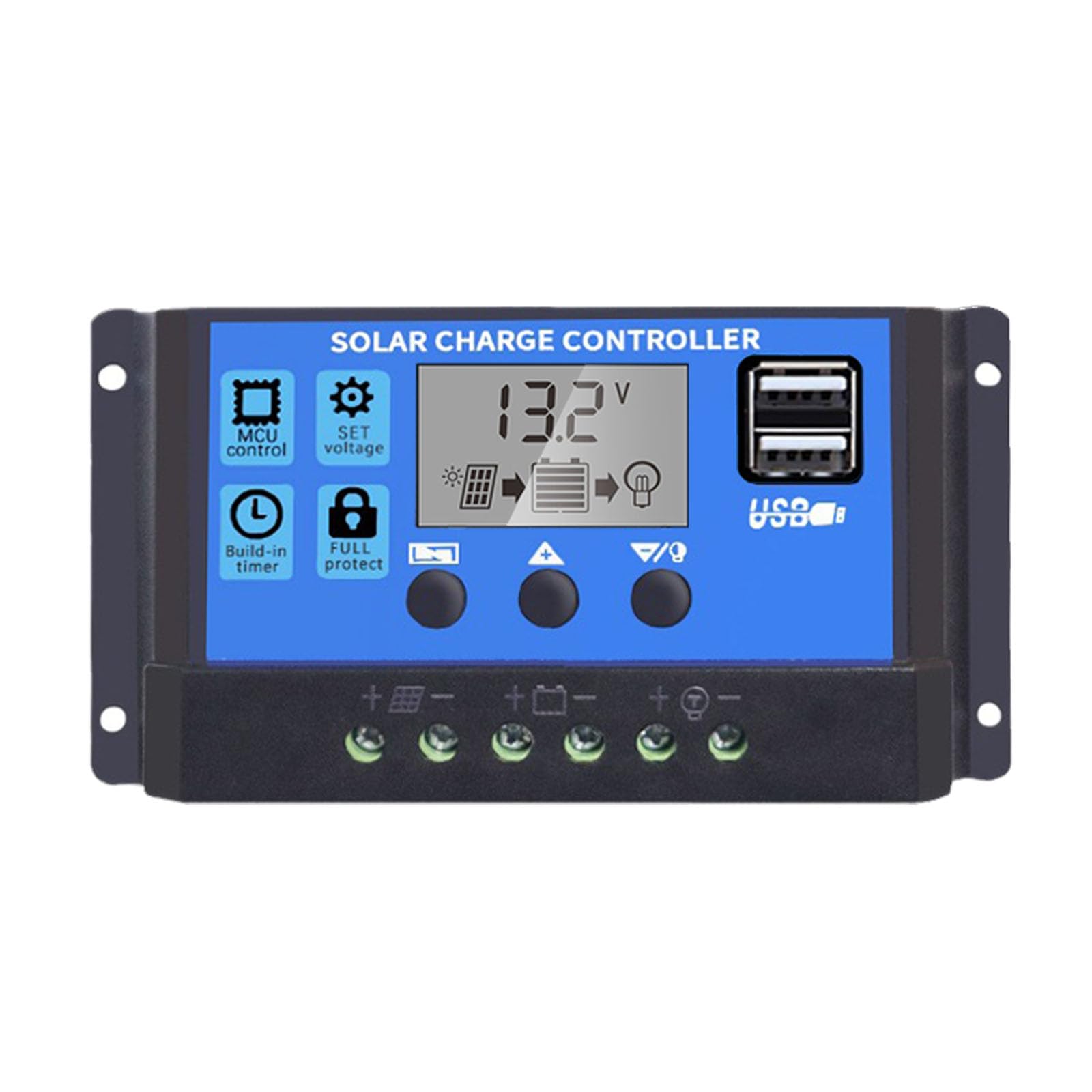
- デュアルUSBポート: Supports mobile phone charging (5V/2A output).
- 包括的な保護: Includes short-circuit protection, open-circuit protection, reverse polarity protection, and over-load protection to enhance system efficiency and battery lifespan.
- LCDディスプレイ: Provides clear indication of status and data, allowing for convenient mode switching and parameter configuration.
- 調整可能なパラメータ: User-configurable settings for various battery types and operational needs.
- 内蔵タイマー: For load control.
4. パッケージ内容
- 1x Saooer Solar Charge Controller (30A)
5. セットアップとインストール
Follow these steps for proper installation of the solar charge controller. Incorrect connection order can damage the controller.
- バッテリーを接続します。 Connect the battery to the charge regulator first. Ensure correct polarity (positive to positive, negative to negative). This allows the controller to recognize the battery voltage.
- ソーラーパネルを接続します。 Connect the solar panel to the solar charge controller. Ensure correct polarity.
- 負荷を接続する: Connect the consumer or load to the charge controller regulator. Ensure correct polarity.
Important Disconnection Note:
When disconnecting the system, always remove the solar panel connection first, then the load connection, and finally the battery connection. This prevents potential damage to the controller.

6. 操作手順
コントローラーには LCD ディスプレイと操作用の 3 つのボタンがあります。 メニュー, UP、 そして 下.
6.1.LCDディスプレイ
The LCD display shows real-time system status and data, including battery voltage, charging current, discharging current, and various parameter settings.
6.2. ボタンの機能
- メニューボタン: Press to cycle through different display modes and enter parameter setting mode. Long press to exit setting mode.
- 上ボタン: In setting mode, press to increase the parameter value.
- 下ボタン: In setting mode, press to decrease the parameter value.
6.3.パラメータ設定
To adjust parameters (e.g., battery type, charge/discharge voltage limits, load timer settings):
- を押す メニュー button until the desired parameter display appears.
- 長押し メニュー button until the displayed value starts flashing.
- 使用 UP そして 下 ボタンで値を調整します。
- Once the desired value is set, long press the メニュー button again to save the setting and exit the flashing state.
Refer to the specific icons on the LCD for detailed parameter identification.

7. メンテナンス
定期的なメンテナンスにより、ソーラー充電コントローラーの寿命が長くなり、最適なパフォーマンスが確保されます。
- 清潔さ: コントローラーは清潔に保ち、ほこりやゴミが付かないようにしてください。清掃には乾いた布をご使用ください。
- 接続: Periodically check all wiring connections to ensure they are tight and free from corrosion. Loose connections can cause power loss and overheating.
- 換気: Ensure the installation area has adequate ventilation to prevent overheating of the controller.
- 検査: Inspect the controller for any signs of physical damage or unusual operation.
8。 トラブルシューティング
ソーラー充電コントローラで問題が発生した場合は、次の一般的なトラブルシューティング手順を検討してください。
- ディスプレイなし/電源なし: バッテリーの接続を確認し、バッテリーに十分な容量があることを確認してください。tage. Verify all wiring is correct and secure.
- バッテリーが充電されていません: Check solar panel connections and ensure the panel is receiving adequate sunlight. Verify solar panel voltage and current. Ensure the controller's charging parameters are correctly set for your battery type.
- ロードが機能しない: Check load connections. Ensure the load is not exceeding the controller's rated current. Check the load timer settings if applicable. The controller may have entered protection mode due to over-discharge or over-load; check the display for error codes or indicators.
- オーバーボリュームtage/アンダーボリュームtage アラーム: バッテリー容量を確認するtage. Ensure solar panel open-circuit voltageはコントローラの最大入力電圧を超えないtage.
これらのチェックを実行しても問題が解決しない場合は、カスタマー サポートにお問い合わせください。
9. 仕様
| 特徴 | 仕様 |
|---|---|
| ブランド | Saooer |
| モデル | 30Aソーラー充電コントローラー |
| システム巻tage | 12V / 24V自動検知 |
| 放電電流 | 30A |
| 材料 | 金属、プラスチック |
| 表示タイプ | 液晶 |
| USB出力 | Dual USB, 5V/2A |
| 含まれるコンポーネント | 1x Solar Charge Controller |

10. 保証とサポート
For warranty information, please refer to the documentation provided with your purchase or contact your retailer. For technical support or inquiries, please contact Saooer customer service through their official channels.