
1.製品オーバーview
The ANJIELO SMART 94218B is a 4-wire video intercom system designed for enhanced home security and convenience. It features a 7-inch touchscreen indoor monitor and an HD 1080P outdoor doorbell camera. The system supports WiFi connectivity for remote access via a mobile application, allowing you to monitor and interact with visitors from anywhere. Key features include a 148° wide-angle lens, integrated infrared sensor for night vision, and robust IP65 waterproof and dustproof construction for the outdoor unit. It is compatible with 12V electronic locks for integrated access control.
2. パッケージ内容
箱を丁寧に開梱し、下記のすべての付属品が揃っていること、また良好な状態であることをご確認ください。欠品や破損がある場合は、カスタマーサポートまでご連絡ください。

画像: 上view of the ANJIELO SMART 94218B package contents, including the doorbell, IC cards, wiring, user manual, screwdriver, screws, and connection lines.
- 屋外ドアベルユニット
- Indoor Monitor (7-inch Touchscreen)
- IC Cards (Multiple for access control)
- 4-Core Wiring Cable
- External Power Supply (1.2m)
- ユーザーマニュアル
- ドライバー
- 取り付けネジと壁プラグ
- Connection Lines for electronic locks
3. 安全情報
Please read and understand all safety instructions before installation and operation. Failure to follow these instructions may result in electric shock, fire, or damage to the product.
- 電気安全: 配線や設置を行う前に、必ず電源を切ってください。電気工事に不安がある場合は、資格のある電気技師に依頼してください。
- 水への露出: While the outdoor unit is waterproof (IP65), avoid submerging it in water. Ensure all connections are sealed properly during installation.
- 温度: Do not expose the device to extreme temperatures or direct sunlight for prolonged periods, which could affect performance and lifespan.
- クリーニング: お手入れには柔らかく乾いた布をご使用ください。研磨剤入りの洗剤や溶剤は使用しないでください。
- 子供たち: Keep packaging materials and small components away from children to prevent choking hazards.
4. 製品の構成と寸法
Familiarize yourself with the different parts of your outdoor doorbell unit and its physical dimensions.

画像: 詳細 view of the outdoor doorbell unit with labels for the rain cover, IR-LED, camera, speaker, keypad, card reader, microphone, call button, and fingerprint sensor.
- レインカバー: Provides additional protection against weather elements.
- IR-LED: 夜間視認照明用の赤外線 LED。
- カメラ: 1080P HD camera for video capture.
- スピーカー: 双方向の音声通信用。
- キーパッド: Numeric keypad for password-based unlocking.
- カード読み取り装置: For IC card access control.
- マイクロフォン: 双方向の音声通信用。
- コールボタン: To alert the indoor monitor and mobile app.
- 指紋センサー: For fingerprint-based unlocking.
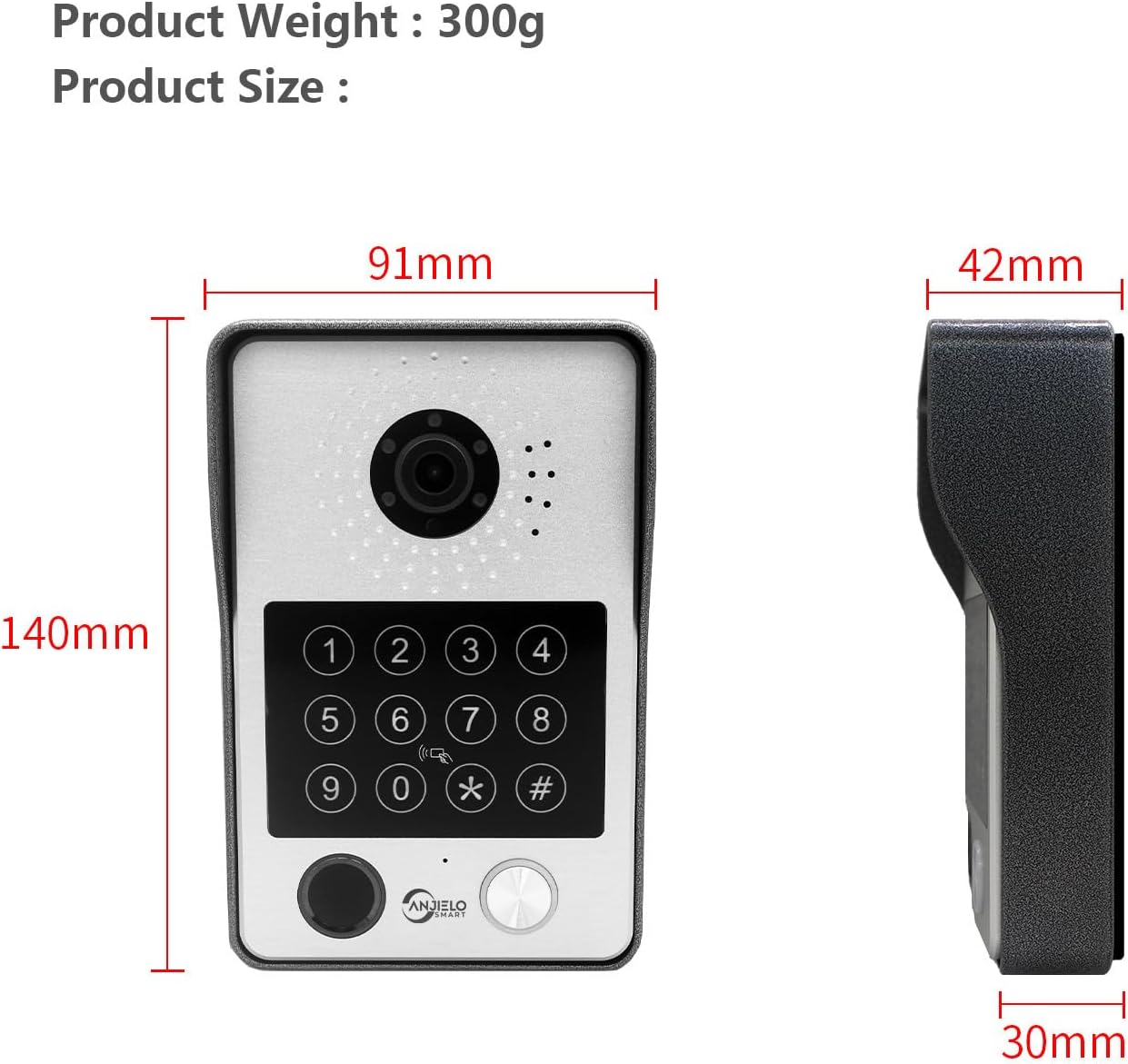
Image: Dimensions of the outdoor doorbell unit: 140mm (height) x 91mm (width) x 42mm (depth, including rain cover) / 30mm (unit depth).
5. セットアップとインストール
5.1配線手順
The ANJIELO SMART 94218B system uses a 4-wire connection between the outdoor doorbell unit and the indoor monitor. Ensure all power is disconnected before beginning wiring.
- 配線の準備: Use the provided 4-core cable to connect the outdoor unit to the indoor monitor. For extended distances, a high-quality 4-core wire is recommended.
- 接続電源: Connect the external 1.2m power supply to the indoor monitor.
- 電子ロック接続: If connecting to a 12V electronic lock, use the provided connection lines. Refer to the lock's manual for specific wiring requirements.
- 安全な接続: ショートを防止するために、すべての配線接続が確実に保護され、適切に絶縁されていることを確認してください。
5.2 室外機の取り付け
The outdoor unit is designed for wall mounting and features IP65 waterproofing.

Image: The outdoor unit is IP65 waterproof, dustproof, and anti-vandal, featuring an aluminum alloy shell with a rain cover.
- 場所を選択してください: ドアの近くで適切な場所を選択し、カメラがクリアに映るようにしてください。 view of visitors and is at an appropriate height.
- ドリル穴: Use the mounting bracket (if provided, or mark holes directly) to mark and drill holes for the mounting screws.
- セキュアユニット: Attach the outdoor unit securely to the wall using the provided screws and wall plugs. Ensure the rain cover is correctly positioned.
5.3 Initial Configuration (Wi-Fi and App)
The main indoor monitor can connect to your home Wi-Fi network for remote access via the mobile application.
- 電源オン: Once all wiring is complete, connect the power supply to an electrical outlet.
- モニターの設定: Follow the on-screen prompts on the 7-inch touchscreen monitor to complete the initial setup.
- Wi-Fi接続: Navigate to the network settings on the monitor and connect to your home Wi-Fi network.
- アプリのダウンロード: Download the dedicated mobile application (e.g., Tuya APP) from your smartphone's app store.
- ペアデバイス: Follow the instructions within the app to pair your video intercom system. This typically involves scanning a QR code displayed on the monitor or entering a device ID.
6. 操作手順
6.1 5-in-1 Unlocking Methods
The ANJIELO SMART 94218B offers multiple convenient ways to unlock your door.

Image: Visual representation of the five unlocking methods: Fingerprint, Password, IC Card, unlocking via the Indoor Monitor, and unlocking via the Tuya mobile application.
- 指紋: Place your registered fingerprint on the sensor on the outdoor unit.
- パスワード: Enter your pre-set password on the keypad of the outdoor unit.
- ICカード: Tap a registered IC card on the card reader area of the outdoor unit.
- モニター: Use the unlock function on the indoor touchscreen monitor.
- モバイルアプリ: Use the unlock function within the paired mobile application.
6.2 Two-Way Audio and Monitoring
Communicate with visitors and monitor your entrance from various devices.

Image: The system enables two-way audio communication with visitors through the indoor monitor or a connected mobile phone, showing live views on both devices.
- 訪問者の呼び出し: When a visitor presses the call button on the outdoor unit, all connected indoor monitors and paired mobile phones will ring.
- 通話に応答: You can answer the call from any indoor monitor or your mobile phone to see, hear, and speak with the visitor.
- インターホン機能: Indoor monitors support call forwarding and internal audio-only conversations between multiple monitors within the home.
6.3 動きの検出と録画
The system provides security by detecting motion and recording events.

Image: The system's smart PIR motion detection sends alerts to your mobile phone and monitor when movement is detected, automatically recording video or snapshots.
- 自動録音: When motion is detected or the doorbell is pressed, the camera automatically records video or captures snapshots.
- ストレージ: Recordings are saved to an additional Micro SD card (not included, or included as a component) for later review.
- View録音: あなたはできる view recorded events directly on the indoor monitor or through the mobile application.
6.4 ナイトビジョン
The outdoor unit provides clear visibility even in low-light conditions.

Image: Comparison of day and night vision capabilities, highlighting the 1080P resolution and 148-degree wide-angle view provided by the outdoor unit's integrated IR-LEDs.
The integrated infrared sensor and IR-LEDs enable clear night vision, ensuring you can identify visitors and monitor your entrance effectively, even in complete darkness.
7. メンテナンス
7.1 お手入れとクリーニング
- 室外機: Periodically wipe the camera lens and keypad with a soft, damp ホコリや汚れを取り除く布。刺激の強い化学物質の使用は避けてください。
- 屋内モニター: タッチスクリーンはマイクロファイバークロスで拭いてください。洗浄液を画面に直接吹きかけないでください。
- 接続: Regularly check wiring connections for any signs of wear or corrosion, especially for outdoor components.
8。 トラブルシューティング
If you encounter issues with your ANJIELO SMART video intercom system, refer to the following common problems and solutions.
| 問題 | 考えられる原因 | 解決 |
|---|---|---|
| No power to monitor/doorbell | Power adapter unplugged; wiring issue; power outage. | Check power connections; verify power outlet; inspect wiring for damage. |
| 屋外ユニットからの映像/音声が出ない | Loose wiring connection; camera/microphone fault. | Ensure 4-core wiring is securely connected; restart the system. |
| Cannot unlock door | Incorrect password/fingerprint/IC card; electronic lock issue; wiring problem. | Verify credentials; check electronic lock power and wiring; ensure correct unlock method is selected. |
| モバイルアプリが接続されない | Monitor not connected to Wi-Fi; incorrect app pairing; internet issue. | Check monitor's Wi-Fi status; re-pair device in app; verify home internet connection. |
| 夜間視力が悪い | IR-LEDs obstructed or faulty; dirty camera lens. | Clean camera lens; ensure no obstructions; contact support if IR-LEDs are not functioning. |
If the problem persists after trying these solutions, please contact ANJIELO SMART customer support for further assistance.
9. 技術仕様
Detailed technical specifications for the ANJIELO SMART 94218B video intercom system.
| 特徴 | 仕様 |
|---|---|
| ブランド | アンジェロ・スマート |
| モデル番号 | 94218B |
| 接続技術 | 有線、無線(Wi-Fi) |
| ビデオキャプチャ解像度 | 1080p |
| 特集 | Night Vision, Motion Detection, 5-in-1 Unlock (Fingerprint, Password, IC Card, App, Monitor) |
| 屋内/屋外での使用 | 屋内(モニター)、屋外(ドアベル) |
| 対応デバイス | スマートフォン |
| マウントタイプ | 壁掛け |
| 色 | 黒 |
| アラームタイプ | モーションのみ |
| 制御方法 | アプリ |
| 接続プロトコル | Wi-Fi |
| 巻tage | 12ボルト |
| ワットtage | 2ワット |
| チャンネル数 | 2 |
| ビデオキャプチャフォーマット | 動画 |
| アイテムの寸法 | 27 x 2 x 18 cm |
| Unit Volume/Weight | 1.0 カウント |
| 原産国 | 中国 |
| メーカー | アンジェロ・スマート |
10. 保証とサポート
10.1 保証情報
For specific warranty details regarding your ANJIELO SMART 94218B video intercom system, please refer to the warranty card included in your package or contact the seller directly. Warranty terms typically cover manufacturing defects for a specified period from the date of purchase.
10.2 カスタマーサポート
If you require technical assistance, have questions about installation, or need to report a product issue, please contact ANJIELO SMART customer support. You can usually find contact information on the product packaging, the seller's webサイト内、またはモバイル アプリケーション内でご利用いただけます。