
1. はじめに
The PHYSEN WiFi Smoke Detector is an intelligent fire alarm designed to enhance home safety. Equipped with a photoelectric sensor, it efficiently detects slow-burning and smoldering fires. This device features a 10-year battery and sensor life, providing long-term, reliable protection. It connects to your home's 2.4GHz Wi-Fi network, enabling real-time notifications via the Tuya or Smart Life mobile application.
2. 安全情報
- This smoke detector complies with EN 14604 standards, ensuring high quality and reliability.
- The device performs an automatic self-test every 56 seconds to check circuits, electronics, and battery level.
- The alarm emits an 85dB sound to alert occupants.
- 重要: Do not install smoke detectors in the kitchen or areas with high humidity and cooking fumes, as this may lead to false alarms.

The PHYSEN WiFi Smoke Detector is certified according to EN 14604 and TÜV Rheinland standards, ensuring reliable safety performance.

This smoke detector offers a 10-year product lifespan, including a 10-year battery and sensor, providing continuous 24/7 protection for your home.
3 製品の特徴
- 10-Year Battery & Sensor: Equipped with a long-life battery and photoelectric sensor for extended service.
- Wi-Fi接続: Connects to 2.4GHz Wi-Fi for smart features.
- Real-Time Push Notifications: Receive immediate alerts on your smartphone via the Tuya/Smart Life app.
- Device Sharing Function: Share access with up to 12 different app accounts for family safety.
- セルフテスト機能: Automatic and manual testing capabilities to ensure proper operation.
- 85dBアラーム: Loud audible alarm to alert occupants in case of smoke detection.
- カバレッジ: One device covers approximately 40 square meters.
4.製品オーバーview

Key components include ventilation slots for smoke entry, an LED indicator for status, a test/hush button for manual testing and silencing, and a loud buzzer for alarms.
- 換気スロット: Allows smoke to enter the detection chamber.
- LEDインジケーター: Provides visual status of the detector (e.g., normal operation, alarm, fault).
- テスト/ハッシュボタン: Press to manually test the alarm or silence a false alarm.
- ブザー: 警報音を発します。
5. セットアップとインストール
The PHYSEN WiFi Smoke Detector offers flexible installation options.

The smoke detector offers flexible installation options: use the provided adhesive pad for quick mounting or secure it with screws for a more permanent fixture. Rotate to activate after installation.
インストール方法:
- 接着剤による取り付け:
- 取り付け面が清潔で、乾燥しており、滑らかであることを確認してください。
- 粘着パッドの保護フィルムを剥がします。
- Attach the adhesive pad to the back of the detector.
- Press the detector firmly onto the desired ceiling location.
- ネジ取り付け:
- Use the provided mounting bracket as a template to mark screw holes on the ceiling.
- 必要に応じて下穴を開け、壁アンカーを挿入します。
- 取り付けブラケットを天井にネジで固定します。
- カチッと音がするまで時計回りに回して、煙探知器を取り付けブラケットに取り付けます。
アクティベーション:
After installation, rotate the detector clockwise onto its base or mounting bracket to activate the internal battery. The LED indicator will flash to confirm activation.
推奨される配置:
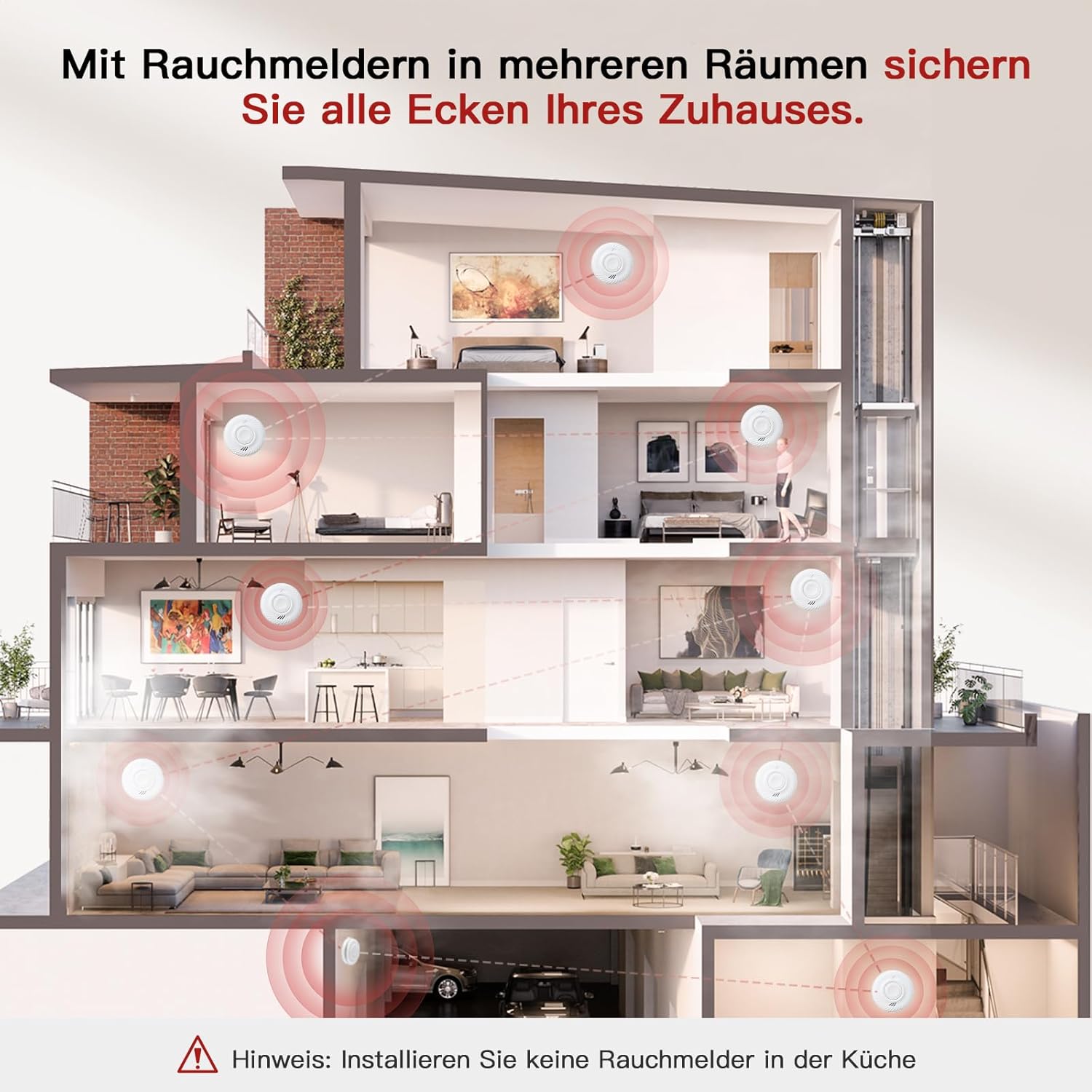
Install smoke detectors in multiple rooms to secure all areas of your home. Important: Do not install smoke detectors in the kitchen due to potential false alarms from cooking fumes.
- 地下室や屋根裏部屋を含む家の各階に少なくとも 1 つの煙探知機を設置してください。
- 寝室エリアの内外に検出器を設置します。
- 隙間風により煙検知が妨げられる可能性がある窓、ドア、通気口の近くに検知器を設置しないでください。
- Maintain a distance of at least 1 meter (3 feet) from cooking appliances.
6. 操作手順
通常操作:
Once activated, the detector will perform a self-test and enter normal monitoring mode. The LED indicator will flash periodically (e.g., every 56 seconds) to indicate proper functioning.
検出器のテスト:
It is recommended to test your smoke detector weekly to ensure it is working correctly.
- Press and hold the Test/Hush button on the detector for a few seconds.
- The alarm will sound loudly, and the LED indicator will flash rapidly.
- ボタンを離してください。アラームは停止します。

Perform convenient self-tests of the smoke detector directly from your smartphone using the app, eliminating the need to physically reach the device. The alarm sounds at 85dB during a test or actual event.
Hush/Silence Function:
迷惑なアラーム(調理中の煙など)の場合は、一時的にアラームを消音することができます。
- Press the Test/Hush button on the detector.
- The alarm will silence for a short period (e.g., 10 minutes) before automatically resetting.
- If the smoke is still present after the hush period, the alarm will sound again.
7. App Connection (Tuya/Smart Life)
Connect your PHYSEN WiFi Smoke Detector to the Tuya or Smart Life app for remote monitoring and notifications.

Connect the detector to the Tuya/Smart Life app via 2.4GHz Wi-Fi to receive real-time notifications on your smartphone when smoke is detected or in case of malfunction. Ensure your phone has cellular or Wi-Fi network access.
- アプリをダウンロード: Download and install the "Tuya Smart" or "Smart Life" app from your smartphone's app store (iOS or Android).
- 登録/ログイン: アカウントを作成するか、既存のアカウントにログインしてください。
- デバイスを追加:
- Ensure your smartphone is connected to a 2.4GHz Wi-Fi network. The smoke detector only supports 2.4GHz Wi-Fi.
- Open the app and tap "+" or "Add Device."
- Select "Security & Video Surveillance" > "Smoke Detector (Wi-Fi)" or similar category.
- On the smoke detector, press and hold the Test/Hush button until the LED indicator starts blinking rapidly (usually blue). This puts the device into pairing mode.
- Follow the on-screen instructions in the app to connect the detector to your Wi-Fi network. You may need to enter your Wi-Fi password.
- Once connected, the LED indicator on the detector will stop blinking rapidly and remain off or flash slowly, indicating a successful connection.
- デバイスの共有:

The device can be shared with up to 12 different app accounts, allowing all shared users to receive real-time push notifications for enhanced family safety.
- In the app, navigate to the device settings for your smoke detector.
- Look for a "Share Device" or "Device Sharing" option.
- Enter the email or phone number associated with the Tuya/Smart Life account of the person you wish to share access with.
- Shared users will receive real-time push notifications.
8. メンテナンス
定期清掃:
Clean your smoke detector at least once a month to prevent dust and debris buildup, which can affect performance.
- Gently vacuum the ventilation slots using a soft brush attachment.
- きれいな、dで外部を拭きますamp 布で拭いてください。洗浄溶剤やスプレーは使用しないでください。
バッテリー:
The detector is equipped with a sealed 10-year battery. It is not user-replaceable. When the battery is low, the detector will emit a low battery warning (a chirp and/or app notification). Replace the entire unit when the low battery warning persists or after 10 years of operation.
9。 トラブルシューティング
- Alarm sounds intermittently or chirps: This usually indicates a low battery. Since the battery is sealed, the unit needs to be replaced.
- 誤報:
- Check for sources of smoke or steam (e.g., cooking, hot showers, fireplaces).
- Clean the detector to remove dust or insects.
- Relocate the detector if it is too close to kitchens or bathrooms.
- Detector does not connect to Wi-Fi:
- Ensure your Wi-Fi network is 2.4GHz. The detector does not support 5GHz Wi-Fi.
- Wi-Fi パスワードが正確かどうか確認してください。
- Move the detector closer to your Wi-Fi router.
- ルーターを再起動して再度ペアリングを試みてください。
- Ensure the detector is in pairing mode (rapidly blinking LED).
- アプリ通知なし:
- Ensure your phone has a stable internet connection (cellular or Wi-Fi).
- Check app notification settings on your phone and within the Tuya/Smart Life app.
- Verify that the detector is still connected to Wi-Fi (check its status in the app).
- Test button does not work: Ensure the detector is properly activated and the battery is not depleted. If issues persist, the unit may be faulty and require replacement.
10. 仕様
| ブランド | ファイセン |
| モデル番号 | SDWIFI-1006 |
| 電源 | 電池式(10年間の密閉型電池) |
| センサータイプ | 光電型透過方式 |
| 接続性 | 2.4GHz Wi-Fi |
| アラームの音量 | 85デシベル |
| 材料 | 難燃性ABS |
| 製品寸法 | 奥行き3cm x 幅9cm x 高さ9.5cm |
| アイテム重量 | 0.96キログラム(6ユニット分) |
| 認定資格 | EN 14604, TÜV Rheinland |
11. 保証とサポート
For warranty information and technical support, please refer to the documentation included with your purchase or contact PHYSEN customer service through their official webご購入いただいたサイトまたは販売店にお問い合わせください。保証請求のために購入証明書を保管してください。