
Dhiedas H8
Dhiedas Smart Fingerprint Door Lever H8 User Manual
モデル: H8
製品終了view
The Dhiedas Smart Fingerprint Door Lever H8 offers advanced security and convenient access with multiple unlocking methods. This manual provides detailed instructions for installation, operation, and maintenance to ensure optimal performance and user satisfaction.

Image: The Dhiedas Smart Fingerprint Door Lever H8, highlighting its five distinct unlocking methods: fingerprint, code, mobile app, Apple Watch, and traditional key.
主な特徴:
- 5つのロック解除方法: Access your door using fingerprint, custom codes, the eSmartlock mobile app, Apple Watch, or traditional backup keys.
- Fast Biometric Recognition: Recognizes your fingerprint in just 0.2 seconds, supporting up to 100 unique fingerprints.
- eSmartlock App Control: Manage fingerprints, view unlock logs, adjust volume, share access permissions, and set passage or privacy modes.
- バッテリー寿命の延長: Features a low power consumption design, offering up to 365 days of standby time. Includes a USB-C emergency charging port and low battery reminders.
- 簡単なDIY取り付け: Designed for standard single-cylinder, mortise, and integrated doors, suitable for both left-handed and right-handed configurations without requiring drilling or a locksmith.
箱の中身
インストールを開始する前に、すべてのコンポーネントが揃っていることを確認してください。
- Fingerprint door handle lock (Front and Back Handles)
- キー x 2
- ユーザーマニュアル x 1
- 1 x Screwdriver & all screws
- 1 x Strike Plate & Strike Hole Cover
- 1×ロックラッチ
- 1×スピンドル
- 接続パイプ x 2
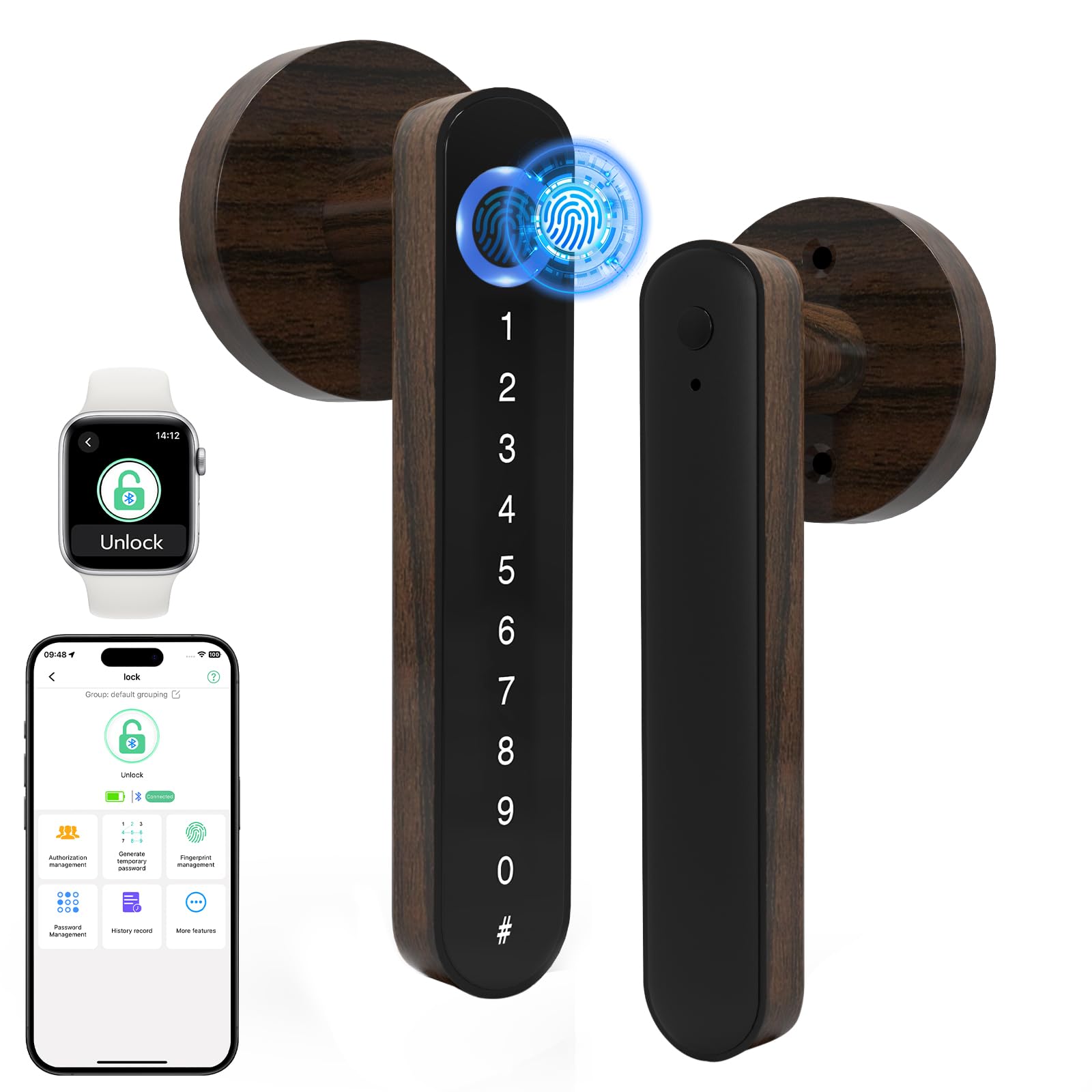
Image: The Dhiedas Smart Fingerprint Door Lever H8, along with its various components included in the package.
インストールガイド
Follow these steps carefully to install your Dhiedas Smart Fingerprint Door Lever H8. For a visual guide, please refer to the installation video below.
インストールビデオ:
Video: Detailed step-by-step instructions on how to install the Dhiedas Smart Fingerprint Door Lever H8.
ステップバイステップのインストール:
- ラッチを取り付けます。
- Adjust the latch to fit your door's backset (between 2-3/8" (60mm) and 2-3/4" (70mm)).
- Ensure the spindle hole is squarely aligned with the ground.
- Fix the lock latch with the provided wooden screws.
- Install the Front Handle:
- Route the battery cable through the square spindle.
- Insert the battery cable and square spindle into the lock latch hole.
- Install the Back Handle:
- Unscrew the battery cover screw on the back handle to open the battery compartment.
- Route the battery cable through the back handle.
- Fix the back handle with the M4 screws.
- バッテリーケーブルを接続します。
- Install 4 AAA alkaline batteries (not included).
- Install the battery cover to the back handle and secure it with the battery cover screw.
- テストインストール:
- Check if the door lock can be used normally by pressing the handle and observing the latch movement.

Image: Diagram illustrating the compatible door thickness (1-3/8" - 2-1/8") and backset dimensions (2-3/8" or 2-3/4") for installation.
操作手順
The Dhiedas Smart Fingerprint Door Lever H8 offers multiple convenient ways to unlock your door.
ロック解除方法:
- 指紋によるロック解除: 登録した指をセンサーに置きます。約0.2秒後にロックが解除されます。
- Code Unlock: Enter your programmed numerical code on the keypad, followed by the '#' key.
- eSmartlock App Unlock: Use the eSmartlock app on your smartphone to remotely unlock the door via Bluetooth.
- Apple Watch Unlock: For compatible Apple Watch users, unlock the door directly from your watch.
- キーロック解除: In case of emergency or battery depletion, use the provided physical keys to unlock the door.

Image: The eSmartlock mobile application displaying unlock records and the Apple Watch interface for unlocking the door.
動作モード:
- Auto-Lock Mode (Default): The door will automatically lock after a set period (e.g., 3.5 seconds) once closed. This setting can be adjusted via the eSmartlock app.
- 通過モード: This mode keeps the door unlocked, allowing free entry and exit without requiring credentials. Ideal for high-traffic periods. Activate/deactivate via the eSmartlock app.

Image: Visual explanation of the automatic locking mechanism and the passage mode, which allows the door to remain unlocked for convenience.
メンテナンス
Proper maintenance ensures the longevity and reliable operation of your Dhiedas Smart Fingerprint Door Lever H8.
- バッテリー交換: The lock uses 4 AAA alkaline batteries. When the low battery reminder activates, replace all four batteries promptly. Use the USB-C emergency charging port if batteries deplete before replacement.
- クリーニング: Wipe the fingerprint sensor and keypad with a soft, dry cloth. Avoid using abrasive cleaners or solvents that could damage the finish or electronic components.
- 定期点検: すべてのネジと接続が確実に固定されているか定期的に確認してください。

Image: Illustration of the battery compartment requiring 4 AAA batteries and the USB-C emergency charging port for power in case of battery depletion.
トラブルシューティング
If you encounter issues with your Dhiedas Smart Fingerprint Door Lever H8, refer to the following common solutions:
| 問題 | 考えられる原因 | 解決 |
|---|---|---|
| ロックが応答しません。 | 電池残量が少ない、または消耗しています。 | Replace all 4 AAA alkaline batteries. Use the USB-C emergency power if needed. |
| 指紋が認識されません。 | 指が濡れているか、汚れているか、正しく置かれていないため、指紋が登録されていません。 | Ensure finger is clean and dry. Reposition finger on the sensor. Register the fingerprint via the app if it's new. |
| キーパッドが反応しません。 | Low battery; temporary software glitch. | Replace batteries. Try restarting the lock by removing and reinserting batteries. |
| ドアは自動的にロックされません。 | Passage mode is active; auto-lock feature disabled. | Deactivate passage mode or enable auto-lock through the eSmartlock app. |
仕様
| 特徴 | 詳細 |
|---|---|
| ブランド | ディエダス |
| モデル名 | H8 |
| ロックタイプ | Biometric, Keypad, Apple Watch Unlock |
| ロック解除方法 | Fingerprint, Code, eSmartlock App, Apple Watch, Keys |
| 指紋容量 | 最大 100 個の指紋 |
| コード容量 | 最大100コード |
| 電源 | 単4アルカリ電池4本(別売) |
| 非常用電源 | USB-Cポート |
| バッテリー寿命 | 最大365日間のスタンバイ |
| 材料 | 亜鉛 |
| 寸法(長さ×幅×高さ) | 6.3 x 2.4 x 2.4インチ |
| アイテム重量 | 1.08 ポンド |
| 接続性 | ブルートゥース |
| 適合ドア | Standard single-cylinder, Mortise, Integrated doors (left/right handed) |
保証とサポート
Dhiedas provides comprehensive support for your product:
- 製品保証: Enjoy a 1-year product warranty from the date of purchase.
- カスタマーサポート: Lifetime customer support is available. For any issues or inquiries, please contact Dhiedas customer service.
- アプリのサポート: The eSmartlock app is free to use without any monthly or yearly fees.