
導入
Thank you for choosing the ATOTOEXCEL A5L 2 DIN Android Car Stereo. This device integrates advanced features such as a 7-inch display, Android operating system, wireless CarPlay and Android Auto, a 1080P DVR front camera, and a powerful audio system with DSP. This manual provides detailed instructions for installation, operation, maintenance, and troubleshooting to ensure optimal performance and user experience.

Figure 1: ATOTOEXCEL A5L Multi-function Android Car Stereo overview.
設定
パッケージ内容
パッケージにすべてのアイテムが揃っていることを確認します。
- カーステレオ
- DVR Front Camera
- 電源ケーブル
- リアカメラ入力ケーブル
- RCAコネクタ
- USB外付けストレージケーブル
- GPSアンテナ
- ダブルDINブラケット
- 取り付けブラケット
- 取り付けネジ
- オンラインリソースクイックガイド
- ISOコネクタ(A/B)
- Installation Frame x 2
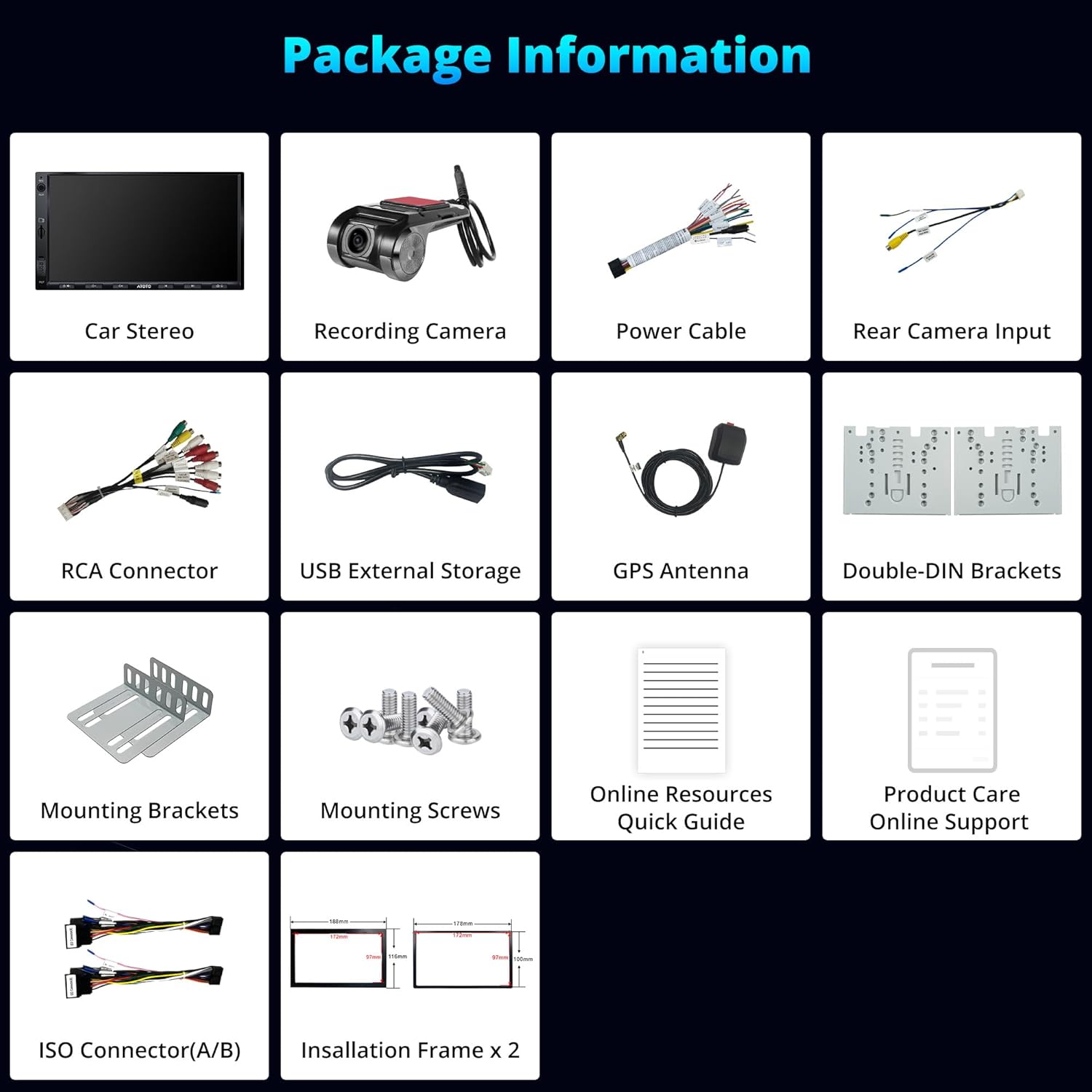
図 2: 製品パッケージに含まれるコンポーネント。
インストール
The A5L car stereo is designed for standard 2 DIN slots. Professional installation is recommended. Ensure the vehicle's power is disconnected before beginning installation.
- 取り付け: Use the provided double-DIN and mounting brackets to secure the head unit into your vehicle's dashboard.
- 配線: Connect the power cable, speaker wires, and other accessory cables (e.g., rear camera, USB, GPS antenna) according to the wiring diagram.
- 外部デバイス: Connect the DVR front camera and GPS antenna to their respective ports.
- 電源オン: Reconnect the vehicle's power and turn on the car stereo to test functionality.

Figure 3: Wiring diagram for connecting the A5L car stereo.

Figure 4: Physical dimensions of the A5L head unit for installation reference.
操作手順
Android システム
The A5L operates on an Android system, providing access to a wide range of applications via the Google Play Store. Regular Over-The-Air (OTA) updates are available for new features and system improvements.
- アプリのインストール: Connect to the internet and access the Google Play Store to download and install desired applications.
- システムアップデート: Check for and install OTA updates through the system settings to ensure your device has the latest software.

Figure 5: Accessing the Google Play Store for app downloads.
インターネット接続
The A5L offers three methods for internet access:
- WiFiホットスポット: Connect to a mobile hotspot or home Wi-Fi network.
- Bluetoothテザリング: Bluetooth 経由で携帯電話のインターネット接続を共有します。
- USBテザリング: Connect your phone via USB to share its internet connection.
Internet access enables navigation, music streaming, internet radio, and vehicle tracking via the TrackHU app.

Figure 6: Internet access options for the A5L car stereo.
ワイヤレス CarPlay & Android Auto
Connect your smartphone wirelessly via Bluetooth and Wi-Fi, or via USB, to access CarPlay or Android Auto. This allows seamless integration of your phone's music, navigation maps, messages, and calls.
- 繋がり: Enable Bluetooth and Wi-Fi on your phone and the car stereo. Follow the on-screen prompts to pair and connect.
- 音声コントロール: ハンズフリー操作には Siri または Google アシスタントをご利用ください。

図 7: ワイヤレス CarPlay と Android Auto の機能。

Figure 8: Navigation and connectivity options with CarPlay and Android Auto.
DriveChat (GenAI Co-Pilot)
DriveChat, powered by ChatGPT, offers interactive conversations and personalized advice through specialized chatbots. You can set custom activation words for convenience.
- アクセス: Launch the DriveChat application from the main menu.
- 交流: Engage in conversations or ask for advice on various topics.
- カスタマイズ: Configure activation words in the DriveChat settings.

Figure 9: DriveChat GenAI Co-Pilot for interactive assistance.

Figure 10: DriveChat AI offering intelligent voice management and specialized chatbots.
1080P DVR Front Camera
The A5L includes a 1080P DVR front camera (AC-44P2) that records automatically in a loop. This ensures timely recording of collisions or key events.
- 自動録音: The camera starts recording when the vehicle is powered on.
- ループ録音: 古いfootage is overwritten by new recordings once the storage is full.
- Video Lock: 重要な食べ物tage can be manually or automatically locked to prevent overwriting.

図 11: ライブ view from the 1080P AHD DVR front camera.

Figure 12: Automatic loop recording ensures continuous coverage.
オーディオシステム
The A5L features an integrated amplifier and Digital Signal Processor (DSP) for enhanced audio quality. It supports 9 bands with presets for sound customization.
- イコライザー(EQ): Adjust sound frequencies using the 24-band EQ to match your preferences and musical genres.
- Bluetoothオーディオ: Stream music wirelessly from your connected devices.
- FMラジオ: Tune into FM stations with personalized radio selection and RDS information.
- AUX入力: Connect external audio devices via the AUX port for true stereo output.

Figure 13: Digital Signal Processor (DSP) and equalizer settings for audio customization.

Figure 14: Essential audio functionalities including Bluetooth, AUX, and FM radio.

図15:統合 amplifier and DSP for clear and deep audio.
Multifunctional Bluetooth
The A5L's Bluetooth system allows connection to third-party devices, such as diagnostic scanners (e.g., OBD scanner AC-4450), without interrupting music or calls. It also includes a screen lock function for privacy when away from the vehicle.
- デバイスのペアリング: Pair compatible Bluetooth devices through the Bluetooth settings menu.
- スクリーンロック: Activate the screen lock feature to protect your online profiles when the car is off.

Figure 16: Connecting other devices via Bluetooth and screen lock function.
GPSトラッキング(TrackHU)
The TrackHU app provides real-time vehicle updates, travel data management, and precise positioning using GPS, GLONASS, Galileo, and Beidou satellite systems.
- リアルタイム追跡: Monitor your vehicle's location and status in real-time.
- ルート再生: Review past routes with speed management.
- インスタントアラート: Receive notifications for geofence breaches and online/offline status changes.

Figure 17: TrackHU app for powered driving and real-time information.
画面
The A5L features a 7-inch IPS display with a resolution of 1280x720 pixels, offering a wide 178° viewing angle and excellent clarity.
- 高解像度: Enjoy clear and sharp visuals for navigation and media.
- 広い View角度: The 178° IPS display ensures consistent image quality from various seating positions.

Figure 18: IPS display features for optimal viewing。
メンテナンス
To ensure the longevity and optimal performance of your ATOTOEXCEL A5L car stereo, follow these maintenance guidelines:
- クリーニング: 画面と外装の清掃には、柔らかく乾いた布をご使用ください。研磨剤入りの洗剤や溶剤の使用は避けてください。
- ソフトウェアアップデート: Regularly check for and install OTA software updates to benefit from new features and bug fixes.
- 環境条件: ユニットを極端な温度、長時間の直射日光、過度の湿気にさらさないでください。
トラブルシューティング
If you encounter issues with your A5L car stereo, refer to the following common solutions:
- 電源なし: Check all power connections and the vehicle's fuse box. Ensure the ignition wire is correctly connected.
- 音が出ない: Verify speaker connections, volume settings, and EQ settings. Check if the mute function is active.
- Bluetooth/Wi-Fi 接続の問題: ステレオとデバイスの両方でBluetoothとWi-Fiが有効になっていることを確認してください。両方のデバイスを再起動してみてください。
- CarPlay/Android Autoが接続されない: Ensure your phone's operating system is up to date. Try connecting with a different USB cable if using a wired connection. For wireless, ensure Bluetooth and Wi-Fi are active and properly paired.
- 画面が反応しない: Perform a soft reset by pressing and holding the power button for 10 seconds. If the issue persists, consult customer support.
- GPS信号損失: GPSアンテナが正しく取り付けられ、クリアな視界があることを確認してください。 view 空の。
For persistent issues, please contact ATOTOEXCEL customer support.
仕様
| 特徴 | 詳細 |
|---|---|
| ブランド | ATOTOEXCEL |
| モデル | A5L |
| 表示サイズ | 7インチ |
| ディスプレイ解像度 | 1280x720 IPS |
| オペレーティング·システム | アンドロイド |
| プロセッサ | Quad-core Cortex (2GB RAM + 32GB ROM) |
| 接続性 | 2.4G/5Ghz Wi-Fi, Bluetooth, USB |
| カーインテグレーション | ワイヤレスCarPlay、ワイヤレスAndroid Auto |
| オーディオ機能 | 24-band EQ (DSP), Integrated Amplifier (4x45W Peak, 4x24W RMS), Stereo Output |
| DVRカメラ | 1080P Front DVR Camera (AC-44P2 included) with Loop Recording |
| GPS追跡 | TrackHU App, GPS, GLONASS, Galileo, Beidou |
| 追加機能 | DriveChat (GenAI Co-Pilot), Split-screen, MirrorLink, Multifunctional Bluetooth |
| 互換性のある周辺機器 | スピーカー、 Ampライフル、スマートフォン |
| 重さ | 1.39キログラム |
| 寸法 | 22.6 x 14.7 x 14.5 cm |
保証とサポート
製品のお手入れ
Your ATOTOEXCEL A5L comes with 12 months of product care, with an additional 6 months available upon contacting customer support. Our expert customer service team is generally responsive within one business day.

Figure 19: 18 Months of Product Care.
OTAアップデート
We are committed to providing high-quality car audio systems with regular firmware updates via OTA. These updates not only resolve potential bugs but also introduce new functionalities.

Figure 20: Regular OTA Updates for enhanced functionality.
サポートへのお問い合わせ
For assistance, please contact us through your order center, eproductcare, or email support@atotoglobal.com.

Figure 21: Support contact information.