
1. はじめに
The BOYA V35 is a compact and easy-to-use 2.4GHz wireless microphone system designed for capturing clear, high-quality audio. It is ideal for content creators, journalists, and anyone needing a reliable wireless audio solution for cameras and camcorders with a 3.5mm input. This manual provides detailed instructions for setting up, operating, and maintaining your BOYA V35 system.
2. 箱の中身
パッケージの内容をチェックして、すべてのアイテムが揃っていることを確認してください。
- BY-V35 Transmitter (TX) x 2
- BY-V35 RX Receiver x 1
- BY-V35 Foam Windscreen x 2
- USB-C to USB-A Charging Cable x 1
- 3.5 mm TRS-TRSオーディオケーブル x 1
- 充電ケース x 1
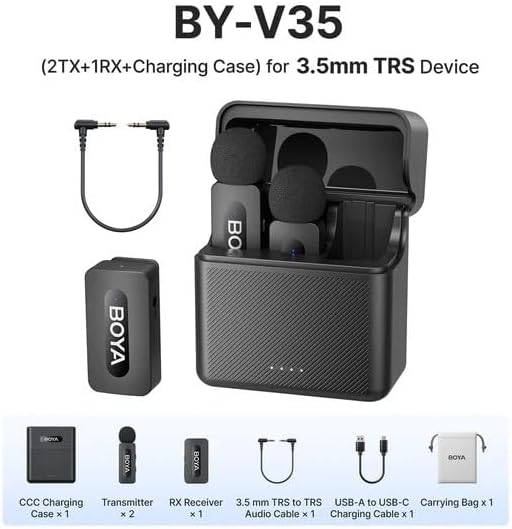
図2.1: Diagram showing all components included in the BOYA V35 package, including two transmitters, one receiver, a charging case, foam windscreens, and cables.
3.製品オーバーview
3.1.送信機(TX)

図3.1: フロント view of the BY-V35 Transmitter with the foam windscreen attached, showing the BOYA logo and indicator light.

図3.2: 側 view of the BY-V35 Transmitter, illustrating the integrated clip for attachment to clothing and the foam windscreen.
The transmitter is a compact unit with an integrated microphone and clip. It features a power button, a status indicator light, and a USB-C charging port. The omnidirectional microphone is designed to capture sound from all directions.
3.2. 受信機(RX)

図3.3: 側 view of the BY-V35 Receiver, showing the USB-C port, power button, and 3.5mm output jack.
The receiver connects to your recording device (camera, camcorder). It includes a 3.5mm TRS output jack, a power button, a status indicator light, and a USB-C charging port. The receiver is designed for easy connection and stable signal reception.
3.3.充電ケース
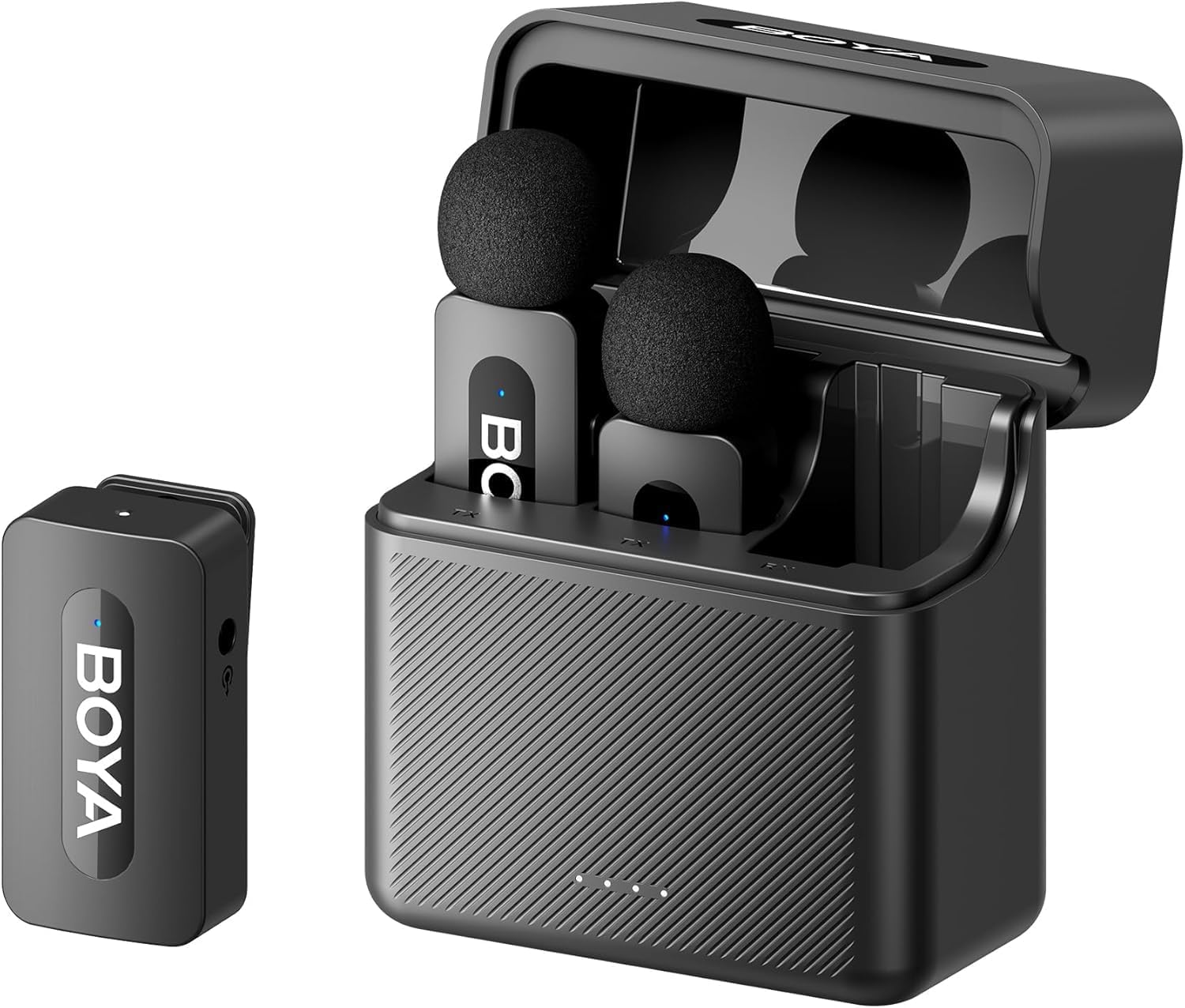
図3.4: The complete BOYA V35 system, including the charging case, two transmitters, and one receiver, ready for storage or charging.
The charging case provides convenient storage and charging for both transmitters and the receiver. It has its own USB-C charging port and LED indicators to show the charging status of the case and the devices inside.
4.セットアップガイド
4.1. デバイスの充電
- 送信機と受信機を充電ケースに入れます。
- Connect the USB-C to USB-A charging cable to the charging case and a USB power adapter (not included).
- The LED indicators on the charging case will show the charging status. The device indicators will also light up during charging.
- Ensure all devices are fully charged before first use for optimal battery life.
4.2. 電源を入れてペアリングする
- Press and hold the power button on both the transmitter(s) and the receiver for a few seconds until the indicator lights turn on.
- The devices will automatically attempt to pair. A solid blue light on both the transmitter and receiver indicates a successful connection. A blinking light indicates searching for a connection.
4.3. 録音機器への接続
- Connect one end of the 3.5mm TRS to TRS audio cable to the 3.5mm output jack on the BY-V35 receiver.
- Connect the other end of the 3.5mm TRS to TRS audio cable to the microphone input jack on your camera or camcorder.
- Ensure your recording device's audio input is set to external microphone if applicable.
4.4. 送信機の取り付け
- Attach the foam windscreen to the transmitter's microphone to reduce wind noise and plosives.
- Use the integrated clip on the back of the transmitter to securely attach it to the speaker's clothing, ideally about 6-8 inches (15-20 cm) from the mouth.
5. 操作手順
5.1. 電源のオン/オフ
To power on or off the transmitter or receiver, press and hold the power button for approximately 3 seconds. The indicator light will illuminate or turn off accordingly.
5.2. 音声の録音
- Ensure the transmitter(s) and receiver are powered on and successfully paired (solid blue indicator light).
- Start recording on your connected camera or camcorder.
- Monitor the audio levels on your recording device to ensure proper sound capture.
5.3. Status Indicator Lights
- 青一色: Device is powered on and successfully paired.
- 青く点滅: Device is powered on and searching for a connection.
- 赤一色: バッテリー残量が少なくなりました。
- Blinking Red (while charging): 充電中です。
- Solid Green (while charging): 完全に充電されました。
6. メンテナンス
6.1. 清掃
- 柔らかく乾いた布でデバイスを拭いてください。
- 過酷な化学薬品や研磨剤入りのクリーナーは使用しないでください。
- Ensure the foam windscreens are clean and free of debris. Replace if damaged.
6.2. ストレージ
- Store the BOYA V35 system in its charging case when not in use to protect it from dust and damage.
- 直射日光や極端な温度を避け、涼しく乾燥した場所に保管してください。
6.3. バッテリーのお手入れ
- Charge the devices regularly, even if not used frequently, to maintain battery health.
- 長期間にわたってバッテリーを完全に放電することは避けてください。
7。 トラブルシューティング
| 問題 | 考えられる原因 | 解決 |
|---|---|---|
| 音が出ない、または音量が小さい | Devices not powered on; Not paired; Incorrect cable connection; Recording device volume too low. | Ensure TX and RX are on and paired. Check 3.5mm cable connection. Increase recording device's input volume. |
| 音質が悪い(雑音、音飛び) | Interference; Out of range; Low battery; Damaged windscreen. | Move closer to the receiver. Charge devices. Replace windscreen. Avoid strong electromagnetic fields. |
| デバイスがペアリングされない | Devices too far apart; Interference; One device not powered on. | Ensure TX and RX are close to each other. Power cycle both devices. Check battery levels. |
| Charging case not charging devices | Charging case battery empty; Poor contact; Faulty cable. | Charge the charging case. Ensure devices are correctly seated. Try a different USB-C cable. |
8. 仕様
| 特徴 | 詳細 |
|---|---|
| ブランド | ボヤ |
| モデル番号 | BY-V35 |
| 接続技術 | ワイヤレス2.4GHz |
| コネクタタイプ | 3.5ミリジャック |
| 極性パターン | 全方向 |
| 周波数範囲 | 20Hz-16kHz |
| 信号対ノイズ比 | 80デシベル |
| 電源 | 電池駆動 |
| アイテム重量 | 0.2 Kilograms (approximate, for entire kit) |
| アイテムの寸法 | 6.1 x 2.2 x 3.4 inches (approximate, for entire kit) |
| 対応デバイス | ビデオカメラ、カメラ |
9. 保証とサポート
保証情報およびテクニカルサポートについては、BOYAの公式ウェブサイトをご覧ください。 webご購入の際は、サイトをご覧いただくか、お近くの販売店にお問い合わせください。保証請求の際に必要となりますので、購入証明書を保管してください。