
1. はじめに
Thank you for choosing the AromaTech Ambience Scent Diffuser. This waterless nebulizing diffuser is designed to disperse essential oil blends and fragrances efficiently, covering areas up to 1000 sq ft. Featuring Bluetooth connectivity for app control and ambient LED lighting, the Ambience diffuser provides a consistent and enjoyable scenting experience without heat or water. Please read this manual thoroughly before operation to ensure proper use and maintenance.

Image: The AromaTech Ambience Diffuser positioned on a coffee table in a living room, demonstrating typical placement.
2. 安全情報
- 機器を使用する前にすべての説明書をお読みください。
- ディフューザーは子供やペットの手の届かないところに保管してください。
- Use only AromaTech essential oil blends or fragrances. Other oils may damage the device.
- ディフューザーを水やその他の液体に浸さないでください。
- 電源アダプターがお住まいの地域の電源と互換性があることを確認してください。
- 清掃する前、または長期間使用しない場合は、ディフューザーを電源コンセントから抜いてください。
- 動作中は通気口を塞がないでください。
- Avoid placing the diffuser on unstable surfaces.
3. パッケージ内容
パッケージにすべてのアイテムが揃っていることを確認します。
- AromaTech Ambience Scent Diffuser (White Stone Resin)
- 電源アダプター
- Empty 60ml Diffuser Oil Bottle (for your chosen fragrance oil, not included)
- ユーザーマニュアル(このドキュメント)
4.製品オーバーview
Familiarize yourself with the components of your AromaTech Ambience Scent Diffuser.
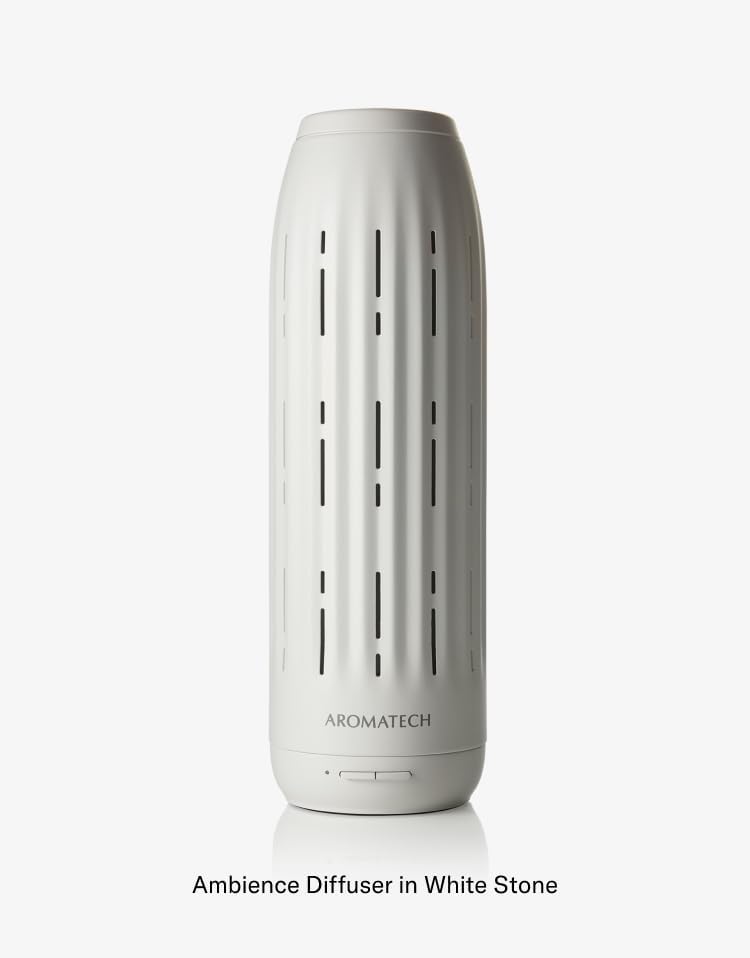
画像: 詳細な view of the Ambience Diffuser, highlighting its design and the AromaTech logo.
- Diffuser Body: The main unit housing the nebulizing technology.
- コントロールボタン: Located at the base for basic operation (e.g., power, LED).
- Oil Compartment: Area where the essential oil bottle is inserted.
- 通気口: Openings for scent dispersion.
- 電源ポート: 電源アダプタを接続します。
5. セットアップ
- 開梱: パッケージからすべてのコンポーネントを慎重に取り出します。
- 配置: Place the diffuser on a flat, stable surface in your desired area. Ensure it is away from direct sunlight, heat sources, and out of reach of children and pets.
- オイルボトルを準備する: Unscrew the cap from your AromaTech essential oil blend or fragrance bottle. If using the empty 60ml bottle, fill it with your chosen AromaTech oil.
- オイルボトルを挿入します: Locate the oil compartment on the diffuser. Carefully screw the oil bottle into the designated port until secure. Do not overtighten.
- 接続電源: Plug the power adapter into the diffuser's power port, then plug the adapter into a suitable electrical outlet.
6. 操作手順
6.1 電源オン/オフ
- To power on the diffuser, press the power button located at the base of the unit.
- 電源をオフにするには、もう一度電源ボタンを押します。
6.2 Bluetooth Connectivity and AromaTech App
The AromaTech Ambience diffuser can be controlled via the AromaTech App on your smartphone (compatible with Apple and Android devices).
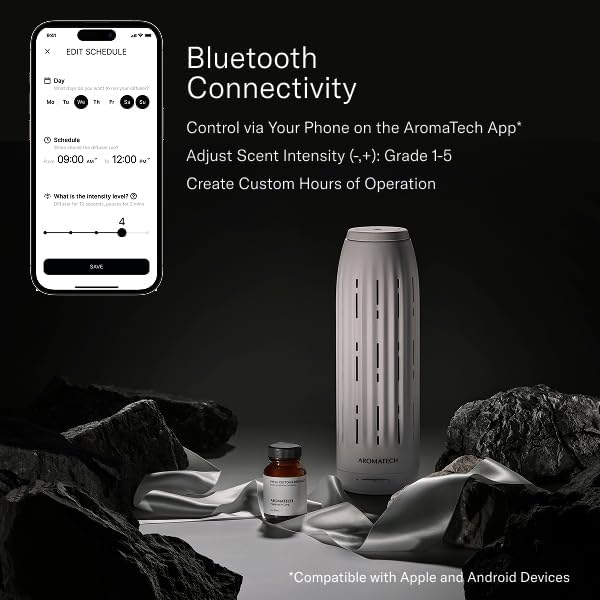
Image: A smartphone displaying the AromaTech App's scheduling and intensity control interface, alongside the Ambience diffuser and a bottle of fragrance oil.
- アプリをダウンロードする: Download the "AromaTech" app from your device's app store (Apple App Store or Google Play Store).
- Bluetoothを有効にする: スマートフォンでBluetoothが有効になっていることを確認します。
- ペアデバイス: Open the AromaTech App and follow the on-screen instructions to pair with your Ambience diffuser.
- 香りの強さを調整する: Within the app, you can adjust the scent intensity from Grade 1 to 5.
- スケジュールの作成: Set custom operating hours and days for the diffuser to automatically turn on and off.
6.3 アンビエントLED照明
The diffuser features ambient LED lighting. Refer to the AromaTech App for specific controls to turn the LED light on/off or adjust its settings, if available.
7. メンテナンス
7.1 ディフューザーのクリーニング
定期的に清掃することで、最適なパフォーマンスが確保され、ディフューザーの寿命が延びます。
- 電源を切ってプラグを抜きます: 清掃する前に必ずディフューザーの電源をオフにし、プラグを抜いてください。
- オイルボトルを取り外す: Carefully unscrew and remove the essential oil bottle.
- 外側を拭く: 柔らかくてamp cloth to wipe the exterior of the diffuser. Do not use abrasive cleaners or solvents.
- Clean Nozzle (if necessary): If you notice reduced scent output or clogging, you may need to clean the nebulizing nozzle. Consult AromaTech support for specific instructions or use a small amount of rubbing alcohol on a cotton swab to gently clean the nozzle opening. Ensure it is completely dry before reassembling.
- 完全に乾かす: 組み立て直して電源を再接続する前に、すべての部品が完全に乾いていることを確認してください。
7.2 Refilling/Replacing Oil
- When the oil bottle is empty, power off and unplug the diffuser.
- Carefully unscrew the empty bottle.
- Screw in a new bottle of AromaTech essential oil blend or fragrance.
- Reconnect power and resume operation.
8。 トラブルシューティング
| 問題 | 考えられる原因 | 解決 |
|---|---|---|
| ディフューザーがオンになりません。 | No power; Power adapter not connected properly. | 電源アダプターがディフューザーと電源コンセントの両方にしっかりと差し込まれていることを確認してください。 |
| 香りが出ない、または香りが弱い。 | Oil bottle empty; Oil bottle not inserted correctly; Nozzle clogged; Incorrect intensity setting. | Check oil level and replace if empty. Ensure bottle is securely screwed in. Clean the nebulizing nozzle as per maintenance instructions. Adjust scent intensity via the AromaTech App. |
| Bluetooth接続の問題。 | Bluetooth not enabled on phone; Diffuser too far from phone; App not updated. | Ensure Bluetooth is active on your device. Move closer to the diffuser. Restart the AromaTech App or reinstall it. |
| ディフューザーから異常な音がする。 | Diffuser not on a flat surface; Internal component issue. | ディフューザーを安定した平らな場所に置いてください。ノイズが続く場合は、AromaTechカスタマーサポートにお問い合わせください。 |
9. 仕様
- ブランド: アロマテック
- モデル名: 雰囲気
- カバレッジ: 最大1000平方フィート
- テクノロジー: Waterless Nebulizing
- 接続性: Bluetooth (AromaTech App)
- 材料: Resin (White Stone finish)
- 特別な機能: Timer Setting, Ambient LED Lighting
- オイル容量: Compatible with 60ml AromaTech oil bottles
10. 保証とサポート
For warranty information, technical support, or customer service inquiries, please visit the official AromaTech webサイトをご覧いただくか、カスタマー サポート チームに直接お問い合わせください。
AromaTech Official Webサイト: www.aromatech.com