
導入
This manual provides essential information for the safe assembly, operation, and maintenance of your COSTWAY Vanity Desk with Lights. Please read all instructions carefully before use and retain this manual for future reference.
The vanity desk features a 2-in-1 design, allowing it to function as both a makeup table and a writing desk. It includes a mirror with 10 LED bulbs offering 3 adjustable light modes and brightness, a cushioned stool, and ample storage with three drawers, including removable dividers.
重要な安全情報
Always assemble the vanity according to the instructions provided. Ensure the vanity is stable and secure before use. Do not place heavy objects on the vanity to prevent tipping. Be cautious when adjusting the lighting to avoid electrical hazards. Keep the vanity and its components away from water and heat sources.
An anti-tipping device is included to enhance safety. It is crucial to install this device to prevent accidental collisions and ensure stability, especially in households with children or pets.

Image: Installation of the anti-tipping device to secure the vanity to the wall.
パッケージ内容
組み立てを始める前に、下記のすべての部品が揃っていることを確認してください。部品が不足または破損している場合は、カスタマーサポートまでご連絡ください。
- 化粧台×1
- 1 x Vanity Stool
- ユーザーマニュアル x 1
- Necessary hardware and tools for assembly
セットアップと組み立て手順
The vanity set is designed for hassle-free setup. All necessary parts are labeled, and detailed instructions are provided in the included user manual. Follow the step-by-step guide for proper assembly.
- コンポーネントを解凍します: すべての部品をパッケージから慎重に取り出し、傷がつかないように清潔で柔らかい表面の上に広げます。
- デスクフレームを組み立てる: Attach the legs to the main tabletop using the provided hardware. Ensure all connections are secure.
- 引き出しの取り付け: Insert the drawers into their respective slots. The large drawer includes removable dividers for customizable organization.
- ミラーアセンブリを取り付ける: Secure the mirror frame with LED bulbs to the tabletop. The mirror can be rotated 360 degrees for optimal view角度を変える。
- スツールを組み立てる: Attach the legs to the cushioned stool seat.
- 転倒防止装置の取り付け: For safety, fix the vanity table to the wall using the anti-tipping device as illustrated in the safety section.
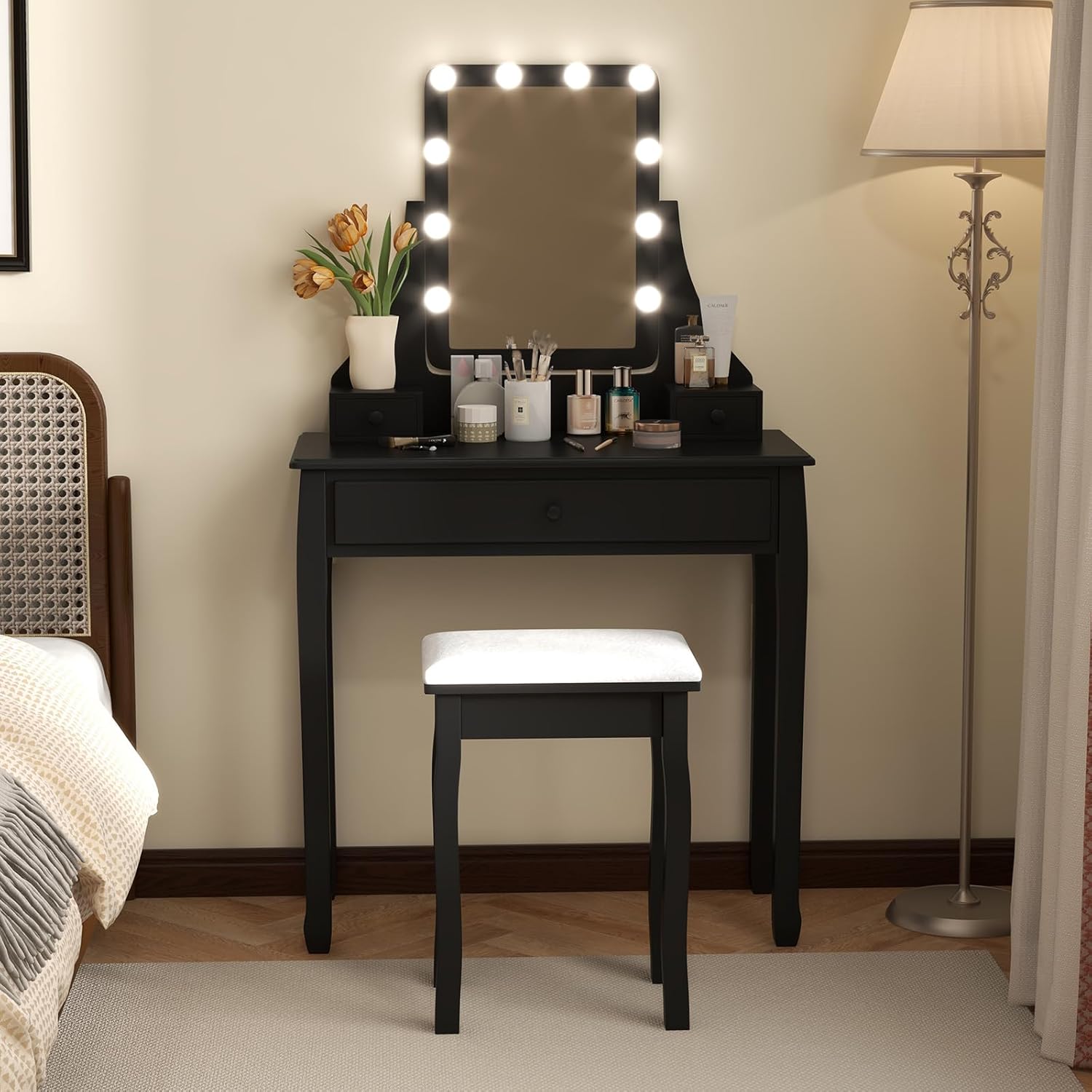
Image: Fully assembled COSTWAY Vanity Desk with Lights and stool.

Image: Detail of the vanity desk's storage drawers, including removable dividers.
操作手順
LEDミラーライト
The mirror is equipped with 10 LED bulbs offering adjustable lighting to suit various preferences and needs.
- 電源オン/オフ: コントローラーの電源ボタンを押して、ライトをオンまたはオフにします。
- ライトモードを変更する: Briefly press the mode button on the controller to cycle through the 3 light modes: Warm Yellow, Warm White, and Cool White.
- 明るさを調整: Press and hold the power button on the controller to continuously adjust the brightness level from 0% to 100%. Release the button when the desired brightness is reached.

Image: LED mirror light modes and brightness control.
ミラー調整
The mirror features a 360-degree rotatable design, allowing you to adjust it to the most suitable angle for your comfort and makeup application.
- Gently grasp the sides of the mirror and rotate it to your desired position.
- Ensure the mirror is stable in its adjusted position before use.

Image: Key features including the 360-degree rotatable mirror.
メンテナンス
Cleaning the Vanity Desk
- 木の表面を柔らかくて乾いた布で拭いてください。amp 布で拭いてください。仕上げを傷める可能性のある研磨剤入りの洗剤や刺激の強い化学薬品は使用しないでください。
- For the mirror, use a glass cleaner and a lint-free cloth to prevent streaks.
- Regularly dust the desk to maintain its appearance.
Cushioned Stool Care
- Spot clean the upholstered stool cushion with a mild fabric cleaner as needed.
- 色あせを防ぐため、直射日光に長時間さらさないでください。

Image: Details of the cushioned stool, including padding and non-slip feet.
トラブルシューティング
| 問題 | 考えられる原因 | 解決 |
|---|---|---|
| LEDライトが点灯しない | Power cable not connected; Faulty power adapter; Bulb issue | Ensure power cable is securely plugged in. Check power adapter for damage. Contact customer support if lights remain off. |
| ライトがちらついたり薄暗くなったりする | Loose connection; Low power supply | Check all connections. Ensure the power source is stable. Adjust brightness settings. |
| Vanity desk feels unstable | Loose assembly; Uneven floor; Anti-tipping device not installed | Tighten all screws and bolts. Place on a level surface. Install the anti-tipping device as instructed. |
| 引き出しがスムーズに動かない | Misalignment; Obstruction; Damaged runners | Ensure drawers are correctly aligned. Remove any obstructions. Check drawer runners for damage. |
仕様
| 特徴 | 詳細 |
|---|---|
| モデル番号 | 1054US-CYHU |
| 全体寸法(長さ x 幅 x 高さ) | 32インチ x 16インチ x 54.5インチ (81cm x 40cm x 137cm) |
| Tabletop Dimensions (L x W x H) | 32インチ x 16インチ x 30.5インチ (81cm x 40cm x 77cm) |
| ミラーの寸法(幅×高さ) | 11インチ x 17インチ (28cm x 43cm) |
| スツールの寸法(幅×奥行き×高さ) | 15.5インチ x 11.5インチ x 20インチ (39cm x 29cm x 51cm) |
| 正味重量 | 37.5 ポンド (17 kg) |
| 材料 | Wood, Pine |
| 色 | 黒 |
| 組み立てが必要 | はい |
| テーブルトップの耐荷重 | 110ポンド |
| 便の耐荷重 | 240ポンド |
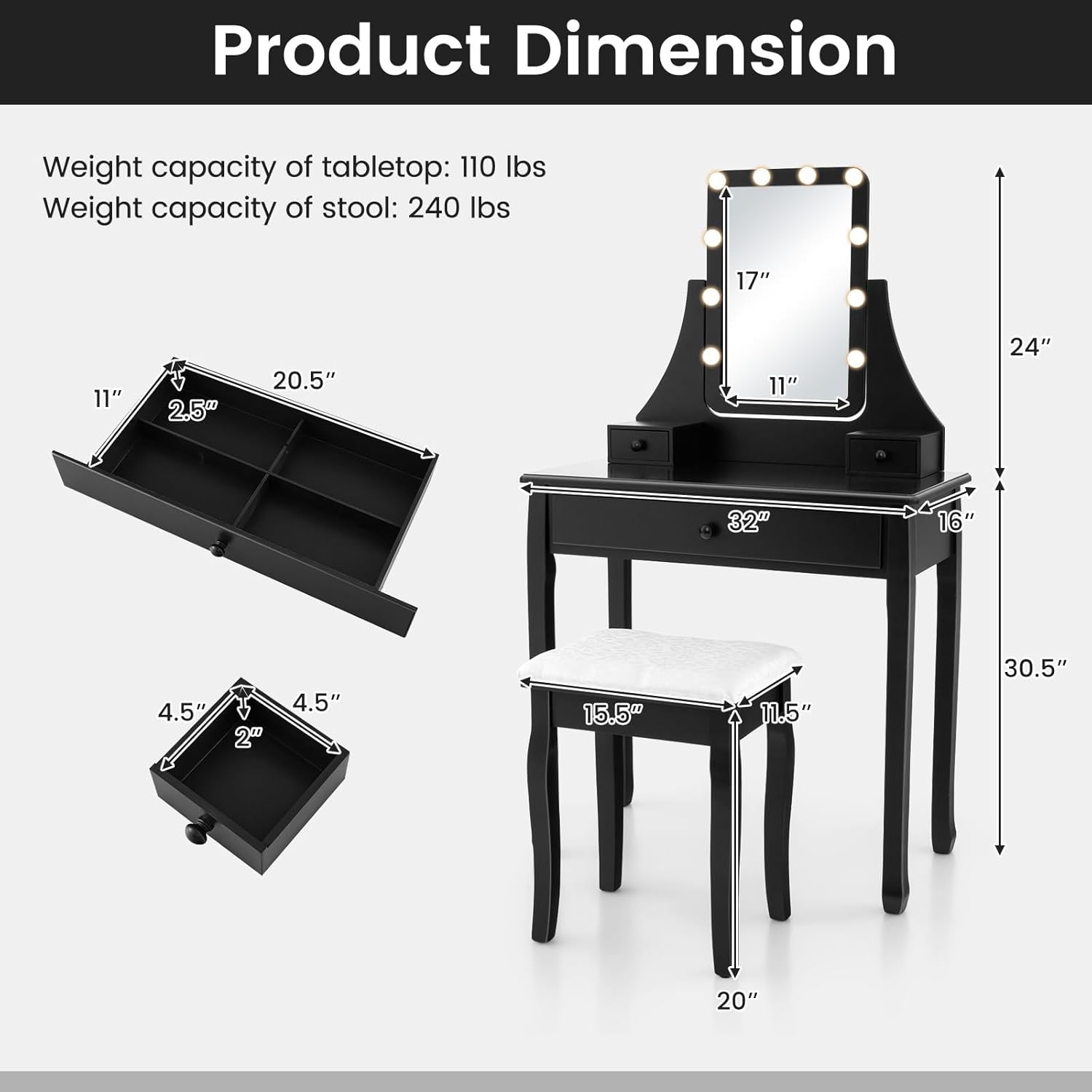
画像: 製品の詳細な寸法と重量容量。
保証とサポート
Specific warranty information for this product is not provided in this manual. For details regarding warranty coverage, please refer to the product packaging or contact COSTWAY customer service directly.
If you encounter any issues or have questions not addressed in this manual, please contact COSTWAY customer support through their official website or the retailer where the product was purchased. Please have your model number (1054US-CYHU) and purchase date ready when contacting support.