
1. はじめに
Thank you for choosing the Kaschun CT120S Professional Audio Mixer. This 12-channel mixer is designed for a wide range of audio applications, including DJing, studio recording, live streaming, and stage performances. It features 48V phantom power, USB recording, Bluetooth connectivity, and a built-in MP3 player, offering versatile control over your audio. This manual provides essential information for the proper setup, operation, and maintenance of your mixer to ensure optimal performance and longevity.
2. 安全情報
- 電源: Ensure the mixer is connected to a 110V AC power source with an American plug. Do not use incompatible power adapters.
- 換気: Place the mixer in a well-ventilated area. Do not block ventilation openings.
- 水分: Keep the mixer away from water, moisture, and high humidity. Do not operate with wet hands.
- 熱: ミキサーをラジエーター、ヒートレジスター、ストーブ、その他の熱を発生する装置などの熱源の近くに置かないでください。
- クリーニング: 清掃する前に電源を切ってください。乾いた柔らかい布を使用してください。液体クリーナーやエアゾールスプレーは使用しないでください。
- サービス: この製品を自分で修理しようとしないでください。 すべてのサービスを資格のあるサービス担当者に依頼してください。
- ファントムパワー: When using 48V phantom power for condenser microphones, ensure the microphone is connected before activating phantom power to prevent damage.
3.製品オーバーview
The Kaschun CT120S is a professional 12-channel audio mixer designed for clarity and control. Its ultra-thin metal body ensures durability and portability. Key features include:
- 12 入力チャンネル: Multiple microphone (XLR) and line inputs for diverse audio sources.
- 3バンドイコライゼーション: Dedicated knobs for high, mid, and low frequencies on each channel for precise tone shaping.
- 48Vファンタム電源: Essential for condenser microphones, available on XLR inputs.
- Bluetooth 5.0接続: 互換性のあるデバイスからのシームレスなワイヤレス オーディオ ストリーミング。
- USB Recording & MP3 Player: Direct recording to USB and playback of MP3 files with an LED display.
- エフェクトプロセッサー: Built-in effects for enhancing vocals and instruments.

図3.1: 前面 view of the Kaschun CT120S Professional Audio Mixer, showcasing its 12 channels and control layout.
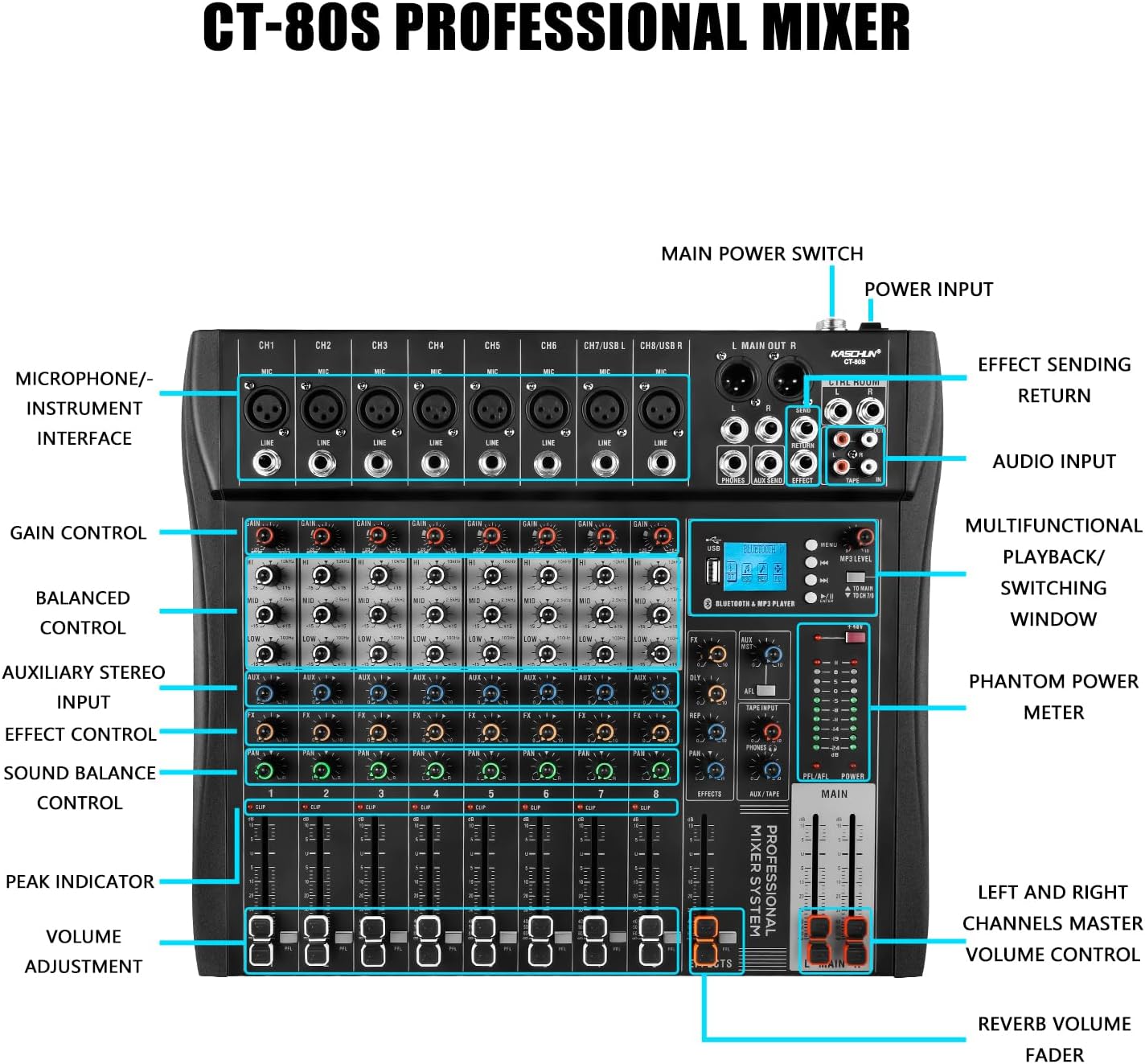
Figure 3.2: Detailed labeled diagram of the CT120S mixer, indicating the function of each control and input/output port.
4. セットアップ
Follow these steps to set up your Kaschun CT120S mixer:
- 開梱: ミキサーをパッケージから慎重に取り出し、損傷がないか確認してください。
- 配置: ミキサーを安定した平らな面に置き、ユニットの周囲に十分な換気を確保してください。
- 電源接続: Connect the provided power cord to the mixer's power input and then to a standard 110V AC wall outlet. Do not power on yet.
- 入力接続:
- マイク: Connect XLR microphones to the MIC inputs (CH1-CH12). If using condenser microphones, ensure 48V phantom power is off before connecting, then activate it once connected.
- ラインレベルデバイス: Connect instruments, keyboards, or other line-level devices to the LINE inputs using 1/4-inch TRS or TS cables.
- 出力接続: Connect the MAIN OUT (XLR or 1/4-inch) to your amplifier, powered speakers, or recording interface. Connect headphones to the PHONES output for monitoring.
- 初回電源オン: Once all connections are secure, turn on the mixer's main power switch.
5. 操作手順
This section details the primary functions and controls of your CT120S mixer.
5.1 チャンネルコントロール
- ゲインコントロール: Adjusts the input sensitivity for each channel. Set this to achieve a strong signal without clipping (indicated by the PEAK indicator).
- 3バンドEQ(高、中、低): Fine-tune the tonal characteristics of each channel. High controls frequencies above 10kHz, Mid around 2.5kHz, and Low below 100Hz. Adjust these to shape your sound.
- AUXコントロール: Sends a portion of the channel signal to the auxiliary output, typically used for monitor mixes or external effects.
- FX コントロール: チャンネル信号の一部を内部エフェクト プロセッサに送信します。
- PAN コントロール: チャンネル信号のステレオ位置(左から右)を調整します。
- VOLUME Adjustment (Fader): Controls the output level of each individual channel to the main mix.
- CLIP/PEAK Indicator: Lights up when the input signal is too high, indicating potential distortion. Reduce the GAIN if this light illuminates frequently.
5.2 Bluetooth接続
The CT120S features built-in Bluetooth 5.0 for wireless audio playback.

Figure 5.1: Illustration of Bluetooth wireless connection to the CT120S mixer from a mobile device.
- モバイルデバイス(スマートフォン、タブレットなど)で Bluetooth を有効にします。
- On the mixer's MP3 player section, select the Bluetooth mode. The LED display will show 'BT' or a similar indicator.
- On your device, search for available Bluetooth devices and select 'CT120S' (or similar name).
- Once paired, you can play audio from your device through the mixer. Adjust the MP3/USB channel volume on the mixer.
5.3 USB Recording and MP3 Playback
The mixer supports direct USB recording and MP3 playback.
- MP3の再生: MP3が入ったUSBフラッシュドライブを挿入します files into the USB port. The mixer will automatically detect and begin playing. Use the controls on the MP3 player section to navigate tracks and adjust volume. The LED display shows song names.
- USB 録音: To record your mix, ensure a USB flash drive is inserted. Press the 'REC' button on the MP3 player section. The mixer will record the main stereo output directly to the USB drive. Press 'REC' again to stop recording.
5.4 48Vファンタム電源
The mixer provides 48V phantom power for condenser microphones.

Figure 5.2: Close-up of the 48V phantom power switch and graphical representation of the 3-stage adjustable balance (EQ curves).
- Locate the '+48V' switch on the mixer.
- Before activating, ensure all condenser microphones are properly connected to their respective XLR inputs.
- Flip the '+48V' switch to the ON position. An indicator light will confirm activation.
- Always turn off phantom power before disconnecting condenser microphones or connecting dynamic microphones.
6. メンテナンス
適切なメンテナンスを行うことで、ミキサーの寿命が長くなり、最適なパフォーマンスが確保されます。
- クリーニング: Regularly wipe the mixer's surface with a soft, dry, lint-free cloth. For stubborn dirt, slightly damp布を水で拭いてください。研磨剤入りの洗剤や溶剤は使用しないでください。
- 防塵: When not in use, cover the mixer with a dust cover to prevent dust accumulation, especially in faders and knobs.
- ストレージ: ミキサーは直射日光や極端な温度を避け、涼しく乾燥した場所に保管してください。
- ケーブル管理 コネクタやポートの損傷を防ぐために、ケーブルがきちんと整理され、張力がかかっていないことを確認してください。
7。 トラブルシューティング
このセクションでは、発生する可能性のある一般的な問題について説明します。
| 問題 | 考えられる原因 | 解決 |
|---|---|---|
| 音声出力なし | Main volume fader is down; input gain too low; output cables disconnected or faulty; speakers/amp音量をオフまたはミュートにします。 | Increase MAIN fader; adjust channel GAIN; check all cable connections; ensure speakers/amplifier are powered on and unmuted. |
| 歪んだ音 | Input signal too high (CLIP indicator on); output level too high; faulty cable. | Reduce channel GAIN; lower MAIN output level; try a different cable. |
| Bluetooth接続の問題 | Device not in pairing mode; mixer not in Bluetooth mode; interference. | Ensure both devices are in pairing mode; select Bluetooth mode on mixer; move closer to mixer; restart both devices. |
| マイクが機能しない(コンデンサーマイク) | 48V phantom power not activated; faulty microphone or cable. | Activate +48V phantom power; test with a different microphone or cable. |
| USB録音が機能しない | USB drive not inserted or formatted incorrectly; drive full. | Ensure USB drive is properly inserted; check drive format (FAT32 recommended); delete old files or use a new drive. |
8. 仕様
| 特徴 | 仕様 |
|---|---|
| モデル番号 | CT120S |
| チャンネル数 | 12 |
| アイテム重量 | 5.99ポンド |
| パッケージ寸法 | 22 x 17.27 x 4.5インチ |
| 電源 | コード式電気 |
| 巻tage | 110ボルト(AC) |
| 接続技術 | USB、ブルートゥース |
| 出力コネクタタイプ | XLR |
| ファントムパワー | 48V |
9. 保証とサポート
For any issues encountered before purchase or during product usage, please do not hesitate to contact Kaschun customer service for assistance. We are committed to providing a response within 24 hours. Please refer to your purchase documentation for specific warranty terms and conditions.
For further support, visit the official Kaschun store or contact your retailer.