
Philips 27M2C5501/00
Philips Evnia 27M2C5501 27インチ LED Fast VA QHD 180Hz 曲面アンビグローモニター ユーザーマニュアル
Model: 27M2C5501/00
導入
This manual provides essential information for the safe and efficient operation of your Philips Evnia 27M2C5501 monitor. Please read this manual thoroughly before using the product and retain it for future reference.
The Philips Evnia 27M2C5501 is a 27-inch curved LED monitor featuring Fast VA panel technology, QHD resolution, and a 180Hz refresh rate. It is designed to provide an immersive visual experience, with features like AMD FreeSync™ Premium for tear-free gaming and flicker-free technology to reduce eye strain during extended use.

画像: 正面 view of the Philips Evnia 27M2C5501 monitor, showcasin湾曲したディスプレイと洗練されたデザインが特徴です。
安全情報
Always observe the following safety precautions to prevent electric shock, injury, or damage to the monitor:
- モニターを雨や湿気にさらさないでください。
- モニターを開けないでくださいasing. 内部にはユーザーが修理できる部品はありません。
- モニター周囲の換気が適切であることを確認してください。通気口を塞がないでください。
- モニターに付属の電源コードとアダプターのみを使用してください。
- モニターが落ちないように、安定した平らな面に置いてください。
- 清掃する前に、モニターを電源コンセントから抜いてください。
パッケージ内容
パッケージ内にすべてのアイテムが揃っていることを確認してください:
- Philips Evnia 27M2C5501 Monitor
- モニタースタンド(ベースとネック)
- 電源ケーブル
- HDMIケーブル
- DisplayPortケーブル
- ユーザーマニュアルとドキュメント
設定
1. スタンドの組み立て
- 傷がつかないように、モニターの表面を下にして、柔らかくて清潔な表面に慎重に置いてください。
- Attach the stand neck to the monitor's mounting area. Ensure it clicks securely into place or is fastened with screws as indicated in the quick start guide.
- Connect the stand base to the stand neck, securing it with the captive screw at the bottom of the base.

画像: 背面 view of the monitor, illustrating the attachment point for the stand neck.

画像: 正面 view of the monitor with the stand fully assembled, ready for use.
2. デバイスへの接続
モニターは HDMI および DisplayPort 接続をサポートしています。
- HDMI接続: HDMI ケーブルの一方の端をコンピューターのグラフィック カードの HDMI ポートに接続し、もう一方の端をモニターの HDMI ポートの 1 つに接続します。
- DisplayPort接続: Connect one end of the DisplayPort cable to the DisplayPort on your computer's graphics card and the other end to the DisplayPort on the monitor.
- オーディオ出力: For external speakers or headphones, connect your audio device to the Audio Out port on the monitor.

画像: 詳細 view of the monitor's input ports, including two HDMI ports, one DisplayPort, and an Audio Out jack.
3. 電源接続
電源ケーブルをモニターの電源入力に接続し、もう一方の端をアースされた電源コンセントに差し込みます。
モニターの操作
電源のオン/オフ
モニターの電源をオン/オフにするには、通常モニターの背面または右下にある電源ボタンを押します。モニターの電源がオンになると、電源インジケーターライトが点灯します。
オンスクリーンディスプレイ(OSD)メニュー
The OSD menu allows you to adjust various monitor settings. Navigate the OSD using the joystick or buttons typically found on the back or bottom of the monitor.
- 画像設定: 明るさ、コントラスト、シャープネス、色温度を調整します。
- 入力選択: HDMI と DisplayPort 入力を手動で切り替えます。
- オーディオ設定: オーディオ出力の音量を制御します。
- アンビグロウ: Customize the ambient lighting feature.
- ゲーム設定: Enable/disable Adaptive Sync (AMD FreeSync Premium), adjust response time, and other gaming-specific features.
アンビグロー機能
The Philips Ambiglow feature creates an immersive viewing experience by projecting a halo of light from the back of the monitor onto the surrounding wall. This light dynamically adapts to the on-screen content, enhancing perceived image depth and reducing eye strain in dark environments.
画像: 背面 view of the monitor demonstrating the Ambiglow lighting feature in action, casting colored light onto the wall.
モニターの調整
モニター スタンドでは、さまざまな人間工学的な調整が可能です。
- 高さ調整: モニターを好みの高さに上げたり下げたりできます view高さ。
- 傾き調整: 画面を前後に傾けて最適な位置に調整します viewing angle (typically -5 to 20 degrees).
- スイベル調整: Rotate the monitor horizontally on its base (typically +/- 30 degrees).

Image: Diagrams illustrating the range of height, tilt, and swivel adjustments available for the monitor.
メンテナンス
適切なメンテナンスにより、モニターの寿命が長くなります。
- 画面の掃除: 柔らかく糸くずの出ない布で画面を優しく拭いてください。頑固な汚れには、モニター専用のクリーニング液を布に含ませ、画面に直接拭き取らないでください。
- Cのクリーニングasing: モニターの表面を拭くときは、柔らかく乾いた布を使用してください。asing. 研磨剤入りの洗剤は使用しないでください。
- ストレージ: モニターを長期間保管する場合は、電源プラグを抜き、ほこりから保護するためにカバーをかけてください。涼しく乾燥した場所に保管してください。
トラブルシューティング
モニターに問題が発生した場合は、次の一般的な問題と解決策を参照してください。
| 問題 | 考えられる原因 | 解決 |
|---|---|---|
| 電源なし | 電源ケーブルが接続されていない、電源コンセントが機能していない | 電源ケーブルがモニターとコンセントにしっかりと接続されていることを確認してください。別のデバイスでコンセントをテストしてください。 |
| 信号なし | ビデオケーブルが接続されていません。間違った入力が選択されています | Check video cable connections (HDMI/DP). Use OSD to select correct input source. |
| 画像のちらつき | リフレッシュレートの不一致、ケーブルの問題 | Ensure graphics card refresh rate matches monitor's 180Hz. Try a different video cable. |
| 歪んだ画像 | 解像度の不一致; グラフィックドライバーの問題 | ディスプレイ解像度を2560x1440に設定します。グラフィックドライバーを更新します。 |
これらの解決策を試しても問題が解決しない場合は、Philips カスタマー サポートにお問い合わせください。
仕様
| 特徴 | 詳細 |
|---|---|
| ブランド | フィリップス |
| モデル番号 | 27M2C5501/00 |
| 画面サイズ | 27インチ(68.5 cm) |
| パネルタイプ | 高速VA |
| 解決 | QHDワイド1440p(2560×1440) |
| リフレッシュレート | 180Hz |
| アスペクト比 | 16:9 |
| 曲率 | 湾曲した |
| 接続 | HDMI x 2、DisplayPort x 1、オーディオ出力 |
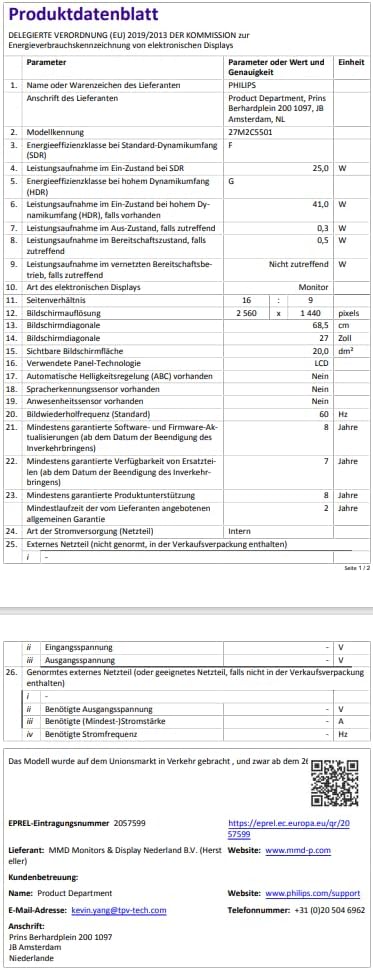
| 消費電力(標準) | 24.7ワット |
| エネルギー効率クラス | F |
| 特集 | Ambiglow, AMD FreeSync Premium, Flicker-Free, Adaptive Sync |
| 原産国 | 中国 |

Image: EU Energy Label for the Philips Evnia 27M2C5501 monitor, indicating an energy efficiency class of F.
詳細な製品情報については、 EPRELデータベース.
保証とサポート
Philips provides comprehensive support for your monitor:
- 一般保証: 購入日から最低2年間。
- 製品サポート: Minimum 8 years of guaranteed product support.
- スペアパーツの入手可能性: Minimum 7 years of guaranteed spare parts availability from the end of market placement.
- ソフトウェア/ファームウェアのアップデート: Minimum 8 years of guaranteed software and firmware updates from the end of market placement.
カスタマーサポート連絡先情報:
- メーカー: フィリップス
- Product Department: MMD Monitors & Display Nederland B.V.
- 住所: Prins Bernhardplein 200 1097 JB Amsterdam, NL
- メールアドレス: kevin.yang@tpv-tech.com
- Webサイト: www.philips.com/support
- 電話: +31 (0)20 504 6962
Ask a question about this manual
Ask about setup, troubleshooting, compatibility, parts, safety, or missing instructions. Manuals+ will review the question and use this page’s manual context to help answer it.