
Aroeally T01
Aroeally Hidden Camera Detector User Manual
モデル: T01
導入
This Aroeally Hidden Camera Detector (Model T01) is a versatile 4-in-1 device designed to enhance your privacy and security in various environments. It combines RF signal detection, camera lens finding, magnetic field detection, and a flashlight function to help you identify and locate hidden cameras, GPS trackers, and eavesdropping devices. Its compact and portable design makes it an essential tool for travel, office, and personal security.

Figure 1: Aroeally T01 Hidden Camera Detector and its retail packaging.
主な特徴
- 4-in-1 Detection Capabilities:
- RF信号検出: Detects active RF bug transmitters such as transmitting cameras and GPS trackers.
- Camera Lens Finder & Camera Detector: Utilizes infrared laser scanning for visual inspection to spot hidden pinhole cameras.
- 磁場検出: Identifies widely used magnetized GPS trackers.
- 懐中電灯機能: Provides illumination for use in dark environments.
- Super Signal Detection Range: Capable of detecting radio waves, 2G, 3G, and 4G mobile signals, and SIM card bugs. Frequency detection range spans from 1Mhz to 6.5Ghz.
- 強化されたプライバシー保護: Employs passive and infrared scanning techniques to accurately detect eavesdropping devices, telephone eavesdropping, meeting eavesdropping, GPS location trackers, car eavesdropping, pinhole cameras, cable cameras, and electrical radiation sources.
- ユーザーフレンドリーなデザイン: Features a rechargeable lithium-ion battery with approximately one hour fast charging, providing up to 25 hours of continuous use and 25 days of standby time. Constructed from high-quality PC material, it is portable and lightweight (only 30g), making it ideal for travel and daily use.
- Ultra Sensitivity with 5 Levels: Equipped with upgraded ultra-sensitive chips, offering 5 adjustable sensitivity levels to accurately pinpoint signal sources. Effective detection range covers an area of 30 square meters.
セットアップガイド
- デバイスの充電: Connect the included USB cable to the device's Type-C port and a compatible USB power adapter. The device features a built-in rechargeable lithium-ion battery. A full charge takes approximately one hour.
- 電源オン/オフ: Press and hold the power button (usually marked with a power symbol) for three seconds to turn the device on or off.
- 感度の調整: Short press the power button to cycle through the 5 levels of sensitivity. Higher sensitivity allows for a wider detection range, while lower sensitivity helps narrow down the source.
- アンテナを延長: For increased RF signal detection range, extend the retractable antenna located at the top of the device.

Figure 2: Basic operation steps including power, mode, and sensitivity adjustment.

図3:以上view of detector components and their functions.
操作手順
1. RF Signal Detection (Red Indicator Light)
This mode detects wireless signals from hidden cameras, GPS trackers, and eavesdropping devices. Before using this mode, it is recommended to switch off or disconnect any known network equipment (like Wi-Fi routers, Bluetooth devices) in the immediate area to prevent continuous false alarms and ensure accurate detection.
- 電源ボタンを3秒間押し続けて、デバイスの電源を入れます。
- Press the "MODE" button until the red indicator light illuminates, indicating RF signal detection mode.
- Adjust sensitivity using short presses of the power button. Start with a higher sensitivity and decrease it as you get closer to a signal source to pinpoint its exact location.
- Slowly scan the area. The signal strength indicator lights will illuminate, and the device may beep, indicating the presence of an RF signal. More lights and faster beeping signify a stronger signal.
2. Camera Lens Finder (Infrared Scanning)
This mode helps locate hidden pinhole cameras by reflecting light off their lenses.
- Push to open the detection window for infrared scanning.
- Ensure the infrared light is switched on. You can adjust the flash frequency of the infrared light by clicking the on/off button.
- Look through the red light filter on the device. Slowly scan the room, paying close attention to common hiding spots like smoke detectors, air vents, power outlets, and decorative items.
- Hidden camera lenses will appear as bright red reflective spots when viewed through the filter.

Figure 4: Detailed steps for using the infrared camera lens finder.

Figure 5: Principle of Camera Infrared Scanner operation.
3. Magnetic Field Detection (Green Indicator Light)
このモードは、車両に取り付けられていることが多い磁気 GPS トラッカーを検出するために特別に設計されています。
- Press the "MODE" button until the green indicator light illuminates, signifying magnetic field detection mode.
- Slowly move the device close to surfaces where a magnetic tracker might be hidden, such as under a car, inside car wheel wells, or behind furniture.
- The device will indicate the presence of a magnetic field with lights and/or sound.

Figure 6: Using the detector for GPS locator detection in a vehicle.
4. 懐中電灯機能
The device includes a built-in flashlight for convenience in low-light conditions.
- Press the dedicated flashlight button (usually marked with a light bulb icon) to turn the flashlight on or off.
Official Product Video: Operation Guidance
Video 1: Official operation guidance for the Hidden Camera Detector, demonstrating various functions.
メンテナンス
- クリーニング: デバイスの清掃には、柔らかく乾いた布を使用してください。研磨剤入りの洗剤や溶剤は使用しないでください。
- ストレージ: デバイスは直射日光や極端な温度を避け、涼しく乾燥した場所に保管してください。
- バッテリーのケア: To prolong battery life, avoid fully discharging the device frequently. Recharge the battery when the low battery indicator appears. If storing for extended periods, charge the device every 3-6 months.
トラブルシューティング
| 問題 | 考えられる原因 | 解決 |
|---|---|---|
| デバイスの電源が入らない。 | 電池が消耗しています。 | 付属の USB ケーブルを使用して、デバイスを少なくとも 1 時間充電します。 |
| Constant alarms or false positives in RF detection mode. | Interference from nearby Wi-Fi routers, Bluetooth devices, or mobile phones. | Temporarily switch off or disconnect known network equipment in the area. Reduce the sensitivity level to narrow down the detection range. |
| Cannot detect hidden cameras using infrared scanning. | Improper scanning technique or camera is well-hidden. | Ensure the infrared light is on and you are looking through the red filter. Scan slowly and thoroughly, especially in dark environments. Check common hiding spots. |
| Sensor sound is too loud or annoying. | Audio alert is enabled. | Press and hold the "MODE" button for a few seconds to turn off the annoying beep. The device will still provide visual alerts via LED indicators. |
| Limited detection range for specific signals (e.g., 2.4Ghz). | 感度設定が低すぎます。 | Increase the sensitivity level by short pressing the power button. Extend the retractable antenna for better reception. |
仕様
| 特徴 | 詳細 |
|---|---|
| モデル番号 | T01 |
| ブランド | Aroeally |
| 検出モード | RF Signal Detection, Camera Lens Finder, Magnetic Field Detection, Flashlight |
| 周波数検出範囲 | 1Mhz - 6.5Ghz |
| Effective Detection Area | 最大30平方メートル |
| 感度レベル | 5 levels, adjustable |
| 電源 | 充電式リチウムイオン電池内蔵 |
| 充電時間 | 約1時間(急速充電) |
| 動作時間 | 最大25時間(連続使用) |
| 待機時間 | 最長25日間 |
| 材料 | High-quality PC |
| アイテム重量 | 3.84オンス(約109g) |
| 製品寸法(長さ x 幅 x 高さ) | 5.51 x 1.18 x 1.18 インチ (14 x 3 x 3 cm) |
| 推奨用途 | Indoor Security, Travel, Office, Hotels, Fitting Rooms, Cars |
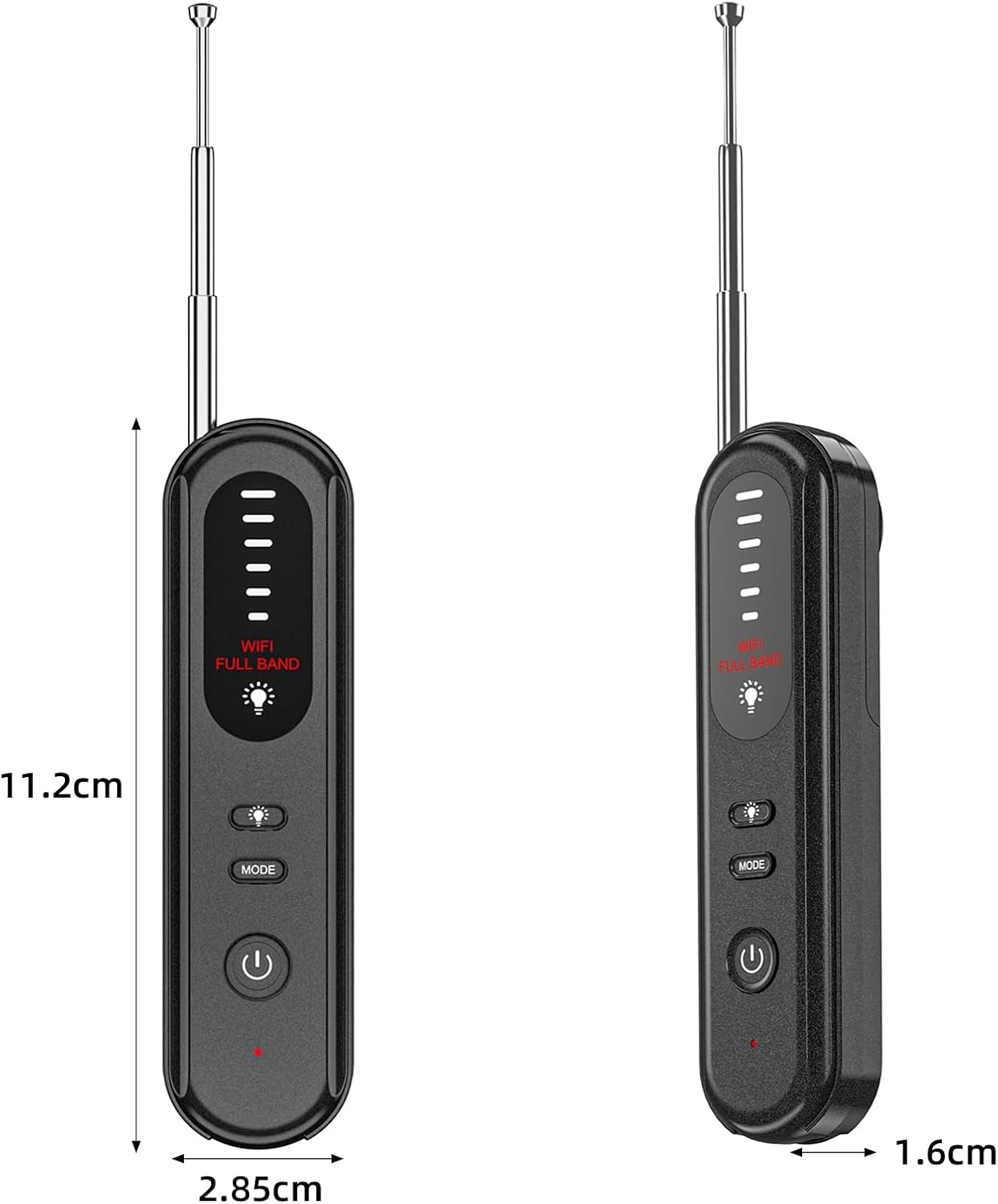
Figure 7: Product dimensions of the Aroeally T01 Detector.
保証とサポート
Specific warranty details for the Aroeally T01 Hidden Camera Detector are not provided in this manual. For warranty claims, technical support, or further assistance, please contact the manufacturer, Aroeally, or the seller, KAPOLAND TRADING CO., LIMITED, through their official channels or the platform where the product was purchased.
保証に関するお問い合わせに備えて、購入証明書を保管しておいてください。
Ask a question about this manual
Ask about setup, troubleshooting, compatibility, parts, safety, or missing instructions. Manuals+ will review the question and use this page’s manual context to help answer it.