
導入
This manual provides detailed instructions for the installation, operation, and maintenance of your darkFlash DB330M Micro-ATX PC Case. Please read this manual thoroughly before beginning assembly to ensure proper setup and safe usage. The DB330M case features a 270° panoramic tempered glass panel, pre-installed PWM ARGB fans, and a high-speed I/O panel.
安全情報
- PC ケース内のコンポーネントを取り付けたり、保守作業を行う前に、必ず壁のコンセントから電源を外してください。
- Handle tempered glass panels with care to prevent breakage. Avoid impacts or sharp objects.
- 敏感なコンポーネントへの静電放電 (ESD) による損傷を防ぐために、静電気防止手袋を着用するか、静電気防止リスト ストラップを使用してください。
- 小さな部品やネジは子供の手の届かないところに保管してください。
- 過熱を防ぐために、PC ケースの周囲に適切な換気を確保してください。
パッケージ内容
パッケージにすべてのアイテムが揃っていることを確認します。
- darkFlash DB330M Micro-ATX PC Case
- 3 x プリインストールされた PWM ARGB ファン
- 付属品箱(ネジ、結束バンド等)
- ユーザーマニュアル(このドキュメント)
上の機能view
- 270° Panoramic Tempered Glass: 広範囲にわたる view 内部コンポーネントと RGB 照明。
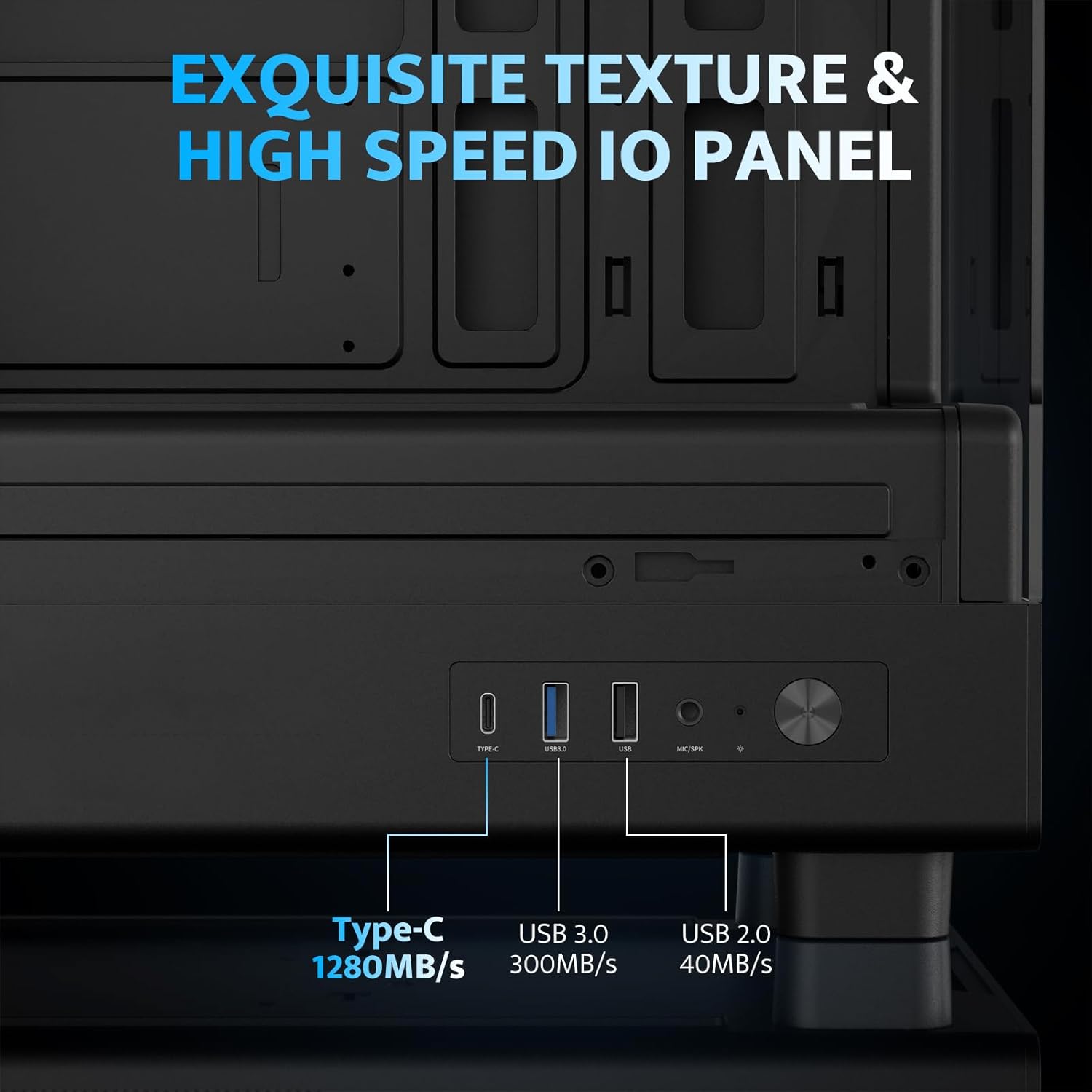
- 高速I/Oパネル: Includes USB 3.0 and Type-C ports for fast data transfer.
- Vertical Airflow Cooling: Optimized design with pre-installed fans for efficient heat dissipation.
- 磁気ダストフィルター: Located on top and bottom to keep components clean.
- 簡単なインストール: User-friendly design for hassle-free assembly and maintenance.
仕様
| 特徴 | 仕様 |
|---|---|
| モデル名 | DB330M PC CASE |
| 寸法(長さx幅x高さ) | 奥行き8.58インチ x 幅13.11インチ x 高さ15.75インチ (218mm x 333mm x 400mm) |
| マザーボードの互換性 | マイクロATX、ITX |
| ケースタイプ | ミディタワー |
| 材料 | プラスチック、強化ガラス |
| プレインストールされたファン | 120mm PWM ARGBファン×3 |
| CPUクーラーの最大高さ | 180mm |
| 最大GPUクリアランス | 305mm |
| ラジエーターサポート(上) | 最大240mm |
| 電源取付タイプ | Bottom Mount (Max 140mm PSU length) |
| I/O ポート | 1 x USB 3.0, 1 x Type-C, Audio In/Out |
セットアップとインストール
1. Accessing the Interior (Quick Release Design)
The darkFlash DB330M features a quick-release design for easy access to internal components. The tempered glass panels can be removed by gently pulling them away from the chassis. The top panel also detaches for fan/radiator installation.

2. マザーボードの取り付け
Install your Micro-ATX or ITX motherboard into the designated area. Ensure standoffs are correctly aligned and secured. The case supports CPU coolers up to 180mm in height and GPUs up to 305mm in length.

3. ファンと冷却システムの取り付け
The case comes with three pre-installed 120mm PWM ARGB fans. Two fans are located at the top, and one at the rear. Additional fan mounts are available at the bottom (up to 2 x 120mm) for enhanced airflow. The case supports a 240mm AIO radiator on the top panel.
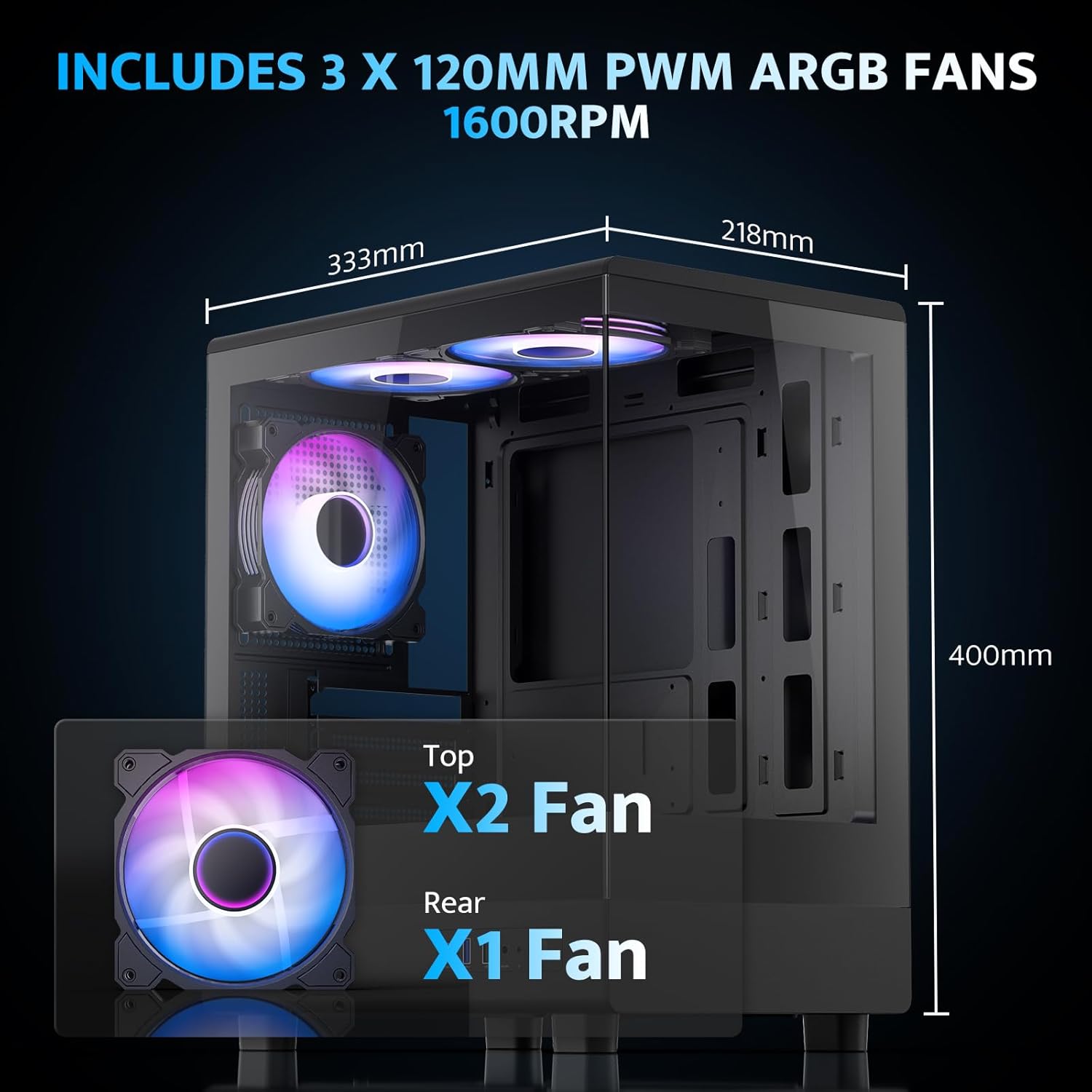
The pre-installed fans are PWM ARGB type, offering speed adjustment and rich lighting modes with motherboard synchronization. Note: An RGB hub controller is not included.

4. 電源とストレージの設置
Install your power supply unit (PSU) in the bottom mount. The case supports PSUs up to 140mm in length. Utilize the standard hard drive cage for storage devices.
5. フロントI/Oパネルの接続
Connect the front I/O panel cables to your motherboard. The panel includes a Type-C port, USB 3.0 port, and USB 2.0 port for various connectivity needs.
6.ケーブル管理
Utilize the cable routing options and tie-downs behind the motherboard tray to ensure clean cable management. This improves airflow and aesthetics.
操作手順
1. 電源を入れる
After all components are securely installed and connected, plug in the power cable to your PSU and press the power button on the front I/O panel to start your system.
2. ARGBファンコントロール
The pre-installed ARGB fans can be controlled via compatible motherboard software (if connected to an ARGB header) to customize lighting effects and fan speeds. Refer to your motherboard manual for specific software instructions.
3. エアフロー構成
The DB330M is designed with optimized airflow channels. The pre-installed fans facilitate vertical airflow, with the fan above the PSU directing air towards the graphics card. Ensure no obstructions block the airflow paths.


メンテナンス
1. ダストフィルターのクリーニング
Regularly clean the magnetic dust filters located on the top and bottom of the case. Gently remove the filters and clean them with compressed air or a soft brush. Reattach them securely after cleaning.
2.一般的なクリーニング
Use a soft, dry cloth to wipe down the exterior of the case. For tempered glass panels, use a glass cleaner and a microfiber cloth. Avoid abrasive cleaners or solvents.
トラブルシューティング
- PCの電源が入らない:
- Ensure the power supply is properly connected to the wall and the PSU switch is in the 'ON' position.
- PSU からのすべての電源ケーブルがマザーボードとコンポーネントにしっかりと接続されていることを確認します。
- フロントパネルの電源スイッチとマザーボードの接続を確認します。
- ファンが回転しない/RGBが機能しない:
- ファン電源ケーブルがマザーボードまたはファン コントローラーに接続されていることを確認します。
- Ensure ARGB cables are connected to a compatible ARGB header on the motherboard or an ARGB controller.
- Check motherboard software settings for fan speed and RGB control.
- USBポートが機能しない:
- Verify the front panel USB 3.0 and Type-C cables are correctly plugged into the corresponding headers on your motherboard.
- マザーボードのドライバーが最新であることを確認します。
保証とサポート
darkFlashは 1年間の保証 for this computer case. For technical support, warranty claims, or further assistance, please contact darkFlash customer service through their official webご購入いただいたサイトまたは販売店にお問い合わせください。保証の有効性を確認するため、購入証明書を保管してください。
公式ダークフラッシュ Webサイト: www.ダークフラッシュ.com