
Plugable USBC-PDMON
Plugable USB-C Portable Monitor USBC-PDMON Instruction Manual
Model: USBC-PDMON | Brand: Plugable
1.製品オーバーview および主な機能
The Plugable USBC-PDMON is a 15.6-inch Full HD (1920x1080) IPS portable monitor designed for enhanced productivity on the go. It features 100W Power Delivery pass-through charging and a 3x USB-C 10Gbps hub, making it a versatile solution for expanding your workspace.

Image: The Plugable USBC-PDMON portable monitor in use, showcasing its slim design and the protective case functioning as a stand.
主な特徴:
- 15.6インチ フルHD(1920x1080)IPSディスプレイ: Provides crisp, clear visuals with wide viewing angles and up to 300 nits brightness.
- 100W Power Delivery Pass-Through: Allows charging of your laptop, smartphone, or tablet (up to 85W output) while using the monitor.
- Integrated 3x USB-C 10Gbps Hub: Expands connectivity with two 10Gbps USB-C ports for data transfer or connecting peripherals.
- ポータブルで軽量: Weighing 1.85lbs (with cover), it's ideal for travel and mobile workstations.
- Protective Case/Stand: The included cover protects the screen and conveniently folds into a stand for various view角度を変える。
- ユニバーサル互換性: Works with Mac, Windows, Chrome, iPad, iPhone, and Android devices equipped with full-featured USB-C or Thunderbolt ports.
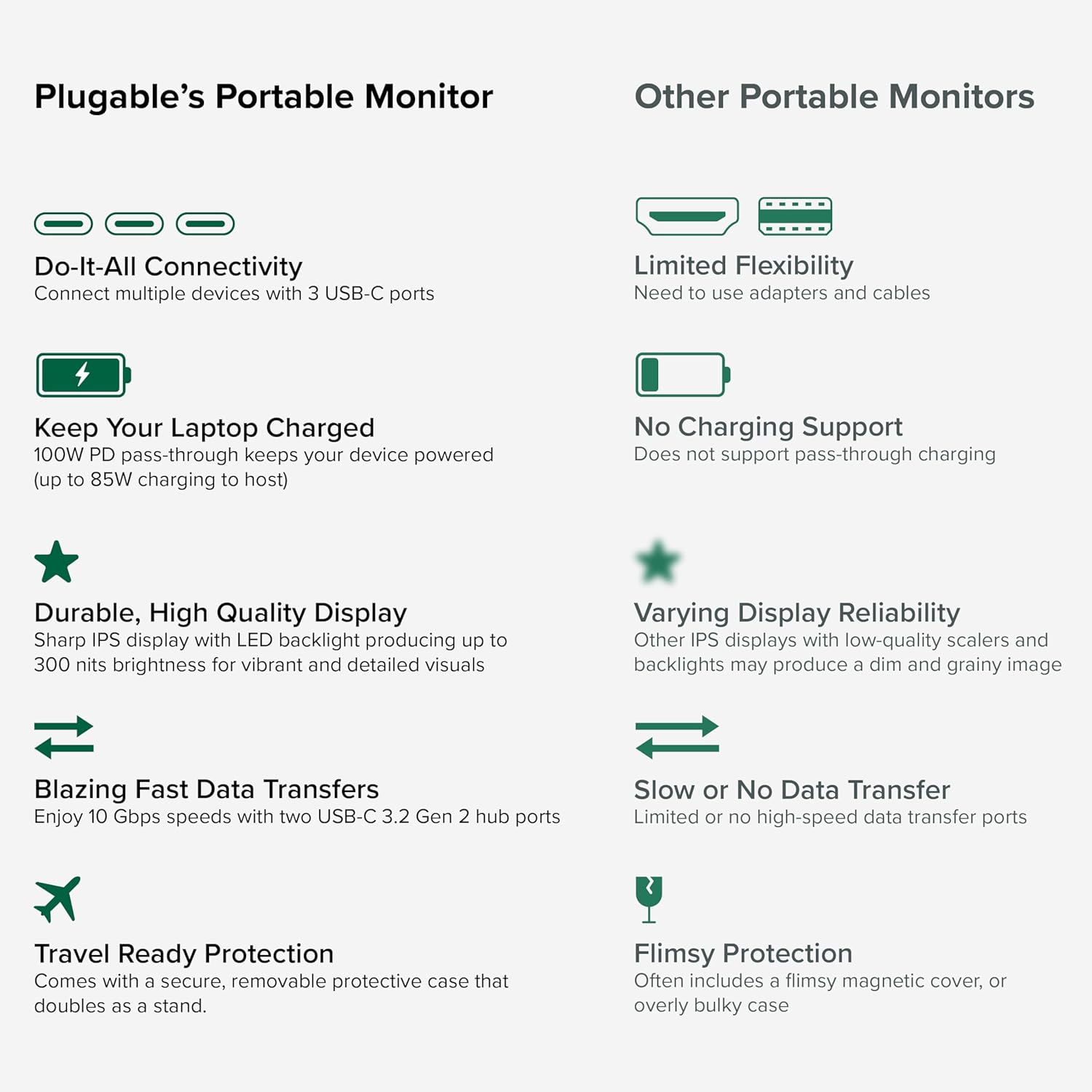
Image: A comparison highlighting the superior connectivity, charging support, display quality, data transfer speeds, and travel-ready protection of the Plugable monitor.
2. 含まれるもの
パッケージの内容をチェックして、すべてのアイテムが揃っていることを確認してください。
- 1920x1080 IPS Travel Display with Protective Case/Stand
- 1 Meter USB-C Host Cable
- クイックスタートガイド
3.セットアップガイド
Follow these steps to set up your Plugable portable monitor:
- モニターを開梱します。 Carefully remove the monitor and its accessories from the packaging.
- スタンドの位置: The protective cover doubles as a stand. Fold the cover to create a stable base for the monitor. The built-in magnets will help secure it in place.
- デバイスに接続します: Use the included 1-meter USB-C host cable to connect the monitor to your laptop, smartphone, or tablet. Ensure your device has a full-featured USB-C port that supports video output (DisplayPort Alternate Mode) and Power Delivery.
- Power the Monitor (Optional/Recommended): For optimal performance and to utilize the pass-through charging feature, connect a USB-C power adapter (not included) to the monitor's dedicated power input port. This will also allow the monitor to charge your host device (up to 85W).
- ディスプレイ構成: Your device should automatically detect the monitor. You may need to adjust display settings (e.g., extend, mirror, resolution) in your operating system's display settings.

Image: Visual instructions on how to correctly fold the protective cover to form a stable stand for the monitor.

Image: An illustration demonstrating the power flow when the monitor is used as a hub, providing 85W charging to the connected laptop from a 100W input.
互換性:
このモニターは、幅広いオペレーティング システムおよびデバイスと互換性があります。
- サポートされているプラットフォーム: Mac, Windows, Chrome OS, Android.
- ホストへの接続: USB-C, USB4, Thunderbolt.
- 互換性のあるシステム: MacBooks, Dell XPS, Lenovo ThinkPad, Apple iPhone 15/16+, Samsung Galaxy S24, Google Pixel 8, iPads with USB-C, Samsung Galaxy Tab, Lenovo Tab.

Image: A visual guide to the monitor's broad compatibility across different operating systems and popular devices like laptops, phones, and tablets.
4. 操作手順
Once connected, your Plugable portable monitor is ready for use. Here are some operational tips:
表示モード:
- ディスプレイを拡張: Use this mode to expand your desktop workspace across both your primary device and the portable monitor.
- ミラーディスプレイ: This mode duplicates your primary device's screen onto the portable monitor, useful for presentations or sharing content.
モニターコントロール:
The monitor features control buttons on the side for adjustments:
- 明るさアップ/ダウン: 画面の明るさを好みに合わせて調整します。
- カラーモード: Cycle through preset color modes (Cool, Normal, Warm, sRGB, and User) to optimize visual appearance.
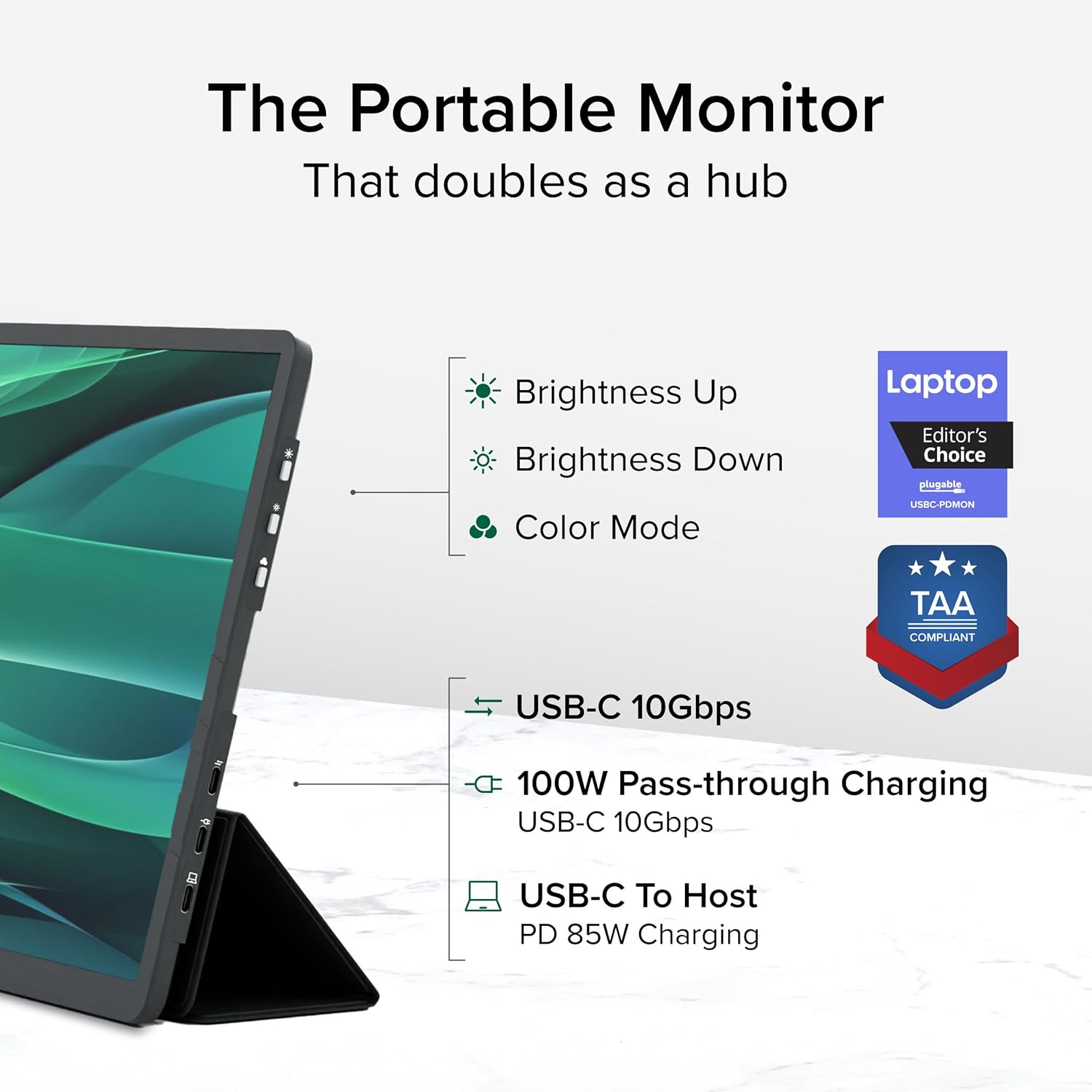
画像: 詳細な view of the monitor's side, indicating the location of the brightness controls, color mode button, and the three USB-C ports for host connection, power delivery, and data hub functionality.
USB-C Hub Functionality:
The monitor acts as a hub, providing additional USB-C ports for your peripherals:
- Connect USB-C devices such as external drives, keyboards, or mice to the available 10Gbps USB-C ports on the monitor.
5. メンテナンス
To ensure the longevity and optimal performance of your Plugable portable monitor, follow these maintenance guidelines:
- 画面の掃除: 柔らかく糸くずの出ない布を軽く拭いてください。ampened with water or a screen-cleaning solution. Avoid harsh chemicals, abrasive materials, or direct spraying onto the screen.
- 本体のクリーニング: モニターの外側は、柔らかく乾いた布で拭いてください。
- ストレージ: When not in use, always use the protective cover to prevent scratches and damage to the screen. Store in a cool, dry place away from direct sunlight and extreme temperatures.
- 取り扱い: モニターは丁寧に取り扱ってください。落としたり、強い衝撃を与えたりしないでください。
6。 トラブルシューティング
If you encounter issues with your Plugable portable monitor, refer to the following common problems and solutions:
ディスプレイが表示されない、または「信号なし」のメッセージが表示される:
- ケーブルの接続を確かめて: Ensure the USB-C cable is securely connected to both the monitor and your host device. Try unplugging and re-plugging the cable.
- USB-Cポートの機能を確認します。 Confirm that your device's USB-C port supports video output (DisplayPort Alternate Mode). Not all USB-C ports have this capability.
- 外部電源: If your host device cannot provide sufficient power, connect an external USB-C power adapter to the monitor's power input port.
- デバイスを再起動します。 Try restarting your laptop, smartphone, or tablet.
ちらつきや不安定なディスプレイ:
- 電源: Ensure the monitor is receiving adequate power. Connect an external USB-C power adapter if not already in use.
- ケーブル品質: Use the included high-quality USB-C cable. A different or lower-quality cable might cause instability.
- ドライバーの更新: ホスト デバイスのグラフィック ドライバーが最新であることを確認します。
充電されない、または充電が遅い:
- 電源アダプターの定格: Ensure the external USB-C power adapter connected to the monitor is rated for at least 100W to provide 85W pass-through charging to your host device.
- ケーブルの互換性: Verify the USB-C cable supports Power Delivery.
If these steps do not resolve your issue, please contact Plugable support for further assistance.
7. 仕様
Detailed technical specifications for the Plugable USBC-PDMON portable monitor:
| 特徴 | 仕様 |
|---|---|
| 画面サイズ | 15.6インチ |
| 解決 | FHD 1080p (1920 x 1080 ピクセル) |
| ディスプレイ技術 | IPS |
| アスペクト比 | 16:9 |
| 画像の明るさ | 300カンデラ(ニット) |
| スクリーン表面 | マット |
| USBポート合計 | 3 (USB-C) |
| 電力供給 | 100W Pass-Through (85W to host) |
| データ転送速度 | 10Gbps (USB-C hub ports) |
| アイテム重量 | 1.85ポンド |
| 製品寸法 | 0.42 x 14.21 x 8.46インチ |
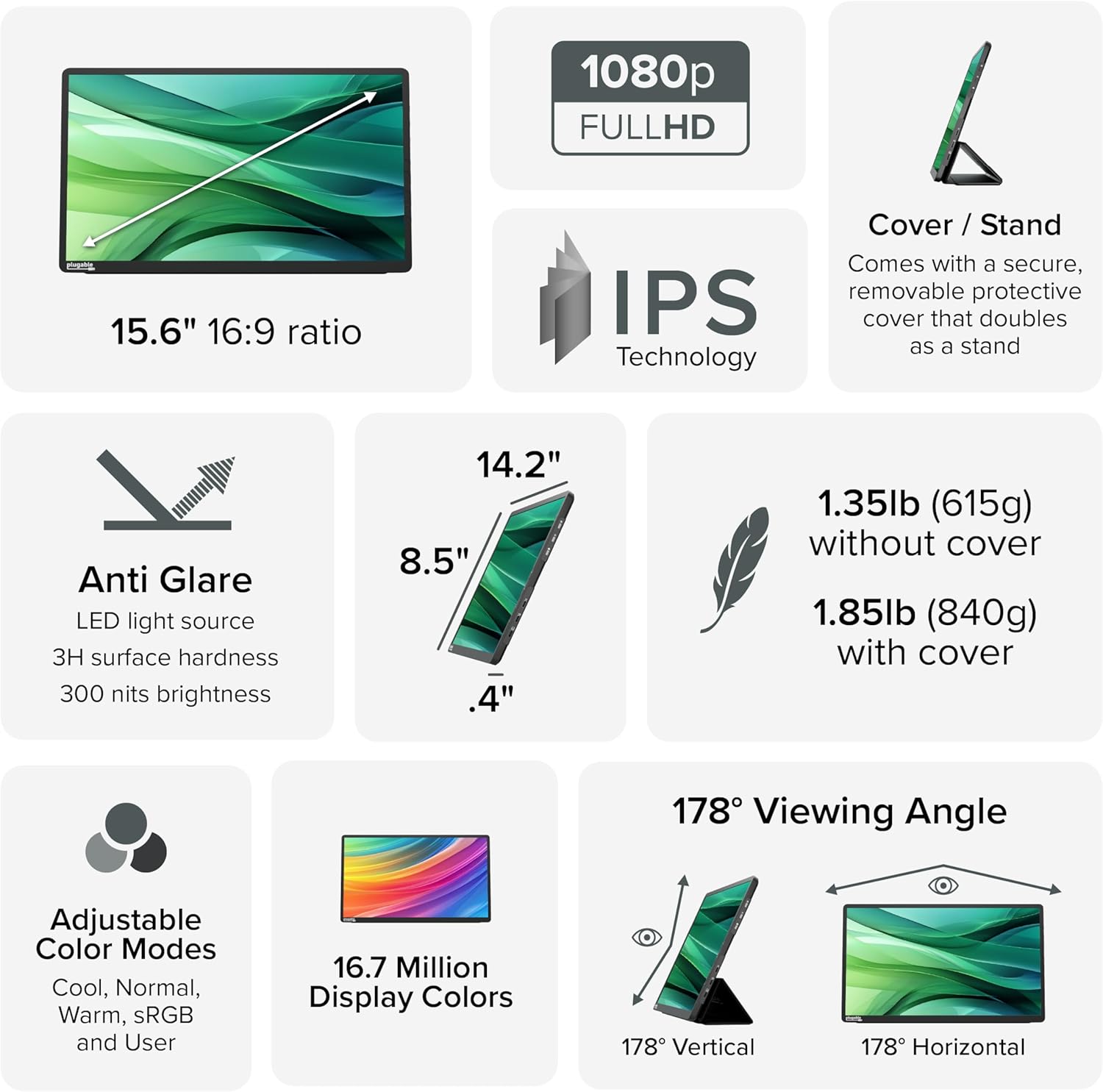
Image: A comprehensive infographic summarizing the monitor's technical specifications, such as screen size, resolution, IPS technology, anti-glare properties, weight, and view角度を変える。
8. 保証とサポート
The Plugable USBC-PDMON portable monitor is designed with reliability at its core and built to meet the demands of both IT departments and home offices.
- 生涯サポート: Includes lifetime support from our North American team of connectivity experts.
- 保証: Backed by a 2-Year Warranty.
For technical assistance or warranty claims, please visit the official Plugable webサイトをご覧いただくか、サポート チームに直接お問い合わせください。