
Docooler Transparent Wireless Dual-Mode Mouse
Docooler Transparent Wireless Dual-Mode Mouse User Manual
Model: Transparent Wireless Dual-Mode Mouse
導入
This user manual provides comprehensive instructions for the Docooler Transparent Wireless Dual-Mode Mouse. It covers product features, setup, operation, maintenance, and troubleshooting to ensure optimal performance and user experience. Please read this manual carefully before using the product.
パッケージ内容
パッケージを開封したら、以下のアイテムがすべて含まれていることを確認してください。
- 1 x Docooler Transparent Wireless Dual-Mode Mouse
- タイプC充電ケーブル x 1
- 1 x USB Dongle (2.4G Receiver)
- ユーザーマニュアル (本書) x 1
製品の特徴
The Docooler Transparent Wireless Dual-Mode Mouse offers advanced features for enhanced productivity and gaming:
- デュアルモード接続: Supports both 2.4G wireless and Bluetooth 5.0 for versatile connection options.
- 透明なデザイン: Unique transparent casing with visible internal components and RGB lighting.
- 調整可能なDPI: Three-level DPI settings (800/1200/1600) for precise cursor control.
- RGB Water-Cooled Lights: Dynamic RGB lighting effects for aesthetic appeal.
- Magnetic PC Cover: Easy access to the USB dongle and secure closure.
- 充電式バッテリー: Type-C充電対応の400mAhバッテリーを内蔵。
- バッテリーレベル表示: Integrated indicator for real-time power monitoring.
- ワンボタン切り替え: Seamless transition between connected devices.

画像: The Docooler Transparent Wireless Mouse showcasing its vibrant RGB water-cooled lighting. The transparent design allows visibility of the internal components, enhancing its unique aesthetic.
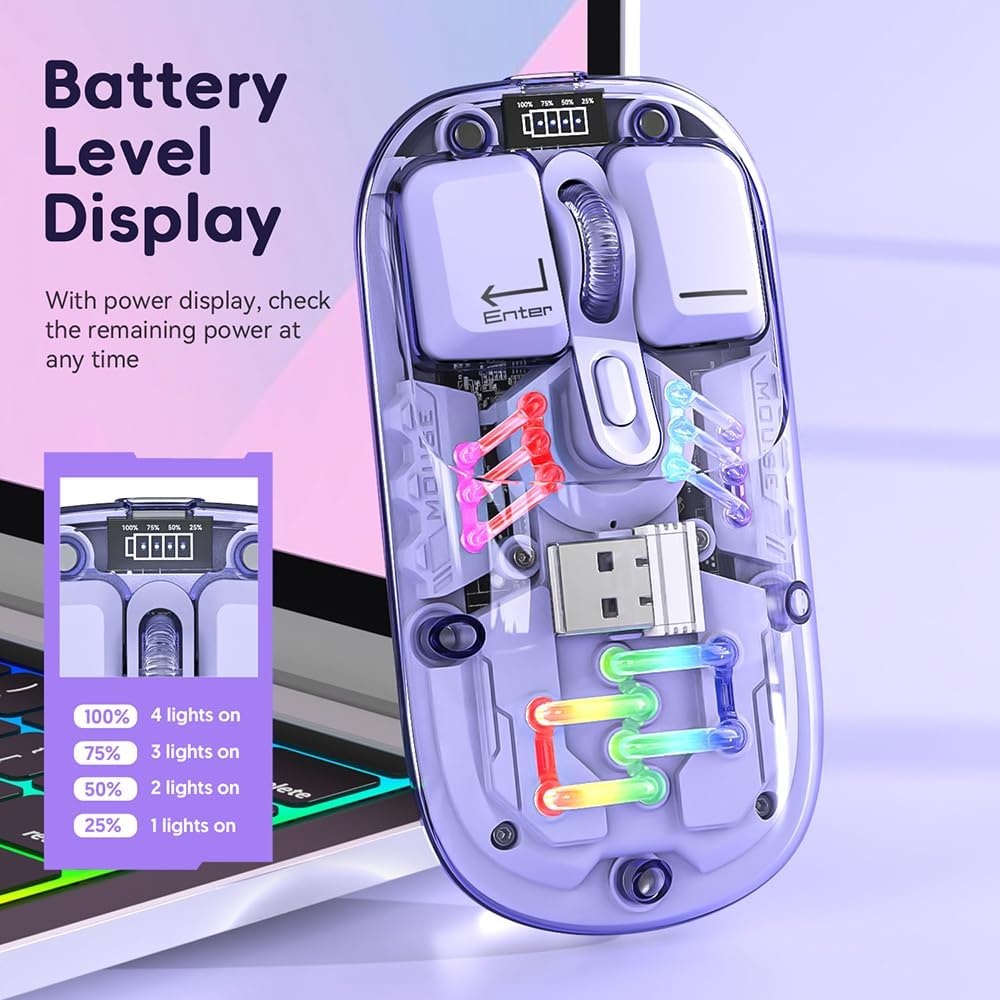
画像: クローズアップ view of the Docooler Transparent Wireless Mouse highlighting its battery level display. The display shows the remaining power with four indicator lights representing 100%, 75%, 50%, and 25% charge levels.

画像: The Docooler Transparent Wireless Mouse demonstrating its strong magnetic adsorption design. The top cover can be easily removed and reattached, ensuring the USB dongle is securely stored and accessible.
設定
マウスの充電
Before first use, it is recommended to fully charge the mouse. Use the provided Type-C charging cable.
- Connect the Type-C end of the charging cable to the mouse's charging port.
- 充電ケーブルの USB-A 端子を USB 電源 (コンピューターの USB ポート、USB 壁アダプターなど) に接続します。
- The battery indicator lights will show charging progress. A full charge typically takes 2-3 hours.

画像: The Docooler Transparent Wireless Mouse connected via its Type-C charging port, illustrating the charging process. The image highlights the convenience of Type-C charging and indicates a typical charging time of 2-3 hours.
マウスの接続
The mouse supports two connection modes: 2.4G Wireless and Bluetooth (BT).
2.4Gワイヤレスモード
- Locate the USB dongle inside the mouse, under the magnetic cover.
- Remove the USB dongle and plug it into an available USB port on your computer.
- マウスの底面にあるモードスイッチを「2.4G」の位置にスライドします。
- マウスは自動的にコンピューターに接続されます。
System Requirements for 2.4G: Windows XP, Windows 7, Windows 8, Windows 10 and above, Android 4.4 and above, iOS 13 or later, MacOS X 10.5 or later, Linux Kernel 2.6+2, Chrome OS.
Bluetooth (BT) モード
- マウスの底面にあるモードスイッチを「BT」の位置にスライドします。
- Press and hold the left, middle (scroll wheel), and right buttons simultaneously for 3 seconds to enter Bluetooth pairing mode. The mouse's lights may flash to indicate pairing mode.
- デバイス(コンピューター、タブレット、スマートフォン)で Bluetooth 設定を開き、新しいデバイスを検索します。
- Select "BT5.0" from the list of available devices to pair.
- Once paired, the mouse's lights will stabilize, and it will be ready for use.
System Requirements for Bluetooth: Windows 8, Windows 10, Android 5.0 and above, iOS 13 and above, macOS X 10.10 and above. Requires BT 4.0 or later BT adapter.
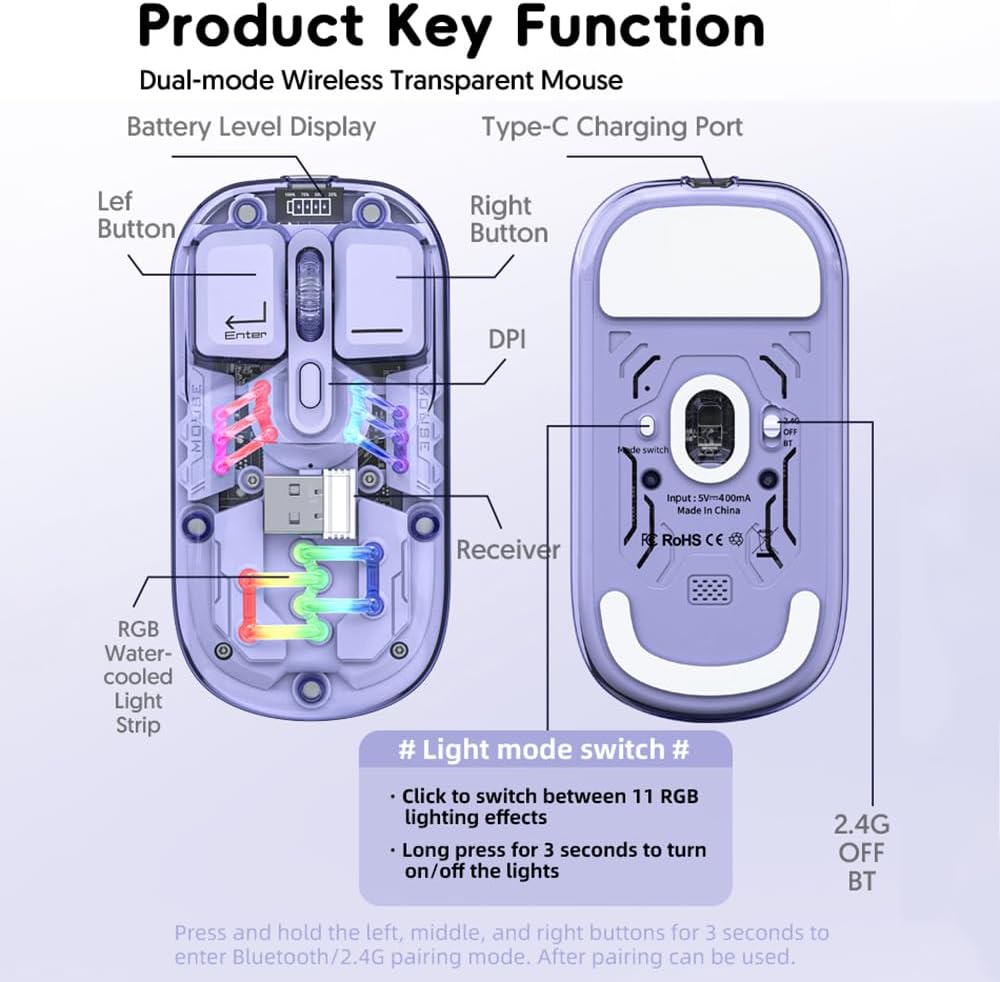
画像: A detailed diagram illustrating the key functions and connection points of the Docooler Transparent Wireless Mouse. It shows the left and right buttons, DPI button, Type-C charging port, receiver storage, RGB light strip, and the mode switch (2.4G/OFF/BT) on the bottom. Instructions for light mode switching and pairing are also visible.
操作手順
DPI調整
The mouse features three adjustable DPI levels: 800, 1200 (default), and 1600. To cycle through DPI settings, press the DPI button located on the top of the mouse, near the scroll wheel. Each press will switch to the next DPI level.
RGB照明制御
The mouse is equipped with RGB water-cooled lights. To control the lighting effects:
- 照明効果を切り替える: Click the dedicated light mode switch button (as indicated in the "Product Key Function" diagram) to cycle through 11 different RGB lighting effects.
- ライトをオン/オフにする: Long press the light mode switch button for 3 seconds to turn the RGB lights on or off.
省電力モード
To conserve battery life, the mouse enters different sleep states when inactive:
- 浅い睡眠: After 60 seconds of no operation, the mouse enters a light sleep state.
- 深い眠り: After 10 minutes of no operation, the mouse enters a deep sleep state.
- 起きろ: To wake the mouse from any sleep state, simply move the mouse or press any button.
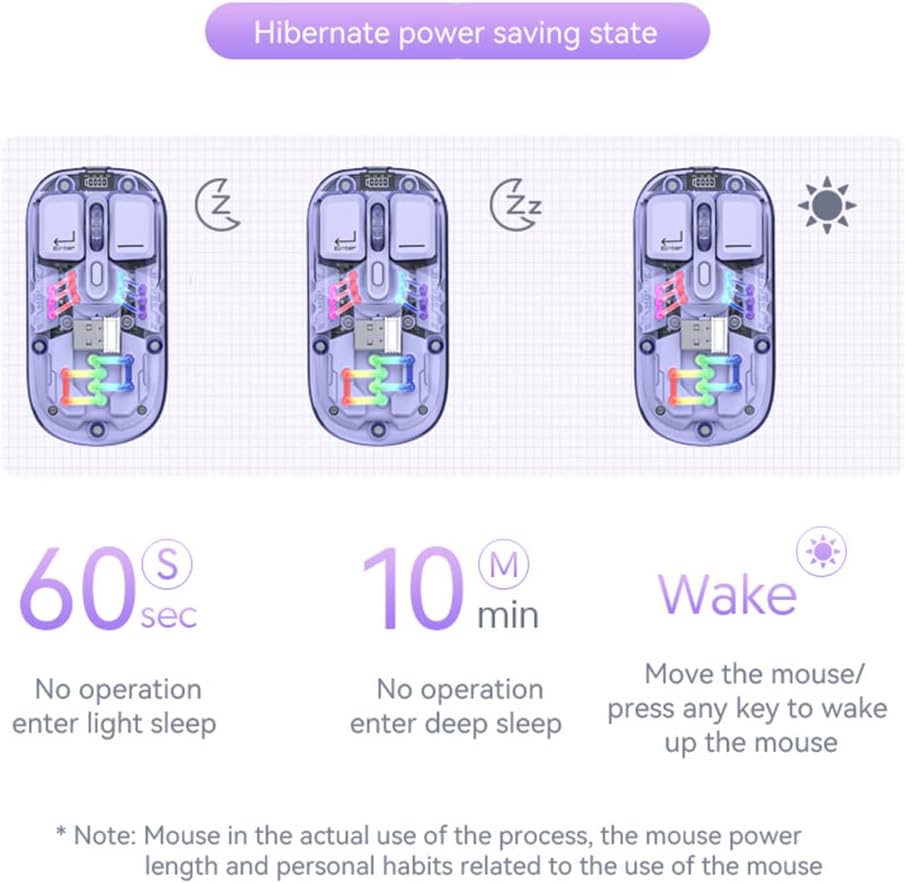
画像: A visual representation of the Docooler Transparent Wireless Mouse's hibernate power saving states. It illustrates that the mouse enters light sleep after 60 seconds of inactivity, deep sleep after 10 minutes, and can be woken by moving the mouse or pressing any key.
仕様
Detailed technical specifications for the Docooler Transparent Wireless Dual-Mode Mouse:
| 特徴 | 仕様 |
|---|---|
| オプションカラー | Purple, Yellow, White, Black, Pink |
| DPI レベル | 800/1200(デフォルト)/ 1600 |
| 充電Voltage / Current | DC 5V / ≤400mA |
| バッテリー容量 | 400mAh |
| 充電モード | タイプC |
| 送信モード | Wireless 2.4G / Bluetooth (BT) |
| Bluetoothバージョン | 5.0 |
| Bluetooth名 | BT5.0 |
| ワーキングVoltage | 3.3V~4.2V |
| Working Current (Light On) | ≤25mA |
| Working Current (Light Off) | ≤8mA |
| 製品寸法 | 113.5 x 58 x 25 ±2mm (4.47 x 2.28 x 0.1 inches) |
| 製品重量 | Approx. 70g (including 2g receiver) / 2.47 ounces |
| Compatible OS (2.4G) | Windows XP/7/8/10+, Android 4.4+, iOS 13+, MacOS X 10.5+, Linux Kernel 2.6+, Chrome OS |
| Compatible OS (BT) | Windows 8/10, Android 5.0+, iOS 13+, macOS X 10.10+ (BT 4.0+ adapter required) |

画像: A summary table of the Docooler Transparent Wireless Mouse's key product parameters, including BT version, connection method, DPI range, mouse size, product weight, battery capacity, voltage, system support, available colors, and version type.

画像: A technical drawing illustrating the precise dimensions of the Docooler Transparent Wireless Mouse, showing its length (113mm), width (58mm), and height (25mm).
トラブルシューティング
If you encounter issues with your Docooler Transparent Wireless Dual-Mode Mouse, please refer to the following common solutions:
- マウスが反応しない:
- マウスが充電されていることを確認してください。Type-Cケーブルを使用して電源に接続してください。
- Check the mode switch on the bottom of the mouse. Make sure it's set to the correct mode (2.4G or BT) for your connection.
- For 2.4G mode, ensure the USB dongle is securely plugged into your computer's USB port. Try a different USB port.
- For Bluetooth mode, ensure Bluetooth is enabled on your device and the mouse is paired. Try re-pairing the mouse (hold left, middle, right buttons for 3 seconds).
- コンピュータ/デバイスを再起動します。
- カーソルの動きが不安定または遅い:
- マウスの DPI ボタンを押して DPI 設定を調整します。
- マウスは清潔で反射しない表面で使用してください。
- Check for low battery. Charge the mouse if necessary.
- RGB lights are off or not changing:
- Long press the light mode switch button for 3 seconds to toggle the lights on/off.
- Click the light mode switch button to cycle through different lighting effects.
- マウスのバッテリー残量が十分であることを確認してください。
- Bluetoothペアリングが失敗します:
- デバイスの Bluetooth が有効になっていて、検出可能であることを確認します。
- Make sure the mouse is in Bluetooth pairing mode (lights flashing after holding left, middle, right buttons).
- Check if your device meets the Bluetooth system requirements (BT 4.0 or later adapter).
- Remove any previous pairings of "BT5.0" from your device's Bluetooth list and try pairing again.
メンテナンス
To ensure the longevity and optimal performance of your Docooler Transparent Wireless Dual-Mode Mouse, follow these maintenance guidelines:
- クリーニング: マウスの表面を拭くときは、柔らかく乾いた布を使用してください。頑固な汚れには、軽くamp布を水で拭いてください。刺激の強い化学薬品、研磨剤入りの洗剤、溶剤の使用は避けてください。
- ストレージ: When not in use for extended periods, store the mouse in a cool, dry place. Ensure the USB dongle is securely stored within the mouse's magnetic compartment.
- バッテリーのケア: Avoid fully discharging the battery frequently. Charge the mouse regularly to maintain battery health. Do not expose the mouse to extreme temperatures.
- 取り扱い: マウスを落としたり、強い衝撃を与えたりしないでください。内部コンポーネントが損傷する可能性があります。
保証とサポート
Docooler products are designed for reliability and performance. This product comes with a standard manufacturer's warranty against defects in materials and workmanship. For specific warranty terms and conditions, please refer to the warranty card included in your product packaging or visit the official Docooler webサイト。
If you require technical support or have questions not covered in this manual, please contact Docooler customer service through the retailer where you purchased the product or via the contact information provided on the official Docooler webサイト。
Ask a question about this manual
Ask about setup, troubleshooting, compatibility, parts, safety, or missing instructions. Manuals+ will review the question and use this page’s manual context to help answer it.