
1. はじめに
ご購入ありがとうございますasing the Womier SK80 Wired Gaming Keyboard. This mechanical keyboard features a 75% compact layout, an integrated LCD screen, hot-swappable switches, and customizable RGB backlighting. Designed for both gaming and daily use, it offers a comfortable and responsive typing experience. This manual provides detailed instructions for setup, operation, maintenance, and troubleshooting to ensure optimal performance of your keyboard.

Figure 1: Womier SK80 Wired Gaming Keyboard (Black)
2. セットアップ
2.1 パッケージ内容
- Womier SK80 Keyboard Unit
- USB-Cケーブル
- キーキャッププーラー
- ユーザーマニュアル
2.2 キーボードの接続
- キーボードの背面にある USB-C ポートを見つけます。
- 付属の USB-C ケーブルの一方の端をキーボードに接続します。
- Connect the other end of the USB-C cable to an available USB port on your computer (Windows PC or Mac).
- キーボードはオペレーティング システムによって自動的に認識されます。

図2: USB-Cケーブルの接続
2.3 システム互換性スイッチ
The keyboard features a switch to toggle between Windows and Mac operating system modes. Locate the switch on the back or side of the keyboard and set it to the appropriate position for your system.

Figure 3: Windows/Mac System Switch
2.4 調節可能な足
The keyboard is equipped with adjustable feet on the underside. You can extend these feet to change the typing angle for improved ergonomics and comfort.

図4: 調整可能なキーボード脚
3. 操作
3.1 LCD Multimedia Display
The Womier SK80 features a vibrant color multimedia display on the upper right side. This screen provides visual feedback for various settings and functions:
- Custom GIF Images: Display personalized GIF animations.
- Caps Lock Status: Indicates whether Caps Lock is active.
- 接続モード: Shows the current connection status.
- WIN/MAC System: Confirms the selected operating system mode.
- バックライトの明るさ/速度: 調整して view current backlight settings.
- RGB モード/カラー: 選択して事前view RGB lighting effects and colors.
- 音量: Displays the current audio volume level.
- 言語: Shows the selected language setting.
The display screen is designed with an 11° tilt angle for optimal viewing ergonomics.

Figure 5: LCD Screen Displaying Various Settings
3.2RGBバックライト
The keyboard offers extensive RGB backlighting customization:
- 19 の照明効果: さまざまなプリセット照明パターンから選択します。
- 9つの照明色: Select your preferred color scheme.
- 調整可能な明るさと速度: Fine-tune the intensity and animation speed of the backlight.
- 音楽同期モード: In this mode, lighting patterns will dynamically respond to playing music.
All RGB backlight modes and settings can be customized using the dedicated keyboard driver software.
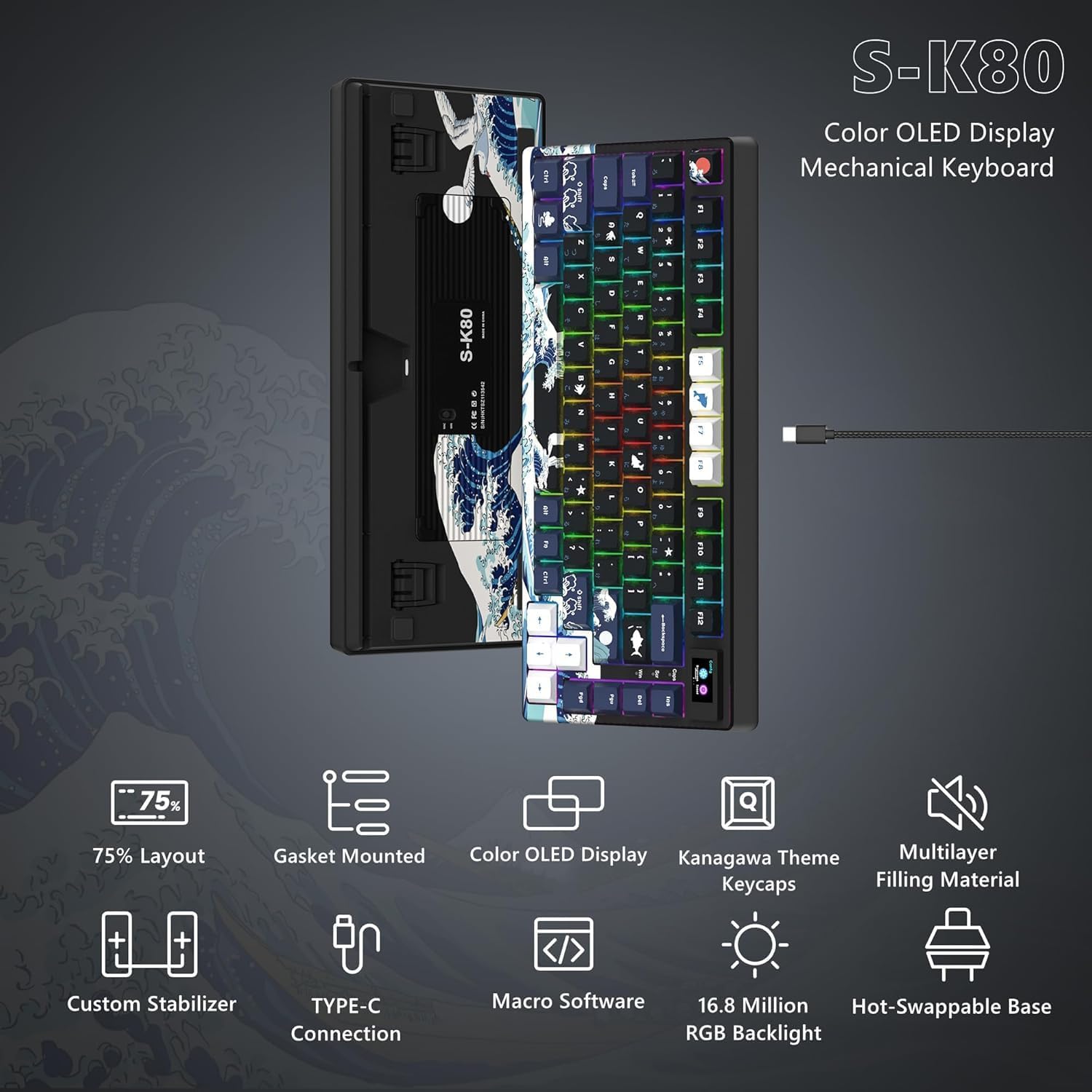
Figure 6: Customizable RGB Backlighting
3.3 プログラム可能なソフトウェア
The Womier SK80 keyboard is fully customizable through its dedicated driver software. This software allows users to:
- Set dynamic GIF animations for the LCD screen.
- Define custom lighting effects.
- Program macro functions for individual keys.
Refer to the software's interface for detailed instructions on customization options.

Figure 7: Keyboard Driver Software Interface
3.4 ホットスワップ可能なスイッチ
The keyboard features a hot-swappable PCB, allowing you to easily change mechanical switches without soldering. It supports both 3-pin and 5-pin switches. This enables personalization of your typing feel and sound.
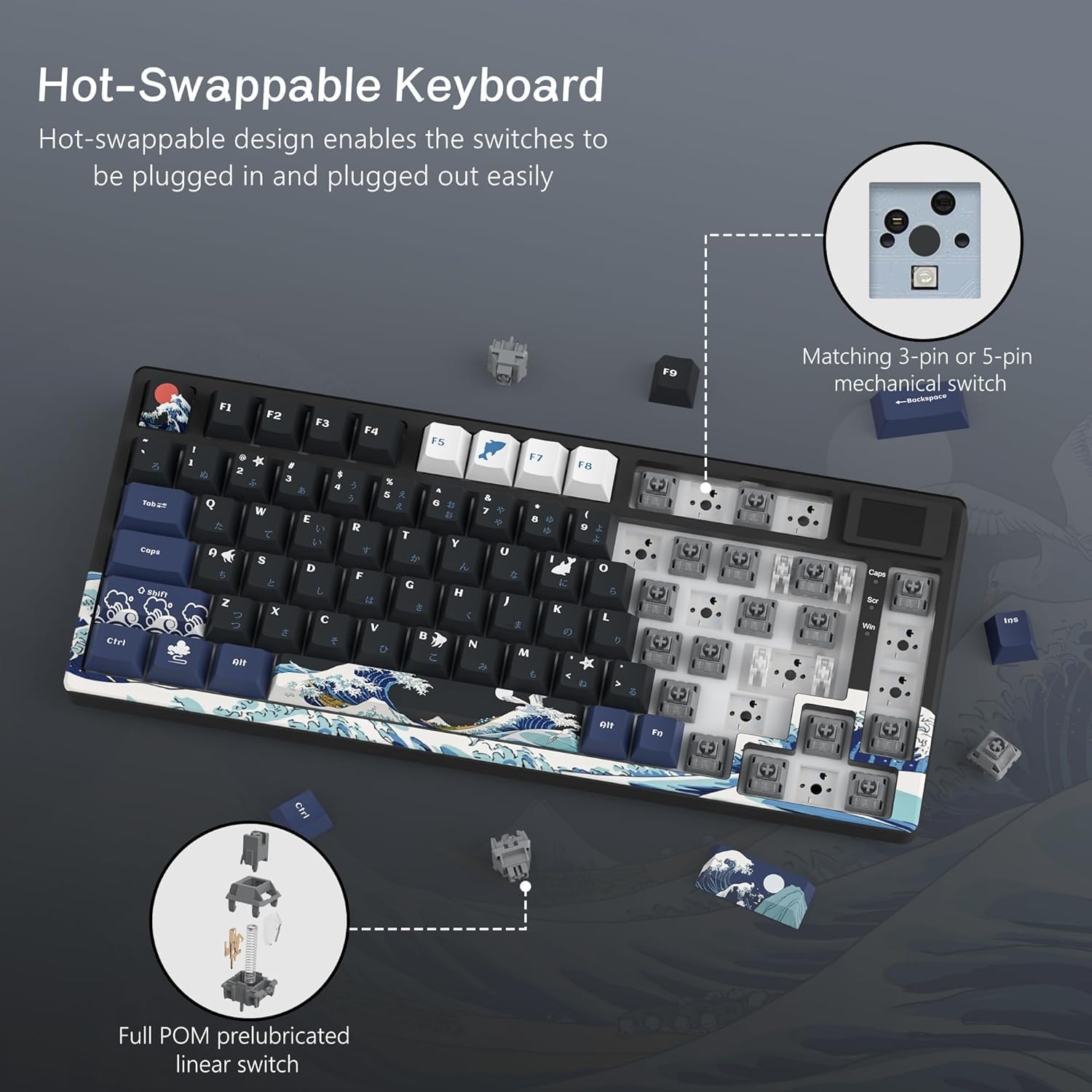
図8: ホットスワップ可能なスイッチ機構
3.5 Gasket Mount Design and Keycaps
The SK80 utilizes a gasket mount design, which enhances typing stability and reduces noise, contributing to a more immersive experience. It comes with classic Cherry profile PBT keycaps, offering durability and a comfortable feel.

Figure 9: Gasket Mount Structure and Keycap Profile
4. メンテナンス
4.1 キーボードのクリーニング
- 清掃する前に、キーボードをコンピューターから取り外してください。
- 柔らかく糸くずの出ない布を使用してください。ampened with a small amount of water or a mild cleaning solution to wipe the keycaps and keyboard surface.
- キー間のほこりやゴミを取り除くには、圧縮空気または小さなブラシを使用します。
- To clean under the keycaps, use the provided keycap puller to carefully remove them. Clean the switches and plate, then reattach the keycaps.
- キーボードの表面仕上げやキーキャップの刻印を損傷する可能性があるため、刺激の強い化学薬品や研磨材の使用は避けてください。
4.2 スイッチの交換(ホットスワップ可能)
- キーボードがコンピューターから取り外されていることを確認してください。
- Use a keycap puller to remove the desired keycap.
- Use a switch puller (not included, but commonly available) to gently grip and pull the switch straight up from the PCB.
- 新しいスイッチのピンをPCBの穴に合わせ、カチッと音がするまでしっかりと押し込みます。ピンが曲がっていないことを確認してください。
- キーキャップを交換します。
5。 トラブルシューティング
5.1 キーボードが反応しない
- USB-C ケーブルがキーボードとコンピューターの両方にしっかりと接続されていることを確認します。
- キーボードをコンピューターの別の USB ポートに接続してみてください。
- コンピュータ固有の問題を排除するために、別のコンピュータでキーボードをテストします。
- Verify that the Windows/Mac compatibility switch is set correctly for your operating system.
5.2 バックライトが機能しない、または正しくない
- Check the backlight brightness settings via the LCD screen or the programmable software.
- 特定の照明プロがいないことを確認するfile is overriding your desired settings.
- If using the software, ensure it is up to date and correctly installed.
5.3 キーが認識されない、または二重入力される
- For hot-swappable switches, carefully remove the keycap and switch for the affected key. Reinsert the switch firmly to ensure proper contact.
- Clean any debris around the switch stem.
- 問題が解決しない場合は、スイッチの交換を検討してください。
6. 仕様
| 特徴 | 説明 |
|---|---|
| ブランド | ウォミエ |
| モデル | SK80 |
| 接続性 | 有線(USB-C) |
| キーボードの説明 | 機械 |
| 推奨用途 | Gaming, Office Work, Typing, Programming, Esports, General Computer Use |
| 特集 | LCD Screen, Hot-Swappable, RGB Backlight, 75% Compact Layout, Wired Connection, Windows/Mac Compatible, Gaming/Office Compatible, Japanese Layout, Programmable Keys, Customizable Display |
| 色 | 黒 |
| バックライトカラーのサポート | RGB |
| スタイル | ゲーム |
| 製品寸法(長さ x 幅 x 高さ) | 34 x 17 x 3.5 cm |
| 対応デバイス | Windows PC, Mac, Desktop Computers, Laptops, Gaming PCs |
| スイッチタイプ | Mechanical Switch (Hot-Swappable) |
| キーボードレイアウト | QWERTY(日本語配列) |
| キーの数 | 80(75%レイアウト) |
| Waterproof Type | 防水ではありません |
| 互換性のあるOSファミリー | ウィンドウズ、マック |
| 含まれるコンポーネント | USB Cable, Keycap Puller, Keyboard Unit, User Manual |
| Product Exterior Material | ABS, Aluminum, Plastic, Polyethylene Terephthalate |
| Keyboard Plate Material | Aluminum Alloy, Polycarbonate |
7. 保証情報
The Womier SK80 Wired Gaming Keyboard comes with a 1年間のメーカー保証 ご購入日から1年間有効です。本保証は、通常の使用状況における材料および製造上の欠陥を対象としています。保証請求の際は、購入証明書を保管してください。
以下のものは保証の対象外となります:
- 事故、乱用、誤用、洪水、火災、地震、またはその他の外部要因によって引き起こされた損傷。
- Damage caused by operating the product outside the permitted or intended uses described by Womier.
- Damage caused by service performed by anyone who is not a representative of Womier.
- Products or parts that have been modified to alter functionality or capability without the written permission of Womier.
8. カスタマーサポート
For technical assistance, warranty claims, or general inquiries, please contact Womier customer support through the following channels:
- オンラインサポート: Visit the official Womier webFAQ とサポート リソースのサイト。
- メールアドレス: 製品のパッケージまたは公式 webサポート メール アドレスについては、サイトをご覧ください。
When contacting support, please have your product model (SK80) and proof of purchase readily available.