
1. はじめに
The MASTECH MS8236 is a versatile 2-in-1 digital multimeter and network cable track tester designed for electrical and network diagnostics. This device combines the functions of a digital multimeter for measuring electrical parameters with a network cable tester for verifying cable integrity and a tone generator for tracing wires. It is suitable for professional and DIY use in various applications.
2. 安全情報
Always adhere to basic safety precautions when using this device to prevent personal injury or damage to the meter or equipment under test. Read all instructions carefully before use.
- 各関数に指定された最大入力値を超えないでください。
- 通電中の回路を扱うときは細心の注意を払ってください。
- 測定を行う前に、機能スイッチが正しい位置にあることを確認してください。
- メーターが破損しているように見える場合、またはテスト リードが破損している場合は、メーターを使用しないでください。
- 正確な測定を保証するために、電池残量低下インジケーターが表示されたら、すぐに電池を交換してください。
- Avoid using the device in environments with high humidity, extreme temperatures, or explosive gases.
- Always disconnect power to the circuit before testing continuity or resistance.
3.製品オーバーview
The MASTECH MS8236 integrates a digital multimeter with a detachable cable tracker/tone generator. The main unit features a clear digital display, function selector dial, and input jacks. The cable tracker assists in identifying and tracing network and telephone lines.
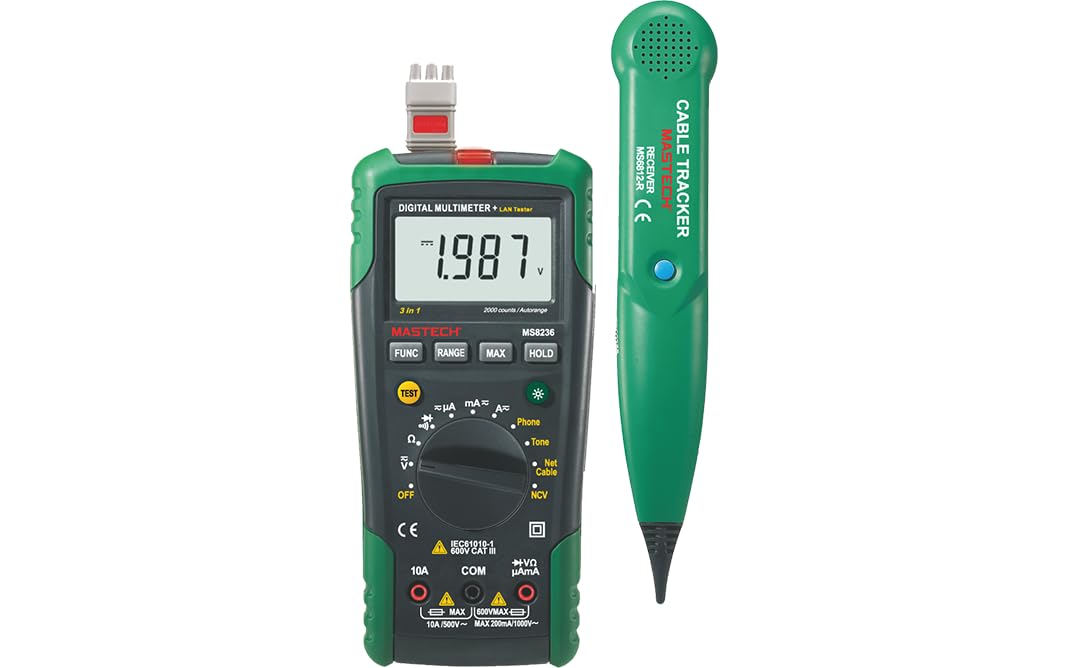
Figure 3.1: MASTECH MS8236 Digital Multimeter and Cable Tracker. The image shows the main multimeter unit on the left and the separate cable tracker unit on the right. Both are green and black.
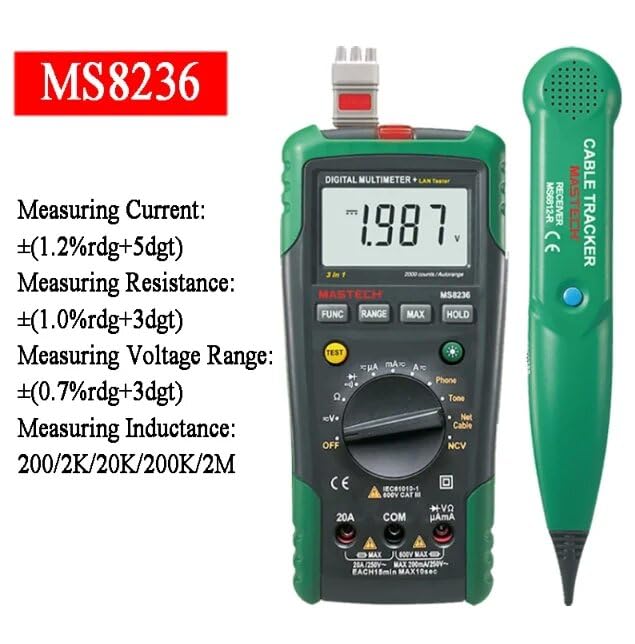
Figure 3.2: Close-up of the MASTECH MS8236 Multimeter Display and Controls. The display shows '1.987 V' and the function dial indicates various measurement modes including V, A, Ohm, Diode, Continuity, Phone, Net Cable, and NCV.
主な特徴:
- 表示:2000カウント
- Ranging: Auto & Manual
- 非接触巻tage(NCV)検出器
- ダイオードオープンボリュームtage:1.7V
- 導通ブザー: 70Ω以下で作動
- データホールド機能
- 低バッテリ表示
- ディスプレイバックライト
- 自動電源オフ
- Network Cable Check: Tests for open circuits, shorts, miss-wires, reversals, split pairs, and shield detection. Supports T568A, T568B, 10Base-T.
- Telephone Line Check: Identifies line states (Busy, Ringing, Clear) and continuity.
- Tone Function: For tracking cables and diagnosing break points.
4. セットアップ
4.1。 開梱と検査
Carefully unpack the MS8236 and all accessories. Inspect the device for any signs of damage. If any damage is found, contact your supplier immediately.
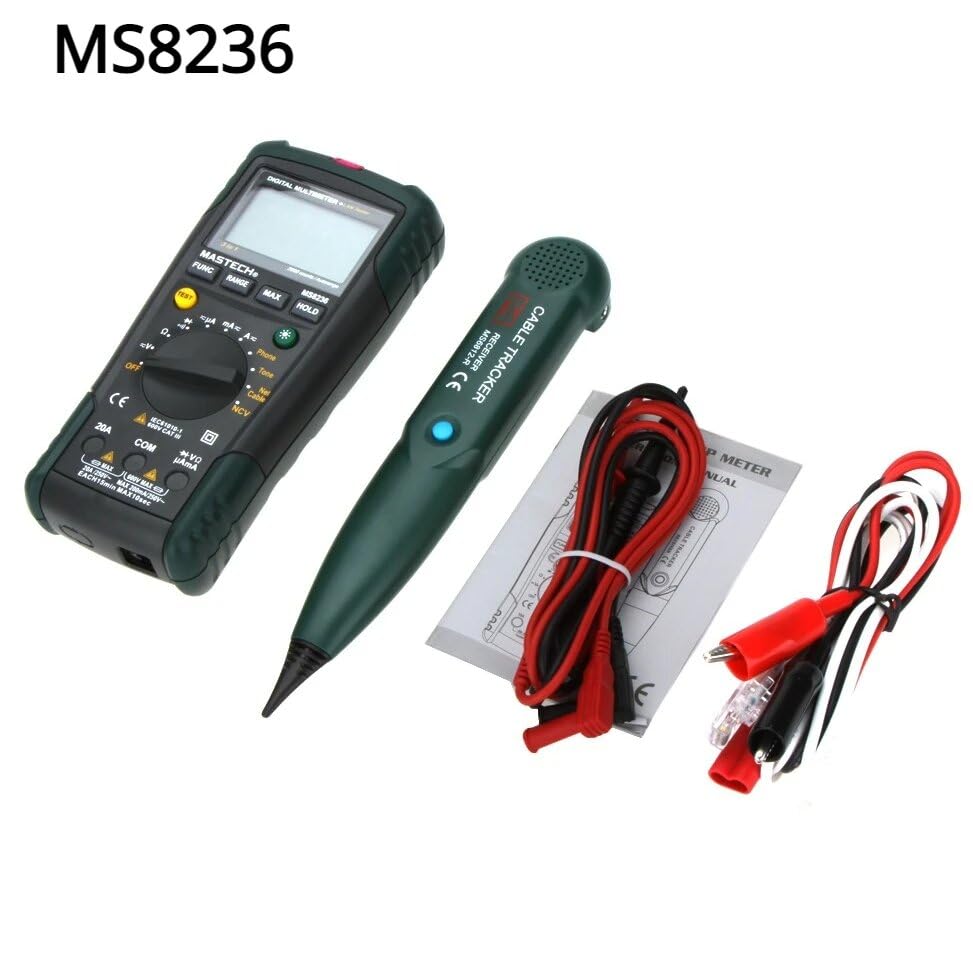
Figure 4.1: MASTECH MS8236 Kit Contents. The image displays the multimeter, cable tracker, red and black test leads, a network cable adapter, and a small instruction manual.
4.2. バッテリーの取り付け
The MS8236 requires 2 LR44 batteries, which are included. To install or replace batteries:
- Locate the battery compartment cover on the back of the multimeter unit.
- ドライバーを使用してバッテリーコンパートメントを開きます。
- Insert the 2 LR44 batteries, observing the correct polarity (+/-).
- バッテリーコンパートメントカバーをしっかりと閉じます。
5. 操作手順
5.1. Basic Multimeter Functions
Connect the test leads to the appropriate input jacks (COM for black lead, VΩmA for red lead for most measurements, or 20A for high current). Select the desired function using the rotary switch.
- 巻tage Measurement (DCV/ACV): Turn the rotary switch to the 'V' position. Select DC or AC voltage if applicable. Connect test leads in parallel to the circuit.
- Current Measurement (DCA/ACA): Turn the rotary switch to the 'A' position. Select DC or AC current. Connect test leads in series with the circuit. Ensure the correct input jack (mA or 20A) is used.
- 抵抗測定(Ω): Turn the rotary switch to the 'Ω' position. Ensure the circuit is de-energized. Connect test leads across the component.
- ダイオードテスト(→|): Turn the rotary switch to the diode symbol. Connect the red lead to the anode and the black lead to the cathode of the diode.
- 導通試験 ()))): Turn the rotary switch to the continuity symbol. The buzzer will sound if the resistance is below approximately 70Ω.
5.2. Network Cable Check
This function tests the integrity of network cables (RJ45). It can detect open circuits, shorts, miss-wires, reversals, split pairs, and shield detection for T568A, T568B, and 10Base-T standards.
- Turn the rotary switch to the 'Net Cable' position.
- Connect one end of the network cable to the RJ45 port on the main multimeter unit.
- Connect the other end of the network cable to the RJ45 port on the remote cable tracker unit.
- Observe the display for test results, which will indicate the cable status. The device also features a debug mode for detailed fault identification.
5.3. Telephone Line Check
This function allows for checking the state of a working telephone line and its continuity.
- Turn the rotary switch to the 'Phone' position.
- Connect the telephone line to the appropriate port on the main unit.
- The device will identify the state of the line as Busy, Ringing, or Clear. It can also judge the continuity of the telephone cables or wires.
5.4. Tone Function
The tone function is used with the cable tracker to trace cables and wires and diagnose break points.
- Turn the rotary switch to the 'Tone' position.
- Connect the test leads or RJ11/RJ45 plug to the cable you wish to trace.
- Use the remote cable tracker unit to follow the cable. The tracker will emit an audible tone when it detects the signal from the main unit, helping to locate the cable and identify breaks.
5.5.非接触Voltage (NCV) 検出
NCV機能によりAC電圧の検出が可能tage without direct contact with the conductor.
- ロータリースイッチを「NCV」の位置に回します。
- マルチメーターの上部を通電中のAC電圧の近くに移動しますtag電子ソース。
- デバイスはACボリュームの存在を表示しますtag可聴アラームおよび/または視覚インジケータを通じて通知します。
5.6.追加機能
- データ保持: 「HOLD」ボタンを押すと、ディスプレイの現在の表示が固定されます。もう一度押すと解除されます。
- バックライト: Press the backlight button (often labeled with a light bulb symbol) to illuminate the display for better visibility in low-light conditions.
- 自動電源オフ: バッテリー寿命を節約するために、一定時間操作が行われないとデバイスの電源は自動的にオフになります。
6. メンテナンス
6.1. 清掃
広告でケースを拭くamp 布と中性洗剤を使用してください。研磨剤や溶剤は使用しないでください。使用前にデバイスが完全に乾いていることを確認してください。
6.2. バッテリーの交換
ディスプレイに電池残量低下のインジケーターが表示されたら、セクション4.2の説明に従って電池を交換してください。デバイスを長期間使用しない場合は、電池を取り外してください。
7。 トラブルシューティング
- 表示されない、またはかすかに表示される場合: バッテリーの取り付けと充電レベルを確認してください。必要に応じてバッテリーを交換してください。
- 誤った読み方: Ensure test leads are properly connected and the correct function is selected. Verify the circuit is de-energized for resistance/continuity tests.
- Network cable test failure: Ensure both ends of the cable are securely connected to the main unit and remote. Check for physical damage to the cable or connectors.
- No tone from cable tracker: Verify the main unit is in 'Tone' mode and properly connected to the cable. Check the cable tracker's battery.
8. 仕様
The following table outlines the general and electrical specifications for the MASTECH MS8236.

Figure 8.1: MASTECH MS8236 Features and Specifications Table. This image provides detailed electrical specifications for DC Voltage、AC Voltage, DC Current, AC Current, and Resistance, including ranges, resolutions, and accuracies.
| パラメータ | 範囲 | 解決 | 正確さ |
|---|---|---|---|
| DCVol。tage | 200mV/2V/20V/200V/600V | 0.1mV/1mV/10mV/100mV/1V | ±(0.5%+5) |
| ACVol。tage | 200mV/2V/20V/200V/600V | 0.1mV/1mV/10mV/100mV/1V | ±(0.8%+5) |
| 直流電流 | 200µA/2000µA/20mA/200mA/2A/10A | 0.1µA/1µA/10µA/0.1mA/1mA/10mA | ±(1.2%+5) ±(2.0%+10) for 10A |
| AC電流 | 200µA/2000µA/20mA/200mA/2A/10A | 0.1µA/1µA/10µA/0.1mA/1mA/10mA | ±(1.5%+5) ±(3.0%+10) for 10A |
| 抵抗 | 200Ω/2kΩ/20kΩ/200kΩ/2MΩ/20MΩ | 0.1Ω/1Ω/10Ω/100Ω/1kΩ/10kΩ | ±(1.0%+5) ±(1.5%+5) for 20MΩ |
| ダイオードオープンボリュームtage | 1.7V | ||
| 連続ブザー | <70Ω | ||
| 画面 | 2000カウント | ||
| 範囲 | オート&マニュアル | ||
| 非接触巻tage検出器 | はい | ||
| 自動電源オフ | はい | ||
| データ保持 | はい | ||
| 低バッテリ表示 | はい | ||
| ディスプレイバックライト | はい | ||
| 電源 | LR2電池44個(付属) | ||
| 製品寸法 | 16 x 9 x 5 cm | ||
| アイテム重量 | 500グラム | ||
| 材料 | アクリロニトリルブタジエンスチレン(ABS) | ||
| 認定資格 | CE、RoHS | ||
9. 保証とサポート
For warranty information and technical support, please refer to the documentation provided with your purchase or contact the seller or manufacturer directly. Specific warranty terms may vary by region and retailer.