
1. はじめに
This manual provides comprehensive instructions for the installation, operation, and maintenance of your LongPlus Smart 4K 8CH Home Security Camera System. This system is designed to provide robust surveillance with advanced features such as 4K UHD resolution, intelligent AI detection, and flexible storage options, ensuring comprehensive protection for your property.
システムを操作する前にこのマニュアルをよくお読みになり、今後の参照用に保管してください。
2. パッケージ内容
Verify that all items listed below are included in your package. If any items are missing or damaged, please contact LongPlus customer support.
- 1 x 8CH NVR with 48/1.875V Adaptor
- 4 x 4K PoE Bullet Cameras
- 1 x USBマウス
- 1×1M Cat5ケーブル
- 1 x 1M HDMIケーブル
- 4×18M Cat5ケーブル
- 2 x Extra Connectors
- ネジおよびその他のアクセサリの 4 x パック
- クイックスタートガイド x 1

Image: The LongPlus 4K 8CH NVR system, including the main NVR unit, four white PoE bullet cameras, and a 2TB hard drive. This image illustrates the primary components of the security system.
3. セットアップ
3.1物理的な設置
Before mounting, test all cameras and connections to ensure proper functionality.
- NVRの配置: Place the NVR in a secure, dry, and well-ventilated area, away from direct sunlight and heat sources. Ensure it is easily accessible for connections.
- カメラの配置:
- Choose strategic locations that provide optimal coverage of desired areas (e.g., entry points, driveways, yards).
- Consider the camera's 132° wide-angle view 包括的なカバレッジを実現します。
- Ensure the cameras are within the 100ft night vision range for effective low-light monitoring.
- The cameras are designed for outdoor use with a durable metal body, capable of withstanding extreme weather conditions (-22°F to 140°F).
- ケーブル配線:
- Connect each PoE camera to the NVR's PoE ports using the provided Cat5 cables. The system supports cable runs up to 660ft.
- HDMI または VGA ケーブルを使用して NVR をモニターに接続します。
- ナビゲーションのために、USB マウスを NVR の USB ポートに接続します。
- Connect the NVR to your router's LAN port using the 1M Cat5 cable for network access.

Image: A detailed diagram illustrating the connection setup for the LongPlus 8-channel PoE Home Security Camera System. It shows PoE cameras connecting to the NVR, the NVR connecting to a router for internet access, and connections to a monitor, mouse, and power. Remote access via PC and mobile devices is also depicted.

画像: クローズアップ view of the rear panel of the LongPlus NVR, highlighting its various ports including HDMI, VGA, USB, and Ethernet ports for camera and network connections.

Image: A visual comparison showing the LongPlus camera's 132-degree wide viewing angle providing broader coverage compared to a typical 121-degree view 他のカメラから。
3.2 初期電源投入と設定
- Connect the NVR power adapter to a power outlet. The system will power on automatically.
- Follow the on-screen prompts on the connected monitor to complete the initial setup wizard, including setting up a password and network settings.
- The NVR comes with a 2TB HDD pre-installed. Ensure it is properly connected inside the NVR for local storage.
4. 操作
4.1 Remote Access and App Installation
To access your security system remotely, download the Longvision APP on your smartphone or tablet (iOS/Android) or use the client software for Mac/Windows.
- 検索する "Longvision" in the Apple App Store or Google Play Store.
- Install the app and follow the in-app instructions to add your NVR system.
- The system supports up to 32 users for shared access.

Image: Screenshots of the Longvision mobile application, demonstrating its live view, smart motion alert notifications, and video playback features. The app is compatible with Mac, Windows, Apple iOS, and Google Android operating systems.
4.2 Recording Modes and Storage
The NVR supports various recording modes and flexible storage options.
- 24時間7日連続録画: The system records continuously to the pre-installed 2TB HDD. The storage is expandable up to 10TB.
- モーショントリガー録画: Records only when motion is detected, saving storage space. This is the default mode.
- スケジュールされた記録: 録音する特定の時間を設定します。
- H.265+圧縮: Utilizes advanced H.265+ video compression technology, which saves over 75% of storage space compared to H.264, allowing for longer recording times.
- クラウドストレージ: Bank-level encrypted cloud storage is available as an optional service for off-site backup.
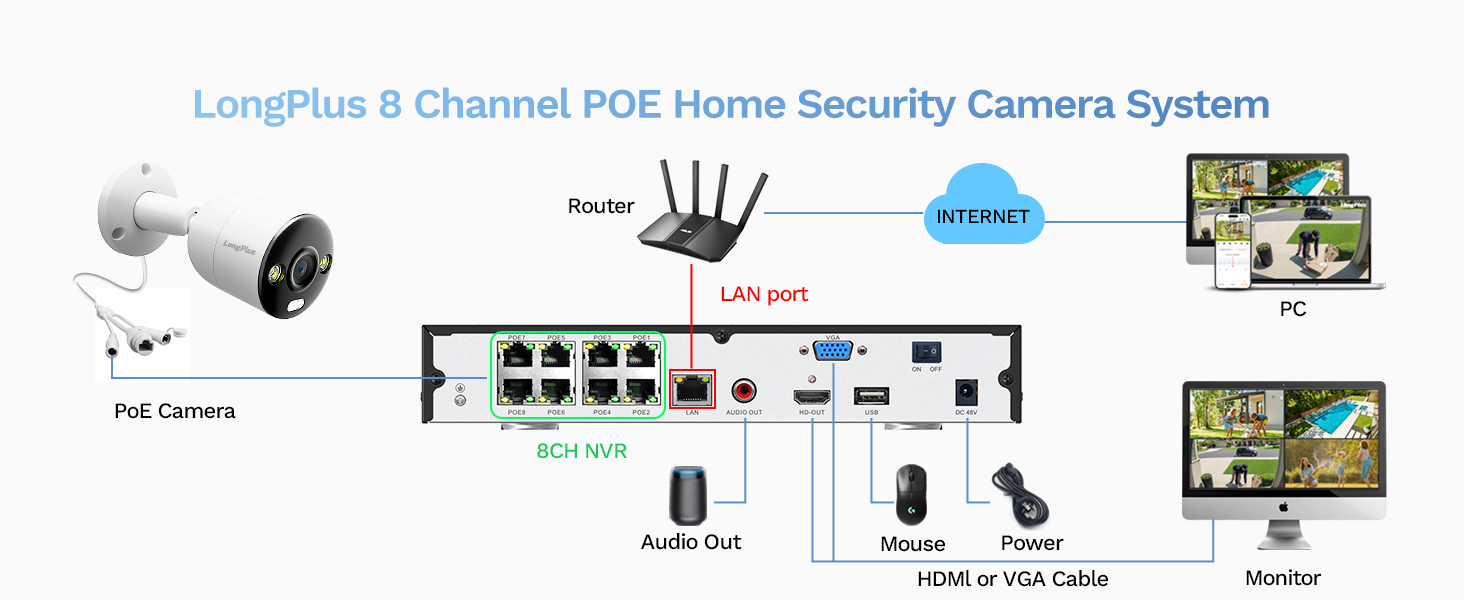
Image: A visual comparison demonstrating the efficiency of H.265+ compression over H.264, highlighting how H.265+ saves over 75% of storage space, enabling longer recording durations.
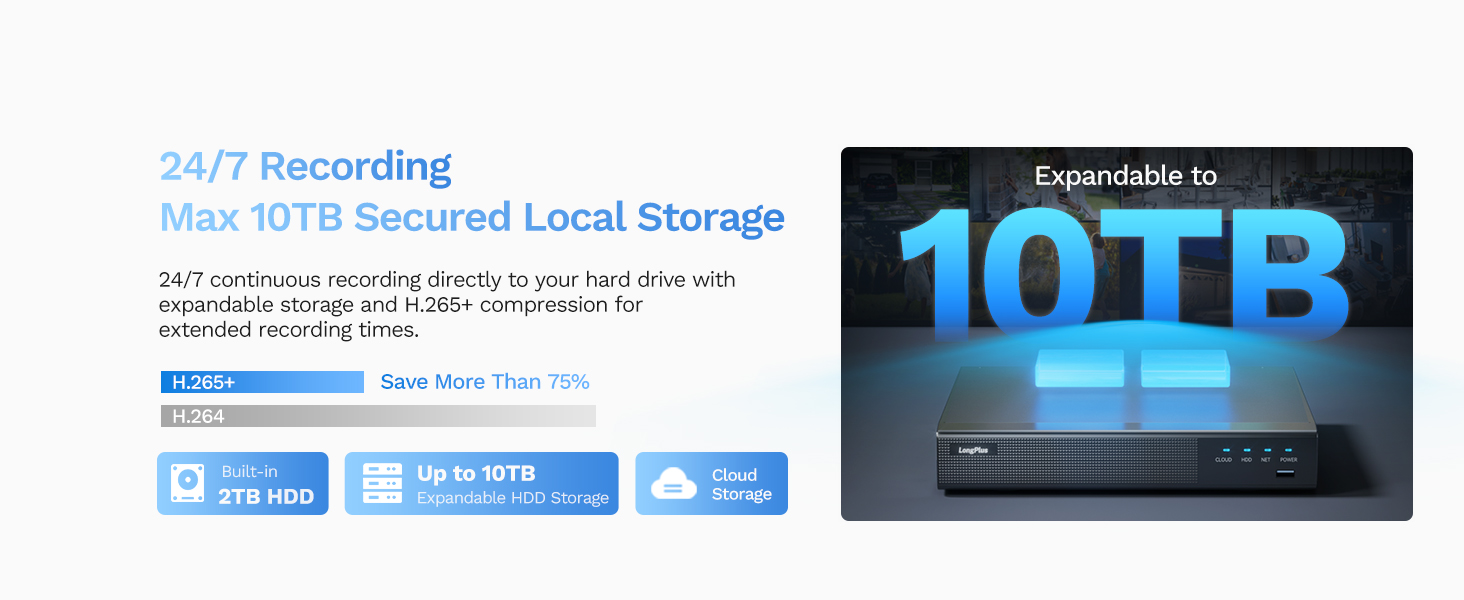
Image: An illustration of the LongPlus NVR's 24/7 recording capability and its support for expandable local storage up to 10TB, with a built-in 2TB HDD.
4.3 ナイトビジョンモード
The LongPlus system offers three distinct night vision modes to suit various lighting conditions:
- IR Night Vision (Infrared Mode): 鮮明な白黒画像を提供tage in complete darkness up to 100ft.
- カラーナイトビジョン(フルカラーモード): Delivers vibrant, full-color footage even in low-light conditions, allowing for better identification of details.
- Smart Night Vision (AI Mode): Automatically switches to color night vision and activates the built-in spotlights when motion is detected, providing clear, illuminated footage.

Image: A visual comparison demonstrating the three night vision modes: Full Color Mode, Infrared Mode, and Smart Night Vision (AI Mode), showing how each mode renders the scene differently in low light.
4.4 AI Motion Detection and Activity Zones
The system features advanced AI object detection for precise alerts.
- 物体検出: Accurately detects humans, vehicles, and pets, reducing false alarms.
- リアルタイムアラート: Receive instant push notifications, emails, or siren alerts when motion is detected.
- アクティビティゾーン: カメラの視野内の特定の領域を定義する view where motion detection should be active. This helps to ignore irrelevant motion (e.g., public roads).
- プライバシーマスク: Configure privacy masks to block out specific areas from being recorded or viewed, ensuring privacy.

Image: An illustration of the smart AI detection capabilities, showing the system identifying a person and a vehicle, and the corresponding alert options: push notification, email, and siren.

Image: A visual representation of how to set up motion detection zones and privacy masks within the camera's view, allowing users to customize surveillance areas and protect privacy.
4.5 Two-way Audio and Strobe Light Alarm
Enhance your security with interactive features:
- 双方向オーディオ: Communicate directly with visitors or deter intruders using the built-in microphone and speaker on the cameras.
- Strobe Light Alarm: When a humanoid, vehicle, or pet motion is detected, the camera can automatically trigger a red and blue strobe light to warn off intruders.
- サイレンアラーム: An audible siren can be activated manually or automatically upon detection to further deter unwanted presence.

Image: An illustration depicting the two-way audio feature, where a person can speak through the camera, and the camera's red and blue strobe light alarm activating upon detection of an intruder.
5. メンテナンス
- 定期清掃: カメラのレンズは定期的に柔らかくてきれいな布で拭いてください。amp 鮮明な画質を確保するための布。
- ファームウェアの更新: The NVR firmware automatically updates when connected to the internet. Ensure your system is connected to receive the latest features and security enhancements.
- HDDヘルスチェック: Regularly check the health of your HDD through the NVR's system settings to prevent data loss.
- ケーブル検査: Inspect all cables for wear and tear, especially outdoor cables, to ensure reliable connection and power.
6。 トラブルシューティング
| 問題 | 考えられる原因 | 解決 |
|---|---|---|
| モニター/テレビに画像が表示されない | Loose HDMI/VGA cable, NVR not powered on, incorrect input source on monitor. | Check all cable connections. Ensure NVR is powered. Select correct input source on monitor (HDMI/VGA). |
| カメラ画像なし | Loose PoE cable, camera not powered, faulty camera/cable. | Check PoE cable connections to NVR and camera. Ensure NVR PoE ports are active. Try a different port or cable. |
| アプリ経由のリモートアクセスは不可 | NVR がインターネットに接続されていない、ネットワーク設定が正しくない、アプリが正しく構成されていない。 | Ensure NVR is connected to router and has internet access. Verify network settings on NVR. Re-add device in Longvision app. |
| モーションアラートを受信できませんでした | Motion detection not enabled, activity zones not set correctly, notification settings off in app. | Enable motion detection in NVR settings. Adjust activity zones. Check app notification settings. |
| 夜間視力の質が悪い | Dirty lens, IR/Starlight mode not optimal, external light interference. | Clean camera lens. Try different night vision modes (IR, Color, Smart). Reduce external light sources that might cause glare. |
7. 仕様
| 特徴 | 詳細 |
|---|---|
| ブランド | ロングプラス |
| モデル番号 | LP8ME84B1 |
| 接続技術 | 有線(PoE) |
| ビデオキャプチャ解像度 | 4K(8MP) |
| チャンネル数 | 8 |
| メモリストレージ容量 | 10 TB (2TB HDD included) |
| 商品の寸法 (長さ x 幅 x 高さ) | 11.76 x 11.41 x 7.67インチ |
| オペレーティングシステムの互換性 | Android、Mac OS、Windows、iOS |
| 推奨用途 | 屋内、屋外 |
| 暗視範囲 | 100フィート |
| フレームレート | 30fps |
| 録画モード | Motion-triggered (default), Scheduled, 24/7 |
| USBポート合計 | 2 |
| ハードウェアインターフェイス | イーサネット、HDMI、USB、VGA |
| View角度 | 132度 |
| 特集 | High Efficiency Video Coding (H.265+), Red & Blue Flashing Lights, Easy to Install, Waterproof, Vehicle Detection, Adjustable, Motion Sensor, Siren Alarm, Flexible Storage (Local/Cloud), Smart Playback, Person/Vehicle/Animal Detection, Two-way Audio |
8. 保証とサポート
LongPlus provides a 2年間保証 for this product, ensuring peace of mind regarding manufacturing defects and performance issues.
さらに、 生涯テクニカルサポート is available for all LongPlus customers. If you encounter any issues or have questions regarding your security system, please do not hesitate to contact our professional technical team. We aim to respond to all queries within 24 hours.
For support, please refer to the contact information provided in your Quick Start Guide or visit the official LongPlus webサイト。