
1. はじめに
This manual provides detailed instructions for the installation, operation, and maintenance of your Hiseeu Wireless Security Cameras System. This system features 5MP PTZ and Bullet cameras, a 3TB HDD NVR, and is designed for reliable surveillance with easy setup and remote access capabilities.

図1: Hiseeu Wireless Security Camera System components including NVR and 8 cameras.
2.製品オーバーview およびコンポーネント
Your Hiseeu security system includes the following main components:
- Network Video Recorder (NVR) with pre-installed 3TB HDD
- 5MP PTZ Cameras (Quantity may vary based on package)
- 5MP Bullet Cameras (Quantity may vary based on package)
- NVRおよびカメラ用電源アダプター
- USBマウス
- HDMIケーブル
- イーサネットケーブル
- 取り付けネジキット
Refer to the diagram below for an identification of the various ports and components on your cameras and NVR.

図2: 詳細 view of camera and NVR ports and features.
3. セットアップ
3.1 NVRの初期設定
- NVRを電源に接続します。 NVR 電源アダプターを NVR と電源コンセントに差し込みます。
- モニターに接続: Use the provided HDMI or VGA cable to connect the NVR to a monitor or TV.
- マウスを接続する: ナビゲーションのために、USB マウスを NVR の USB ポートに接続します。
- ネットワーク接続: リモート用 viewing and app functionality, connect the NVR to your router using the provided Ethernet cable.
- カメラのペアリング: The cameras are pre-paired with the NVR for a plug-and-play experience.
3.2カメラの設置
- カメラのマウント: Securely mount the cameras in your desired outdoor or indoor locations using the provided screw kits. Ensure the cameras have a clear line of sight to the areas you wish to monitor.
- パワーカメラ: 各カメラをそれぞれの電源アダプターに接続し、電源コンセントに差し込みます。カメラは自動的にNVRに接続されます。

図3: Camera power connection for continuous operation.
The cameras are IP66 waterproof, making them suitable for outdoor use in various weather conditions.

図4: IP66 waterproof camera designed for year-round outdoor durability.
3.3 Mobile App Setup (Eseecloud App)
To access your cameras remotely, download and configure the Eseecloud mobile application.
- アプリをダウンロードする: 検索する "Eseecloud" in your device's app store (iOS/Android) and install it.
- アカウント登録: Open the app, click "Register," and follow the prompts to create an account using your phone number or email.
- デバイスを追加: After logging in, click "Add smart camera" or scan the QR code located on your camera or NVR. For new cameras, reset the camera until you hear a beep sound, then proceed with scanning.
- Wi-Fiに接続します: Select your home 2.4GHz Wi-Fi network (5GHz is not supported) and enter the password. Ensure the Wi-Fi name and password do not contain special characters and the password is not over 12 characters.
ビデオ1: Eseecloud App Manual - Video Version. This video demonstrates the process of setting up the Eseecloud app, registering an account, adding devices, and connecting to Wi-Fi for your Hiseeu security camera system.
4. 操作手順
4.1 Eseecloud Main Interface
From the main app interface, you can manage various camera functions:
- アラームプッシュ: Enable to receive phone notifications for motion alerts.
- 設定: Access camera settings directly.
- クラウドストレージ: Purchase cloud storage services if desired. Mobile video stores suspicious object detections, while 24-hour video stores continuous footage.
- 共有: Share device access with family or friends via QR code.
- リアルタイムビデオ録画: Switch between SD and HD quality, enable sound, take screenshots, and record video. Recorded content can be found in the "Photo album."
- 頻繁に Viewed Location: Set and recall specific camera positions.
4.2PTZコントロール
For PTZ cameras, you can control movement and zoom:
- 方向制御: Drag the direction key to move the camera lens up, down, left, or right.
- PTZ速度: Adjust the rotation speed of the camera (High, Medium, Low).
- クルーズモード: Choose between panoramic cruise or preset position cruise. For preset cruise, set positions first.
- PTZ Control Direction Flip: If the camera direction is reversed after installation, use this option to correct it.
- ズームとフォーカス: Use the "Pro" button on the PTZ interface for zoom in/out options. Optical zoom is for specific camera models; digital zoom can be achieved by swiping the screen.
4.3 Motion Detection Alert
Configure motion detection settings to enhance security:
- モーション検知感度: Adjust sensitivity to reduce false alarms.
- Motion Detection Period: Set specific times for motion detection (all day, daytime, night, or custom).
- Motion Detection Area Setting: Define specific areas for motion detection to trigger alarms.
- サイレン設定: Enable or disable the siren to prompt an alarm sound when motion is detected.

図5: Smart person detection tracking with app notifications.
4.4記録設定
Manage how your system records footage:
- 録音モード: Choose between "Event recording" (records when changes are detected) or "Keep recording" (continuous recording).
- Record Sound Switch: Enable to hear sound during playback or live view.
- Time Record: Customize recording schedules for specific days and times.

図6: The NVR supports 24/7 recording with its built-in 3TB HDD.
4.5 Screen and Sound Settings
Adjust visual and audio preferences:
- ナイトビジョンモード: Select between Smart, Full Color, or Infrared night vision. Full color night vision uses floodlights for bright, clear images in low light.
- Device Call Volume: Adjust the volume for two-way audio communication.
- Privacy Area: Set specific areas to be covered for privacy.
- Humanoid Detection Frame: Enable to highlight detected people with a frame.
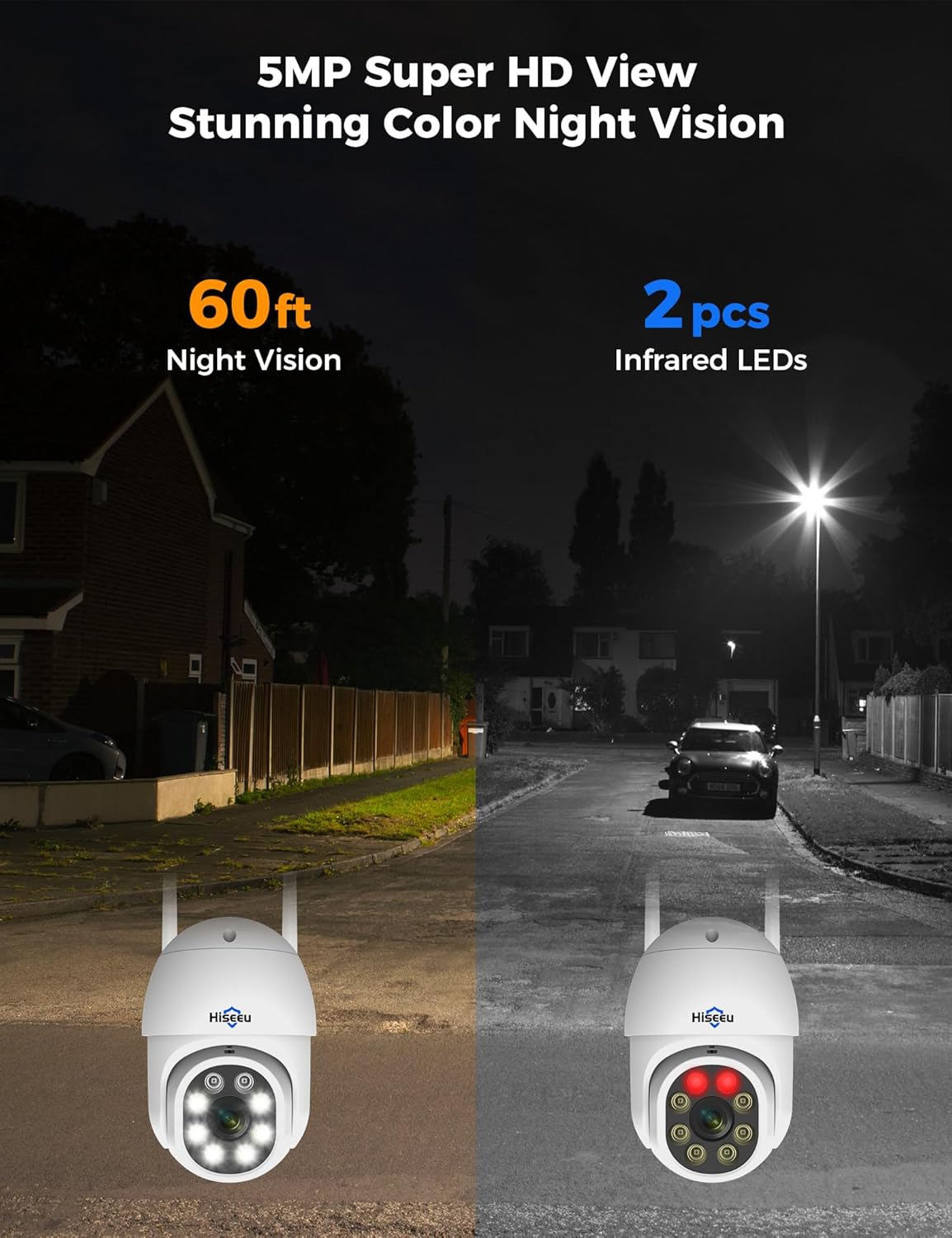
図7: Comparison of night vision capabilities, including 5MP Super HD and Color Night Vision up to 60ft.
4.6 Alexa統合
Integrate your Hiseeu system with Alexa for voice control and viewing:
- Enable Alexa Service Authorization: In the Eseecloud app's advanced settings, enable Alexa service authorization.
- Search Eseecloud Skill: Open the Alexa app, go to "Skills & Games," and search for "Eseecloud."
- Enable to Use: Input your Eseecloud account and password, then select "Discover Devices."
- View on Echo Show: After discovery, you can view your cameras on compatible Alexa devices like Echo Show.
注記: You must name the device in the Eseecloud app, otherwise Alexa may not find it.

図8: Hiseeu system integration with Alexa for convenient voice control and viewing。
5. メンテナンス
- 定期清掃: カメラのレンズとハウジングを定期的に柔らかくてきれいな布で拭いてください。amp 鮮明な画像を保つために布で拭いてください。研磨剤入りの洗剤は使用しないでください。
- 接続を確認してください: すべての電源ケーブルとネットワーク ケーブルがしっかりと接続され、損傷がないことを確認します。
- ファームウェアの更新: Check the Eseecloud app regularly for firmware updates to ensure optimal performance and security.
- 防水キャップ: For outdoor installations, ensure the waterproof cap is correctly installed on the Ethernet port to prevent water ingress.
ビデオ2: How to use a waterproof cap. This video demonstrates the correct installation of the waterproof cap for the camera's Ethernet port, crucial for outdoor durability.
6。 トラブルシューティング
- 画像/信号なし: Check power connections for both NVR and cameras. Ensure cameras are within range of the NVR's wireless signal. Verify NVR is connected to the monitor correctly.
- Wi-Fi接続が悪い: Ensure the NVR is connected to your router via Ethernet. Check that cameras are connected to a 2.4GHz Wi-Fi network. Reduce distance between cameras and NVR/router if possible.
- モーション検出の問題: Adjust motion detection sensitivity and ensure detection areas are correctly configured in the app.
- アプリの接続の問題: Verify your phone has a stable internet connection. Ensure the Eseecloud app is updated to the latest version. Restart the app or your phone if necessary.
7. 仕様
| 特徴 | 仕様 |
|---|---|
| ブランド | ヒセウ |
| 接続技術 | 有線、無線(2.4GHz) |
| ビデオキャプチャ解像度 | 5MP (2640 pixels) |
| チャンネル数 | 最大16 |
| メモリストレージ容量 | 3 TB HDD (built-in) |
| 電源 | コード式電気 |
| 商品の寸法 (長さ x 幅 x 高さ) | 8 x 10 x 10インチ |
| オペレーティングシステムの互換性 | アンドロイド、iOS |
| 推奨用途 | 監視 |
| 対応デバイス | スマートフォン |
| 暗視範囲 | 65フィート |
| フレームレート | 15 fps、24 fps、30 fps |
| 録画モード | 連続、モーション検知 |
| ハードウェアインターフェイス | 802.11 ac / b / g / n |
| レンズタイプ | 修理済み |
| ビデオ入力 | CVBS |
| アイテム重量 | 15.37ポンド |
8. 保証とサポート
Your Hiseeu Wireless Security Cameras System comes with a 12ヶ月限定保証. The actual warranty period shall be implemented according to the requirements of local laws and regulations.
For any questions or support needs, the Eseecloud app provides one-on-one 7/24 online support. Please contact customer service directly through the app to resolve any issues.