
TIME TIMER B0CW36RLRP
TIME TIMER Visual Timers Instruction Manual
Models: 8-inch 60-Minute Visual Timer & PLUS 20-Minute Visual Timer
導入
This manual provides instructions for the TIME TIMER 8-inch 60-Minute Visual Timer and the TIME TIMER PLUS 20-Minute Visual Timer. These devices are designed to visually represent the passage of time, aiding in time management, task completion, and focus for various activities in educational, professional, and home environments.
製品終了view
This package includes two distinct visual timers:
- TIME TIMER Original 8-inch 60-Minute Visual Timer: Features a large display with a red disk that disappears as time elapses. It includes a dry-erase activity card slot and magnetic backing.
- TIME TIMER PLUS 20-Minute Visual Timer: A portable timer with a handle, featuring a blue disk for a 20-minute countdown.
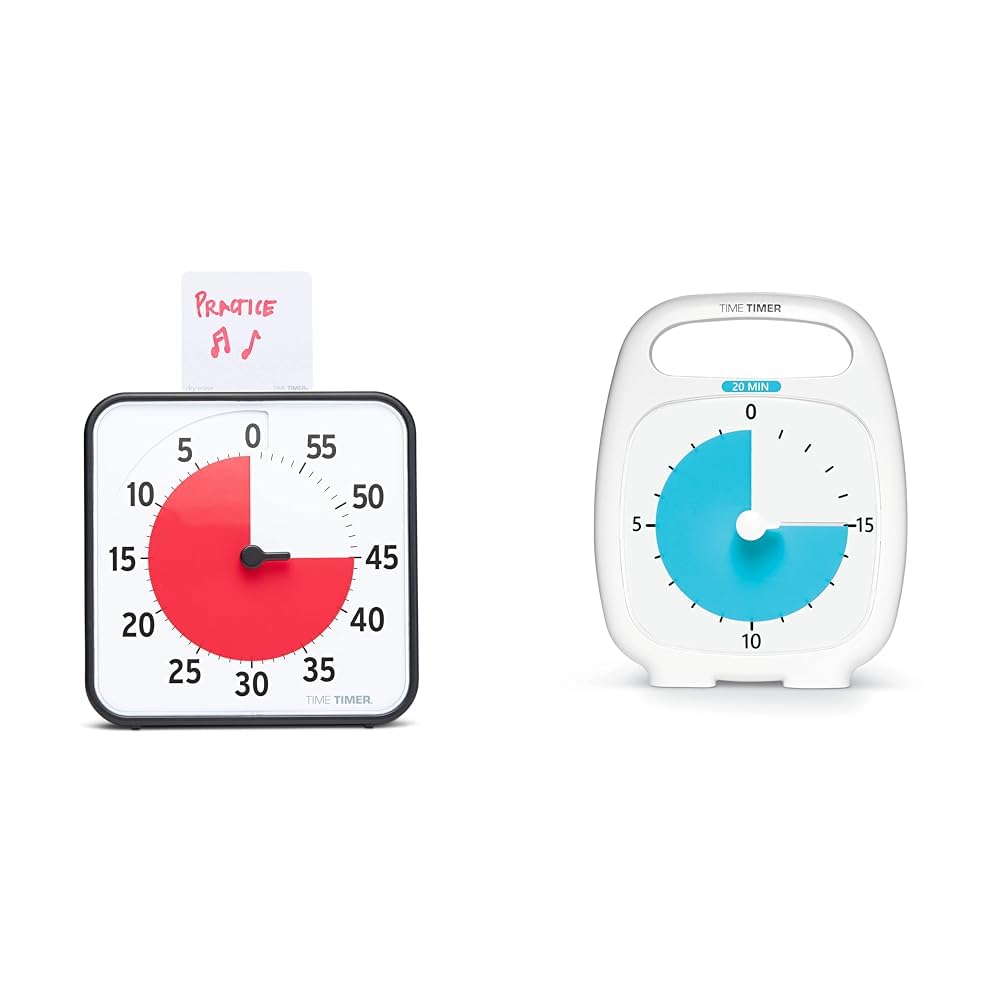
Image: The 8-inch 60-minute visual timer (left) and the 20-minute visual timer (right).
設定
TIME TIMER Original 8-inch 60-Minute Visual Timer
- バッテリーの取り付け: Locate the battery compartment on the back of the timer. Insert 2 AA batteries (not included), ensuring correct polarity.
- 配置:
- デスクでの使用: Extend the two foldable feet on the back to stand the timer on a flat surface.
- 磁気取り付け: The timer features a magnetic back, allowing it to be attached to magnetic whiteboards or other metallic surfaces.
- 壁掛け: The timer can also be hung on a wall using a suitable hook (not included).
- Activity Card: If desired, write or draw the task on the included dry-erase activity card and place it in the top slot of the timer.

Image: The 8-inch 60-minute visual timer with an activity card in its slot.
TIME TIMER PLUS 20-Minute Visual Timer
- バッテリーの取り付け: Locate the battery compartment on the back. Insert 1 AA battery (not included), observing polarity.
- 配置: This portable timer can be placed on any flat surface. Its integrated handle allows for easy transport.

Image: The TIME TIMER PLUS 20-Minute Visual Timer, white with a blue disk.
操作手順
Setting the TIME TIMER Original 8-inch 60-Minute Visual Timer
- 時間設定: Turn the center knob counter-clockwise to move the red disk to your desired duration, up to 60 minutes.
- 秒読み: The red disk will begin to disappear clockwise as time elapses. The timer operates silently, without a ticking sound.
- オプションのアラート: An on/off switch on the back of the timer controls an audible alert that sounds when the timing cycle is complete. Adjust this setting based on your environment and preference.

Image: The 8-inch 60-minute visual timer in use on a whiteboard, demonstrating its magnetic capability.
Setting the TIME TIMER PLUS 20-Minute Visual Timer
- 時間設定: Use the center set knob to move the colored disk to the desired time, up to 20 minutes.
- 秒読み: The colored disk will recede as time passes. This timer also features silent operation.
- オプションのアラート: An optional alarm feature is available for this timer, providing an audible signal upon completion of the countdown.

Image: A child interacting with the 20-minute visual timer, demonstrating its ease of use.
機能と利点
- 視覚的な時間管理: The disappearing colored disk provides a clear, intuitive representation of remaining time, reducing anxiety and improving focus.
- サイレント操作: Both timers operate without a ticking sound, making them suitable for sound-sensitive environments such as classrooms, libraries, or quiet study areas.
- Versatile Placement (8-inch model): Can be used on a desk with foldable feet, magnetically attached to surfaces, or hung on a wall.
- Dry-Erase Activity Card (8-inch model): Allows users to write or draw tasks directly on the card, providing a visual reminder of the activity associated with the timed period.
- Portability (20-minute model): Features an integrated handle and protective lens for easy transport and durability.
- Support for Special Needs: The visual nature of the timers aids individuals with autism, ADHD, or other learning disabilities in understanding time transitions and managing tasks.
メンテナンス
- クリーニング: Wipe the timers with a soft, dry cloth. Avoid using abrasive cleaners or solvents.
- バッテリー交換: Replace batteries when the timer's functionality diminishes or ceases. Dispose of used batteries responsibly.
- ストレージ: Store timers in a cool, dry place when not in use.
トラブルシューティング
- Timer Not Moving:
- 電池が正しく取り付けられており、消耗していないことを確認してください。
- Check that the center knob is turned sufficiently to set the red/blue disk.
- Audible Alert Not Sounding (8-inch model):
- Verify that the alert switch on the back of the timer is in the "on" position.
- バッテリーレベルを確認してください。
- Dry-Erase Card Issues:
- Use only dry-erase markers on the activity card.
- Clean with a dry-erase board eraser or a soft cloth.
仕様
| ブランド | タイムタイマー |
| モデル | Original 8-inch 60-Minute Visual Timer |
| 寸法(約) | 幅7.5インチ x 高さ7.5インチ x 奥行き1.25インチ |
| 電源 | 単三電池2本(別売) |
| 最大時間設定 | 60 minutes |
| 特徴 | Magnetic back, foldable feet, dry-erase activity card slot, optional audible alert |
| ブランド | タイムタイマー |
| モデル | PLUS 20-Minute Visual Timer |
| 電源 | 単三電池1本(別売り) |
| 最大時間設定 | 20 minutes |
| 特徴 | Portable handle, protective lens, silent operation, optional audible alert |
安全情報
- 小さなお子様の手の届かないところに電池を保管してください。
- 古い電池と新しい電池、または異なる種類の電池を混ぜないでください。
- Do not expose the timers to extreme temperatures or moisture.
- この製品はおもちゃではありません。小さなお子様には大人の監督をおすすめします。
保証とサポート
保証情報や技術サポートについては、メーカーの公式ウェブサイトをご覧ください。 web公式サイトをご覧いただくか、カスタマーサービス部門にお問い合わせください。保証請求のために購入時のレシートを保管してください。
Ask a question about this manual
Ask about setup, troubleshooting, compatibility, parts, safety, or missing instructions. Manuals+ will review the question and use this page’s manual context to help answer it.