
導入
Thank you for choosing the DEVIA Smart Watch Pro 1. This manual provides essential information for setting up, operating, and maintaining your device. The Smart Watch Pro 1 combines elegant design with advanced technology, featuring a 1.43-inch AMOLED display, IP68 water resistance, and a 290mAh battery designed for extended use. Please read this manual thoroughly to ensure optimal performance and longevity of your smartwatch.
パッケージ内容
パッケージを開封したら、すべてのアイテムが揃っていて良好な状態であることを確認してください。
- DEVIA Smart Watch Pro 1 (Black)
- 充電ケーブル
- ユーザーマニュアル(このドキュメント)
製品終了view
Familiarize yourself with the components of your DEVIA Smart Watch Pro 1.
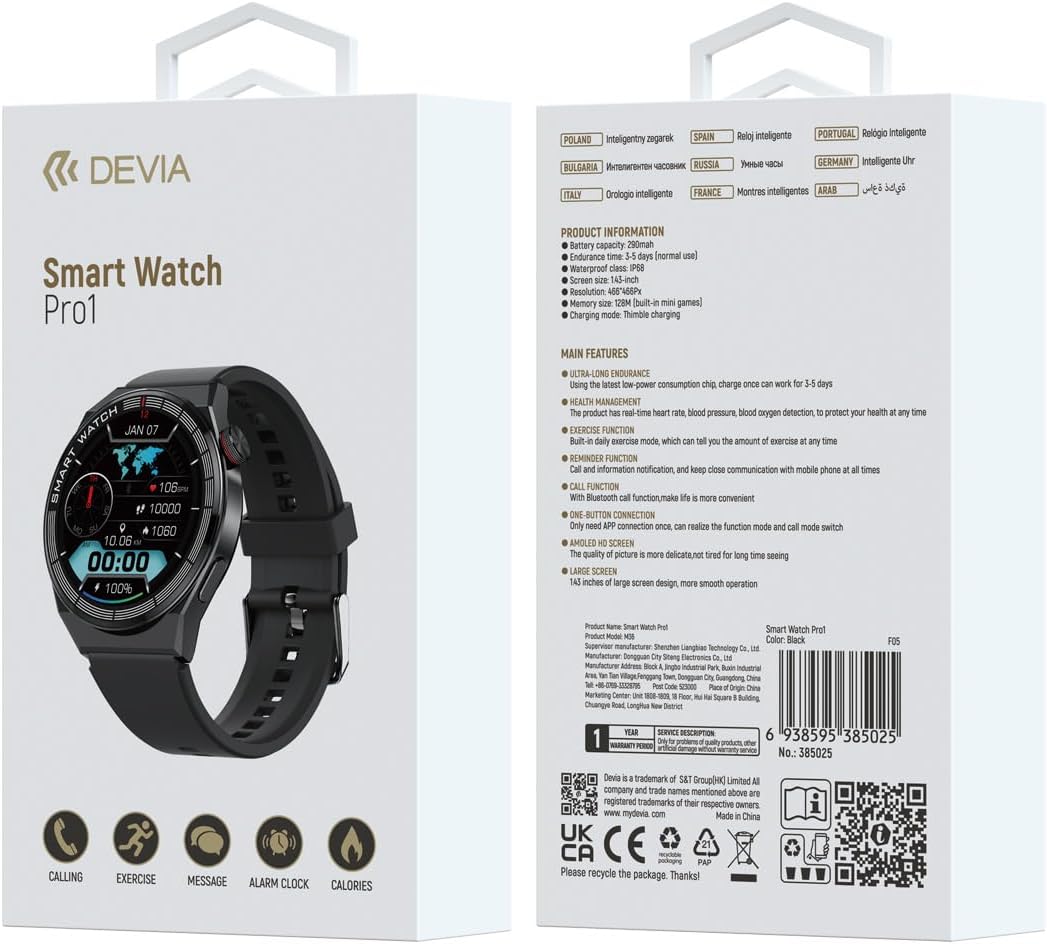
図1: フロント view of the DEVIA Smart Watch Pro 1 displaying various application icons on its AMOLED screen.

図2: サイドプロfile of the DEVIA Smart Watch Pro 1, highlighting its slim design and physical button.

図3: 後方 view of the DEVIA Smart Watch Pro 1, showing the optical health sensors for heart rate, blood pressure, and blood oxygen monitoring, along with charging contacts.
設定
1. スマートウォッチの充電
Before initial use, fully charge your DEVIA Smart Watch Pro 1.
- 充電ケーブルを USB 電源アダプター (別売) またはコンピューターの USB ポートに接続します。
- Align the magnetic charging pins of the cable with the charging contacts on the back of the smartwatch (refer to Figure 3). The watch will vibrate and display a charging indicator.
- Allow approximately 2-3 hours for a full charge. A full charge provides up to 7 days of normal use.
2. 電源のオン/オフ
- 電源オン: Press and hold the side button for a few seconds until the DEVIA logo appears on the screen.
- 電源を切る: From the watch face, swipe down to access quick settings, or navigate to the settings menu. Select "Power Off" or "Shutdown" and confirm. Alternatively, press and hold the side button and select "Power Off" when prompted.
3. アプリのインストールとペアリング
スマートウォッチの全機能を利用するには、スマートフォンにコンパニオン アプリケーションをダウンロードしてインストールします。
- Scan the QR code provided on the product packaging or in the quick start guide to download the official DEVIA smartwatch app, or search for "DEVIA Smart Watch" in your smartphone's app store (Google Play Store for Android, Apple App Store for iOS).
- Install and open the app. Follow the on-screen instructions to create an account or log in.
- スマートフォンでBluetoothが有効になっていることを確認します。
- In the app, navigate to "Device" or "Add Device" and select your DEVIA Smart Watch Pro 1 from the list of available devices.
- Confirm the pairing request on both your smartphone and the smartwatch. The watch supports one-button connection for simplified pairing.
操作手順
1. ナビゲーション
- タッチスクリーン: メニューや画面を移動するには、左右上下にスワイプします。項目を選択するにはタップします。
- サイドボタン: Press the side button to return to the watch face, or to wake the screen. A long press may access power options or a shortcut depending on context.
2. 主な特徴
- 呼び出し機能: With Bluetooth connectivity, you can make and receive calls directly from your smartwatch. Ensure your watch is paired with your phone and the call function is enabled in the app.
- 健康モニタリング: The watch features sensors for heart rate, blood pressure, and blood oxygen monitoring. Access these functions from the main menu. For accurate readings, ensure the watch is worn snugly on your wrist. Data is for reference and not for medical diagnosis.
- 練習機能: Track various sports activities and daily exercise data. The watch records steps, distance, calories burned, and more. Sync with the app for detailed analysis.
- リマインダー機能: Receive notifications for incoming calls, messages, and app alerts directly on your wrist. Configure notification settings within the companion app.
- AMOLED HD Screen: The 1.43-inch AMOLED display provides clear visuals and smooth operation. Adjust brightness and watch faces through the settings menu or companion app.
- ミニゲーム: The watch includes built-in mini-games. Access them from the app menu.
メンテナンス
- クリーニング: Regularly clean your smartwatch and strap with a soft, dry, lint-free cloth. If necessary, use a slightly damp 布で拭き、完全に乾かしてください。刺激の強い化学薬品や研磨剤は使用しないでください。
- 耐水性(IP68): The DEVIA Smart Watch Pro 1 is IP68 rated, meaning it is resistant to dust and can withstand immersion in water up to 1.5 meters for up to 30 minutes. It is suitable for daily use, hand washing, and light rain. However, it is not recommended for hot showers, saunas, diving, or high-pressure water activities. Avoid prolonged exposure to saltwater.
- バッテリーのケア: バッテリーの寿命を延ばすには、時計を頻繁に完全に放電させないでください。バッテリー残量が少なくなったら充電してください。長期間使用しない場合は、時計を涼しく乾燥した場所に保管してください。
- 温度: Avoid exposing the watch to extreme temperatures (hot or cold) as this can affect battery life and overall performance.
トラブルシューティング
| 問題 | 考えられる解決策 |
|---|---|
| 時計の電源が入りません。 | 時計が完全に充電されていることを確認してください。充電ケーブルと電源に少なくとも30分間接続してください。 |
| スマートフォンとペアリングできません。 |
|
| 通知が受信されません。 |
|
| 不正確な健康データ。 | Ensure the watch is worn snugly on your wrist, not too loose or too tight. Clean the sensors on the back of the watch. Avoid excessive movement during measurements. Remember, data is for reference only. |
| 画面が反応しません。 | サイドボタンを長押ししてウォッチを再起動してください。問題が解決しない場合は、画面が清潔で乾いていることを確認してください。 |
仕様
| 特徴 | 詳細 |
|---|---|
| モデル名 | プロ1 |
| モデル番号 | P06938595385025 |
| 画面 | 1.43インチAMOLED HDスクリーン |
| バッテリー容量 | 290mAh |
| バッテリー寿命 | Up to 7 days (normal use); 3-5 days (heavy use) |
| 防水等級 | IP68 |
| 接続性 | Bluetooth (for call function and app pairing) |
| メモリ | 12MB (for built-in mini games) |
| 充電タイプ | Magnetic Thimble Charging |
| 製品寸法 | 3 x 10 x 20 cm (packaging); Watch weight: 0.02 g |
| 色 | 黒 |
保証とサポート
The DEVIA Smart Watch Pro 1 comes with a 1年間保証 ご購入日から製造上の欠陥が対象となります。本保証は、誤用、事故、不正な改造、または通常の摩耗による損傷には適用されません。
For technical support, warranty claims, or further assistance, please contact DEVIA customer service through the official webサイトまたは購入書類に記載されている連絡先情報をご覧ください。
You can also visit the official DEVIA store on Amazon for more information: DEVIA Mexico Store.
For product authenticity verification and additional information, you may visit: guide4goods.com and use the UPC: 6938595385025.


