
1. はじめに
The LEAUDIO Topping D70 PRO OCTO is a high-fidelity Digital-to-Analog Converter (DAC) designed to deliver exceptional audio performance. Featuring 8 Cirrus Logic CS43198 chips, Bluetooth 5.1 with LDAC support, and a full-color Aurora UI, this device offers advanced audio decoding capabilities up to PCM768kHz/32bit and DSD512. This manual provides detailed instructions for setting up, operating, and maintaining your D70 PRO OCTO to ensure optimal performance.
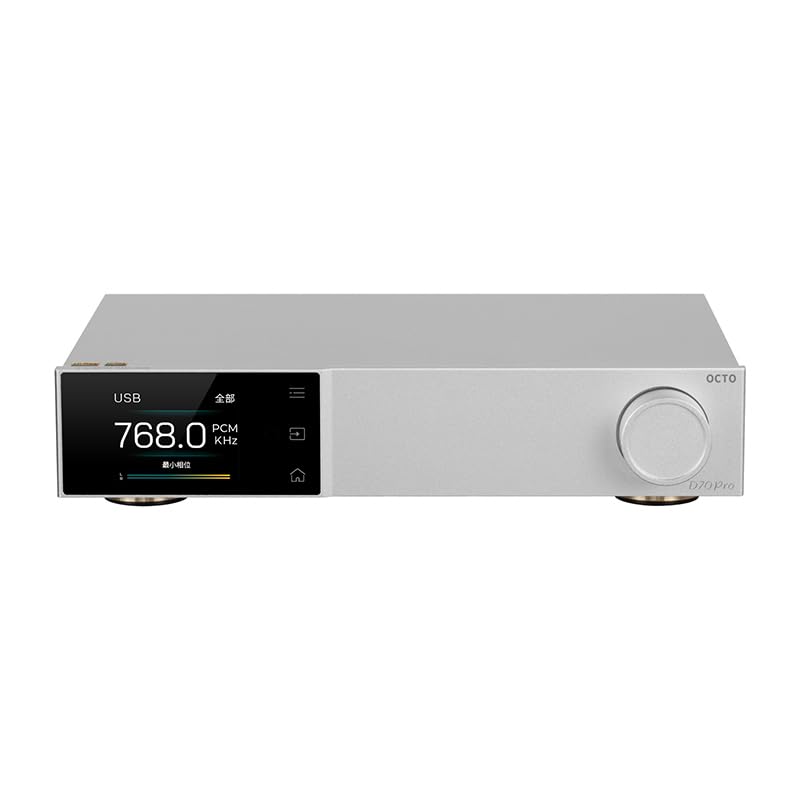
図1: 前面 view of the Topping D70 PRO OCTO HiFi DAC.
2. パッケージ内容
パッケージに以下の項目が含まれているか注意深く確認してください。
- Topping D70 PRO OCTO Unit
- リモートコントロール
- USBケーブル
- AC電源ケーブル
- Bluetoothアンテナ
- クイックスタートガイド
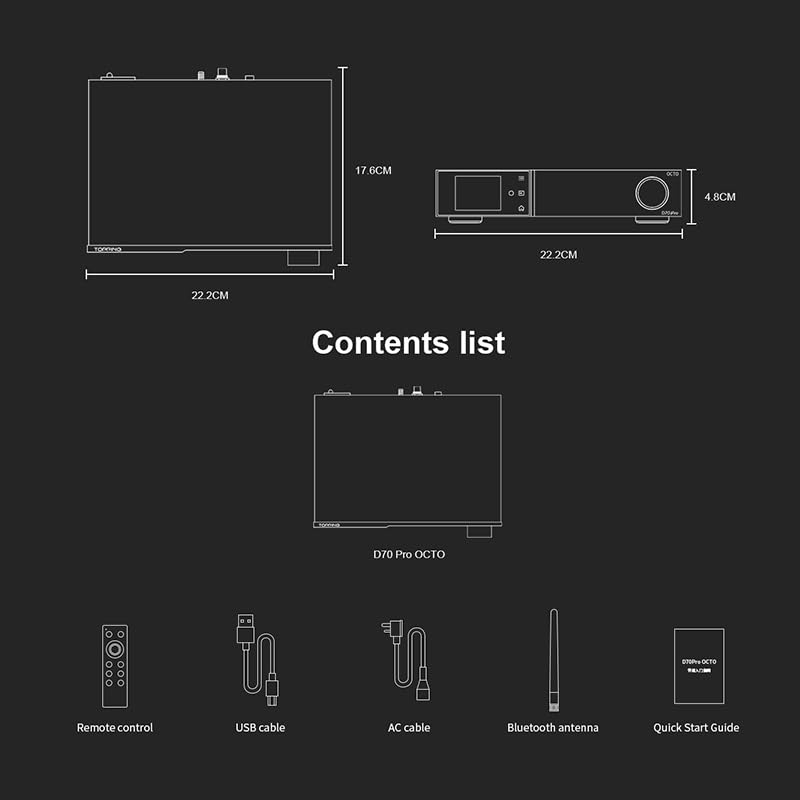
Figure 2: Included accessories: Remote control, USB cable, AC cable, Bluetooth antenna, and Quick Start Guide.
3.製品オーバーview
The D70 PRO OCTO features a clear layout for easy connectivity and control.
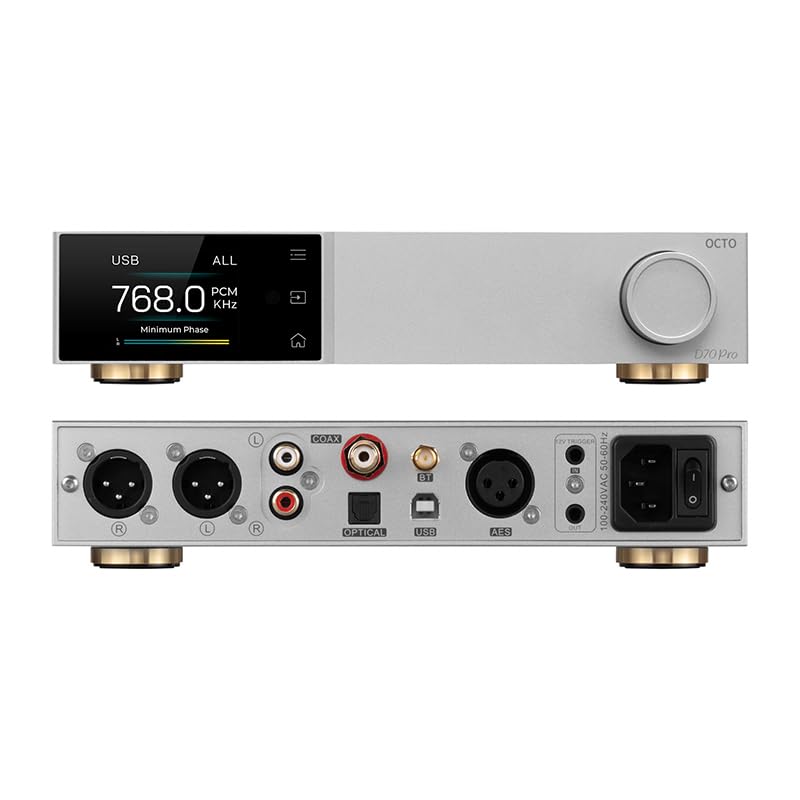
Figure 3: Front panel (top) with display and control knob, and rear panel (bottom) with various input/output ports.
フロントパネル
- 表示画面: 現在のステータス、入力、sを表示しますample rate, and UI information.
- コントロールノブ: For navigation, volume adjustment, and menu selection.
- タッチボタン: Three touch buttons for intuitive control of the Aurora UI.
背面パネル
- USB入力: Connect to a computer for audio playback.
- 同軸入力: デジタルオーディオ入力。
- 光入力: デジタルオーディオ入力。
- Bluetoothアンテナコネクタ: ワイヤレス Bluetooth 受信用。
- USB-C(電源): 電源入力。
- RCA出力(L/R): アンバランスアナログオーディオ出力。
- XLR Output (L/R): バランスアナログオーディオ出力。
- 12Vトリガー: 他のデバイスとの同期電源制御用。
- 電源スイッチ: 主電源のオン/オフ。
4. セットアップ
4.1 初期接続
- Connect the Bluetooth antenna to the designated connector on the rear panel.
- Connect the D70 PRO OCTO to a power source using the provided AC power cable.
- Connect your audio source (e.g., computer, CD player) to the appropriate input on the D70 PRO OCTO (USB, Coaxial, or Optical).
- Connect the D70 PRO OCTO's output (RCA or XLR) to your ampライファまたはアクティブスピーカー。
- Turn on the D70 PRO OCTO using the power switch on the rear panel.
4.2 ドライバのインストール (Windows)
For Windows operating systems, a specific driver is required for optimal performance, especially for ASIO playback. The D70 PRO OCTO utilizes an XMOS XU316 and Thesycon custom driver. This driver can typically be downloaded from the manufacturer's official website. Other operating systems like Mac, Linux, iOS, and Android are generally driver-free and support plug-and-play functionality.

Figure 4: The D70 PRO OCTO offers wide compatibility with various operating systems, with specific driver requirements for Windows.
5. 操作
5.1 基本的な制御
- 電源オン/オフ: 背面パネルの主電源スイッチを使用します。
- 音量調整: Rotate the control knob on the front panel to adjust the output volume.
- 入力選択: Press the control knob or use the remote control to cycle through available inputs (USB, Coaxial, Optical, Bluetooth).
5.2 Aurora UIと表示モード
The D70 PRO OCTO features a full-color Aurora UI with three touch buttons for an enhanced user experience. The display can show various playback information, including sample rate, volume, and input source. You can also switch between different display modes such as FFT (Fast Fourier Transform) and VU (Volume Unit) meters according to your preference.

Figure 5: The Aurora UI offers a full-color screen, touch buttons, customizable functions via the volume knob, and language switching options.
5.3 Bluetooth 5.1 Transmission
The D70 PRO OCTO supports Bluetooth 5.1 with advanced audio encoding protocols including LDAC, aptX-Adaptive, aptX HD, aptX, AAC, and SBC. This allows for high-quality wireless audio streaming from compatible devices.
- Select Bluetooth as the input source on the D70 PRO OCTO.
- Enable Bluetooth on your source device (e.g., smartphone, tablet).
- 検索する "D70 PRO OCTO" in your device's Bluetooth settings and pair.
- ペアリングされると、オーディオはワイヤレスで DAC にストリーミングされます。

Figure 6: The D70 PRO OCTO supports Bluetooth 5.1 for high-quality wireless audio transmission.
6. 主な特徴
- 8x CS43198 DAC Chips: Equipped with eight Cirrus Logic flagship CS43198 chips for superior audio conversion.
- ハイレゾオーディオのサポート: Supports PCM up to 768kHz/32bit and DSD512 audio decoding.
- オーロラUI: Full-color screen and three touch buttons for intuitive control and display.
- 多彩な表示モード: Switch between playback information, FFT, and VU meters.
- Bluetooth 5.1: Supports LDAC, aptX-Adaptive, aptX HD, aptX, AAC, and SBC for high-quality wireless streaming.
- Low Distortion and High Dynamic Range: Achieves THD+N <0.00007% and a dynamic range of 134dB for accurate sound reproduction.
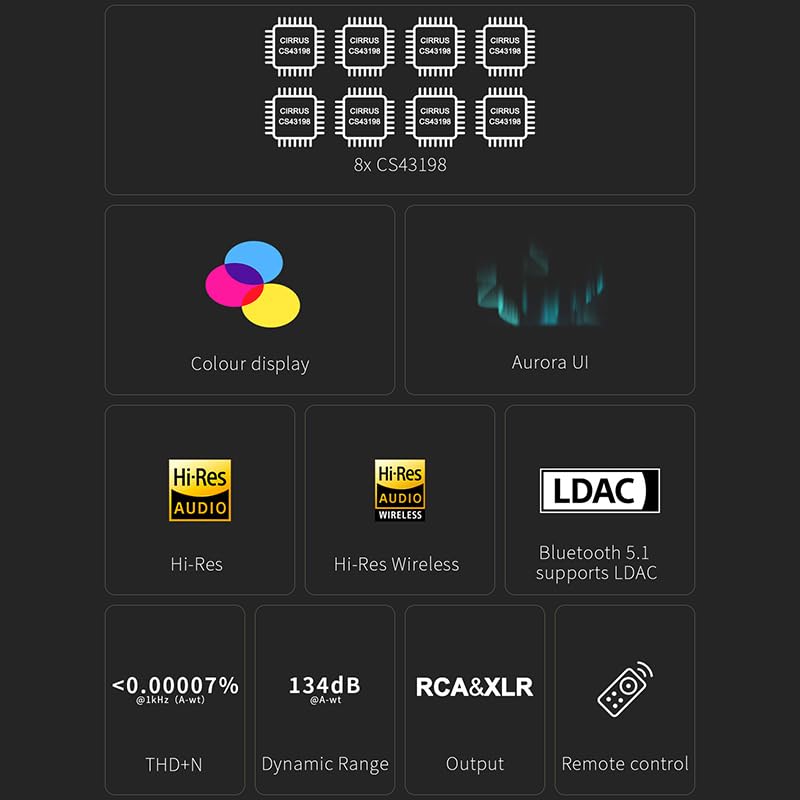
Figure 7: Visual representation of key features including 8x CS43198 chips, color display, Aurora UI, Hi-Res Audio, LDAC, and performance metrics.

Figure 8: Detailed audio performance metrics including THD+N, SNR, DNR, and Noise levels, demonstrating the DAC's high fidelity.
7. 仕様
| 特徴 | 詳細 |
|---|---|
| DACチップ | 8x Cirrus Logic CS43198 |
| PCMデコード | 最大768kHz/32ビット |
| DSDデコード | 最大DSD512 |
| Bluetoothバージョン | 5.1 |
| Bluetooth コーデック | LDAC, aptX-Adaptive, aptX HD, aptX, AAC, SBC |
| THD+N (RCA) | <0.00008% @ 1kHz (A-wt) |
| THD+N (XLR) | <0.00007% @ 1kHz (A-wt) |
| ダイナミックレンジ(RCA) | 128dB @ 1kHz (A-wt) |
| ダイナミックレンジ(XLR) | 134dB @ 1kHz (A-wt) |
| Output Impedance (RCA) | 50Ω |
| 出力インピーダンス(XLR) | 100Ω |
| 入力 | USB、同軸、光、Bluetooth |
| 出力 | RCA、XLR |
| 寸法 | 約14.41 x 9.49 x 3.43インチ(パッケージ) |
| アイテム重量 | 約4.29ポンド |
| 電源入力 | USB-C(DC 15V) |
8. メンテナンス
To ensure the longevity and optimal performance of your D70 PRO OCTO, follow these maintenance guidelines:
- クリーニング: Use a soft, dry cloth to clean the exterior of the device. Avoid using abrasive cleaners, solvents, or chemical sprays, as they may damage the finish.
- 配置: 本製品は、直射日光、熱源、過度の湿気を避け、安定した平らな場所に設置してください。また、本製品の周囲に十分な換気を確保してください。
- 力: Always use the provided power adapter. Disconnect the power cable during lightning storms or when the unit is unused for extended periods.
- 取り扱い: 落としたり、強い衝撃を与えないでください。
9。 トラブルシューティング
If you encounter any issues with your D70 PRO OCTO, please refer to the following common problems and solutions:
| 問題 | 考えられる原因 | 解決 |
|---|---|---|
| 電源なし | 電源ケーブルが接続されていないか、コンセントに障害があります。 | Ensure the power cable is securely connected and the outlet is functional. Check the power switch on the rear panel. |
| 音声出力なし | 入力/出力の選択が間違っている、音量が低すぎる、またはケーブルに欠陥がある。 | Verify the correct input source is selected on the DAC. Check volume levels on both the DAC and connected amplifier/speakers. Ensure audio cables are securely connected and not damaged. |
| Bluetooth接続の問題 | デバイスがペアリング モードになっていないか、範囲外にあるか、干渉を受けています。 | Ensure the DAC is in Bluetooth input mode. Place the source device closer to the DAC. Try unpairing and re-pairing the devices. Avoid sources of strong electromagnetic interference. |
| 歪んだオーディオ | Input signal too high, faulty cables, or incorrect settings. | Reduce the volume on the source device. Check audio cables for damage. Ensure the DAC's settings (e.g., filter modes) are appropriate for your audio. |
| Windows PC not recognizing DAC | USB ドライバーが見つからないか、間違っています。 | Download and install the latest USB driver from the LEAUDIO or Topping official website. Restart your computer and the DAC. |
これらの解決策を試しても問題が解決しない場合は、カスタマー サポートにお問い合わせください。
10. 保証とサポート
The LEAUDIO Topping D70 PRO OCTO is covered by a manufacturer's warranty. Please refer to the warranty card included in your package or visit the official LEAUDIO/Topping web詳細な保証条件については、サイトをご覧ください。
For technical support, service, or further inquiries, please contact your retailer or the manufacturer directly. Keep your purchase receipt and product serial number handy when seeking support.