
イネ L872
IINE Switch Proコントローラー取扱説明書
モデル: L872 | ブランド: IINE
1. はじめに
The IINE Switch Pro Controller is a versatile wireless gamepad designed for an enhanced gaming experience across multiple platforms. Featuring advanced Hall Effect joysticks and triggers for precision and durability, this controller offers multi-platform compatibility, including Nintendo Switch, PC, iOS, Android, and Steam Deck. It integrates essential gaming features such as NFC functionality, motion sensing, customizable macro functions, adjustable rumble, and changeable lighting modes, providing a comprehensive and immersive control solution for various game genres.

Figure 1: IINE Switch Pro Controller with its themed carrying bag.
2. パッケージ内容
- IINE Switch Pro Controller
- Themed Carrying Bag
- USB-C充電ケーブル
- ユーザーマニュアル(このドキュメント)
3.製品オーバーview
コントローラーのレイアウトと主要コンポーネントをよく理解してください。

図2:上 view of the IINE Switch Pro Controller, showing joysticks, D-pad, action buttons, and central function buttons.
- 左/右ホール効果ジョイスティック: 正確でドリフトのない制御を実現します。
- 十字キー: 方向入力。
- A/B/X/Y ボタン: 標準のアクション ボタン。
- L/Rボタン: 肩ボタン。
- ZL/ZR Hall Effect Triggers: Adjustable analog triggers for varied input.
- ホームボタン: 電源のオン/オフを切り替え、ホーム画面に戻ります。
- +/- ボタン: Start/Select または同等のボタン。
- スクリーンショットボタン: スクリーンショットをキャプチャします。
- MR/ML Buttons: マクロ機能用のプログラム可能な戻るボタン。
- USB-Cポート: 充電と有線接続用。
- 3.5mmヘッドフォンジャック: For audio output (wired mode with Switch only).
4. セットアップ
4.1 コントローラの充電
Connect the supplied USB-C cable to the controller's USB-C port and the other end to a USB power source (e.g., console, PC, USB wall adapter). The indicator lights will show charging status. A full charge takes approximately 2-3 hours and provides up to 15 hours of runtime.

図 3: バッテリーの仕様と充電の詳細。
4.2 コントローラーのペアリング
The controller supports multi-platform connectivity via Bluetooth 5.0.

Figure 4: The controller's wide range of compatible devices.
4.2.1 Nintendo Switch接続
- スイッチのHOMEメニューから、 コントローラー、 それから グリップ/順序の変更.
- IINEコントローラーで、 家 button for 3 seconds until the indicator lights flash rapidly.
- 接続されると、コントローラーのプレーヤー インジケーター ライトが点灯したままになります。
4.2.2 PC/Steam Deck/iOS/Android Connection
- Ensure the controller is in the correct mode for your device (refer to the multi-platform switch on the back).
- デバイスで Bluetooth を有効にします。
- IINEコントローラーで、 家 ボタンを3秒間押して、ペアリングモードに入ります。
- Select "IINE Controller" from the list of available Bluetooth devices on your system.
- The controller's indicator lights will become solid upon successful connection.
4.3 Multi-platform Switching
The controller features a switch on the back to select between different platform modes (e.g., Switch, PC, iOS). Ensure the correct mode is selected before attempting to connect to your device.
ビデオ1: オーバーview of the IINE Starfield Controller, demonstrating its multi-platform switching capabilities and various features.
5. 操作手順
5.1 ホール効果ジョイスティックとトリガー
The Hall Effect technology in the joysticks and triggers provides precise, drift-free input and extended longevity. The analog triggers are adjustable, allowing you to switch between short-throw (for shooting games) and long-throw (for racing games) modes via a physical switch on the back of the controller.

Figure 5: Adjustable Hall Effect analog triggers for optimized gameplay.
5.2 Macro/Turbo/Key Remapping
The controller supports customizable macro functions and turbo capabilities. The MR/ML back buttons can be programmed for complex sequences or single-button remapping. Refer to the detailed instructions in the full manual for specific programming steps. The Keylinker mobile app can also be used to customize button mapping, dead zone adjustment, auto-fire rate, and sensitivity settings.

Figure 6: Programmable back buttons for enhanced gameplay.
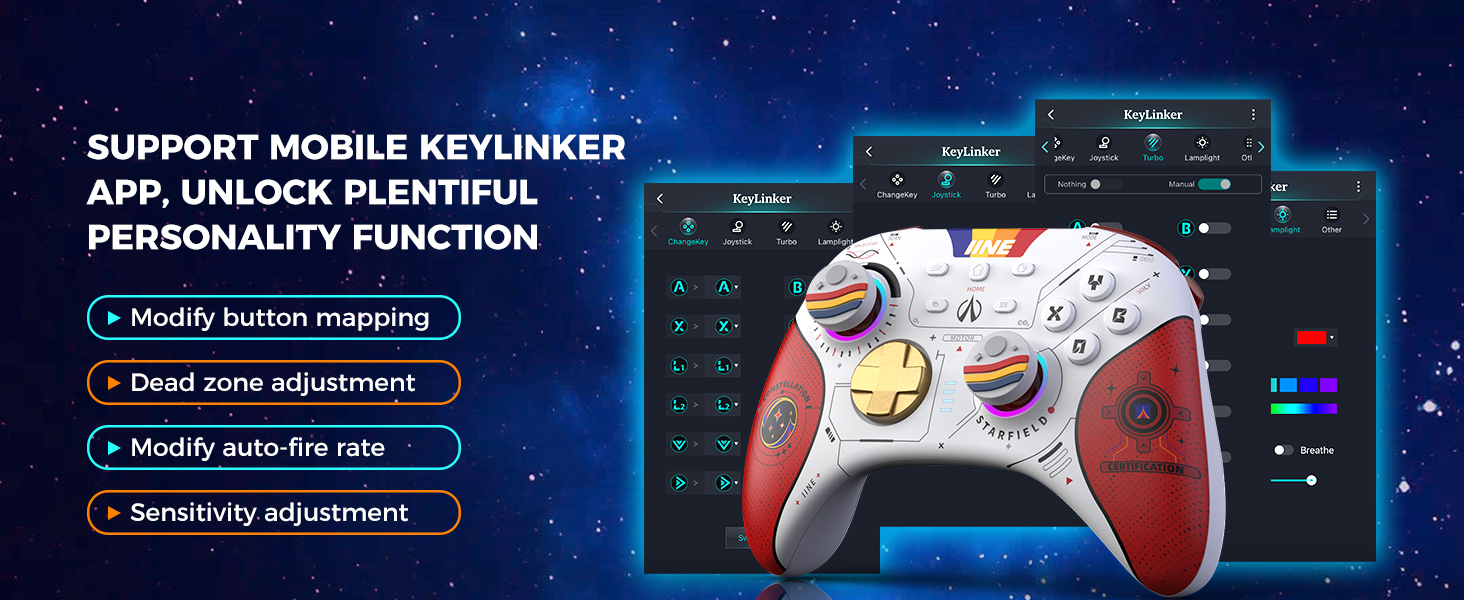
Figure 7: Keylinker mobile app for advanced customization.
5.3 D-Pad and Left Joystick Toggle
In PC mode, you can double-click the Screenshot button to swap the functions of the D-pad and the left joystick. This allows for flexible control based on game requirements, such as joystick control for 3D games or D-pad control for horizontal games.

Figure 8: D-pad and Left Joystick function swapping.
5.4 NFC機能
The integrated NFC technology allows for interaction with compatible devices, such as scanning Amiibo figures on the Nintendo Switch.

Figure 9: NFC functionality for Amiibo and other interactions.
5.5 Six-Axis and Adjustable Vibration
The controller features a six-axis gyro sensor for enhanced motion control in compatible games. The vibration intensity is adjustable, providing immersive feedback for various in-game events like collisions, explosions, and fighting.

図 10: モーション制御用の 6 軸ジャイロスコープ。

Figure 11: Adjustable rumble feedback levels.
5.6つの調整可能な照明モード
The controller features changeable lighting modes for its joysticks, allowing for personalization of the visual appearance.
5.7ヘッドフォンジャック
A built-in 3.5mm headphone jack provides immersive gaming audio. Note that the headphone jack can only be used when the controller is wired connected to a Nintendo Switch.
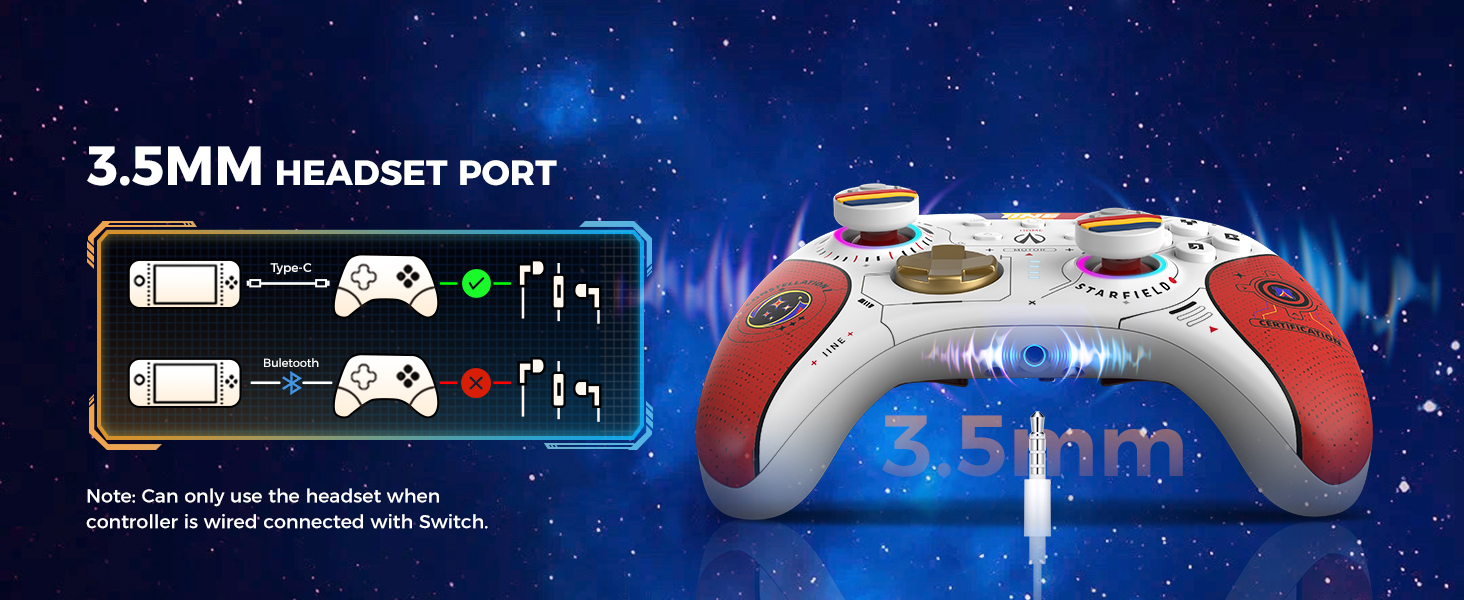
Figure 12: Headphone jack usage details.
5.8 ウェイクアップ機能
Press the HOME button on the controller to wake up a connected Nintendo Switch console (including Switch OLED, Switch Lite, and original Switch models).

Figure 13: Wake-up function for Nintendo Switch consoles.
6. メンテナンス
- クリーニング: コントローラーの清掃には、柔らかく乾いた布をご使用ください。刺激の強い化学薬品や研磨剤の使用は避けてください。
- ストレージ: Store the controller in a cool, dry place, away from direct sunlight and extreme temperatures. Use the provided carrying bag for protection during transport or storage.
- バッテリーのケア: バッテリーの寿命を延ばすには、コントローラーを頻繁に完全に放電させないでください。長期間使用しない場合でも、定期的に充電してください。

Figure 14: The protective carrying bag helps maintain the controller's condition.
7。 トラブルシューティング
| 問題 | 考えられる原因 | 解決 |
|---|---|---|
| コントローラーが接続されません。 | Incorrect pairing mode, low battery, out of range. | Ensure correct platform mode is selected. Charge the controller. Move closer to the device. Re-attempt pairing. |
| 入力の遅れや切断。 | Interference, distance, multiple Bluetooth devices. | Reduce distance to device. Turn off other Bluetooth devices. Try wired connection if available. |
| ジョイスティックがドリフトします。 | Calibration issue (unlikely with Hall Effect), software glitch. | Recalibrate joysticks via console/PC settings. Update controller firmware if available. |
| ヘッドホンジャックが機能しません。 | Not wired to Switch, incorrect settings. | Ensure controller is wired to Nintendo Switch. Check audio settings on Switch. |
8. 仕様
- モデル番号: L872
- 接続性: Bluetooth 5.0, USB-C (wired)
- 互換性: Nintendo Switch, PC, iOS, Android, Steam Deck
- バッテリー容量: 1000mAhリチウムイオン
- バッテリー寿命: 最大15時間(約)
- 充電時間: 約2~3時間
- ジョイスティック/トリガー: ホール効果
- センサー: 6-axis Gyro, Motion Sensor
- 追加機能: NFC, Macro/Turbo, Key Remapping, Adjustable Rumble, Adjustable Lighting, 3.5mm Headphone Jack
- 寸法: 8.07 x 5.98 x 3.19インチ(パッケージ)
- 重さ: 1.26ポンド(商品)
- メーカー: ウェイトップ
- 原産国: 中国
9. 保証とサポート
For warranty information, technical support, or further assistance, please contact IINE customer service through the retailer where the product was purchased or visit the official IINE webサイトでご確認ください。保証請求のために購入証明書を保管してください。
公式IINEストア: AmazonのIINEブランドストア