
1. はじめに
Thank you for choosing the FIREBAT MN56 Mini PC. This manual provides essential information for setting up, operating, and maintaining your device. Please read it thoroughly before use and keep it for future reference.
The FIREBAT MN56 is a compact and powerful mini desktop computer designed for various applications, including business, education, gaming, multimedia, and photo/video editing. It features an AMD Ryzen 7 8745HS processor, high-speed DDR5 memory, and a PCIe 4.0 SSD for exceptional performance.
2. パッケージ内容
パッケージにすべてのアイテムが揃っていることを確認してください:
- FIREBAT MN56 AMD Ryzen 7 8745HS ミニPC x 1
- 米国電源アダプター (19V 6.32A 120W) x 1
- 垂直ブラケット×1
- HDMIケーブル x 1
- ユーザーマニュアル (本書) x 1

Image: The FIREBAT MN56 Mini PC shown with its power adapter, HDMI cable, and vertical stand.
3.製品オーバーview および機能
3.1. 仕様
| 成分 | 詳細 |
|---|---|
| モデル | MN56 |
| 寸法 | 13cm x 13cm x 5.4cm(5 x 5 x 2インチ) |
| 重さ | 0.53kg (1 pound) |
| CPU | AMD Ryzen 7 8745HS(8コア、16スレッド、最大4.9GHz) |
| グラフィックス | AMD Radeon 780M (2600MHz GPU) |
| メモリ | 32GB DDR5 5600MHz (2x16GB), expandable up to 96GB (48GBx2) |
| ストレージ | 1TB PCIe 4.0 M.2 SSD, expandable up to 4TB |
| ワイヤレス接続 | Wi-Fi 6(802.11ax)、Bluetooth 5.2 |
| 無線LAN | 2 x 2.5Gbps RJ45 |
| ビデオ出力 | 1 x HDMI 2.1, 1 x DP 1.4, 1 x USB-C 4.0 (supports DP Alt Mode) |
| USBポート | 2 x USB 2.0 Type-A, 2 x USB 3.2 Type-A, 1 x USB-C 4.0 (PD/DP/DATA), 1 x USB-C IN |
| オーディオ | 1 x3.5mmオーディオジャック |
| 他の | RGBコントロール |
3.2. 主な特徴
- 強力なプロセッサ: Equipped with AMD Ryzen 7 8745HS for high performance in demanding tasks.
- 統合グラフィックス: AMD Radeon 780M provides strong graphics performance, suitable for gaming and multimedia.
- 高速メモリとストレージ: Dual-channel DDR5 5600MHz RAM and PCIe 4.0 SSD ensure fast data access and multitasking.
- トリプルディスプレイ出力: Supports 4K triple display output via HDMI 2.1, DP 1.4, and USB-C 4.0 for enhanced productivity.
- Dual 2.5G RJ45 Ports: Offers high-speed network connectivity, ideal for work, gaming, and web サーフィン。
- 高度な接続性: Features Wi-Fi 6 and Bluetooth 5.2 for robust wireless connections.
- 拡張可能な容量: Memory and storage are upgradeable to meet future needs.
- 効率的な冷却: Dual fans with high-efficiency thermal grease ensure stable performance and heat dissipation.
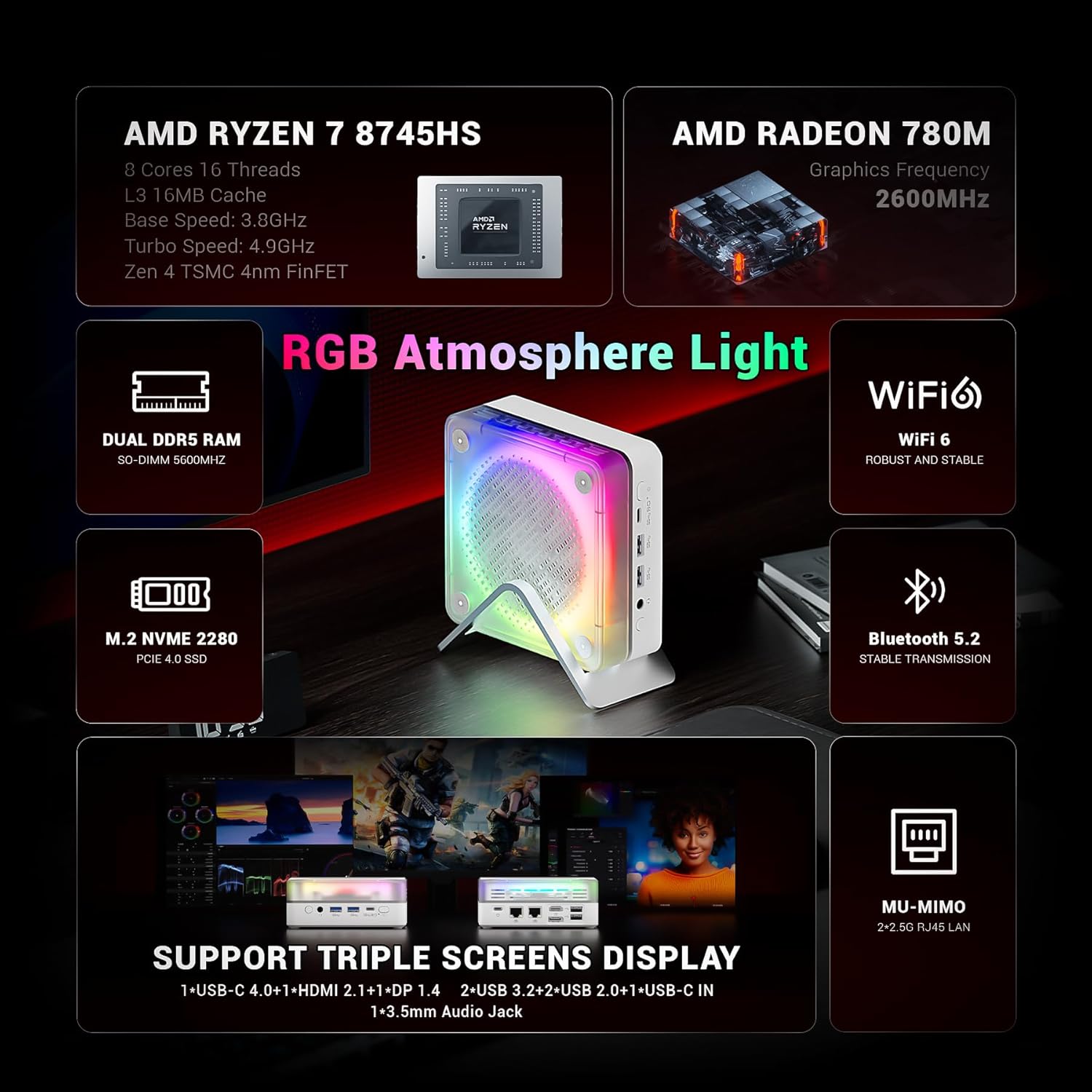
画像: オーバーview of the FIREBAT MN56's key features, highlighting its AMD Ryzen 7 8745HS processor, Radeon 780M graphics, DDR5 RAM, PCIe 4.0 SSD, Wi-Fi 6, Bluetooth 5.2, and various ports.

Image: A graphic illustrating the performance of the Ryzen 7 8745HS CPU compared to other processors.
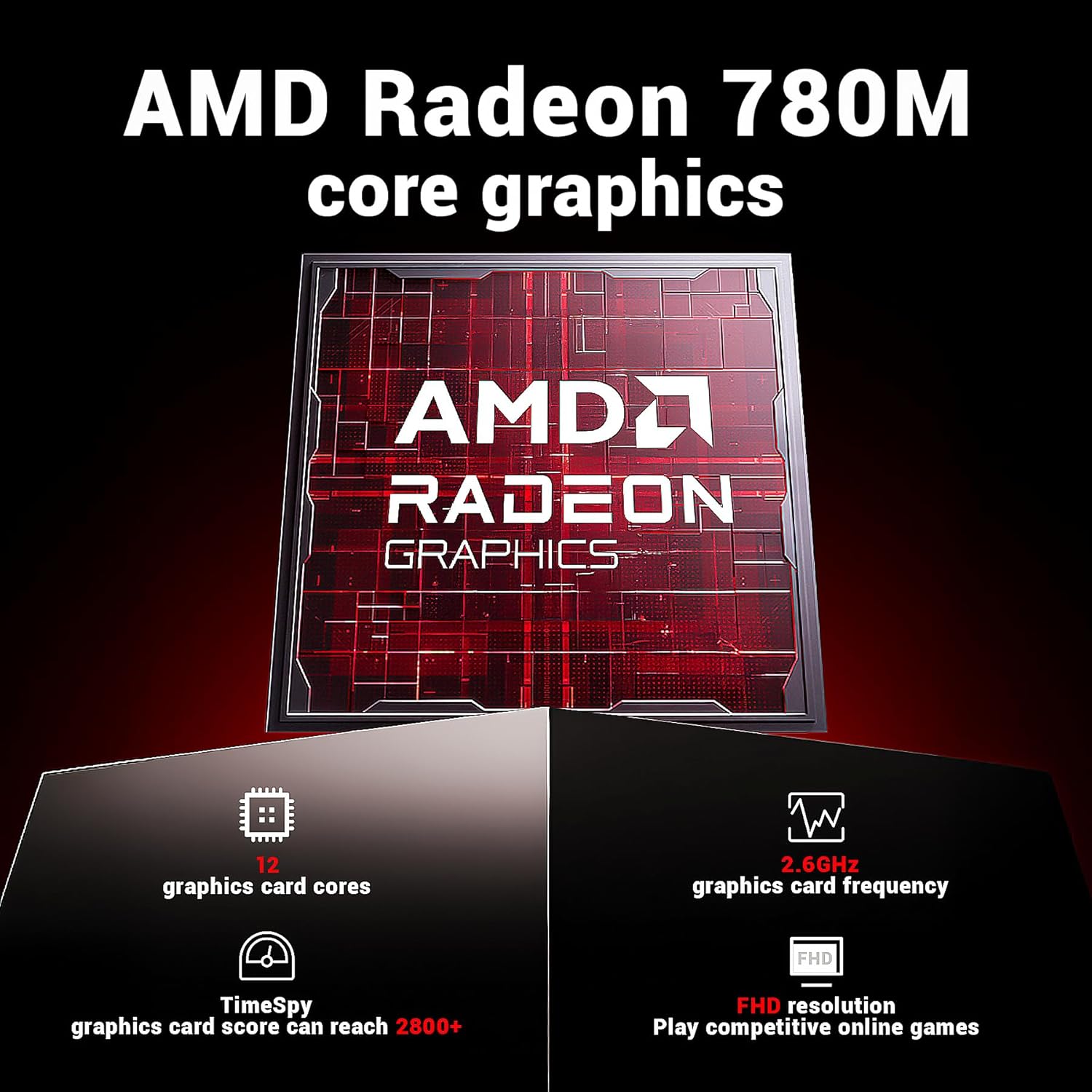
Image: Details on the AMD Radeon 780M integrated graphics, including its 12 graphics card cores and 2.6GHz frequency.

Image: The Mini PC connected to a display, emphasizing its ultra-fast startup and smooth operation.
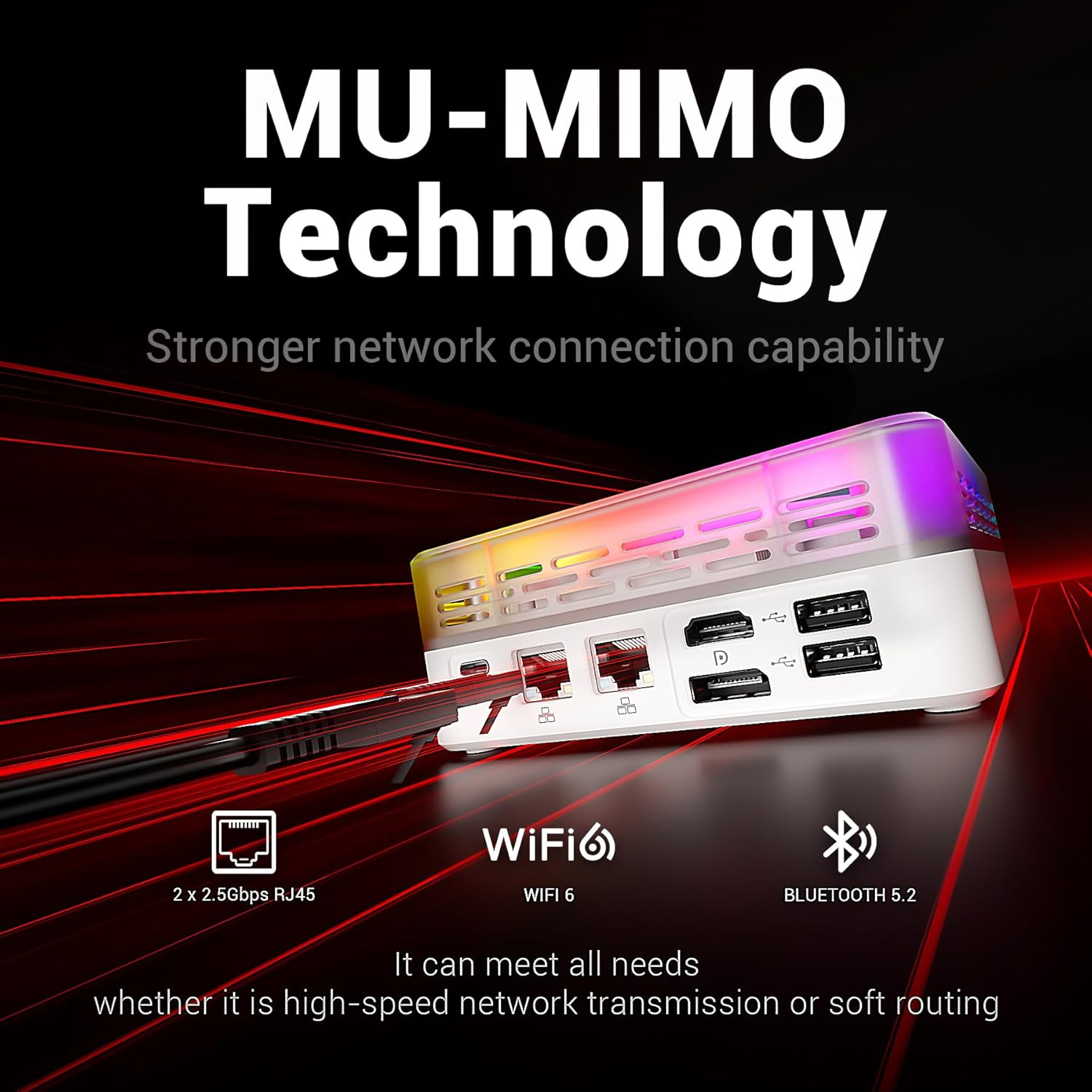
Image: Highlighting the MU-MIMO technology and dual 2.5Gbps RJ45 ports for stronger network connection capability.
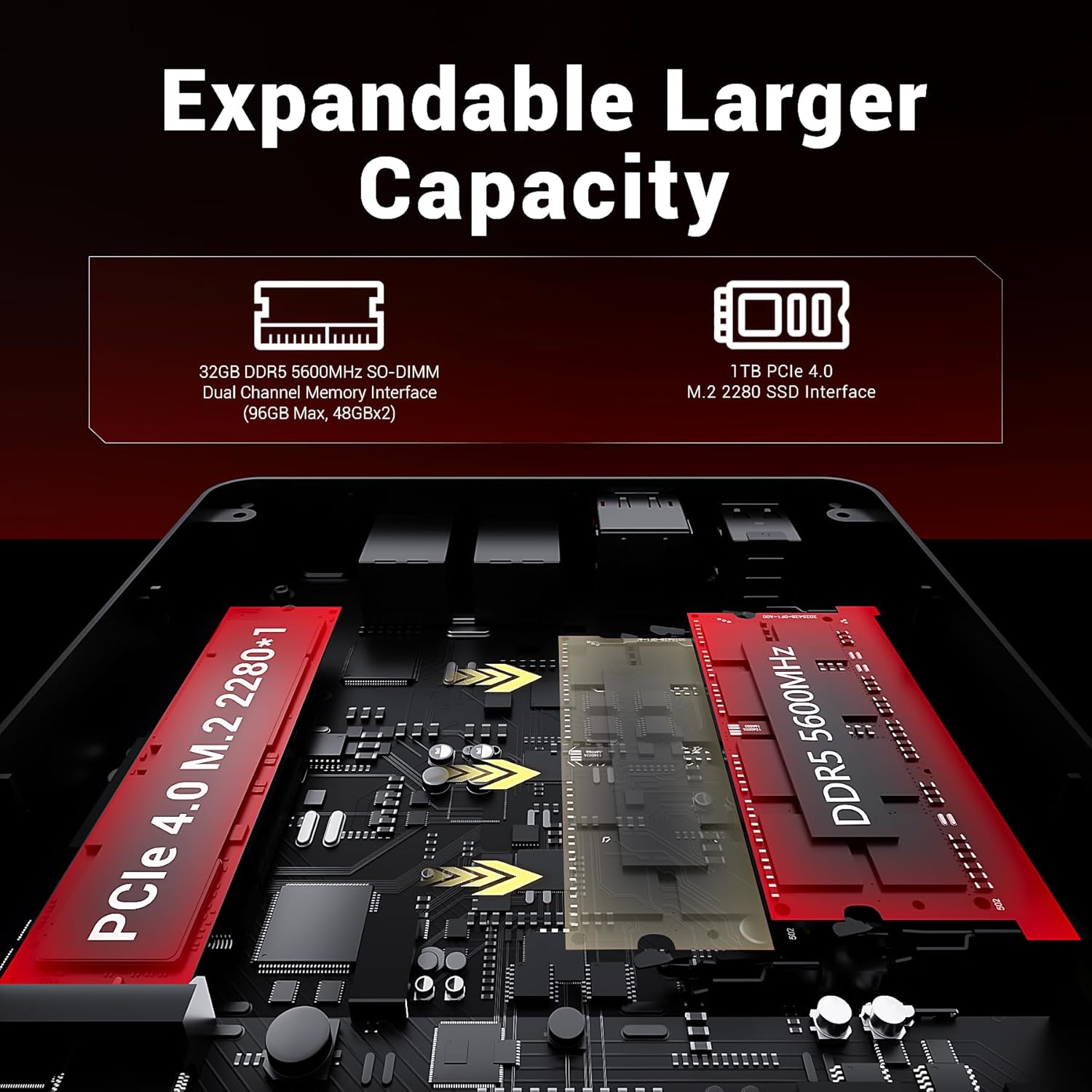
Image: An internal diagram showing the DDR5 SO-DIMM and M.2 2280 SSD slots for expandable capacity.

Image: A diagram illustrating the dual-fan cooling system and high-efficiency thermal grease for optimal heat dissipation.

画像: 詳細な view of the Mini PC's front and rear ports, including USB, HDMI, DP, LAN, and audio jacks.
4.セットアップガイド
4.1。 電源への接続
- Connect the power adapter to the "USB-C IN" port on the Mini PC.
- 電源アダプタを壁のコンセントに差し込みます。
4.2. ディスプレイへの接続
The MN56 supports up to three displays simultaneously.
- Connect one end of the HDMI cable (included) to the HDMI 2.1 port on the Mini PC.
- HDMI ケーブルのもう一方の端をモニターまたはテレビの HDMI 入力に接続します。
- For additional displays, use the DP 1.4 port or the USB-C 4.0 port (with a compatible USB-C to DisplayPort/HDMI adapter, not included).
4.3. 周辺機器の接続
- キーボードとマウス: Connect your USB keyboard and mouse to any of the USB 2.0 or USB 3.2 Type-A ports.
- ネットワーク: For wired internet, connect an Ethernet cable from your router/modem to either of the 2.5Gbps RJ45 LAN ports. For wireless, the device supports Wi-Fi 6.
- オーディオ: ヘッドフォンまたはスピーカーを 3.5mm オーディオ ジャックに接続します。
4.4. 最初の起動
- 必要なケーブルがすべて接続されていることを確認してください。
- ミニ PC の前面にある電源ボタンを押します。
- 画面上の指示に従って、オペレーティング システムのセットアップを完了します。
5. 操作手順
5.1.電力管理
- 電源オン: 電源ボタンを押します。
- スリープモード: Briefly press the power button while the PC is on, or select "Sleep" from the operating system's power options.
- シャットダウン: Select "Shut Down" from the operating system's power options. Do not unplug the power adapter directly without proper shutdown to prevent data loss.
- 再起動: オペレーティング システムの電源オプションから「再起動」を選択します。
5.2. RGB照明制御
The Mini PC features customizable RGB atmosphere lighting. Use the dedicated RGB control port or software (if available) to adjust lighting effects and colors.
5.3. BIOS/UEFI アクセス
BIOS/UEFI設定にアクセスするには、ミニPCの電源を入れ、 デル or F2 key (key may vary, refer to on-screen prompts during boot) immediately after pressing the power button.
6. メンテナンス
6.1. 清掃
- 清掃する前に、デバイスの電源がオフになっており、プラグが抜かれていることを確認してください。
- 外側を拭くときは、柔らかく乾いた布を使用してください。
- For dust accumulation in vents, use compressed air. Do not insert any objects into the vents.
- 液体クリーナーや研磨材の使用は避けてください。
6.2. 保管と取り扱い
- ミニ PC は、直射日光や極端な温度を避け、涼しく乾燥した場所に保管してください。
- デバイスの上に重いものを置かないでください。
- デバイスを水や過度の湿気にさらさないでください。
6.3. Upgrading Memory and Storage
The FIREBAT MN56 allows for memory and storage upgrades. For detailed instructions on how to open the chassis and install components, please refer to the official FIREBAT support website or contact customer service. Ensure the device is powered off and unplugged before performing any internal upgrades.
7。 トラブルシューティング
| 問題 | 考えられる原因 | 解決 |
|---|---|---|
| 電源が入らない/電源が入らない | 電源アダプタが正しく接続されていない、電源コンセントに問題がある、電源アダプタに障害がある。 | Ensure power adapter is securely connected to both the PC and the wall outlet. Try a different outlet. Test with another compatible power adapter if available. |
| モニターに何も表示されない | Display cable loose or incorrect; Monitor input not selected; Faulty monitor/cable. | Check HDMI/DP/USB-C cable connections. Ensure the monitor is set to the correct input source. Try a different cable or monitor. |
| インターネット接続なし(有線) | Ethernet cable loose; Router/modem issue; Network driver issue. | Ensure Ethernet cable is securely connected. Restart your router/modem. Check network settings in the operating system. Update network drivers. |
| Wi-Fi接続なし | Wi-Fi が無効です。パスワードが間違っています。ルーターに問題があります。ドライバーに問題があります。 | Ensure Wi-Fi is enabled in the operating system. Verify Wi-Fi password. Restart your router. Update Wi-Fi drivers. |
| システムが遅い、または応答しない | Too many applications running; Low storage space; Overheating; Malware. | Close unnecessary applications. Free up disk space. Ensure proper ventilation. Run antivirus scans. Consider upgrading RAM/SSD if frequently slow. |
If you encounter issues not listed here or if the problem persists, please contact FIREBAT customer support.
8. 保証とサポート
FIREBAT products come with a standard manufacturer's warranty. Please refer to the warranty card included with your product or visit the official FIREBAT web詳細な保証条件については、サイトをご覧ください。
For technical support, product inquiries, or warranty claims, please contact FIREBAT customer service:
Please have your product model (MN56) and purchase information ready when contacting support.