1.製品オーバーview
This manual provides detailed instructions for the Radiomaster series of multi-protocol receivers, including models R81, R84, R86, R86C, and R88. These receivers are designed for use with FPV drones and other RC applications, offering compatibility with Frsky D8 protocol and various channel configurations (4CH, 6CH, 8CH) with PWM and SBUS output options.
Please ensure to verify the model and part number for compatibility before installation.
2. 技術仕様
各受信機モデルの詳細な仕様は次のとおりです。
2.1. Radiomaster R81 Receiver
| 特徴 | 仕様 |
|---|---|
| チャンネル | 8 |
| 周波数範囲 | 2400-2483.5MHz |
| 電源入力範囲 | 4.5-6V |
| 信号フォーマット | D8 |
| 出力フォーマット | SBUS |
| テレメトリサポート | RSSI |
| 制御距離 | 1km以上 |
| アンテナ長 | 約6cm |
| サイズ | 17x11mm |
| 重さ | 2グラム |
2.2. Radiomaster R84 4CH Receiver
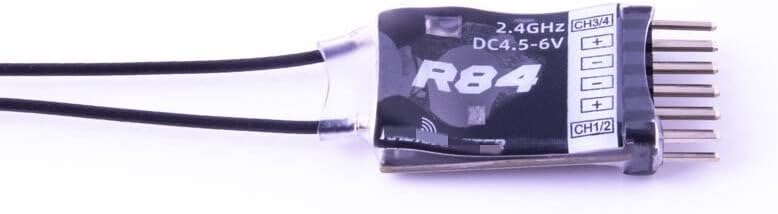
Image: Radiomaster R84 4CH Receiver, showing its compact size and pin configuration for channels 1-4 and power input.
| 特徴 | 仕様 |
|---|---|
| チャンネル | 4 |
| 周波数範囲 | 2400-2483.5MHz |
| 電源入力範囲 | 4.5-8.4V |
| 信号フォーマット | Frsky D8 compatible |
| 出力フォーマット | パルス幅変調 |
| テレメトリサポート | RSSI |
| 制御距離 | 1km以上 |
| アンテナ長 | 6cm |
| サイズ | 17x11mm |
| 重さ | 2グラム |
2.3. Radiomaster R86 6CH Receiver
| 特徴 | 仕様 |
|---|---|
| チャンネル | 6(PWM)、8(SBUS) |
| 周波数範囲 | 2400-2483.5MHz |
| 電源入力範囲 | 4.5-8.4V |
| 信号フォーマット | Frsky D8 compatible |
| 出力フォーマット | パルス幅変調 |
| 範囲 | 1km以上 |
| アンテナ長 | 15cm |
| サイズ | 45x21.2x12.7mm |
| 重さ | 8グラム |
2.4. Radiomaster R86C Receiver
| 特徴 | 仕様 |
|---|---|
| チャンネル | 6(PWM)、8(SBUS) |
| 周波数範囲 | 2400-2483.5MHz |
| 電源入力範囲 | 4.5-8.4V |
| 信号フォーマット | Frsky D8 compatible |
| 出力フォーマット | PWM / SBUS |
| テレメトリサポート | RSSI |
| 範囲 | 1km以上 |
| アンテナ長 | 15cm |
| サイズ | 45x21.2x12.7mm |
| 重さ | 8グラム |
2.5. Radiomaster R88 8CH Receiver
| 特徴 | 仕様 |
|---|---|
| チャンネル | 8 |
| 周波数範囲 | 2400-2483.5MHz |
| 電源入力範囲 | 4.5-8.4V |
| 信号フォーマット | Frsky D8 compatible |
| 出力フォーマット | パルス幅変調 |
| テレメトリサポート | RSSI |
| 範囲 | 1km以上 |
| アンテナ長 | 15cm |
| サイズ | 40x26x16mm |
| 重さ | 11グラム |
3. セットアップとバインディングの手順
This section outlines the general procedure for setting up and binding your Radiomaster receiver to a compatible transmitter (e.g., Radiomaster TX16S, SE).
3.1. Pre-binding Checklist
- Ensure your transmitter is powered on and set to the correct protocol (Frsky D8).
- Verify the receiver is correctly connected to a power source within its specified voltage range (e.g., 4.5-8.4V for R84, R86, R86C, R88; 4.5-6V for R81).
- すべての接続が安全であることを確認します。
3.2. 製本手順
- バインドモードで受信機の電源をオンにする: Connect power to the receiver while holding down the bind button (if present) or follow the specific power-on sequence for bind mode. For most Radiomaster R-series receivers, the LED will flash rapidly indicating bind mode.
- Activate Bind Mode on Transmitter: On your Radiomaster transmitter, navigate to the model setup menu. Select the Frsky D8 protocol. Choose the "Bind" option.
- バインディングの確認: The receiver's LED should change from rapidly flashing to solid, indicating a successful bind. If the LED continues to flash, repeat the binding process.
- テスト接続: After successful binding, power cycle both the transmitter and receiver. Test all control surfaces and functions to ensure proper communication.
Note: Specific bind button locations or power-on sequences may vary slightly between receiver models. Refer to your transmitter's manual for detailed binding instructions.
4. 操作
Once bound, the receiver will establish a connection with your transmitter upon power-up. Ensure your transmitter is powered on first, then power on your model with the receiver. The receiver's LED should illuminate solid, indicating a stable connection.
4.1. チャンネル出力
- PWM出力: Models like R84, R86, R86C, and R88 provide individual PWM outputs for each channel. Connect your servos or ESCs directly to the corresponding pins.
- SBUS出力: The R81 and R86C models also offer SBUS output. SBUS allows for a single wire connection to flight controllers, transmitting all channel data digitally.
4.2. RSSI Telemetry
All listed Radiomaster R-series receivers support RSSI (Received Signal Strength Indicator) telemetry. This feature allows your transmitter to display the signal strength received by the receiver, providing critical information about link quality during flight. Consult your flight controller or transmitter manual for instructions on how to enable and display RSSI data.
5. メンテナンス
Proper maintenance ensures the longevity and reliable operation of your receiver.
- 物理検査: Regularly inspect the receiver for any physical damage, loose wires, or corrosion.
- アンテナの配置: Ensure antennas are properly positioned and not obstructed by carbon fiber or metal components. Avoid sharp bends in the antenna wires.
- 環境保護: 受信機を湿気、ほこり、極端な温度から保護してください。過酷な環境での保護を強化するために、コンフォーマルコーティングや熱収縮チューブの使用を検討してください。
- ファームウェアの更新: Periodically check the Radiomaster official website for any available firmware updates for your receiver or transmitter. Updates can improve performance and add new features.
6。 トラブルシューティング
If you encounter issues with your receiver, consider the following troubleshooting steps:
- No Link/No Control:
- Verify the receiver is correctly bound to the transmitter. Re-bind if necessary.
- Check that the transmitter is powered on and set to the correct protocol (Frsky D8).
- 受信機が規定の電圧内で十分な電力を受け取っていることを確認するtage範囲。
- すべての配線の接続が緩んでいたり損傷がないか点検します。
- Check antenna placement; ensure they are not shielded or damaged.
- 断続的な信号/短距離:
- Check for sources of interference (e.g., other 2.4GHz devices, noisy ESCs, FPV video transmitters).
- Ensure antennas are positioned optimally, away from carbon fiber, metal, and other electronics.
- 送信機の RF 電力設定が適切であることを確認します。
- アンテナに損傷がないか検査します。
- Incorrect Channel Output:
- Confirm the correct output format (PWM/SBUS) is selected on your flight controller or device.
- Check channel mapping on your transmitter and flight controller.
7. 保証とサポート
For warranty information, technical support, or service inquiries, please refer to the official Radiomaster webご購入の際は、サイトをご覧いただくか、正規販売店にお問い合わせください。保証請求の際に必要となりますので、購入証明書を保管してください。
メーカー: HePbak
初回利用可能日: 16年2023月XNUMX日