
導入
This manual provides comprehensive instructions for the SD SPACE DAZZLE 4-in-1 OTG USB Drive. It covers setup, operation, maintenance, troubleshooting, and product specifications to ensure optimal performance and longevity of your device. This USB drive is designed for versatile data transfer and storage across various platforms including iPhone, Android, PC, and Mac devices.
製品の特徴
- 4-in-1接続: Equipped with USB Type C, USB Type A, iPhone (Lightning), and Micro Android ports for broad compatibility.
- プラグアンドプレイ: No drivers required for most operating systems. Simply connect and use.
- 高速データ転送: Features USB 3.0 interface for fast transfer of large file、写真、ビデオ。
- Expand Mobile Storage: Provides external storage for iPhone and Android phones, freeing up internal device space.
- 360°回転設計: Durable metal shell zinc alloy process with a rotating design to protect unused connectors.
- 幅広い互換性: Supports various devices including smartphones, PCs, laptops, car HD players, and smart TVs.

Image: The 4-in-1 OTG USB Drive demonstrating its plug-and-play functionality across multiple device types, including smartphones, laptops, and tablets, highlighting its broad compatibility.
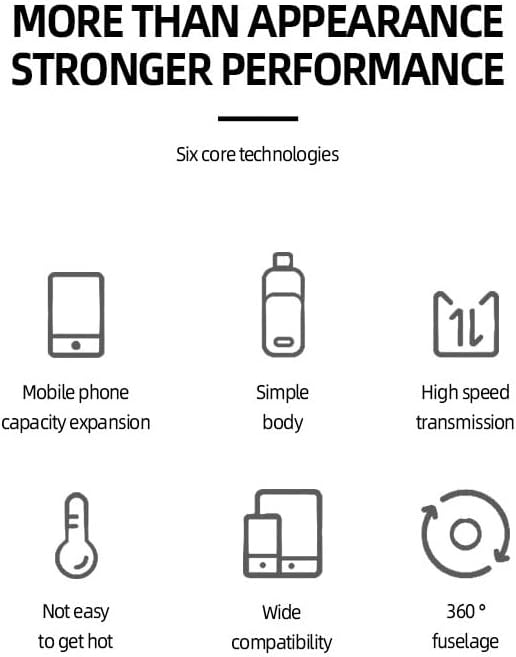
Image: Visual representation of the drive's core features, including mobile storage expansion, high-speed data transfer, and robust design.
セットアップガイド
一般的な接続
The SD SPACE DAZZLE 4-in-1 OTG USB Drive is designed for plug-and-play operation. Simply select the appropriate connector for your device and insert the drive.
For iPhone/iPad Devices
- ダウンロード "Y-Disk" application from the Apple App Store.
- Connect the Lightning connector of the USB drive to your iPhone or iPad.
- Open the "Y-Disk" app to access and manage fileドライブ上にあります。
Androidデバイスの場合
Your Android phone must have OTG (On-The-Go) function enabled to use this flash drive. No additional app download is typically required.
- Connect the Micro Android or USB Type C connector of the USB drive to your Android device.
- Access the drive through your device's file manager or a notification that appears upon connection.
For PC/Mac Devices
- Connect the USB Type A or USB Type C connector of the USB drive to your computer.
- The drive will appear as a removable storage device in your computer's file エクスプローラー (Windows) または Finder (Mac)。
操作手順
File 移行
転送するには files, simply drag and drop them between your device's internal storage and the USB drive. For iPhone/iPad, use the "Y-Disk" app's interface to copy, move, or delete files.
データのバックアップ
重要なものを定期的にバックアップする files from your mobile device to the USB drive to free up space and ensure data safety. The high-speed USB 3.0 interface facilitates quick backups.

Image: The USB drive highlighting its USB 3.0 capabilities, with typical read speeds of 60-100 MB/s and write speeds of 20-50 MB/s for efficient data transfer.
メンテナンス
To ensure the longevity and optimal performance of your SD SPACE DAZZLE 4-in-1 OTG USB Drive, follow these maintenance guidelines:
- コネクタの保護: Utilize the 360° swivel design to protect the unused connector from dust, dirt, and physical damage.
- 極端な状況を避ける: Do not expose the drive to extreme temperatures, direct sunlight, or high humidity.
- 優しく洗浄する: If necessary, clean the exterior of the drive with a soft, dry cloth. Avoid using liquid cleaners or solvents.
- 安全な取り外し Always safely eject the USB drive from your computer or mobile device before physically removing it to prevent data corruption.

Image: The 360-degree swivel mechanism of the USB drive, designed to protect the various connectors when not in use.
トラブルシューティング
- ドライブが認識されません:
- ドライブがポートに完全に挿入されていることを確認してください。
- 別の USB ポートまたはデバイスに接続してみてください。
- For Android, verify that OTG function is enabled in your device settings.
- For iPhone/iPad, ensure the "Y-Disk" app is installed and open.
- 転送速度が遅い:
- Ensure you are using a USB 3.0 compatible port on your computer for optimal speeds.
- 多くの小さな filesは、いくつかの大きなデータを転送するよりも遅くなることがあります files.
- "Y-Disk" App Issues:
- アプリが最新バージョンに更新されていることを確認してください。
- Restart the app or your iPhone/iPad.
- データ破損:
- 取り外す前に必ずドライブを安全に取り出してください。
- Avoid disconnecting the drive during file 転送。
仕様
| 特徴 | 説明 |
|---|---|
| ブランド | SD SPACE DAZZLE |
| メモリストレージ容量 | 128 GB (other capacities may be available) |
| ハードウェアインターフェイス | USB3.0 について |
| 特集 | 4-in-1 USB Drive |
| 接続技術 | USB |
| ハードウェアの接続 | Lightning, USB 2.0 Micro B, USB Type A, USB Type C |
| フラッシュメモリタイプ | USB |
| メーカー | SD Space Dazzle |
保証とサポート
保証情報
This SD SPACE DAZZLE 4-in-1 OTG USB Drive comes with a 1年間保証 ご購入日から1年間有効です。この保証は、通常の使用における製造上の欠陥を対象としています。誤用、事故、不正な改造、または外的要因による損傷は保証の対象外となります。
カスタマーサポート
For technical assistance, warranty claims, or any questions regarding your product, please contact SD SPACE DAZZLE customer support through the retailer where the product was purchased or refer to the contact information provided with your product packaging.