
PONNOR AL929
PONNOR AL929 Money Counter Machine User Manual
モデル: AL929
1. はじめに
This manual provides detailed instructions for the safe and efficient operation of your PONNOR AL929 Money Counter Machine. The AL929 is designed for mixed denomination counting, serial number reading, and multi-currency counterfeit detection, suitable for various business environments.
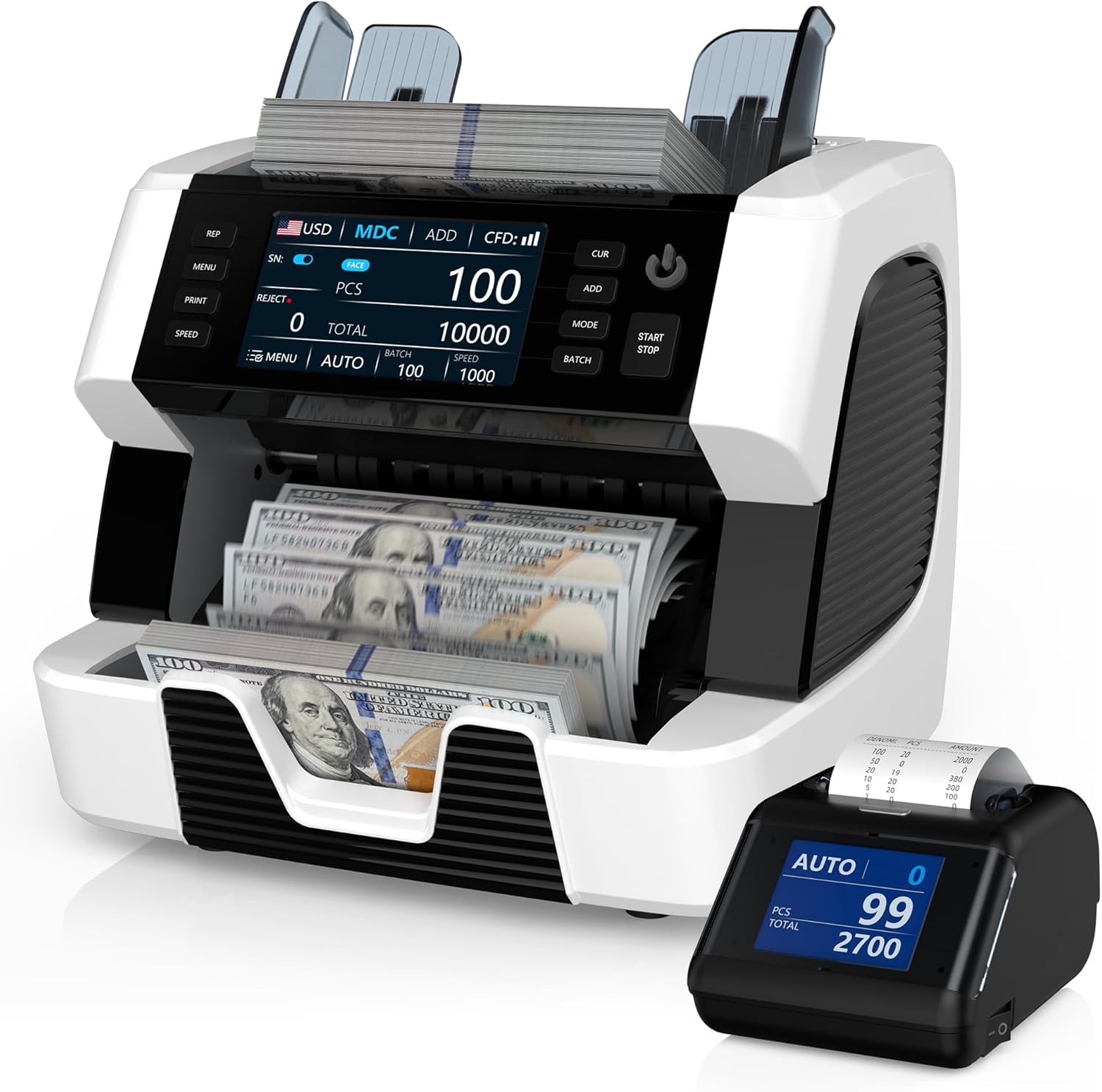
Figure 1: PONNOR AL929 Money Counter Machine with external display and counted bills.
2. パッケージ内容
パッケージにすべてのアイテムが揃っていることを確認します。
- PONNOR AL929 Banknote Counter
- 外部ディスプレイ
- 電源ケーブル
- External Monitor Data Cable
- ユーザーマニュアル
- 掃除用ナイロンブラシ
- CIS校正紙
- ヒューズ
- 柔らかいクリーニングクロス

Figure 2: Package contents of the PONNOR AL929 Money Counter Machine.
3. セットアップ
3.1 初期配置と電源接続
- 機械を安定した平らな面に置きます。
- Connect the power cable to the machine's power socket and then to a suitable power outlet.
- Turn on the machine using the power switch located on the rear panel.
3.2 Connecting the External Display and Printer
- 外部ディスプレイ: Connect the external monitor data cable from the machine's "External Display Port" to the external display unit.
- プリンター: Connect the data cable from the machine's "RS232 Printer Port" to the external thermal printer. Ensure the printer has a paper roll installed.

Figure 3: Rear panel connections for power, external display, and printer.
4. 操作
The AL929 features a 4.5-inch touch screen and button keypad for intuitive control.

図4: コントロールパネルview with key functions labeled.
4.1 Basic Counting Modes
- AUTO/MANUAL Counting: Select the desired mode on the control panel. In AUTO mode, counting begins automatically when bills are placed in the hopper.
- Mixed Denomination Counting (MDC): This mode counts mixed bills and provides a total value, quantity, and value breakdown by denomination.
- ADD関数: Accumulates the count of multiple batches.
- BATCH Function: Counts bills into preset batches (e.g., 100 bills).
- 速度調整: Adjust the counting speed (e.g., 800-1200 pieces/min) as needed.
4.2 Multi-Currency Support
The AL929 supports over 120 currencies. The default recognizable currencies include USD, EUR, GBP, CAD, and MXN. For other currencies, contact support to obtain the necessary update files.

Figure 5: Multi-currency and mixed denomination counting display.
4.3 Serial Number Reading
The machine can read and record serial numbers of counted bills. This feature is accessible via the control panel.
4.4 偽造品検出
The AL929 is equipped with multiple detection methods for bank-level anti-counterfeiting:
- UV (Ultraviolet Detection): Detects UV features on banknotes.
- MG (Magnetic Ink Detection): Checks for magnetic ink patterns.
- IR(赤外線センサー): Verifies infrared security features.
- 2CIS (Contact Image Sensor): Provides image recognition for detailed analysis.
- NT (Note Thickness) & SN (Serial Number) Recognition: Additional security checks.
If a counterfeit note is detected, the machine will issue a red warning and an audible alert.

Figure 6: Bank-grade counterfeit detection features.
4.5 Printing Results
After connecting the external printer, press the 'PRINT' button on the machine to generate a detailed report. The report includes currency type, total amount, serial numbers, and the number of notes counted.

Figure 7: External thermal printer in operation, showing a sampルプリントアウト。
5. メンテナンス
5.1 機械の清掃
定期的なクリーニングにより、最適なパフォーマンスと寿命が確保されます。
- CIS Sensors: Open the back cover and use the provided nylon brush or soft cleaning cloth to gently clean the CIS sensors.
- ジェネラルダスト: Use the nylon brush or soft cleaning cloth to remove dust from the hopper, stacker, and other accessible areas.
5.2 Adjusting Feeding Gap
If bills are jamming frequently or feeding improperly, the feeding gap may need adjustment. Locate the adjustable screw and turn it slightly to optimize the gap. Refer to the manual for precise adjustment instructions.

図8:内部 view highlighting the banknote processing wheel and adjustable screw.
6。 トラブルシューティング
| 問題 | 考えられる原因 | 解決 |
|---|---|---|
| Red warning/Audible alert | Counterfeit, half bills, or very worn bills detected. Incorrect function setting (e.g., FACE/ORI, ADD, BATCH, SN). Counting mode error (MDC mode only effective for multi-currency). | Remove the suspect note from the stacker. Check and adjust function settings. Refer to the manual for specific mode requirements. Press RESTART to continue. |
| ビル・ジャミング | Bills are wrinkled or damaged. Feeding gap is too tight or too loose. CIS sensors are dirty. | Remove the jammed bill. Adjust the feeding gap using the adjustable screw. Clean the CIS sensors as described in the Maintenance section. |
| Cannot count specific currency | Currency not pre-installed or firmware is outdated. | Contact PONNOR support to obtain the necessary currency installation packages and update the machine via the USB port. |
7. 仕様
- モデル: AL929
- 寸法: 7.1 x 13.1 x 11.4インチ
- 商品の重量: 19.05ポンド
- カウント速度: 800-1200 pieces/min
- Detection Methods: 2CIS, UV, MG, IR, NT, SN
- 通貨サポート: 120+ currencies (default: USD, EUR, GBP, CAD, MXN)
- 画面: 4.5インチのタッチスクリーン
- 接続性: USB for updates, RS232 for printer, External Display Port
8. 保証とサポート
PONNOR is committed to providing high-quality products and customer satisfaction. For warranty information, technical support, or currency updates, please contact PONNOR customer service. We provide more than 120 currencies for you to update; you can contact us to get the file.
連絡先: Refer to the contact details provided on the official PONNOR webサイトまたは購入書類をご覧ください。
関連文書 - AL929
 |
MUNBYNIMC01紙幣カウンターユーザーマニュアル MUNBYN IMC01紙幣カウンターのユーザーマニュアル。機能、操作、設置、メンテナンス、技術仕様について詳しく説明しています。この高度な機器を使って紙幣を効率的に計数・管理する方法を学びましょう。 |
 |
MUNBYNIMC01紙幣カウンターユーザーマニュアル MUNBYN IMC01紙幣カウンターのユーザーマニュアル。機能、操作、設置、メンテナンス、技術仕様について詳しく説明しています。紙幣の計数方法、各種モードの使い方、よくある問題のトラブルシューティング方法を学びましょう。 |
 |
DETECK DT600C マネーカウンター ユーザーマニュアル: 操作、機能、トラブルシューティング DETECK DT600Cマネーカウンターの包括的なユーザーマニュアル。機能、操作モード、偽造品検出、技術仕様、メンテナンス、トラブルシューティング、保証について解説します。 |
 |
Kolibri KBR-1500 One-Pocket Mixed Denomination Money Counter User Manual User manual for the Kolibri KBR-1500, a one-pocket mixed denomination money counter. Provides detailed instructions on operation, safety, maintenance, troubleshooting, and warranty information. |
 |
DETECK DT500 混合額面多通貨マネーカウンター ユーザーマニュアル 多通貨対応マネーカウンター「DETECK DT500」のユーザーマニュアルです。機能、仕様、操作、校正、メンテナンス、安全に関する注意事項など、詳細な情報が記載されています。 |
 |
MUNBYN IMC01 紙幣カウンター:よくある質問とトラブルシューティングガイド MUNBYN IMC01 紙幣カウンターの包括的な FAQ およびトラブルシューティング ガイド。機能、エラー コード、クリーニング、キャリブレーション、設定などを網羅しています。 |
Ask a question about this manual
Ask about setup, troubleshooting, compatibility, parts, safety, or missing instructions. Manuals+ will review the question and use this page’s manual context to help answer it.