
1. はじめに
Thank you for choosing the OUILA Rechargeable LED Cabinet Light. This manual provides detailed instructions for the safe and efficient use of your new lighting product. Please read it thoroughly before installation and operation, and retain it for future reference.
2.製品オーバーview およびパッケージの内容
The OUILA LED Cabinet Light is a versatile, rechargeable, and dimmable lighting solution featuring a motion sensor. It is designed for various indoor applications such as cabinets, wardrobes, drawers, stairs, and kitchens, providing comfortable and stable illumination.
パッケージ内容:
- OUILA LED Cabinet Light Bar (x2 for 2-piece set)
- USB-C Charging Cable (x2 for 2-piece set)
- Adhesive Magnetic Strips (for non-metallic surfaces)

Image: Two OUILA LED cabinet light bars and their respective USB-C charging cables, illustrating the complete product package.
3. 主な特徴
- モーションセンサー: Automatically detects human activity within 3 meters (10 feet) in dark environments.
- 3つの照明モード: Night Sensing (AUTO), Always ON, and OFF.
- 無段階調光: Adjustable brightness from 10% to 100% with memory function.
- 充電式バッテリー: Built-in 2800mAh lithium polymer battery, charged via USB-C.
- 超薄型デザイン: 9mm thick aluminum alloy body for sleek integration.
- 目の保護: High-quality LEDs provide stable, flicker-free, and anti-glare illumination.
- 簡単なインストール: Integrated magnets for direct attachment to metallic surfaces or adhesive magnetic strips for other surfaces.

Image: Visual comparison highlighting the OUILA light's eye protection features, such as no flicker and a soft light source, compared to traditional cabinet lights.
4. セットアップとインストール
The OUILA LED Cabinet Light offers two convenient installation methods:
Method 1: Magnetic Adsorption
The light bar has built-in magnets. Simply attach it directly to any magnetic metallic surface (e.g., iron shelves, refrigerators).
Method 2: Adhesive Magnetic Strips
For non-metallic surfaces (e.g., wood cabinets, walls), use the included double-sided adhesive magnetic strips:
- Clean the target surface to ensure it is dry and free of dust.
- Peel off the protective film from one side of the adhesive magnetic strip.
- Attach the strip firmly to the desired installation location.
- Align the light bar with the magnetic strip and allow the built-in magnets to secure it in place.
The light can be easily removed from the magnetic strips for charging or use as a portable light.

Image: Illustration of the two installation methods: using the built-in magnets for metallic surfaces and using adhesive magnetic strips for non-metallic surfaces.
5. 操作手順
The light features a multi-function button for mode selection and brightness adjustment.
5.1. スイッチングモード
Press the button briefly to cycle through the three operating modes:
- First Press: Always ON Mode - ライトは点灯し続けます。
- Second Press: Night Sensing Mode (AUTO) - The light will automatically turn on when motion is detected in a dark environment (within 3 meters / 10 feet). It will turn off after 20 seconds if no further motion is detected, conserving energy.
- Third Press: OFF Mode - The light is turned off.

画像: 詳細 view of the control panel, illustrating how to switch between Always-ON, Auto Sensing, and OFF modes with button presses.
5.2. 明るさ調整(調光)
When the light is on (in either Always ON or Night Sensing mode), press and hold the button to adjust the brightness continuously (stepless dimming) from 10% to 100%. Release the button when the desired brightness is reached. The light features a memory function, retaining the last brightness setting when turned off and on again.
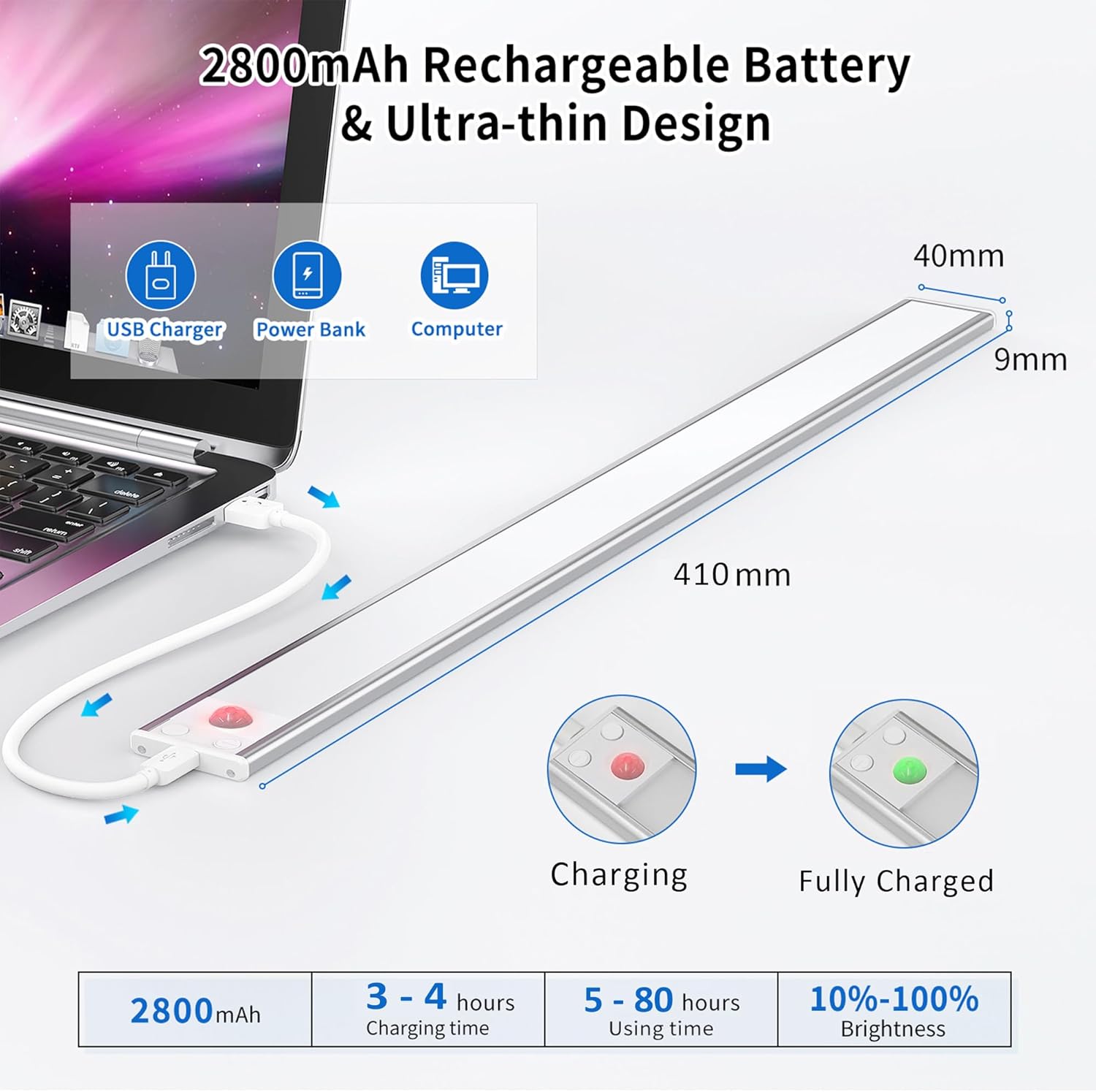
Image: Demonstration of the stepless dimming feature, showing the light's output at 10%, 50%, and 100% brightness in a kitchen setting.
6. バッテリーの充電
The OUILA LED Cabinet Light is equipped with a built-in 2800mAh rechargeable lithium polymer battery.
- Connect the provided USB-C charging cable to the light's charging port.
- Connect the other end of the cable to a DC 5V-1A power source (e.g., USB charger, power bank, computer USB port).
- 充電中は赤いインジケータライトが点灯します。
- バッテリーが完全に充電されると、インジケーターライトが緑色に変わります。
- 充電には通常3〜4時間かかります。
- A full charge provides approximately 5 to 80 hours of use, depending on the selected brightness level and mode.

Image: Technical diagram detailing the product dimensions, various USB charging methods, and battery performance metrics including charging time and usage duration.
7. メンテナンス
- クリーニング: ライトの表面は柔らかく乾いた布で拭いてください。研磨剤入りの洗剤や溶剤は使用しないでください。
- バッテリーのケア: To prolong battery life, avoid fully discharging the battery frequently. Charge the light regularly, especially if it will not be used for an extended period.
- ストレージ: ライトを使用しないときは、涼しく乾燥した場所に保管してください。
8。 トラブルシューティング
| 問題 | 考えられる原因 | 解決 |
|---|---|---|
| ライトが点灯しません。 | Battery is depleted. Incorrect mode selected. | Charge the light fully. Press the button to switch to Always ON or Night Sensing mode. |
| モーションセンサーが動作していません。 | Light is not in Night Sensing (AUTO) mode. Ambient light is too bright. Obstruction blocking sensor. | Ensure the light is in Night Sensing mode. The sensor only activates in dark environments. Clear any obstructions from the sensor area. |
| Light turns off too quickly in Night Sensing mode. | 連続した動きは検出されませんでした。 | The light is designed to turn off after 20 seconds of no motion to save energy. This is normal operation. |
9. 仕様
| ブランド | OUILA |
| モデル番号 | GLS-C018 |
| 寸法(長さ×幅×高さ) | 41 x 4 x 1.2 cm(16.1 x 1.6 x 0.5インチ) |
| 重さ | 490 g (1.08 ポンド) |
| 材料 | アルミニウム合金 |
| 光の色温度 | 6000K(クールホワイト) |
| LEDの数 | 72 |
| 力 | 5ワット |
| 光束 | 3000ルーメン |
| バッテリー容量 | 2800mAh |
| 充電ポート | USBタイプC |
| 入力ボリュームtage | 5ボルト |
| 特集 | Motion Sensor, Dimmable, Rechargeable, Magnetic Installation |
| 使用環境 | 屋内 |
10. 安全情報
- Do not disassemble, modify, or repair the product yourself. This may cause damage or injury.
- Keep the product away from water and high humidity to prevent electrical shock or damage.
- Do not expose the product to extreme temperatures (hot or cold) or direct sunlight for prolonged periods.
- 充電には付属の USB-C ケーブルまたは認定された同等のケーブルのみを使用してください。
- お子様の手の届かない場所に保管してください。
11. 保証とサポート
For any questions, concerns, or technical support regarding your OUILA LED Cabinet Light, please contact the seller or manufacturer through your purchase platform. Please have your model number (GLS-C018) and purchase details ready.