
導入
Thank you for choosing the ProtoArc Ergonomic Foldable Keyboard XK03. This ultra-slim, portable, and rechargeable keyboard is designed for comfort and convenience, allowing you to type efficiently across multiple devices. Its unique split ergonomic design promotes a natural typing position, reducing strain during extended use. This manual provides detailed instructions for setup, operation, and maintenance to ensure optimal performance.

Image: The ProtoArc XK03 keyboard being used in different environments, highlighting its versatility for business, education, and travel.
製品の特徴
- 分割人間工学設計: Features a unique U-shape with a 166-degree angle for a natural typing position, minimizing hand and wrist pressure.
- マルチデバイス接続: Pair up to 3 devices simultaneously via Bluetooth channels and switch between them easily.
- Ultra Slim & Elegant: Pocket-sized and foldable with a wear-resistant PU leather surface, ideal for portability.
- 充電式バッテリー: Built-in 250mAh lithium battery offers up to 150 days of standby time on a single 2-hour charge via USB-C.
- マルチメディアファンクションキー: Includes 13 multimedia function keys for quick access to various controls.

Image: Visual representation of the keyboard's split ergonomic design, emphasizing the 166-degree angle for comfortable typing.

Image: The keyboard demonstrating multi-device connectivity with Bluetooth channels BT1, BT2, and BT3.
パッケージ内容
- ProtoArc 人間工学に基づいた折りたたみ式キーボード XK03
- USB-C充電ケーブル
- ユーザーマニュアル
- 電話/タブレットスタンド

Image: All items included in the ProtoArc XK03 product package.
設定
1. キーボードの充電
Before first use, fully charge the keyboard using the provided USB-C cable. Connect the USB-C end to the keyboard's charging port and the USB-A end to a power source (e.g., computer USB port, USB wall adapter).
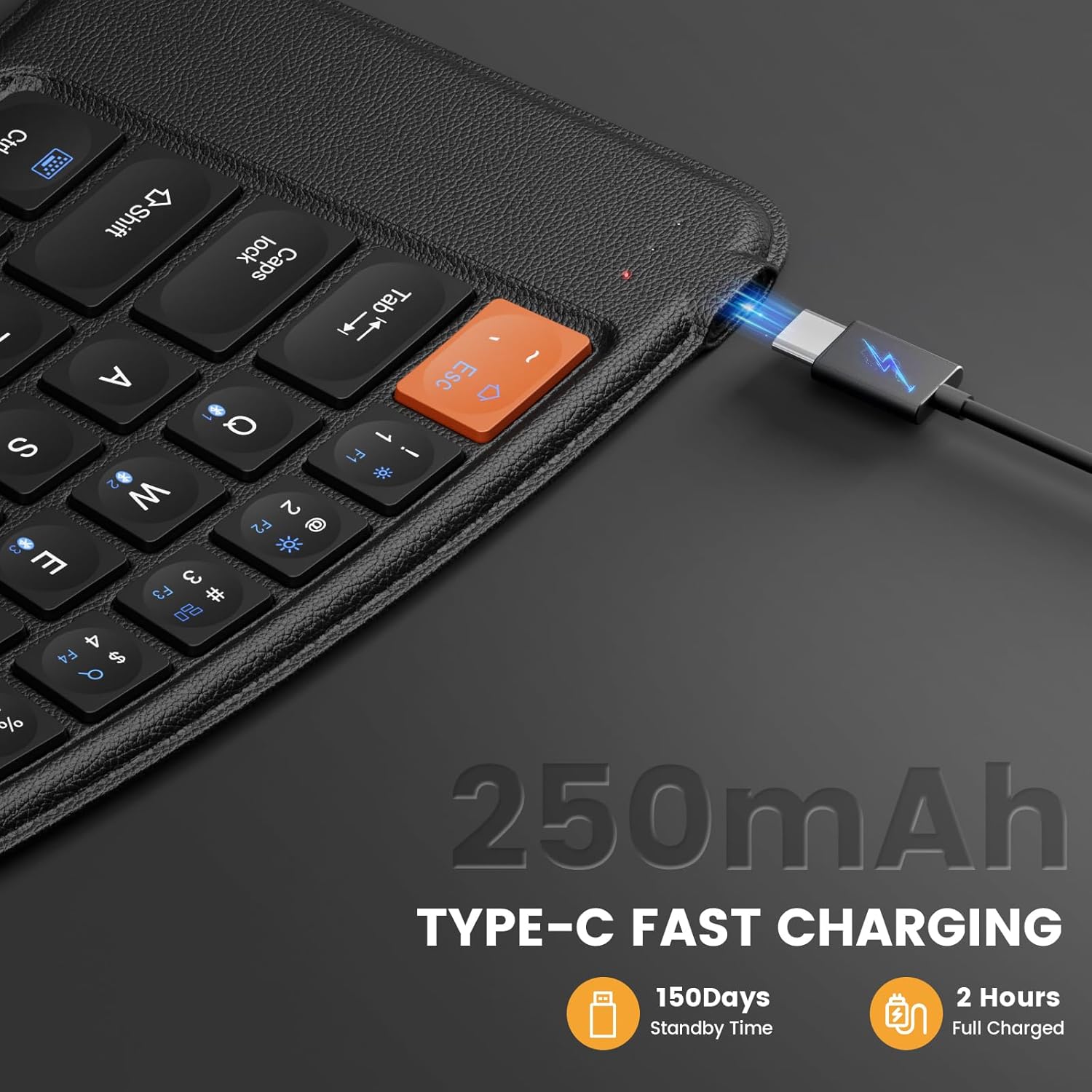
Image: The keyboard's USB-C charging port with the charging cable inserted.
2.Bluetoothペアリング
- Unfold the keyboard to power it on. The indicator light for the current channel (1, 2, or 3) will blink.
- を押し続けます Fn キーとBluetoothチャンネルキーの1つ(Q チャンネル1の場合、 W チャネル2の場合、または E for channel 3) for 3-5 seconds until the corresponding indicator light starts blinking rapidly. This indicates the keyboard is in pairing mode.
- On your device (mobile phone, tablet, or laptop), go to Bluetooth settings and enable Bluetooth.
- 検索する available devices. You should see "XK03" or "ProtoArc XK03" in the list.
- Select "XK03" to connect. Once connected, the indicator light on the keyboard will stop blinking and remain solid for a few seconds before turning off.
- To pair additional devices, repeat steps 2-5, selecting a different Bluetooth channel key (Q, W, or E).
ビデオ: オーバーview of the ProtoArc XK03 Foldable Keyboard, demonstrating its features and multi-device pairing capabilities.
ビデオ: 詳細な説明view of the ProtoArc XK03 Foldable Keyboard, including demonstrations of its ergonomic design and multi-device switching.
操作手順
自動電源オン/オフ
The keyboard features an automatic power on/off function. Simply unfold the keyboard to power it on, and fold it to power it off. This helps conserve battery life.

Image: The keyboard showing its auto power on/off functionality based on its folded or unfolded state.
デバイス間の切り替え
Once paired with multiple devices, you can switch between them by simply pressing the Fn キーと対応するBluetoothチャンネルキー(Q, W、 または E) for the desired device. The switch is instant.
マルチメディアファンクションキー
The keyboard includes dedicated multimedia function keys. To activate these functions, press the Fn key simultaneously with the desired F1-F12 key. Some common functions include:
- 直接押す ESC to get "`".
- 直接押す F1〜F10 to get numbers 1~0.
- プレス Fn + Esc & F1 ~ F12 to achieve multimedia functions (e.g., access homepage, brightness, volume).
- プレス Shift + Esc & F1 ~ F12 シンボルを取得するための対応するキー。
- プレス Fn + Shift + F1 ~ F12 corresponding keys to achieve FN function.
Note: This portable keyboard may not fully replicate all functions of a general office full-size keyboard. Some key combinations like "Ctrl + Alt + Delete" on Windows may not be achievable.
仕様
| モデル | 型番 |
| 接続技術 | Bluetooth (USB-C for charging) |
| バッテリー容量 | 250mAhリチウム電池 |
| 待機時間 | 150日間 |
| 充電時間 | 約2時間 |
| キーボードの説明 | Foldable Ergonomic |
| 対応デバイス | 携帯電話、タブレット、ノートパソコン |
| アイテム重量 | 14.9オンス |
| パッケージ寸法 | 9.84 x 6.5 x 1.46インチ |
| 材料 | Metal (with PU leather surface) |

Image: The folded dimensions of the ProtoArc XK03 keyboard, illustrating its compact and portable nature.
トラブルシューティング
- キーボードが接続されない: Ensure the keyboard is fully charged and in pairing mode (indicator light blinking rapidly). Check your device's Bluetooth settings to ensure it's enabled and searching for devices. Try restarting both the keyboard and your device.
- キーが反応しない: Verify the keyboard is connected to the correct Bluetooth channel. Ensure the keyboard is not in sleep mode (unfold and refold if necessary).
- 遅延または遅延入力: Ensure your device is within the effective Bluetooth range. Minimize interference from other wireless devices.
- マルチメディア キーが機能しない: を押していることを確認してください Fn キーと目的のファンクションキーを同時に押します。
メンテナンス
- キーボードは定期的に柔らかく乾いた布で拭いてください。
- キーボードを極端な温度、湿気、直射日光にさらさないでください。
- 過酷な化学薬品や研磨剤入りのクリーナーは使用しないでください。
- Store the keyboard in its folded state when not in use to protect the keys and conserve battery.
保証とサポート
ProtoArc products come with a standard manufacturer's warranty. For specific warranty details, technical support, or any inquiries regarding your XK03 keyboard, please refer to the contact information provided in the original product packaging or visit the official ProtoArc webサイト。