
Panasonic TX-65MXW834
Panasonic TX-65MXW834 65-inch 4K Ultra HD LED Smart TV
ユーザーマニュアル
導入
This manual provides essential information for the safe and efficient operation of your Panasonic TX-65MXW834 65-inch 4K Ultra HD LED Smart TV. Please read this manual thoroughly before using the product and retain it for future reference. This television integrates advanced display technologies, including HDR Bright Panel Plus and the HXC Processor, for stunning visuals. It also features the Fire TV operating system for seamless access to streaming services and smart functionalities.

図1: 前面 view of the Panasonic TX-65MXW834 65-inch Smart TV.
安全情報
Always adhere to the following safety precautions to prevent electric shock, fire, damage, or injury:
- テレビを雨や湿気にさらさないでください。
- テレビを開けないでくださいasing. すべての修理は資格を持った担当者に依頼してください。
- 適切な換気を確保し、換気口を塞がないようにしてください。
- テレビが落ちないように、安定した水平な場所に置いてください。
- 雷雨のときや長期間使用しない場合は、テレビを電源コンセントから抜いてください。
- 電池は子供の手の届かないところに保管し、適切に廃棄してください。
箱の中身
セットアップを続行する前に、すべてのコンポーネントが存在していることを確認してください。
- Panasonic TX-65MXW834 65-inch Smart TV
- リモートコントロール
- AAA Batteries (2x) for Remote Control
- 電源ケーブル
- TV Stand Feet (2x) and Screws
- ユーザーマニュアル(このドキュメント)
- クイックスタートガイド
設定
1. テレビスタンドの取り付け
Carefully place the TV screen-down on a soft, clean surface. Align the stand feet with the designated slots on the bottom of the TV and secure them with the provided screws. Ensure the stand is firmly attached before placing the TV upright.
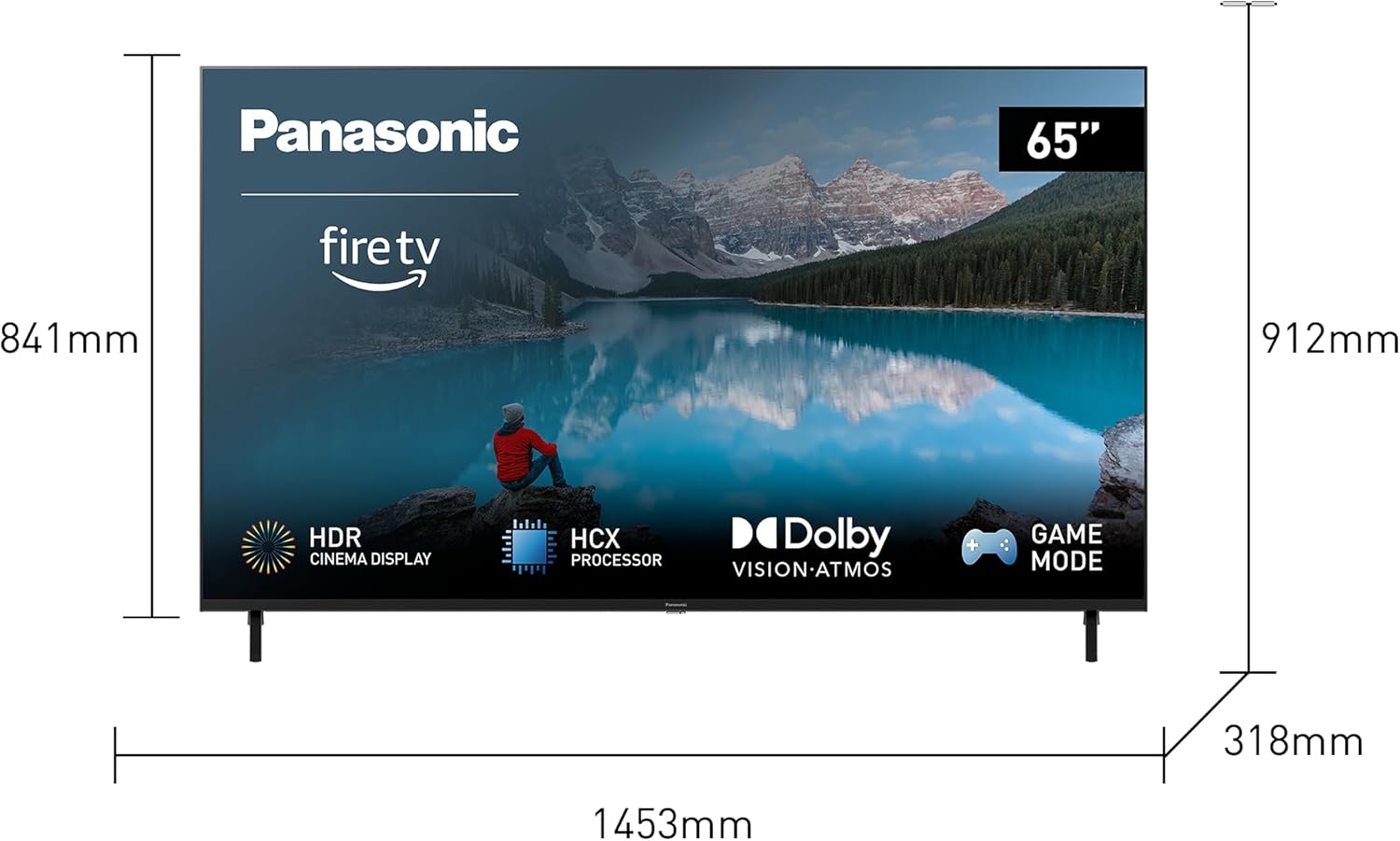
図 2: テレビの寸法とスタンドの取り付けガイド。
2. 周辺機器の接続
Connect your external devices such as cable boxes, gaming consoles, or sound systems to the appropriate ports on the back of the TV. The Panasonic TX-65MXW834 offers a variety of connectivity options:
- HDMIポート(4個): For high-definition video and audio devices. One port supports eARC for enhanced audio return channel.
- USBポート(2個): USB ストレージ デバイスを接続します。
- イーサネット (LAN) ポート: 有線インターネット接続用。
- Digital Audio Output (Optical/Toslink): 外部オーディオシステムに接続します。
- アンテナ/ケーブル入力: アンテナやケーブルテレビを接続します。
- ヘッドフォンジャック: プライベートリスニング用。
- CI (Common Interface) Slot: 条件付きアクセス モジュール用。

図3:背面 view of the TV with port layout.
3. 初期電源投入とネットワーク設定
Plug the power cable into the TV and then into a wall outlet. The TV will power on and guide you through the initial setup process, including language selection, channel scanning, and network connection. You can connect to your home network via Wi-Fi or Ethernet.
For Wi-Fi setup, select your network from the list and enter the password. For Ethernet, simply connect a network cable to the LAN port.

Figure 4: Fire TV user interface during initial setup.
テレビの操作
1. 基本操作
- 電源オン/オフ: リモコンの電源ボタンを押します。
- 入力選択: Use the "Input" button on the remote to switch between HDMI, TV, and other sources.
- 音量コントロール: 音量アップ/ダウンボタンを使用します。
- チャンネルナビゲーション: テレビ放送の場合は、チャンネルアップ/ダウンボタンを使用します。
2. Fire TV Smart Features
Your Panasonic TV comes with integrated Fire TV OS, providing access to a vast library of streaming content and smart applications. Navigate the Fire TV home screen using the remote control to find your favorite movies, TV shows, and apps.

Figure 5: Access popular streaming services through Fire TV.
3. Alexaによる音声コントロール
The included remote control features a built-in microphone and Alexa button. Press and hold the Alexa button, then speak your command to control the TV, search for content, launch apps, or even control compatible smart home devices.

Figure 6: Using Alexa voice commands with your TV.
You can also integrate your TV with other smart home devices, such as Ring video doorbells, to view live feeds directly on your screen.

Figure 7: Smart home integration example with Ring doorbell.
4. 画像とサウンドの設定
Your TV features advanced picture and sound technologies for an immersive viewing experience. Access the settings menu to adjust brightness, contrast, color, and other display options. The TV supports Multi HDR formats including HDR10+, Dolby Vision, and HLG for optimal picture quality.

Figure 8: Multi HDR support for enhanced visuals.
For audio, the TV features high-quality box-bottom speakers and supports Dolby Atmos for rich, immersive sound. You can also connect external Bluetooth audio devices like headphones or speakers.

図 9: Dolby Atmos による没入型オーディオ体験。

Figure 10: Bluetooth audio connectivity.
5. Optimal Gaming Experience
The TV includes a Game Mode and supports HDMI 2.1 features like HRF/VRR (High Refresh Rate/Variable Refresh Rate) to ensure smooth and responsive gaming without lag.

Figure 11: Enhanced gaming with Game Mode and HDMI 2.1 features.
メンテナンス
テレビの寿命を延ばし、最適なパフォーマンスを確保するには、次のメンテナンス ガイドラインに従ってください。
- 画面のクリーニング: 柔らかく糸くずの出ない布で画面を優しく拭いてください。頑固な汚れには、軽くamp布に水または専用のスクリーンクリーナーを含ませてください。絶対に液体をスクリーンに直接吹きかけないでください。
- Casing クリーニング: テレビの表面を拭くときは、柔らかく乾いた布を使用してください。asing. 研磨剤入りの洗剤や溶剤は使用しないでください。
- 換気: Ensure the ventilation openings on the back of the TV are not blocked by dust or objects. Regularly clean dust from these areas.
- 電源コード: 電源コードに損傷がないか定期的に確認してください。損傷している場合は、資格のあるサービス担当者に連絡して交換してください。
トラブルシューティング
テレビで問題が発生した場合は、次の一般的な解決策を参照してください。
| 問題 | 考えられる解決策 |
|---|---|
| 電源なし | Check if the power cable is securely plugged into the TV and the wall outlet. Ensure the outlet has power. Try a different outlet. |
| 画像/音声なし | Verify the correct input source is selected. Check HDMI/audio cable connections. Restart connected devices. |
| リモコンが動作しない | 電池を交換してください。リモコンとテレビの赤外線センサーの間に障害物がないことを確認してください。 |
| Wi-Fi接続の問題 | Restart your router and modem. Re-enter the Wi-Fi password. Move the TV closer to the router or use a wired Ethernet connection. |
| アプリが読み込まれない/クラッシュする | Ensure the TV's software is up to date. Clear the app's cache or reinstall the app. Restart the TV. |
これらの解決策を試しても問題が解決しない場合は、パナソニックのカスタマー サポートにお問い合わせください。
仕様
Detailed technical specifications for the Panasonic TX-65MXW834:
| 特徴 | 詳細 |
|---|---|
| モデル名 | LED TV TX-65MXW834 |
| スクリーン技術 | 液晶 |
| 解決 | 4K (3840 x 2160) |
| リフレッシュレート | 60Hz |
| 寸法(幅×高さ×奥行き) | 145.3 x 91.2 x 31.8 cm(スタンド付き) |
| 重さ | 25.8キログラム |
| 接続性 | Bluetooth, Ethernet, HDMI (4x, 1x eARC), WLAN (Wi-Fi) |
| サポートされているインターネットサービス | Netflix, Prime Video, Disney+, YouTube, and more via Fire TV OS |
| 特集 | Intelligent Voice Recognition (Alexa), HDR Bright Panel Plus, HXC Processor, Multi HDR (HDR10+, Dolby Vision, HLG), Dolby Atmos, Game Mode (HDMI 2.1 HRF/VRR) |
| エネルギー効率クラス (SDR) | G(110 kWh/1000時間) |
| エネルギー効率クラス (HDR) | G(228 kWh/1000時間) |
For detailed energy information, refer to the official EU product data sheet:

Figure 12: EU Product Data Sheet.

図 13: EU エネルギーラベル。
Official EU Product Database Link: https://eprel.ec.europa.eu/qr/1401868
保証とサポート
Your Panasonic TX-65MXW834 TV comes with a manufacturer's warranty. Please refer to the warranty card included in the packaging for specific terms and conditions, including the warranty period and coverage details.
For technical support, service, or warranty claims, please contact Panasonic customer service. You can find contact information on the official Panasonic webサイトまたはテレビに付属のマニュアルをご覧ください。
Online support and FAQs may also be available on the Panasonic support portal. Always provide your model number (TX-65MXW834) and serial number when contacting support.
Ask a question about this manual
Ask about setup, troubleshooting, compatibility, parts, safety, or missing instructions. Manuals+ will review the question and use this page’s manual context to help answer it.