
SECULINK C17-2MP
SECUEYE C17-2MP Dome Camera User Manual
Model: C17-2MP | Brand: SECULINK
導入
This manual provides comprehensive instructions for the installation, operation, and maintenance of your SECUEYE C17-2MP Dome Camera. This advanced security camera is designed for outdoor use, offering high-definition video, intelligent features, and robust weather resistance to ensure reliable surveillance.
製品終了view
The SECUEYE C17-2MP Dome Camera is a versatile security solution featuring:
- Full HD 2MP: Produces brilliant 1080P video with crystal clear image quality. Advanced color night vision (premium LEDs and smart IR-Cut filter) ensures visibility up to 100ft (30m) even at night.
- パン/チルト/ズーム: 幅広い viewing angle with horizontal 335-degree and vertical 90-degree rotation, plus 10x digital zoom. Easily controlled via the mobile app to view more details or a larger area.
- Floodlight and Sound Alarm: Built-in spotlights activate upon motion detection at night, complemented by a security siren for deterrence. Advanced human detection reduces false positives from moving cars or leaves.
- 自動追跡: Intelligently detects and tracks moving objects, automatically adjusting PTZ functions to follow them. Records tracking routes to a TF card and sends real-time alerts to your mobile phone.
- デュアルバンド WiFi: Supports both 2.4 GHz and 5 GHz WiFi for optimal network performance. 2.4 GHz offers wider range, while 5 GHz ensures less interference, providing a high-speed and stable connection.
パッケージ内容
パッケージにすべてのアイテムが含まれていることを確認します。
- SECUEYE C17-2MP Dome Camera
- 充電器
- 取り付けネジとアンカー
- ユーザーマニュアル(このドキュメント)
セットアップガイド
1. 物理的な設置
カメラは壁掛け用に設計されています。最適な設置場所を選んでください。 view通信範囲が広く、Wi-Fi ネットワークと電源コンセントの範囲内にあること。

Image: The SECUEYE C17-2MP Dome Camera with its dual antennas, designed for wall mounting. A smartphone screen next to it shows the camera's live feed and 2.4G/5G Wi-Fi options.
- 取り付け面を準備します。 Ensure the surface is stable and can support the camera's weight.
- ドリル穴をマークする: Use the mounting template (if included) or the camera base to mark the positions for drilling.
- ドリル穴: 必要に応じて下穴を開け、壁アンカーを挿入します。
- カメラを固定する: 付属のネジを使用してカメラベースを壁に取り付けます。
- 接続電源: Plug the charger into the camera's power port and then into a power outlet.
2. ネットワーク接続
The camera supports dual-band Wi-Fi (2.4 GHz and 5 GHz) for flexible connectivity.

Image: A visual representation of the camera's dual-band Wi-Fi capability, indicating support for both 2.4GHz and 5GHz networks for optimal performance.
- アプリをダウンロード: 検索する "SECUEYE" in your mobile device's app store (iOS or Android) and download the official application.
- アカウントを作成する: アプリを開き、画面の指示に従って新しいアカウントを登録します。
- デバイスを追加: Tap the "+" icon or "Add Device" option in the app. Select your camera model.
- Wi-Fiに接続します: Follow the app's prompts to connect the camera to your Wi-Fi network. This typically involves scanning a QR code displayed on your phone with the camera or entering Wi-Fi credentials.
- 接続を待つ: The camera will indicate a successful connection (e.g., a voice prompt or LED indicator change).
カメラの操作
1.ライブ View PTZコントロール
Access the live video feed and control the camera's pan, tilt, and zoom functions directly from the SECUEYE mobile app.

画像: ライブ映像を表示するスマートフォン view from the camera, with on-screen controls for panning (left/right arrows) and tilting (up/down arrows) the camera's view.
パン/チルト: ライブ画面を指でスワイプ view screen in the app to rotate the camera horizontally (335°) and vertically (90°).
デジタルズーム: ピンチしてライブ映像を拡大または縮小 view to get a closer look at details (up to 10x digital zoom).
2. 自動追跡
Enable automatic tracking to have the camera follow detected moving objects within its field of view.
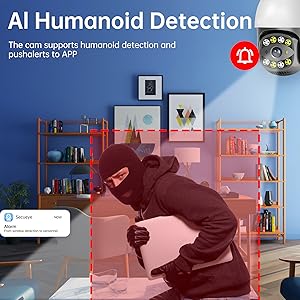
Image: Two individuals in a backyard, with red boxes indicating the camera's human movement tracking capability, showing it can follow subjects.
When activated, the camera will automatically adjust its pan and tilt to keep the detected object centered in the frame. Tracking routes are recorded to the TF card, and alerts are sent to your mobile phone.
3. 人間の検知とアラート
The camera utilizes advanced AI to distinguish human motion from other movements, reducing false alarms.

Image: An illustration of the AI Humanoid Detection feature, showing a person highlighted in red within the camera's view, with an alarm bell icon indicating an alert.
Configure alert settings in the app to receive instant notifications on your mobile device when human activity is detected. You can customize alarm time periods and sensitivity.
4. ナイトビジョン
The camera offers both infrared (IR) and full-color night vision modes for clear monitoring in low-light conditions.

Image: A three-panel comparison showing the camera's night vision capabilities: Infrared Light (monochrome), White Light (illuminated), and Full Color Night (with ambient light and floodlight activation).
IRナイトビジョン: Provides clear black-and-white video up to 100ft (30m) in complete darkness.
カラーナイトビジョン: Activates built-in spotlights upon motion detection at night to provide full-color video.
5. 双方向オーディオ
カメラに内蔵されたマイクとスピーカーを使用して、訪問者と通信したり、侵入者を阻止したりできます。

Image: A graphic illustrating the two-way audio feature, showing a person at a door with a package and speech bubbles indicating communication with the camera user.
Tap the microphone icon in the app to speak, and listen through the speaker.
6.ストレージオプション
カメラは録画した映像をローカルとクラウドの両方で保存できる。tage.

Image: Icons representing memory card (TF card) and cloud storage options, indicating flexible recording solutions for the camera.
TFカードストレージ: Insert a Micro SD card (up to 256GB, sold separately) into the designated slot on the camera for continuous or event-based recording.
クラウドストレージ: Subscribe to the optional cloud storage service (sold separately) for secure, off-site backup of your video footage.
7.デバイス共有
Share access to your camera's live feed and recordings with family members or trusted individuals through the SECUEYE app.

Image: A graphic showing a smartphone screen with multiple camera feeds, surrounded by user profile icons, illustrating the device sharing capability.
Navigate to the sharing settings in the app and invite others to view あなたのカメラ。
メンテナンス
1. 清掃
Regularly clean the camera lens and housing to ensure optimal image clarity and performance. Use a soft, damp 布で拭いてください。強力な化学薬品や研磨剤入りの洗剤は使用しないでください。
2. ファームウェアのアップデート
Periodically check the SECUEYE app for available firmware updates. Keeping your camera's firmware up-to-date ensures the latest features, security enhancements, and bug fixes.
3. 天候保護
The camera is IP65 waterproof, designed to withstand various weather conditions.
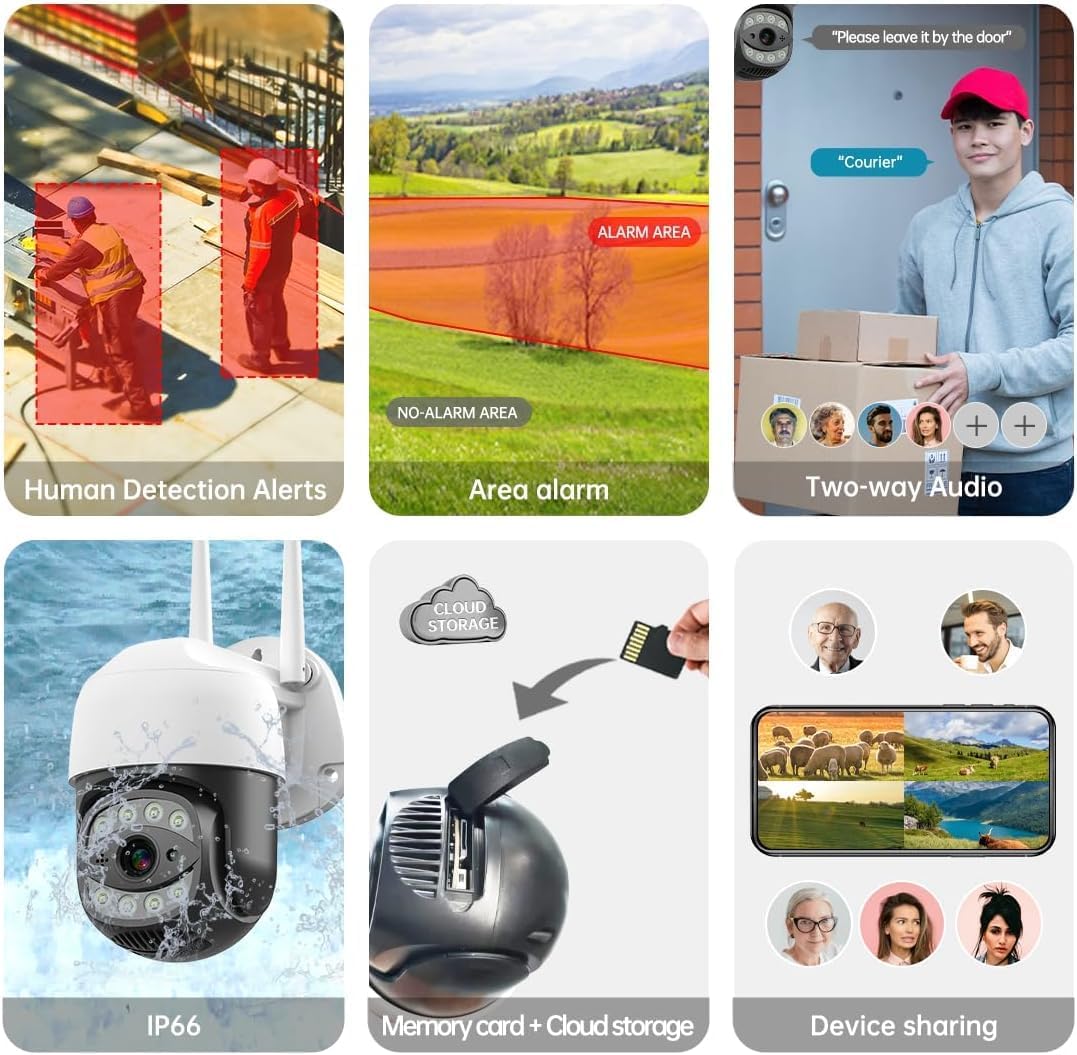
Image: The camera shown in a rainy outdoor environment, with icons indicating its waterproof, cold-proof, and sunscreen properties, highlighting its IP65 weather resistance.
While robust, avoid directing high-pressure water jets directly at the camera.
トラブルシューティング
| 問題 | 考えられる原因 | 解決 |
|---|---|---|
| カメラがWi-Fiに接続できません。 | Incorrect Wi-Fi password; camera too far from router; router not dual-band compatible or 5GHz only selected. | Verify Wi-Fi password. Move camera closer to router. Ensure router supports 2.4GHz or select 2.4GHz band during setup. Reset camera and try again. |
| 画質が悪い。 | レンズが汚れている、ネットワーク帯域幅が低い、照明が不十分。 | Clean the camera lens. Ensure stable Wi-Fi connection. Activate color night vision or add external lighting if needed. |
| 誤報が頻繁に発生します。 | Sensitivity too high; non-human motion triggering alerts (e.g., pets, trees). | Adjust motion detection sensitivity in the app. Utilize human detection feature to filter out irrelevant motion. |
| TF カードに録画できません。 | TF card full or corrupted; incorrect recording settings. | Format or replace the TF card. Check recording schedule and settings in the app. |
技術仕様
| 特徴 | 仕様 |
|---|---|
| モデル | C17-2MP |
| 解決 | 2MP (1920x1080p Max) |
| パン/チルト範囲 | 水平335°、垂直90° |
| デジタルズーム | 10倍 |
| 暗視範囲 | 最大100フィート(30メートル) |
| 接続性 | Dual-Band Wi-Fi (2.4GHz/5GHz), Wired Ethernet |
| ストレージオプション | マイクロSDカード(最大256GB)、クラウドストレージ |
| 耐水性 | IP65 |
| 電源 | DC12V |
| 動作温度 | -10°Cから+ 50°C(14°Fから122°F) |
| アプリの互換性 | SECUEYE (iOS, Android) |
保証とサポート
For warranty information and technical support, please refer to the official SECULINK web公式サイトをご覧いただくか、カスタマーサービスに直接お問い合わせください。保証請求のために購入時のレシートを保管してください。
メーカー: セキュリンク