
1. はじめに
The ORIVISION EHV1401 is a versatile HDMI and VGA video encoder designed for professional video streaming and broadcasting applications. It supports H.265 and H.264 video encoding at resolutions up to 1080P@60Hz, offering multi-channel output and various streaming protocols. This manual provides detailed instructions for setting up, operating, and maintaining your encoder.
2. 主な特徴
- Supports H.265/H.264 video encoding.
- Adaptive selection for HDMI or VGA input.
- Simultaneous HDMI and VGA loop-out display.
- Supports 1x HDMI and 1x VGA input with corresponding loop-out.
- Digital and analog audio loop-out support.
- Wide protocol support: HTTP, HTTPS, RTSP, RTMP, RTMPS, SRT, UDP, RTP, HLS, FLV, Onvif.
- Up to 1080P@60Hz resolution input and output.
- Supports 4 channels of simultaneous stream output.
- Audio encoding without video input capability.
- Two-way audio transmission support.
- AAC/G.711 advanced audio coding format.
- 1000M full-duplex network interface for LAN and WAN transmission.
- Supports POE power supply (optional).
- SDK support for secondary development.
- Network remote management and upgrade capabilities.
- 24時間7日稼働できるように設計されています。
3.製品オーバーview およびインターフェース
The ORIVISION EHV1401 encoder features multiple input and output ports for flexible connectivity. Understanding these interfaces is crucial for proper setup.

図3.1: Front panel of the ORIVISION EHV1401 encoder. From left to right, it shows VGA input, HDMI input, Audio input, Audio output, VGA output, HDMI output, LAN port, and 12V DC power input.
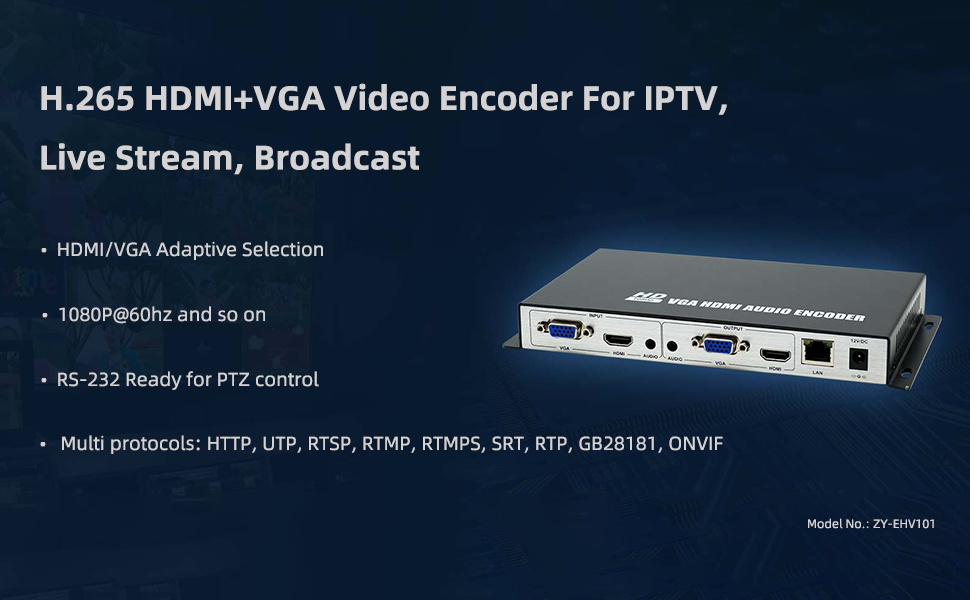
図3.2: 以上view of the ORIVISION EHV1401 encoder highlighting its primary applications for IPTV, Live Stream, and Broadcast, along with key features like adaptive input, 1080P@60Hz support, RS-232 for PTZ, and multiple protocols.
4. セットアップと接続
Follow these steps to connect your ORIVISION EHV1401 encoder to your video sources, displays, and network.
- ビデオソースを接続します: Connect your HDMI or VGA video source (e.g., PC, camera, monitor, DVD player) to the corresponding HDMI or VGA input port on the encoder.
- オーディオソースを接続する(オプション): If using external audio, connect your audio source to the Audio input port.
- Connect Local Displays (Loop-out): For local monitoring, connect HDMI or VGA displays to the HDMI Loopout and VGA Loopout ports.
- ネットワーク接続: Connect an Ethernet cable from the encoder's LAN port to your network router or switch.
- 電源接続: Connect the 12V DC power adapter to the encoder's 12VDC port and plug it into a power outlet. If using POE (Power over Ethernet), ensure your network switch supports POE and connect the Ethernet cable.

図4.1: Basic connection diagram illustrating how to connect video sources (PC, camera, monitor, DVD), local loop-out displays, and network for streaming to various platforms.
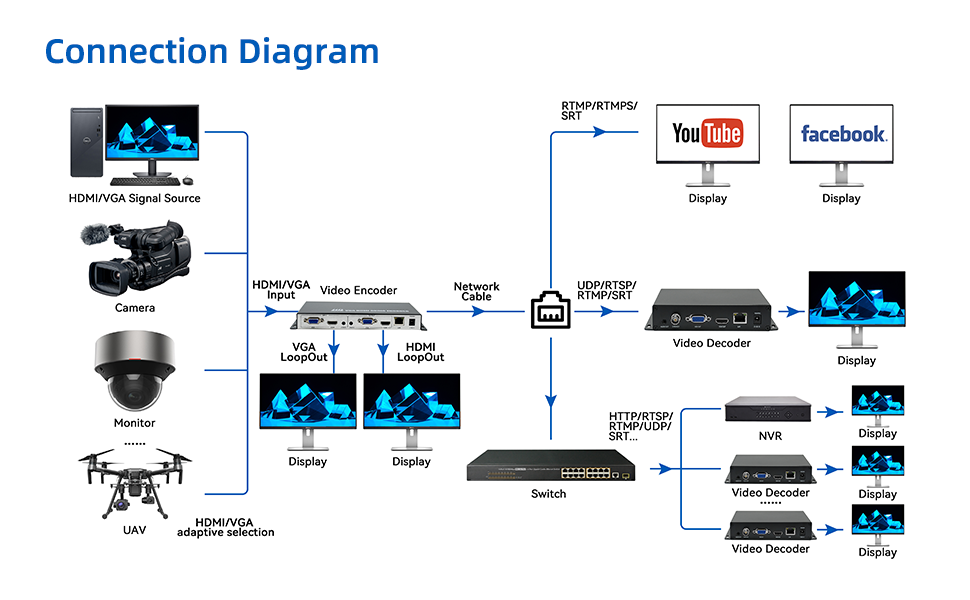
図4.2: Advanced connection diagram showing integration with multiple signal sources, local displays, network switches, and various streaming/recording destinations including YouTube, Facebook, video decoders, and NVRs.
5. 操作手順
Once the encoder is connected, you can configure and manage it via its web インタフェース。
5.1へのアクセス Web インタフェース
- コンピュータがエンコーダーと同じネットワーク上にあることを確認します。
- 開く web browser and enter the encoder's IP address (refer to your network settings or default IP if provided in documentation).
- Log in using the provided credentials (default username/password are usually 'admin'/'admin' or similar, check product documentation).

図5.1: Example screenshot of the encoder's web interface, providing access to system information and configuration settings.
5.2 Configuring Video and Audio Settings
- Navigate to the "Encoder" or "Video Settings" section in the web インタフェース。
- Select your desired input source (HDMI or VGA).
- Configure video resolution (up to 1080P@60Hz), frame rate, and bitrate.
- Adjust audio encoding settings (AAC/G.711) and bitrate.
図5.2: The encoder supports AAC and G.711 audio encoding for high-quality audio transmission.
5.3 ストリーミング構成
The encoder supports various streaming protocols. Configure your desired protocol and destination.

図5.3: The encoder supports a wide range of streaming protocols including RTMP, RTMPS, RTSP, SRT, HLS, UDP/RTP, Multicast, HTTP, and Onvif.
- Select the streaming protocol (e.g., RTMP for YouTube/Facebook Live).
- Enter the streaming server URL and stream key/name provided by your streaming platform.
- Save your settings and start the stream.
6. 仕様
Detailed technical specifications for the ORIVISION EHV1401 encoder (Model ZY-EHV101).

図6.1: Comprehensive specifications table for the ZY-EHV101 model, detailing video input/output, supported resolutions, encoding, audio interfaces, network features, and general device parameters.
| カテゴリ | パラメータ | 価値 |
|---|---|---|
| ビデオ | 入力インターフェース | 1x HDMI 1.4 and VGA (HDCP1.4) |
| サポート解決 | 1920*1080, 1280*720, 1280*800, 1280*768, 1024*768, 1024*576, 960*540, 850*480, 800*600, 720*576, 720*540, 720*480, 720*404, 704*576, 640*480, 640*360, 480*270, Auto | |
| フレームレート | 5-60Hz | |
| 出力インターフェース | 1x Ethernet port (RJ45), 1x HDMI and VGA Loop-out | |
| ビデオエンコーディング | H.265 & H.264 | |
| コードレート | 16kbps - 12Mbps | |
| オーディオ | 入力インターフェース | 1x External audio, HDMI and VGA built-in Audio |
| 出力インターフェース | 1x External audio | |
| オーディオエンコーディング | AAC, G.711 | |
| ネットワーク | RJ45 | 1000Mイーサネットポート |
| Program Streaming | HTTP, RTSP, RTMP/RTMPS, SRT, GB28181, HLS, FLV, ONVIF, Multicast: UDP/RTP | |
| 一般的な | Dimension (W*L*H) | 8.5*4.4*0.98in (217*112*25mm) |
| 総重量 | 0.35kg | |
| 温度 | 0 ~ 45°C (for working), -20~60°C (for storing) | |
| 湿度 | <90%、結露しない | |
| 入力ボリュームtage | DC12V/1A | |
| 消費電力 | 5W |

図6.2: Physical dimensions of the ORIVISION EHV1401 encoder.
7。 トラブルシューティング
This section addresses common issues you might encounter with your ORIVISION EHV1401 encoder.
- ビデオ出力なし:
- Check all HDMI/VGA cable connections. Ensure they are securely plugged in.
- Verify the input source is active and outputting a signal.
- Confirm the resolution and refresh rate of the input source are supported by the encoder (refer to specifications).
- Ensure the correct input source is selected in the encoder's web インタフェース。
- ネットワーク接続なし:
- Check the Ethernet cable connection to the encoder and your network device.
- Verify network settings (IP address, subnet mask, gateway) in the encoder's web インタフェース。
- ネットワーク ルーター/スイッチが正しく機能していることを確認します。
- Streaming Issues (Buffering, Disconnections):
- インターネット接続の速度と安定性を確認してください。
- Reduce the video bitrate in the encoder settings if your internet upload speed is insufficient.
- Verify the streaming server URL and stream key/name are correct.
- Ensure no firewall or network security settings are blocking the streaming protocols.
- 音声なし:
- Check audio cable connections (if using external audio).
- Ensure audio is enabled and correctly configured in the encoder's web インタフェース。
- Verify the audio source is active and producing sound.
8. メンテナンス
Proper maintenance ensures the longevity and optimal performance of your ORIVISION EHV1401 encoder.
- クリーニング: デバイスの外側を拭く際は、柔らかく乾いた布をご使用ください。液体クリーナーや研磨剤は使用しないでください。
- 換気: Ensure the encoder is placed in a well-ventilated area to prevent overheating. Do not block ventilation openings.
- ファームウェアの更新: Periodically check the ORIVISION webファームウェアのアップデートについては、こちらのサイトをご覧ください。ファームウェアを最新の状態に保つことで、パフォーマンスが向上し、新しい機能が追加されます。
- ストレージ: If storing the device for an extended period, ensure it is kept in a cool, dry place within the specified storage temperature range (-20~60°C).
9. 保証とサポート
For warranty information and technical support, please refer to the documentation included with your purchase or visit the official ORIVISION website. You can also contact ORIVISION customer service for assistance with product setup, operation, or troubleshooting.
メーカー: Nantong ZYDZ Electronic Co.,Ltd.
ブランド: オリビジョン