
1. はじめに
This manual provides detailed instructions for the safe and effective use of your CAMKORY 4K 48MP Digital Camera, model DC202. Please read this manual thoroughly before operating the camera and retain it for future reference.
2. 安全情報
To prevent damage to the camera or injury to yourself or others, observe the following safety precautions:
- カメラを水や湿気にさらさないでください。
- カメラを落としたり、強い衝撃を与えたりしないでください。
- カメラを分解したり改造したりしないでください。
- カメラを強い磁場から遠ざけてください。
- 承認されたバッテリーとアクセサリのみを使用してください。
- 電池や電子部品は責任を持って廃棄してください。
3. パッケージ内容
パッケージにすべてのアイテムが含まれていることを確認します。
- 1 x CAMKORY 4K Digital Camera
- ユーザーマニュアル x 1
- クリーニングクロス1枚
- キャリーバッグ x 1。
- 1 x USB Cable (for charging/connection)
- HDMIケーブル x 1
- 2 x充電式バッテリー
- レンズキャップ×1
- 1 x 32GB SDカード
4.カメラオーバーview
The CAMKORY DC202 is a compact digital camera designed for ease of use, featuring 4K video recording and 48MP still image capture. It includes an optical viewfinder, autofocus, and digital image stabilization.
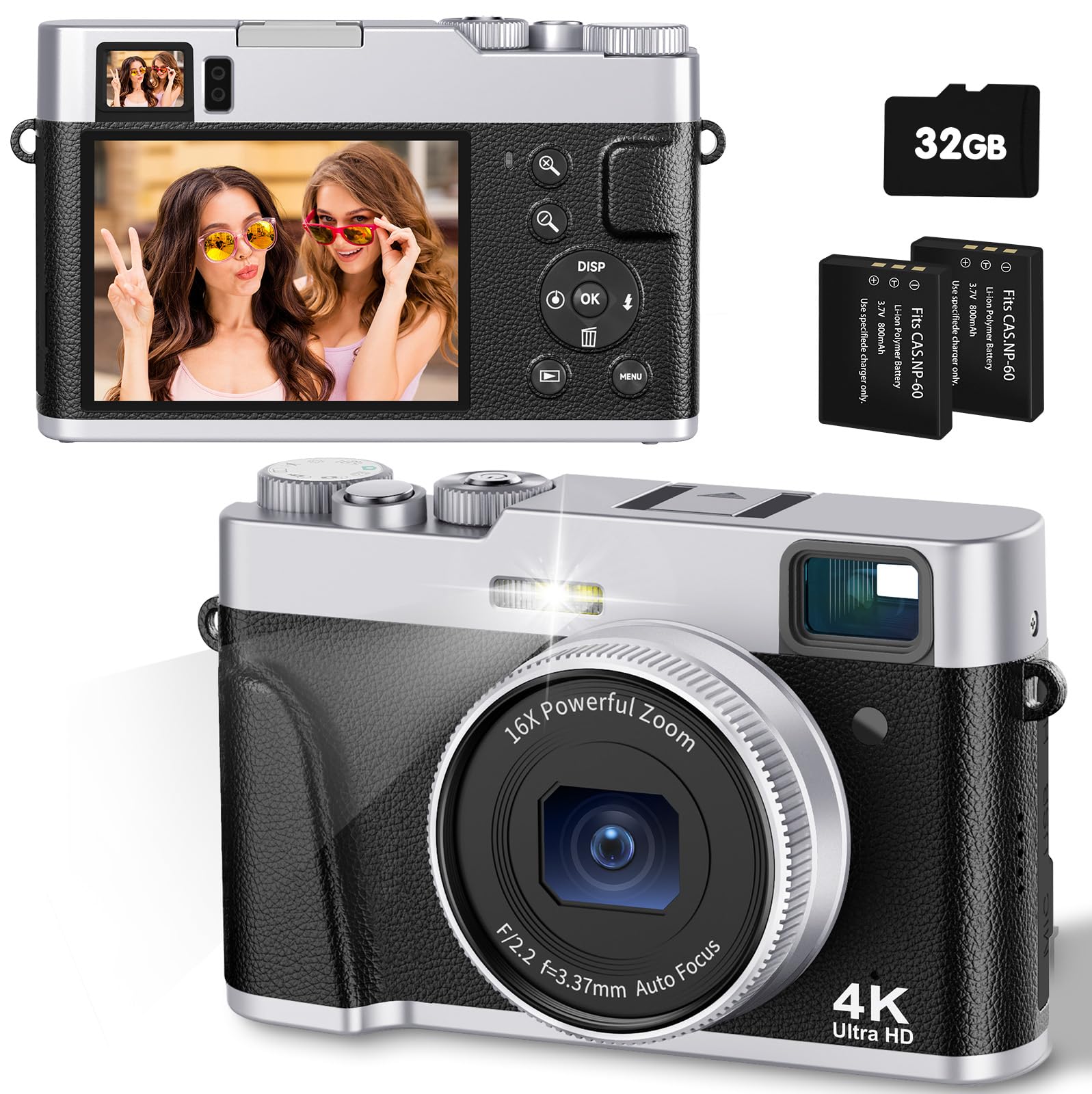
Image: The CAMKORY 4K Digital Camera, illustrating the optical viewfinder and the difference between 1080p and 4K image quality in a landscape scene.

画像: 正面 view of the camera, showing the lens, built-in flash, and the mode dial on top.

画像: 背面 view カメラの LCD 画面とナビゲーションおよび設定用のさまざまなコントロール ボタンが表示されます。
5. セットアップ
5.1 バッテリーの取り付け
The camera uses Lithium-polymer batteries. Ensure correct orientation when inserting the battery. The information page on the battery should face the camera screen side when inserted. Incorrect insertion may prevent the camera from powering on or charging.
5.2 メモリカードのインストール
Insert the provided 32GB SD card into the memory card slot until it clicks into place. Ensure the card is inserted in the correct direction.
5.3 バッテリーの充電
Connect the camera to a power source using the supplied USB cable. The charging indicator will illuminate. Charging is complete when the indicator turns off.
5.4初期電源オン
Press and hold the power button to turn the camera on. Follow any on-screen prompts for initial setup, such as setting the date and time.
6. カメラの操作
6.1 電源オン/オフ
電源ボタンを長押しして、カメラの電源をオンまたはオフにします。
6.2 写真を撮る
To take a photo, select the photo mode using the mode dial. Point the camera at your subject. Lightly press the shutter button halfway down to activate autofocus. The focus frame on the screen will change from yellow to green when focus is achieved. Press the shutter button fully to capture the image.

Image: A person using the camera, demonstrating the autofocus function on a subject.

Image: Advanced autofocus technology ensuring clear focus on subjects, contrasting with blurry results from other cameras.
6.3ビデオの録画
To record a video, select the video mode using the mode dial. Press the shutter button to start recording and press it again to stop. The camera supports 4K video recording with a pause function.
6.4 Using the Optical Viewファインダ
光学 viewfinder provides a clear and precise view of your subject, even in bright conditions, aiding in composition without relying solely on the LCD screen.
6.5 フラッシュ操作
The camera features an improved powerful flash. You can set the flash to automatic, on, or off depending on lighting conditions. The flash is ideal for low-light environments.

Image: A comparison showing the effect of the camera's flash in a low-light setting, with the flash off and on.
6.6 ズーム機能
The camera features a 16x digital zoom. Use the zoom controls to adjust the magnification of your subject.
6.7 画像安定化
The camera includes digital image stabilization to help reduce blur caused by camera shake, resulting in clearer photos and videos.
6.8 モードダイヤル
The mode dial allows quick selection between different functions such as photo mode, video mode, and settings.
6.9つの特別な機能
- マクロ関数: The advanced autofocus allows for close-up photography, capturing fine details like water droplets.
- セルフタイマー: Set a delay of 2, 5, or 10 seconds before a photo is taken, useful for self-portraits or group shots.
- Slow Motion & Time-lapse: Capture dynamic scenes with slow-motion video or condense long events into short time-lapse sequences.
- フィルター: Apply one of 20 different filters to your photos for creative effects.
- Webカム機能: カメラをUSB経由でコンピュータに接続して、 webライブストリーミングやビデオ通話用のカメラ。
- Smile Detection & Burst Shooting: The camera can automatically detect smiles and capture multiple images in quick succession for burst shooting.

画像: コラージュショーasing various camera features such as powerful flash, webcam capability, slow motion, time-lapse, 20 different filters, and self-timer options.
7. 再生とデータ転送
7.1 Viewイングメディア
Switch to playback mode to review 撮影した写真やビデオを LCD 画面に表示します。
7.2コンピューターへの接続
Use the supplied USB cable to connect the camera to your computer. This allows for easy transfer of images and videos without requiring additional software.
7.3テレビに接続する
Use the supplied HDMI cable to connect the camera to a television for view写真やビデオをより大きな画面で鑑賞できます。
8. メンテナンス
8.1 クリーニング
Gently clean the lens with the provided cleaning cloth. For the camera body and screen, use a soft, dry cloth. Do not use harsh chemicals or abrasive materials.
8.2 ストレージ
When not in use, store the camera in its carrying bag in a cool, dry place, away from direct sunlight and extreme temperatures. Remove batteries if storing for extended periods.
9。 トラブルシューティング
- カメラの電源が入らない: Ensure the battery is correctly inserted and fully charged. Check if the battery is inserted with the information page facing the camera screen.
- 画像がぼやけています: Ensure proper focus by half-pressing the shutter button. Check lighting conditions and consider using the flash. Digital image stabilization helps, but steady hands are still recommended.
- メモリカードエラー: Ensure the SD card is correctly inserted. If the error persists, try formatting the card (this will erase all data) or use a different compatible SD card.
- フラッシュが動作しない: Check flash settings to ensure it is not set to 'off'. Ensure the battery has sufficient charge.
- 転送できません filesコンピュータへ: Ensure the USB cable is securely connected to both the camera and the computer. Check the camera's connection mode settings (if applicable) to ensure it's set for data transfer.
10. 仕様
| 特徴 | 仕様 |
|---|---|
| モデル番号 | DC202 |
| ブランド | CAMKORY |
| 寸法(長さ×幅×高さ) | 12 x 3 x 7.5 cm |
| 重さ | 140グラム |
| Effective Capture Resolution | 48メガピクセル |
| ビデオキャプチャフォーマット | AVI (4K resolution) |
| 画像フォーマット | JPEG |
| 光センサー技術 | シーモス |
| 光学センサーサイズ | 1/3.2インチ |
| デジタルズーム | 16倍 |
| 画像安定化 | デジタル |
| オートフォーカス | はい |
| 光学 Viewファインダ | はい |
| フラッシュ | Integrated (Auto, On, Off modes) |
| 画面サイズ | 3 Inches (IPS display) |
| メモリーカードタイプ | SD(32GBカード付属) |
| 接続性 | HDMI、USB |
| 電池のタイプ | リチウムポリマー(2個入り) |
| 露出制御タイプ | 自動、手動 |
| 特集 | 4K Video, 48 MP Image, Easy Operation, Macro Autofocus, Optical Viewfinder, Powerful Flash, 16x Digital Zoom, Image Stabilization, Time-lapse, Slow Motion, Self-timer, 20 Filters, Live Streaming, Webカム |
11. 保証とサポート
For warranty information and technical support, please refer to the documentation included with your purchase or contact CAMKORY customer service through their official webサイト。