
導入
This manual provides detailed instructions for the installation, operation, and maintenance of your EBTOOLS 4.3-inch 1080P Mirror Dash Cam. This device is designed to record video footage from both the front and rear of your vehicle, offering features such as parking monitoring and loop recording for enhanced driving safety and evidence collection. Please read this manual thoroughly before using the product to ensure proper functionality and to avoid any damage.
製品の特徴
- 耐久性のある構造: Manufactured from high-quality ABS material for robustness and extended durability.
- 広角レンズ: Equipped with wide-angle lenses to minimize blind spots and capture comprehensive road details.
- ループ録音: Ensures continuous recording by automatically overwriting the oldest video files when the memory card reaches its capacity.
- 全天候型パフォーマンス: Capable of recording clear video footage even in adverse weather conditions such as rain or fog.
- ユーザーフレンドリーなデザイン: Features a straightforward installation process and intuitive controls for ease of use.
パッケージ内容
パッケージに以下のすべての項目が含まれていることを確認してください。
- EBTOOLS 4.3-inch Mirror Dash Cam Unit
- 後方view カメラ
- カーチャージャー
- リアカメラ接続ケーブル
- Mounting Straps/Adhesive
- ユーザーマニュアル(このドキュメント)

設定
1. ダッシュカムの取り付け
ミラーダッシュカメラを車両の既存の後部に固定しますview mirror using the provided mounting straps. Ensure it is firmly attached and does not obstruct your view.
2. リアカメラの接続
Route the rear camera cable from the dash cam to the desired mounting location at the rear of your vehicle. Connect the rear camera to the AV IN port on the main dash cam unit. For optimal performance, ensure the cable is neatly tucked away and secured.


3. 電源接続
Connect the provided car charger to the dash cam's power input port and then plug the other end into your vehicle's 12V power outlet (cigarette lighter socket). The device will typically power on automatically with the vehicle's ignition.
4.メモリーカードを挿入します
Insert a compatible Micro SD card (not included) into the TF CARD slot on the dash cam. Ensure the card is inserted correctly until it clicks into place. A high-speed Class 10 or higher card is recommended for reliable recording.

操作手順
電源オン/オフ
- 自動: The dash cam will power on and begin recording automatically when your vehicle's ignition is turned on.
- マニュアル: Press and hold the Power button (usually marked with a power symbol) to manually turn the device on or off.
メニューナビゲーション
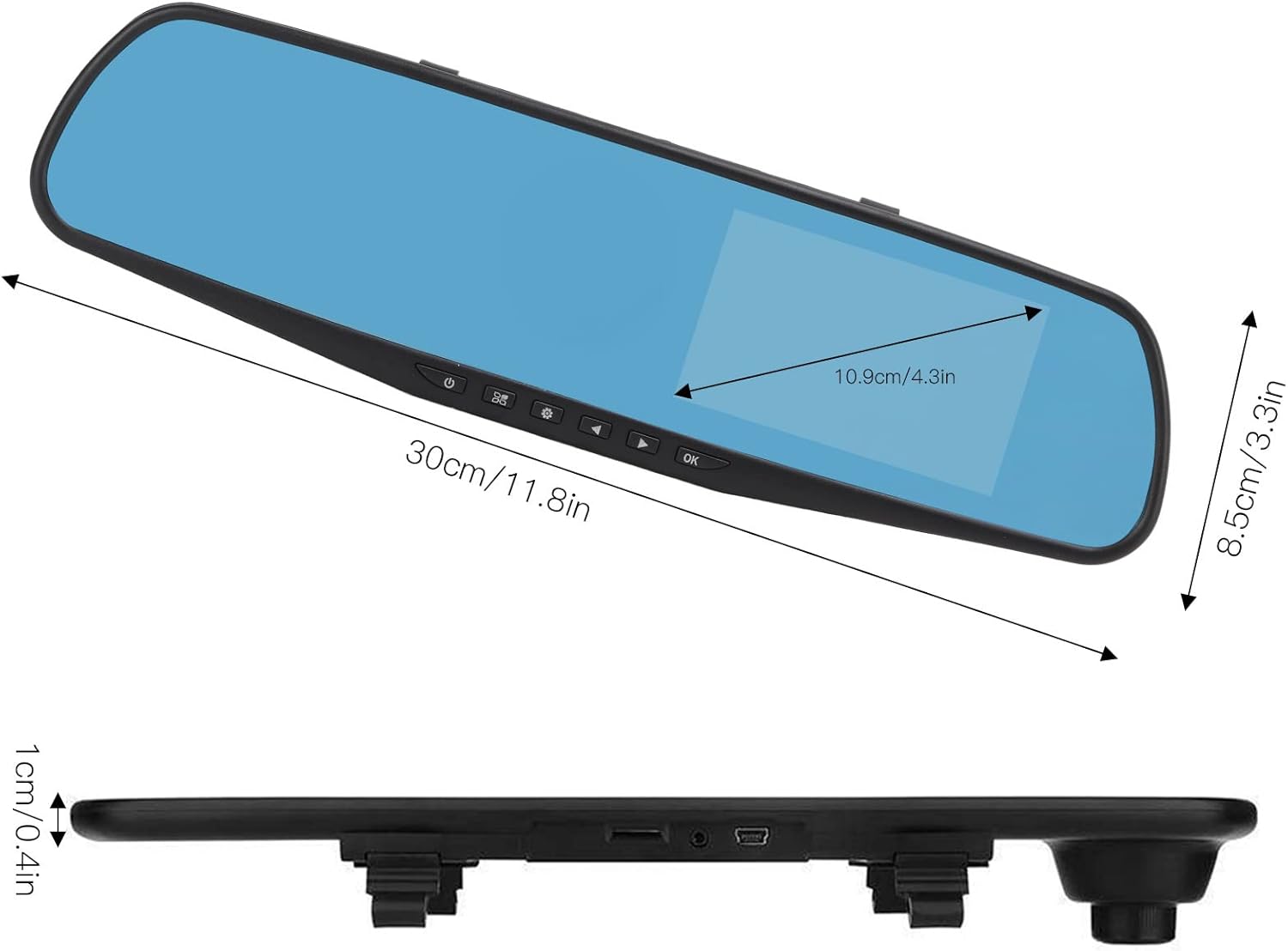
Use the physical buttons located on the bottom of the mirror unit to navigate through the menu options:
- メニューボタン: を押して設定メニューに入ります。
- 上/下ボタン: メニュー オプションをスクロールするために使用します。
- OKボタン: Press to confirm a selection or setting.
記録モード
- ループ録音: This feature records video in continuous segments (e.g., 1, 2, 3, or 5 minutes). When the memory card is full, the oldest file新しい録音用のスペースを確保するために、すべての録音は自動的に上書きされます。
- モーション検出: When enabled, the dash cam will automatically start recording if it detects movement in front of the vehicle while parked. This feature is useful for parking surveillance.
ビデオ解像度設定
You can adjust the video resolution for both front and rear cameras in the settings menu:
- フロントカメラ: Select between 1080P (FHD 1400x1080) or 720P (HD 1280x720).
- リアカメラ: Records at 720P resolution.
言語設定
The device supports multiple languages. Navigate to the language settings in the menu to select your preferred language, including English, German, French, Italian, Japanese, Korean, and Simplified Chinese.

メンテナンス
- クリーニング: ドライブレコーダーの画面とレンズを拭く際は、柔らかく乾いた布をご使用ください。研磨剤入りの洗剤や溶剤の使用は避けてください。
- メモリーカード: Regularly format your Micro SD card (at least once a month) to ensure optimal performance and prevent data corruption. Back up any important footagフォーマットする前にeを入力します。
- 温度: Avoid exposing the device to extreme temperatures, both hot and cold, as this can affect battery life and component integrity.
トラブルシューティング
- デバイスの電源が入らない:
- Ensure the car charger is properly connected to both the dash cam and the vehicle's 12V power outlet. Check if the vehicle's ignition is on. Test the charger in another port or with another device if possible.
- 録画の問題(例:録画が停止する、データが破損する) files):
- Verify that a compatible, high-speed Micro SD card (Class 10 or higher) is inserted correctly. Format the memory card through the dash cam's settings menu. If issues persist, try a different memory card.
- Screen display problems (e.g., black screen, distorted image):
- Check all cable connections, especially for the rear camera. Try resetting the device to factory settings via the menu. If the problem continues, contact customer support.
- リアカメラが表示されない:
- Ensure the rear camera cable is securely connected to both the rear camera and the AV IN port on the main unit. Check for any damage to the cable or connectors.
仕様
| アイテムタイプ | 4.3-inch Mirror Dash Cam |
| 材料 | アブソリュート |
| 画面サイズ | 4.3インチ |
| 表示タイプ | TFT液晶 |
| フロントカメラアングル | 110度 |
| リアカメラアングル | 90-110 degrees (Adjustable) |
| フロントビデオ解像度 | 1080P (FHD 1400x1080), 720P (HD 1280x720) |
| リアビデオ解像度 | 720P |
| ループ録画間隔 | 1分、2分、3分、5分 |
| モーション検出 | サポート |
| 画像解像度 | 12MP、10MP、5MP、3MP、2MP、1.3MP |
| ビデオフォーマット | 動画 |
| 画像フォーマット | JPEG |
| レンズタイプ | F2.78 glass resolution multi-layer filter wide-angle lens |
| サポートされている言語 | English, German, French, Italian, Japanese, Korean, Simplified Chinese |
| ビデオ出力 | USBカードリーダー |
| 取り付け方法 | 粘着タイプ |
| 製品寸法 | Approx. 30cm (11.8in) L x 8.5cm (3.3in) W x 1cm (0.4in) T |
| パッケージ寸法 | 34 x 12 x 6 cm; 512 g |
保証とサポート
For warranty information or technical assistance, please refer to the warranty card included with your product or contact EBTOOLS customer support through the retailer's platform where the product was purchased. Our support team is available to help with any questions or issues you may encounter.