
1. はじめに
Thank you for choosing the Lume Cube RGB Tube Light Mini. This versatile and powerful LED light is designed for photographers, videographers, and content creators seeking precise and customizable lighting solutions. With its app-controlled features, extensive color range, and durable design, the Tube Light Mini is an essential tool for enhancing your creative projects. This manual provides detailed instructions for setup, operation, maintenance, and troubleshooting to ensure you get the most out of your device.
2. 箱の中身

Figure 2.1: Lume Cube RGB Tube Light Mini and its accessories.
以下にリストされているすべてのアイテムがパッケージに含まれていることを確認してください。
- チューブライトミニ
- ミニ三脚
- リストストラップ
- USB電源ケーブル
- Molded Hard Shell Travel Case
3.製品オーバーview
3.1 主な特徴
- 何百万もの色: Select from millions of color options, including saturation & tint, to bring your creative vision to life.
- Bluetooth アプリ コントロール: The Lume Control App allows you to change any setting from your smartphone.
- 耐久性と耐候性: Built with an aluminum body, designed for use in various environments.
- Precision & Premium Lighting: Features a CRI of 97+, ensuring near-perfect color output for high-quality content.
- どこにでもマウント可能: Equipped with multiple 1/4"-20 mounting points for versatile positioning.
- 磁気: Built-in magnets allow for creative placement on metal surfaces.
3.2 コントロールとポート

Figure 3.1: Physical controls and ports on the Tube Light Mini.
The Tube Light Mini features intuitive physical controls for quick adjustments:
- 電源ボタン: 押し続けると電源がオン/オフになります。
- モードボタン: Cycles through different lighting modes (CCT, HSI, Effects).
- Stepless Adjustment Dial: Adjusts brightness, color temperature, or hue/saturation depending on the selected mode.
- USB-C充電ポート: Used for charging the device and can also function as a power bank.
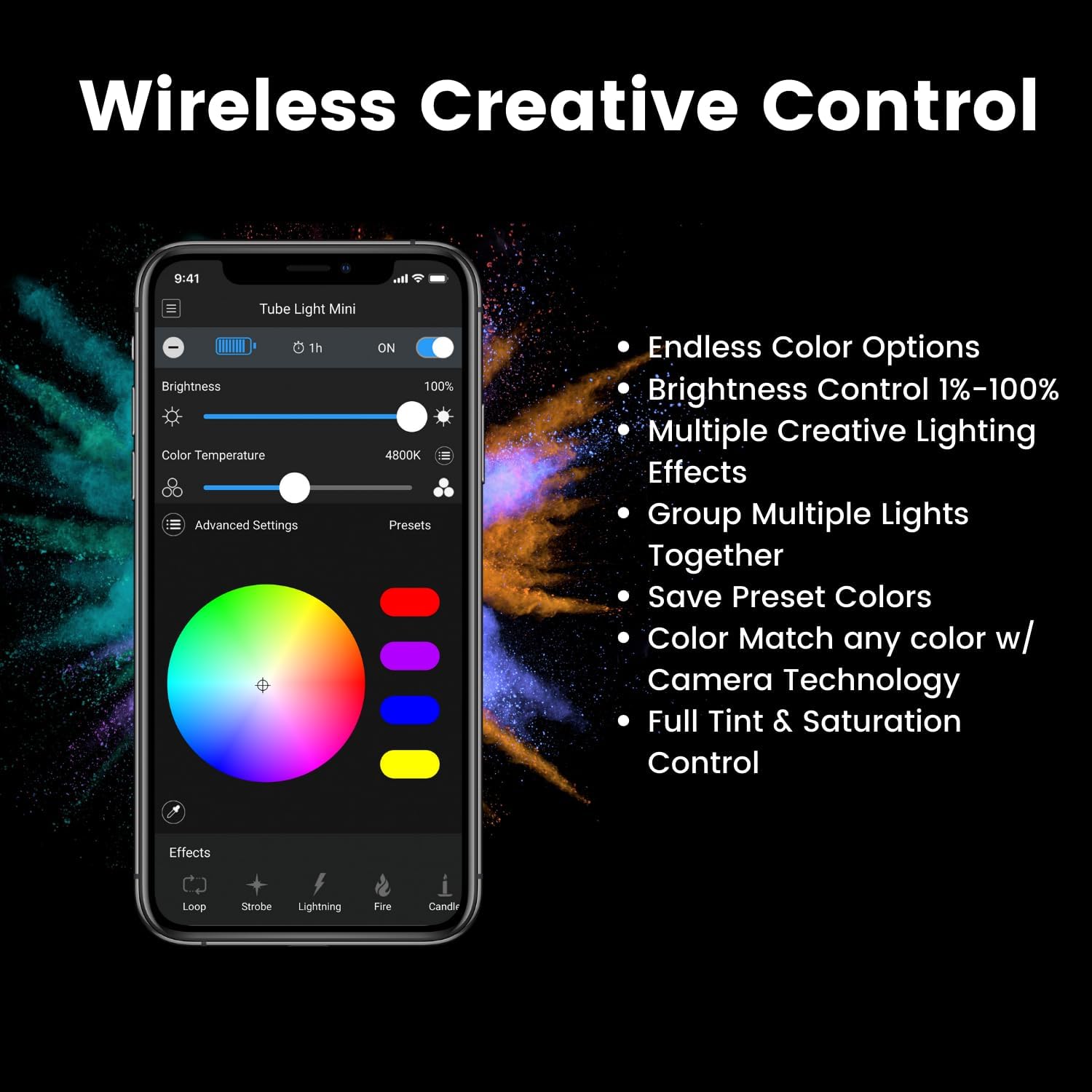
Figure 3.2: Lume Control App interface for wireless control.
For comprehensive control, download the Lume Control App. The app provides:
- Endless Color Options
- Brightness Control (1%-100%)
- Multiple Creative Lighting Effects
- Ability to Group Multiple Lights Together
- Save Preset Colors
- Color Match with Camera Technology
- Full Tint & Saturation Control
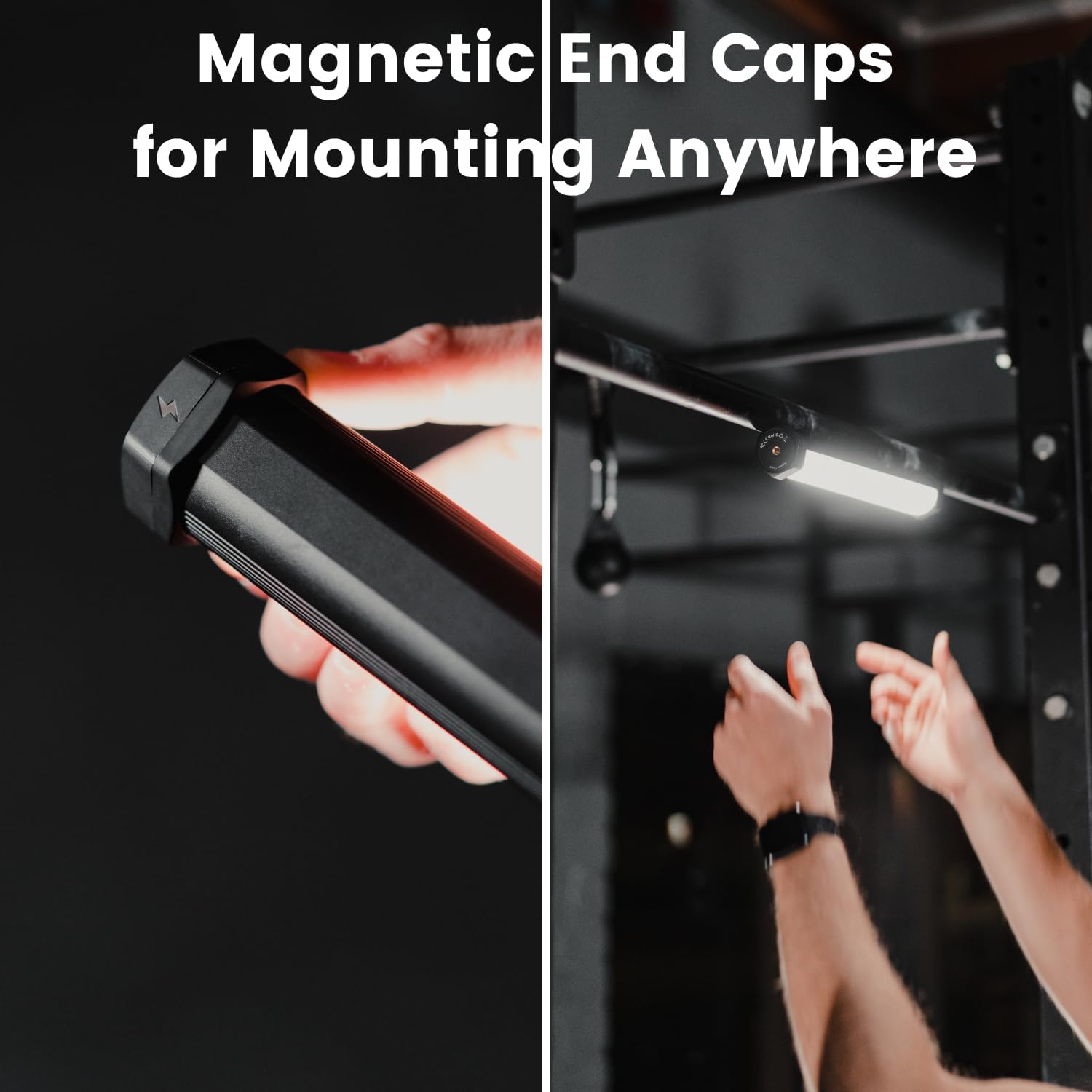
Figure 3.3: Magnetic end caps for versatile mounting.

Figure 3.4: Tube Light Mini with included tripod base.
The Tube Light Mini features magnetic end caps for quick attachment to metal surfaces and multiple 1/4"-20 screw threads for mounting on tripods, stands, or other accessories. A mini tripod is included for immediate use.
4. セットアップ
4.1 初期充電
Before first use, fully charge your Tube Light Mini. Connect the provided USB Power Cable to the USB-C port on the light and to a compatible USB power adapter (not included). The LCD screen will indicate charging status. A full charge typically takes approximately 2 hours.
4.2 アプリのダウンロードとペアリング
- Download the "Lume Control" app from your device's app store (iOS or Android).
- スマートフォンでBluetoothが有効になっていることを確認します。
- Power on the Tube Light Mini by pressing and holding the Power Button.
- Open the Lume Control app. The app should automatically detect and connect to your Tube Light Mini. If not, follow the in-app instructions to manually add the device.
5. 操作手順
5.1 電源オン/オフ
Press and hold the Power Button for 2 seconds to turn the light on or off.
5.2 Adjusting Settings (Manual Control)
Use the Mode Button to cycle through different modes displayed on the LCD screen (Figure 3.1):
- CCTモード: Adjusts color temperature (warm to cool white) using the Stepless Adjustment Dial.
- HSI モード: Adjusts hue, saturation, and intensity (brightness) using the Stepless Adjustment Dial.
- エフェクトモード: Cycles through pre-programmed special effects. Use the dial to adjust effect parameters.
5.3 Adjusting Settings (App Control)
For advanced control, use the Lume Control App (Figure 3.2):
- 輝度: Use the slider to adjust light intensity from 1% to 100%.
- 色温度: Select precise color temperatures for white light.
- カラーホイール: Choose from millions of RGB colors by tapping or dragging on the color wheel.
- 効果: Access and customize various built-in lighting effects (e.g., Strobe, Lightning, Fire, Candle).
- プリセット: Save and recall your favorite custom lighting settings.
5.4 パワーバンクの機能

Figure 5.1: Tube Light Mini charging a smartphone.
The Tube Light Mini can act as a portable power bank (2500mAh) to charge other devices. Connect your device to the USB-C port on the Tube Light Mini using a compatible cable.
6. メンテナンス
6.1 クリーニング
To clean the Tube Light Mini, use a soft, dry cloth. For stubborn marks, a slightly damp cloth with mild soap can be used, ensuring no liquid enters the ports or internal components. Do not use harsh chemicals or abrasive cleaners.
6.2 ストレージ
When not in use, store the Tube Light Mini in its provided hard shell travel case in a cool, dry place away from direct sunlight and extreme temperatures.
6.3バッテリーケア
To prolong battery life, avoid fully discharging the battery frequently. Recharge the device when the battery indicator is low. If storing for extended periods, charge the battery to approximately 50% every 3-6 months.

Figure 6.1: The Tube Light Mini is designed to be durable and weatherproof.
7。 トラブルシューティング
7.1 ライトが点灯しない
- バッテリーが充電されていることを確認してください。電源に接続し、少なくとも15分間充電してから、再度電源を入れてください。
- Press and hold the Power Button firmly for 2-3 seconds.
7.2 アプリの接続の問題
- Ensure Bluetooth is enabled on your smartphone and the Tube Light Mini is powered on.
- Close and reopen the Lume Control app.
- Restart your smartphone and the Tube Light Mini.
- アプリが最新バージョンに更新されていることを確認してください。
7.3 Inconsistent Light Output/Color
- バッテリーレベルを確認してください。バッテリー残量が少ないとパフォーマンスに影響する可能性があります。
- Ensure the light is not overheating. Allow it to cool down if it feels excessively warm.
- Perform a factory reset (refer to Lume Cube's official support for specific instructions if needed).
8. 仕様
| 特徴 | 詳細 |
|---|---|
| モデル番号 | LC-TLMINI |
| 製品寸法 | 12 x 6 x 12インチ |
| アイテム重量 | 2.71ポンド |
| CRI評価 | 97以上 |
| 光出力 | 950ルーメン |
| バッテリー寿命 | 102 minutes |
| 接続性 | ブルートゥース |
| パワーバンク容量 | 2500mAh |
| 初回利用可能日 | 22年2023月XNUMX日 |
9. 保証とサポート
For detailed warranty information and customer support, please visit the official Lume Cube web公式サイトをご覧いただくか、カスタマーサービスに直接お問い合わせください。保証請求の際に必要となりますので、購入証明書を保管してください。
詳しい情報とサポートについては、 LUME CUBE Store on Amazon.