
オライモ OEB-E105D
Oraimo FreePods 4 OEB-E105D User Manual
モデル: OEB-E105D
導入
This manual provides comprehensive instructions for the Oraimo FreePods 4 OEB-E105D Active Noise Cancellation earbuds. Please read this manual carefully before using the product to ensure proper operation and to maximize your listening experience. Keep this manual for future reference.

Image: Oraimo FreePods 4 earbuds in their open charging case, with one earbud shown outside the case. The earbuds are black and white, and the case is black.
設定
1. イヤホンとケースの充電
Before first use, fully charge the Oraimo FreePods 4. Place the earbuds into the charging case. Connect the charging case to a power source using a compatible USB-C cable. The indicator lights on the case will show the charging status. A full charge typically takes approximately 1.5 hours for the earbuds and 2 hours for the case.
2. 初期ペアリング
- イヤホンが充電ケースに入っており、ケースの蓋が開いていることを確認します。
- デバイス(スマートフォン、タブレットなど)で Bluetooth を有効にします。
- 検索する new Bluetooth devices. Select "Oraimo FreePods 4" from the list of available devices.
- 接続されると、音声プロンプトによってペアリングの成功が確認されます。

Image: A smartphone screen displaying a Google Pop-up Notification for quick pairing with Oraimo FreePods 4. The earbuds and case are shown below the phone.
Note: For Android devices (version 6.0 and above) with Google Play services, Google Fast Pairing allows for seamless and quick connection via a pop-up notification.
3. Oraimo Sound APP Installation
Enhance your experience by downloading the Oraimo Sound APP. This application allows for customization of sound profiles, noise control modes, and other features.
- Scan the QR code provided in the product packaging or visit the official Oraimo webアプリをダウンロードするサイト。
- Alternatively, download from your device's app store (Google Play Store or Apple App Store).
- Once installed, open the app and follow the on-screen instructions to connect your FreePods 4.

Image: A smartphone screen showing the Oraimo Sound APP interface, displaying battery levels for both earbuds and the charging case. Next to it are the Oraimo Sound app icon and a QR code for download.
Download the Oraimo Sound APP: Oraimo Sound APP
操作手順
1.タッチコントロール
| アクション | 関数 |
|---|---|
| シングルタップ(L/R) | 音楽の再生/一時停止、通話の応答/終了 |
| ダブルタップ(右) | 次のトラック |
| ダブルタップ(左) | 前のトラック |
| 長押し(L/R、2秒) | 通話を拒否、音声アシスタントを起動 |
| 長押し(L/R、3秒) | アクティブノイズキャンセリング(ANC)/透明モードの切り替え |
2. アクティブノイズキャンセレーション(ANC)
The Oraimo FreePods 4 feature Active Noise Cancellation to reduce ambient noise, providing a more immersive audio experience. Long press either earbud for 3 seconds to cycle through ANC On, Transparency Mode, and ANC Off. Transparency Mode allows you to hear your surroundings while still enjoying your audio.

Image: A close-up of an Oraimo FreePods 4 earbud against a dark background, with sound wave graphics illustrating active noise cancellation.
3. Customizing Your Listening Experience
Utilize the Oraimo Sound APP to personalize your audio. The app offers various Equalizer (EQ) modes and allows for manual adjustment of sound frequencies to match your musical taste.
- 5つのEQモード: Choose from preset modes like Standard, HavyBass™, Rock, Jazz, and Vocal.
- カスタムイコライザー: Adjust specific frequency bands to create your preferred sound profile.
- HavyBass™ Technology: Experience richer and deeper bass with Oraimo's signature sound-tuning technology.

Image: A smartphone screen displaying the Oraimo Sound APP with five distinct EQ modes: Standard, HavyBass, Rock, Jazz, and Vocal, along with an equalizer adjustment screen.

画像: 爆発した view diagram of an Oraimo earbud, highlighting internal components related to sound production and the HavyBass™ sound-tuning technology logo.
4. Find Your Earbuds
The Oraimo FreePods 4 support the "Find My Device" feature, allowing you to locate missing earbuds. This feature is available for devices running Android 6.0 or above and supporting Google Play services.
- Open the "Find device" section within your phone's settings or the Oraimo Sound APP.
- You can ring either the left or right earbud to help locate them.
- The app may also show the last known location where the earbuds were connected.
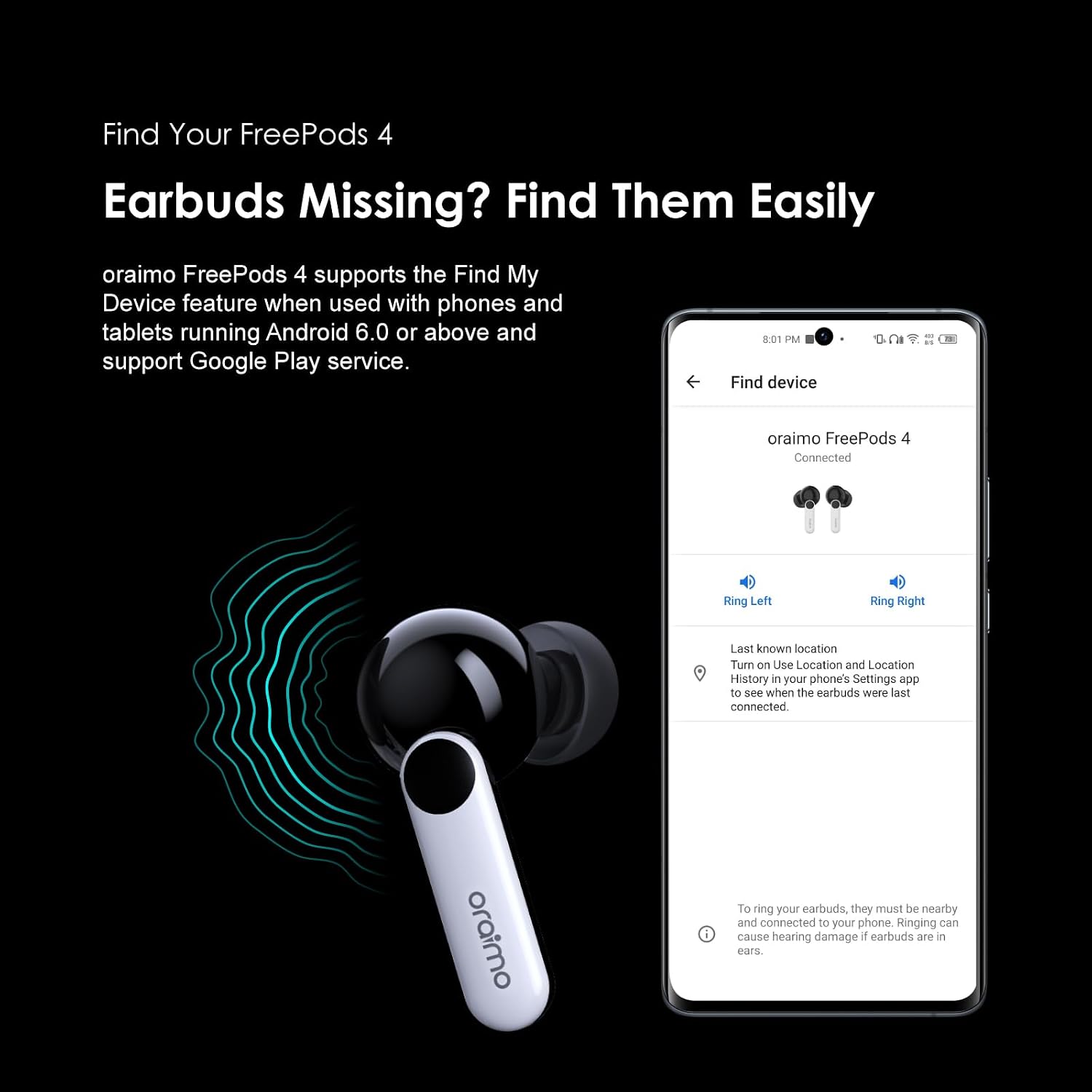
Image: A smartphone screen showing the "Find device" interface for Oraimo FreePods 4, with options to "Ring Left" and "Ring Right" earbuds. An earbud is shown below the phone, with radiating sound waves.
5. バッテリー寿命
The Oraimo FreePods 4 offer extended battery life for prolonged listening. Actual battery life may vary based on usage, volume levels, and ANC settings.
- ANCオフ: Up to 8.5 hours of playback on a single charge, with the charging case providing an additional 27 hours, totaling 35.5 hours.
- ANCオン: Up to 7 hours of playback on a single charge, with the charging case providing an additional 22 hours, totaling 29 hours.
- 急速充電: A 10-minute quick charge can provide up to 170 minutes of battery life.

Image: A woman wearing an Oraimo FreePods 4 earbud in a field, with text indicating "35.5-hour Long Battery Time" and battery life details for ANC On (7+22 Hrs) and ANC Off (8.5+27 Hrs).
メンテナンス
1. 清掃
- イヤホンと充電ケースは、柔らかく乾いた糸くずの出ない布で定期的に清掃してください。
- Remove ear tips and clean any earwax or debris from the earbud nozzles using a small, soft brush or cotton swab.
- Ensure charging contacts on both earbuds and inside the case are clean and dry.
- 研磨剤入りの洗剤、アルコール、化学溶剤は使用しないでください。
2. ストレージ
- 使用しないときは、イヤホンを保護し、充電を保つために充電ケースに保管してください。
- 高温多湿、直射日光を避けて保管してください。
3. 耐水性
The Oraimo FreePods 4 are rated IPX5 water-resistant, meaning they are protected against low-pressure water jets from any direction. This makes them suitable for workouts and light rain. However, they are not designed for submersion in water or for use during swimming. Ensure earbuds are dry before placing them back in the charging case to prevent damage.
トラブルシューティング
| 問題 | 解決 |
|---|---|
| イヤホンがペアリングされない | Ensure earbuds are charged. Turn off and on Bluetooth on your device. Forget "Oraimo FreePods 4" from your device's Bluetooth list and re-pair. |
| イヤホンが XNUMX つしか機能していない | 両方のイヤホンを充電ケースに戻し、蓋を閉めて数秒待ってから蓋を開けてもう一度お試しください。両方のイヤホンが充電されていることを確認してください。 |
| 音量が低い、または音質が悪い | Adjust volume on your device. Clean earbud nozzles and ear tips. Try different ear tip sizes for a better seal. Check EQ settings in the Oraimo Sound APP. |
| イヤホンが充電されない | Ensure charging contacts on earbuds and case are clean. Try a different USB-C cable and power adapter. Ensure the charging case itself has power. |
| ANCは効果がない | Ensure ANC is enabled (long press earbud). Ensure earbuds are properly seated in your ears to create a good seal. |
仕様
| 特徴 | 詳細 |
|---|---|
| モデル番号 | OEB-E105D |
| ブランド | オライモ |
| 耳の位置 | 耳に装着 |
| フォームファクター | 耳に装着 |
| 色 | 黒 |
| インピーダンス | 16オーム |
| バッテリー | リチウムイオン電池4個(付属) |
| 製品寸法 | 4.9 x 14.1 x 16.8 cm; 25 g |
| 原産国 | 中国 |
| 耐水性 | IPX5 (Sweat Protection) |
| 主な特徴 | Active Noise Cancellation, Customize Your Listening, HavyBass™ Technology, Google Fast Pairing, Find My Device Support |
保証とサポート
1. 保証情報
The Oraimo FreePods 4 OEB-E105D comes with a 12 Months Local Warranty保証請求のために購入証明書を保管してください。保証は、通常の使用条件下での製造上の欠陥および故障を対象としています。
2. カスタマーサポート
For further assistance, technical support, or warranty inquiries, please contact Oraimo customer service through their official web製品を購入したサイトまたは小売店にお問い合わせください。
Visit the official Oraimo Store for more information: Oraimo Store on Amazon.ae
Ask a question about this manual
Ask about setup, troubleshooting, compatibility, parts, safety, or missing instructions. Manuals+ will review the question and use this page’s manual context to help answer it.