
1. はじめに
This manual provides instructions for the proper use and care of your Docooler Portable USB Cassette Player. This device allows you to play audio cassettes and convert their content into digital MP3 files via a USB connection to a computer. Please read this manual thoroughly before operating the device to ensure optimal performance and longevity.
2.製品オーバーview
The Docooler Portable USB Cassette Player is a compact, handheld device designed for playing and digitizing audio cassettes. It features a transparent casing, allowing visibility of the internal mechanism.
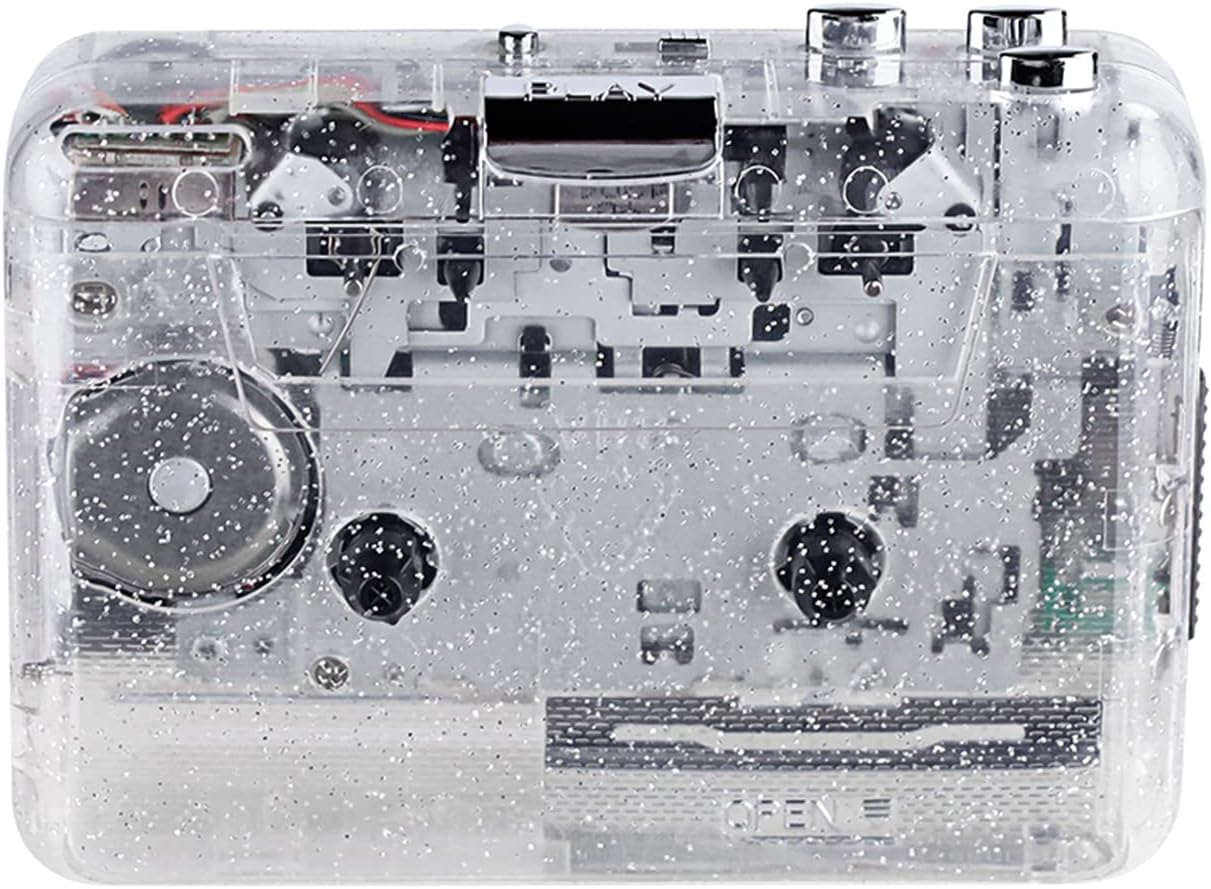
図1: 前面 view of the Docooler Portable USB Cassette Player, showcasin透明なデザインが特徴です。

Figure 2: Various angles of the cassette player, including top, side, and open views.
パッケージ内容:
- Docooler Portable USB Cassette Player
- USBケーブル
- ユーザーマニュアル(このドキュメント)
- Headphones (may vary by package)
3. セットアップ
3.1 電源
The cassette player can be powered by either batteries or a USB connection.
バッテリーの取り付け:
- デバイスのバッテリー収納部を見つけます。
- 電池ボックスのカバーを開きます。
- 単三電池 2 本 (別売) を挿入し、極性 (+/-) が正しいことを確認します。
- 電池カバーをしっかりと閉じてください。
USB電源:
Connect the provided USB cable to the player's USB port and the other end to a powered USB port on your computer or a USB wall adapter. The device will draw power from the USB connection.
4. 操作手順
4.1 カセットテープの再生
- カセットコンパートメントカバーを開きます。
- Insert an audio cassette tape with the open edge facing upwards.
- カセットコンパートメントカバーをしっかりと閉じます。
- ヘッドフォンまたは外部スピーカーを 3.5mm オーディオ出力ジャックに接続します。
- を押す 遊ぶ 再生を開始するボタン。
- 使用 停止 再生を停止するボタン。
- 使用 FF(早送り) そして REW(巻き戻し) テープ内を移動するためのボタン。
- 音量調節ダイヤルを使用して音量を調整します。
- The "DIR" button allows you to quickly flip the tape direction. The "play mode" button can be used to reverse playback once or an unlimited number of times.

Figure 3: The cassette player in use, demonstrating tape insertion and playback setup.

Figure 4: Users listening to audio through headphones connected to the cassette player.
4.2 テープからMP3への変換 Files
The Docooler Portable USB Cassette Player can convert your analog cassette audio into digital MP3 files. This process requires a computer and compatible audio recording software (not included).
- Ensure the cassette player is powered (via batteries or USB).
- Connect the cassette player to your computer using the provided USB cable.
- Install and open your preferred audio recording software on your computer. Software such as Audacity (free and open-source) is commonly used for this purpose.
- Configure your recording software to recognize the cassette player as an audio input device.
- 変換したいカセットテープをプレーヤーに挿入します。
- ソフトウェアで録音を開始し、 遊ぶ カセットプレーヤーのボタン。
- Monitor the recording process. Once the tape has finished playing, stop the recording in your software.
- 録音した音声をMP3として保存する file コンピュータ上で。

Figure 5: Illustration of the process to convert cassette audio to MP3 files using the player and a computer.
5. メンテナンス
5.1デバイスのクリーニング
- プレーヤーの外側を柔らかく乾いた布で拭いてください。
- Do not use liquid cleaners or abrasive materials, as they may damage the surface.
- Periodically clean the tape heads and pinch rollers using a cotton swab lightly damp最適な音質を確保し、テープへの損傷を防ぐために、イソプロピルアルコールで消毒されています。
5.2 ストレージ
- 長期間使用しない場合は、液漏れを防ぐために電池を取り外してください。
- プレーヤーは直射日光や極端な温度を避け、涼しく乾燥した場所に保管してください。
6。 トラブルシューティング
| 問題 | 考えられる原因 | 解決 |
|---|---|---|
| 電源なし | Dead batteries; USB cable not connected properly. | 電池を交換してください。USB ケーブルがしっかりと接続されていることを確認してください。 |
| 音が出ない | Headphones/speakers not connected; volume too low; dirty tape heads. | Connect audio output device; increase volume; clean tape heads. |
| Poor sound quality (hissing, muffled) | Dirty tape heads; worn-out tape; low battery. | テープヘッドをクリーニングし、別のテープを使用して、電池を交換してください。 |
| Tape not playing or moving | Tape jammed; mechanism issue; low battery. | Check tape for damage; replace batteries. |
| Cannot convert to MP3 | USB connection issue; software not configured correctly; no recording software. | Ensure USB is connected; check software settings; install compatible recording software. |
7. 仕様
- モデル: B0C69FDZF6
- 電源: 2 x AA Batteries or USB 5V DC
- インタフェース: USB2.0 について
- オーディオ出力: 3.5mmステレオジャック
- 寸法: 7.2×5.91×1.54インチ(約)
- 重さ: 9.6オンス(約)
- メーカー: ドクーラー
8. 安全情報
- デバイスを水や過度の湿気にさらさないでください。
- 落としたり、強い衝撃を与えないでください。
- ご自身でデバイスの分解や修理を試みないでください。資格のあるサービス担当者にご相談ください。
- お子様の手の届かない場所に保管してください。
- 地域の規制に従ってバッテリーを廃棄してください。
9.保証とサポート
For warranty information or technical support, please refer to the documentation included with your purchase or contact Docooler customer service through their official website or the retailer where the product was purchased. Please have your model number (B0C69FDZF6) and purchase date available when contacting support.