1. はじめに
This user manual provides essential information for the proper setup, operation, and maintenance of your Beelink MINI S12 Mini PC. Please read this manual thoroughly before using the device to ensure optimal performance and longevity.
2. パッケージ内容
パッケージにすべてのアイテムが揃っていることを確認します。
- Beelink MINI S12 ミニPC
- Power Adapter (Optional: US / EU / UK / JP / AU plug types)
- HDMI Cables (2 included)
- Wall-mounted Bracket (VESA mount)
- ユーザーマニュアル

Image: Included accessories for the Beelink MINI S12 Mini PC, showing the user manual, VESA mount, HDMI cables, and various power adapter options.
3.製品オーバーview
3.1 Front and Rear Panel Interfaces
The Beelink MINI S12 Mini PC features a variety of ports for connectivity:

画像: 詳細 view of the front and rear interfaces of the Beelink MINI S12 Mini PC. The front panel includes an RTC Key, two USB 3.2 Gen2 (10Gbps) ports, an earphone jack, and a power button. The rear panel features two USB 3.2 Gen2 (10Gbps) ports, a 2.5G LAN port, two 4K 60Hz HDMI ports, a DC power input, and a locking slot.
- フロントパネル: RTC Key, 2x USB 3.2 Gen2 (10Gbps), 3.5mm Earphone Jack, Power Button.
- 後面パネル: 2x USB 3.2 Gen2 (10Gbps), 1x 2.5G LAN Port, 2x 4K 60Hz HDMI Ports, DC Power Input, Locking Slot.
3.2 内部コンポーネントと拡張
The MINI S12 supports high-speed storage and memory configurations:

画像: 内部 view of the Beelink MINI S12 Mini PC highlighting the dual M.2 2280 SSD slots. One slot supports PCIe 3.0 x1 (not compatible with SATA3 SSDs), and the other supports PCIe 3.0 x4 (compatible with SATA3 SSDs). The device ships with a SATA3 SSD, with optional 256GB or 512GB configurations.
- ストレージ: Built-in 256GB M.2 SATA3 SSD. Supports M.2 2280 NVMe/SATA3 SSD, configurable up to 4TB storage.
- メモリ: 8GB DDR4 RAM. Single-channel support up to 16GB (dependent on memory type), optional single-channel 8GB/16GB memory.

Image: A SO-DIMM DDR4 3200MHz memory module, illustrating the type of high-quality memory used in the Beelink MINI S12 for stable operation.
3.3 Processor and Cooling
The MINI S12 is powered by an Intel N95 Processor and features an efficient cooling system.

Image: A data comparison table highlighting the specifications of the Intel N95 processor (4 cores, 4 threads, 3.4GHz Max Turbo Frequency, 1.7GHz Base Frequency, 25W TDP-up) against the N5105 processor.
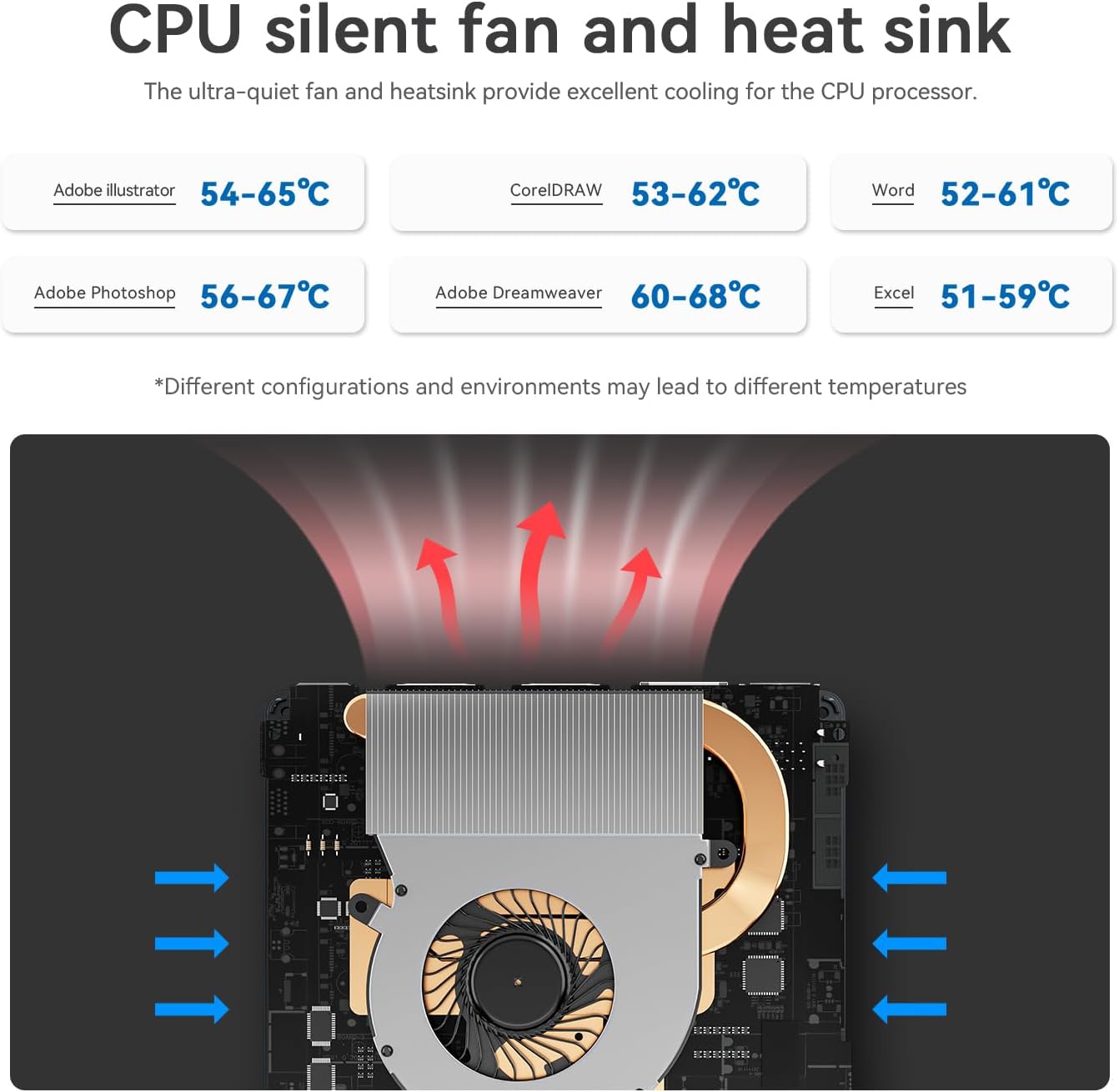
Image: Diagram illustrating the CPU silent fan and heat sink, designed to provide excellent cooling for the processor. It shows air intake and exhaust paths, with typical operating temperatures for various applications.
3.4 主な特徴
- 省エネ: 低消費電力設計。
- ワイヤレス接続: WiFi5 (802.11ax) for fast data transfer and Bluetooth 4.2.
- ネットワーク: 2.5G LAN port for high-speed wired internet.
- 画面: Dual HDMI ports supporting 4K FPS video playback and dual-screen 4K display.
- ウェイクオンLAN: Supports auto power on via network signal.
- 取り付け: VESA mount included for behind-monitor or wall installation.

Image: Infographic displaying key features such as energy saving, WiFi5 (867Mbps), Wake on LAN/Auto Power On, Dual Display support (4K resolution), LAN 2.5G (312.5MB/s), and Wall Mount capability.
4.セットアップガイド
4.1 周辺機器の接続
- Connect your monitor(s) to the HDMI ports on the rear panel using the provided HDMI cables.
- キーボードとマウスを利用可能な USB ポートに接続します。
- For wired internet, connect an Ethernet cable to the 2.5G LAN port. For wireless internet, ensure your WiFi network is available.
- If desired, mount the Mini PC using the VESA bracket on the back of your monitor or a wall.
4.2電源オン
- Connect the power adapter to the DC power input port on the rear panel.
- 電源アダプタを電源コンセントに差し込みます。
- 前面パネルの電源ボタンを押して、ミニ PC の電源をオンにします。
The Mini PC comes pre-installed with Windows 11 Home. Follow the on-screen instructions for initial Windows setup.
Video: An official product video from Beelink Limited showcasing the Beelink MINI S12 N95 Mini PC, demonstrating its compact size, various ports, internal components, and dual-screen 4K display capabilities. This video provides a visual overview of the product's features and setup.
5. 操作手順
5.1 基本操作
- 電源オン: フロントパネルの電源ボタンを押します。
- 電源を切る: 標準の Windows シャットダウン手順 (スタート メニュー > 電源 > シャットダウン) を使用します。
- 再起動: 標準の Windows 再起動手順 (スタート メニュー > 電源 > 再起動) を使用します。
- 寝る: 標準の Windows スリープ手順 (スタート メニュー > 電源 > スリープ) を使用します。
5.2 デュアルディスプレイ設定
To utilize the dual 4K display feature:
- Connect two monitors to the two HDMI ports on the rear of the Mini PC.
- 両方のモニターを接続して電源を入れると、Windows によって自動的に検出されます。
- Right-click on the desktop, select "Display settings," and configure your preferred display mode (e.g., Extend, Duplicate) and resolution.
6. メンテナンス
6.1 クリーニング
- ミニ PC の外側は、定期的に柔らかい乾いた布で拭いてください。
- Use compressed air to gently clear dust from the ventilation grilles to maintain optimal airflow and cooling.
- 液体クリーナーや溶剤をデバイスに直接使用しないでください。
6.2ソフトウェアアップデート
- Keep your Windows operating system updated by regularly checking for updates via "Settings > Windows Update."
- Ensure your device drivers are up-to-date for optimal performance and compatibility. Visit the official Beelink web必要に応じて、最新のドライバーをサイトから入手してください。
7。 トラブルシューティング
7.1 電源なし
- 電源アダプタがミニ PC と正常な電源コンセントの両方にしっかりと接続されていることを確認します。
- 別のデバイスを接続して、電源コンセントが機能していることを確認します。
- 互換性があり利用可能な場合は、別の電源アダプターを試してください。
7.2 表示なし
- Check that the HDMI cables are securely connected to both the Mini PC and the monitor(s).
- モニターの電源がオンになっており、正しい入力ソース (HDMI 1、HDMI 2 など) に設定されていることを確認します。
- 別のモニターに接続するか、別の HDMI ケーブルを使用してみてください。
7.3 ネットワーク接続の問題
- 有線(LAN): イーサネットケーブルの接続を確認してください。ルーター/モデムが正常に動作していることを確認してください。
- ワイヤレス(WiFi): Windowsの設定でWi-Fiが有効になっていることを確認してください。Wi-Fiネットワークが表示されているか確認し、正しいパスワードを入力してください。ルーター/モデムを再起動してください。
7.4 システムの速度低下
- バックグラウンドで実行されている不要なアプリケーションを閉じます。
- 保留中の Windows 更新プログラムまたはドライバー更新プログラムを確認してインストールします。
- SSD に十分な空き容量があることを確認してください。
- ウイルススキャンを実行してマルウェアがないか確認します。
8. 仕様
| 特徴 | 仕様 |
|---|---|
| プロセッサ | Intel N95 (最大 3.4 GHz、4C/4T、4M キャッシュ) |
| ラム | 8GB DDR4 |
| ストレージ | 256 GB M.2 SATA3 SSD (Expandable up to 4TB) |
| グラフィックス | インテルUHDグラフィックス |
| オペレーティング·システム | Windows 11 ホーム |
| ワイヤレス接続 | WiFi5(802.11ax)、Bluetooth 4.2 |
| 無線LAN | 2.5Gイーサネット |
| ビデオ出力 | HDMI x 2 (4K @ 60Hz) |
| USBポート | 4x USB 3.2 Gen2 (10Gbps) |
| オーディオ | 3.5mmイヤホンジャック |
| 寸法 | 約4.52×4.01×1.54インチ |
| 重さ | 約1.57ポンド |
9. 保証とサポート
All Beelink products have obtained FCC, CE, and RoHS Certification. We offer a 1-year free warranty from the date of purchase. For technical assistance or any questions, please contact our customer support. We provide 7 days/24 hours serving.
If you require assistance with installing a Windows 10 system or have other inquiries, please send us a message through the official support channels.