
Carlinkit CPC200-TBOX-MAX
Carlinkit CarPlay Ai Box Android 13.0 システム ユーザーマニュアル
Comprehensive guide for your Carlinkit CarPlay Ai Box, Model CPC200-TBOX-MAX.
1.製品オーバーview
The Carlinkit CarPlay Ai Box transforms your wired CarPlay system into a full Android 13.0 multimedia experience. It supports wireless CarPlay and Android Auto, offering access to various applications and enhanced navigation capabilities.

Image: The Carlinkit CarPlay Ai Box device next to a car display showing Netflix and YouTube.
2. パッケージ内容
パッケージにすべてのアイテムが含まれていることを確認します。
- Carlinkit CarPlay Ai Box (1 unit)
- USB/Type-C Data Cable (1 unit)
- 取扱説明書(1部)

Image: Contents of the Carlinkit Ai Box package, including the device, cables, and user manual, with dimensions shown.
3. インストールと初期設定
Follow these steps for initial installation and setup:
- 有線CarPlayを確認する: Ensure your car's system has built-in wired CarPlay or Android Auto functionality. This device is compatible only with wired CarPlay touch screen cars.
- デバイスを接続します: Select the appropriate USB/Type-C data cable based on your car's vehicle connectivity port. Plug one end into the Carlinkit Ai Box and the other into your car's USB/Type-C port.
- First-Time Recognition: When connecting for the first time, the car system will adapt to the product's resolution and may reboot after recognition.
- SIM/TFカードの挿入(オプション):
The device supports Nano SIM and Micro SD (TF) cards for 4G network access and storage expansion. Insert the TF card with the metal face down. Insert the SIM card with the metal face down.
Video: Tutorial on how to correctly insert SIM and TF cards into the Carlinkit Ai Box.
Note: Do not insert the SIM/TF card backward, as this may damage the product's card slot.

Image: Visual guide demonstrating the three steps to connect the Carlinkit Ai Box to your car's USB port and initiate the system.
4. 操作手順
4.1 ワイヤレス CarPlay 接続
To enable wireless CarPlay, follow these steps:
- Tap the "AutoKit" icon on your car's screen to access the product's wireless CarPlay/Android Auto connectivity interface.
- iPhoneでWi-FiとBluetoothをオンにします。
- 検索する the Bluetooth name displayed on the car screen (e.g., "AutoKit-TBox Plus") in your phone's Bluetooth settings and click to pair.
- Confirm pairing on your iPhone. Wireless CarPlay will become available once the connection is matched.
Video: Step-by-step guide on connecting your iPhone to the Carlinkit Ai Box for Wireless CarPlay functionality.
Video: Detailed tutorial on how to pair your iPhone with the Carlinkit Ai Box for Wireless CarPlay.
4.2 ワイヤレス Android Auto 接続
To enable wireless Android Auto, follow these steps:
- Tap the "AutoKit" icon on your car's screen to access the product's wireless CarPlay/Android Auto connectivity interface.
- Android スマートフォンで、Wi-Fi と Bluetooth をオンにします。
- 検索する the Bluetooth name displayed on the car screen (e.g., "AutoKit-TBox Plus") in your phone's Bluetooth settings and click to pair.
- Confirm pairing on your Android phone. Wireless Android Auto will become available after successful pairing.
Video: Step-by-step guide on connecting your Android phone to the Carlinkit Ai Box for Wireless Android Auto functionality.
Video: Detailed tutorial on how to pair your Android phone with the Carlinkit Ai Box for Wireless Android Auto.
4.3 マルチメディアとナビゲーション
The Carlinkit Ai Box allows you to enjoy various multimedia and navigation applications directly on your car's screen.
- ストリーミングサービス: Access popular streaming platforms like Spotify, Netflix, and YouTube.
- ナビゲーション: Utilize built-in GPS + Glonass + BeiDou satellite positioning for accurate navigation with apps like Google Maps and Waze.
- アプリのダウンロード: Google Play ストアから追加のアプリケーションをダウンロードします。
- 音声コントロール: Supports voice input for commands, phone calls, and music playback.
- 外部デバイス: Connect Bluetooth wireless mouse, remote control, keyboard, and other OBD devices.

Image: Demonstrates the use of music, navigation, and phone functions through the Carlinkit Ai Box interface.
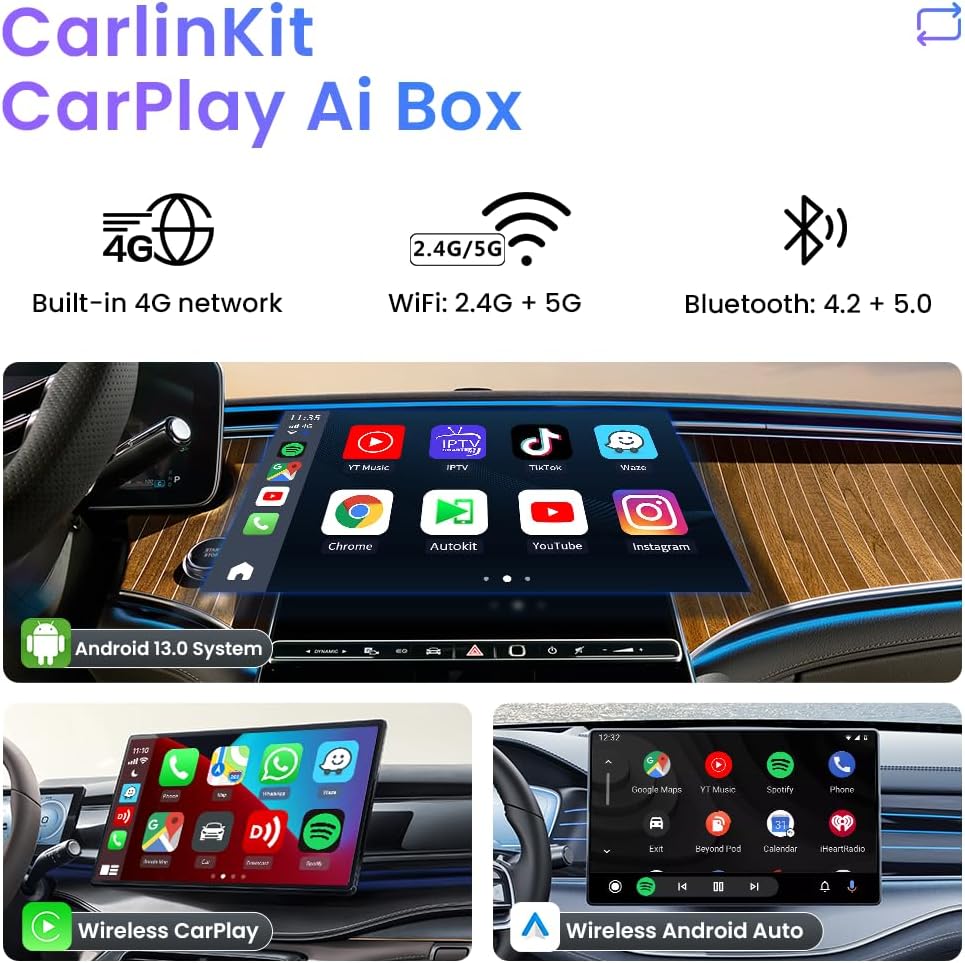
Image: Highlights the built-in GPS, Glonass, and BeiDou satellite positioning for precise navigation.
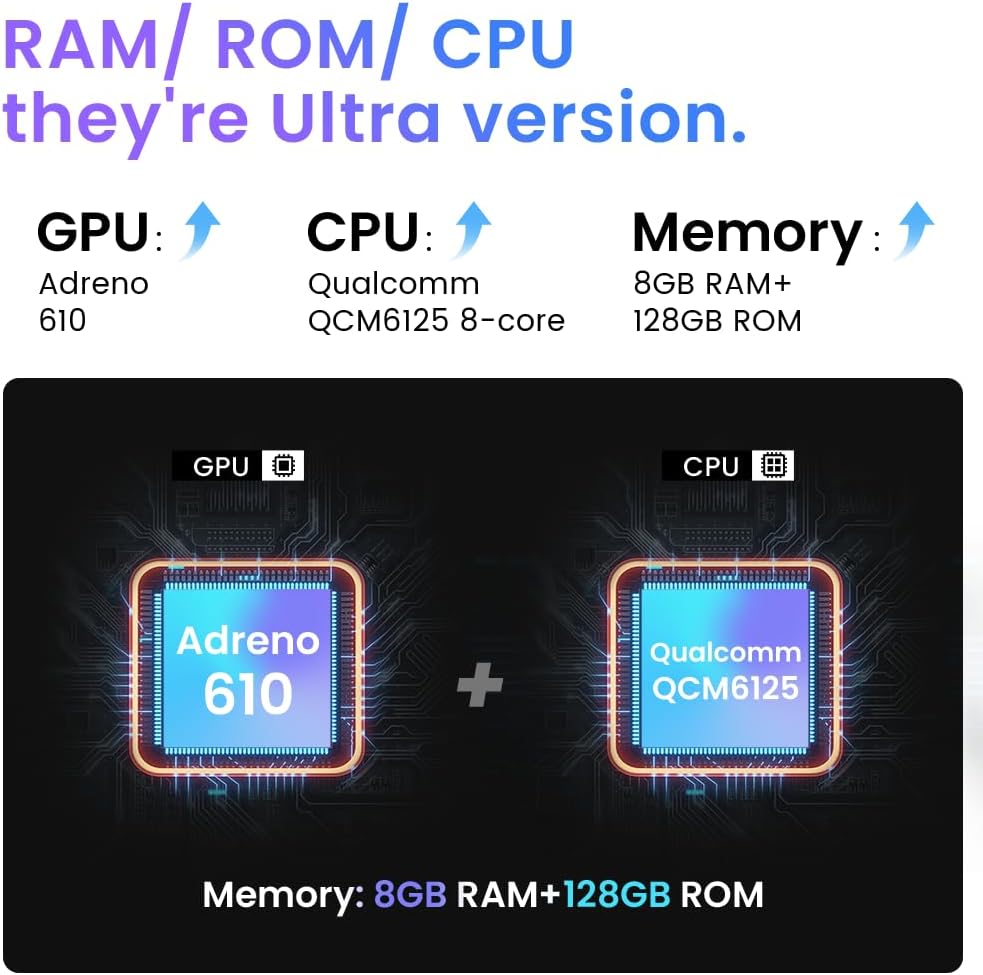
Image: Illustrates the smart voice control feature for hands-free operation.
5. メンテナンス
To ensure the longevity and optimal performance of your Carlinkit CarPlay Ai Box, consider the following maintenance tips:
- デバイスを清潔に保ち、ほこりやゴミを取り除いてください。清掃には柔らかく乾いた布を使用してください。
- デバイスを極端な温度(高温または低温)や直射日光に長時間さらさないでください。
- デバイスを使用しないときは、涼しく乾燥した場所に保管してください。
- 物理的な損傷を防ぐため、デバイスとケーブルを慎重に取り扱ってください。
6. トラブルシューティングとよくある質問
発生する可能性のある一般的な問題に対する解決策は次のとおりです。
- Q: SIM カードを挿入しても認識されない場合はどうすればよいですか?
A: 1. カードの挿入方法が正しいかご確認ください(SIMカードの金属面を下にして、ノッチ側を内側に向けて挿入してください)。2. 製品の電源が入っている状態では、SIMカードの抜き差しは行わないでください。SIMカードの抜き差しは、必ず製品の電源を切ってから行ってください。
- Q: SIM カードは認識されますが、インターネット接続が機能しません。
A: 1. Settings -> Network and Internet -> APN, manually adjust it; 2. Insert the SIM card into the Android phone and check the information parameters of the APN in the phone. Then in the product settings network and Internet - APN - right upper corner "+" sign, add APN parameters (add according to the parameters in the mobile phone); 3. If you need a video tutorial of the operation, please contact the store customer service directly.
- Q: What if Netflix display needs to be updated?
A: After clicking on the "Netflix" APP that comes with the box, "Cancel" and "OK" will appear, you need to click on "Cancel". Do not download Netflix from Google Store. Do not update or delete the software preloaded on the product.
- Q: The device is slow to boot up or connect.
A: Ensure a stable USB connection. For first-time use, the system may take longer to adapt. Subsequent connections should be faster. Ensure your phone's Wi-Fi and Bluetooth are enabled and properly paired.
7. 技術仕様
| 特徴 | 詳細 |
|---|---|
| モデル番号 | CPC200-TBOX-MAX |
| オペレーティング·システム | アンドロイド13.0 |
| プロセッサ | Qualcomm Snapdragon 6125 8-core 2.0 GHz 11nm process technology |
| メモリ | 8GB RAM + 128GB ROM (expandable via SD card) |
| ワイヤレス接続 | Wi-Fi 802.11 a/b/g/n/ac (2.4G+5G), Bluetooth 4.2 BLE + 5.0 BLE |
| ポジショニング | Built-in GPS + Glonass + BeiDou |
| ネットワーク | Built-in 4G Network (SIM card required, sold separately) |
| 対応車種 | Only compatible with cars with built-in Wired CarPlay touchscreen (Not for BMW and Tesla cars) |
| 互換性のある電話 | iPhone: Support iPhone 6 and above, for iOS 10 and above. Android: Support Android 10.0 and above, some require Android 11.0 and above. |
| 寸法 | 7.24 x 5.31 x 1.85インチ |
| アイテム重量 | 2.25オンス |

Image: Visual representation of the device's internal components, highlighting the Qualcomm QCM6125 8-core CPU and 8GB RAM + 128GB ROM.
8. 保証と顧客サポート
Carlinkit provides comprehensive after-sales support for your product.
- 保証: The product comes with a one-year warranty from the date of purchase (for failure caused by quality issues, excluding non-human damage).
- サポート: For any issues, software upgrades, or technical service, please contact the Carlinkit after-sales team. They are available 24 hours a day to assist you.
- 返品と交換: Returns and exchanges are supported for non-human damaged products.
For direct assistance, please refer to the contact information provided by the seller or through your purchase platform.
関連文書 - CPC200-TBOX-MAX
 |
Carlinkit Tbox User Manual: Enhance Your Car's Infotainment System This user manual provides comprehensive details for the Carlinkit Tbox series (including models like CPC200-Tbox, Tbox-plus, TBOX-LED, CPC200-Tbox Ambient, and Tbox-mini), an advanced Android system expansion device designed to enhance your vehicle's infotainment capabilities. Utilizing Qualcomm processors (QCM6125, SM6225, SDM660), the Tbox seamlessly integrates with your car's existing wired CarPlay via USB, enabling wireless CarPlay and Android Auto, 4G internet access via SIM card, GPS navigation, Bluetooth connectivity, and the installation of third-party applications from the Play Store. The manual covers product specifications, setup and connection instructions, app management, troubleshooting common issues, and after-sales service information, ensuring an optimized driving experience. |
 |
CarlinKit CPC200-Tbox Ai Box CarPlay: ワイヤレスアダプター & メディアボックス ユーザーガイド CarlinKit CPC200-Tbox Ai Box CarPlayの包括的なユーザーガイド。ワイヤレスCarPlay/Android Autoアダプターおよびメディアストリーミングボックスとしての機能について詳しく説明しています。システム仕様、製品詳細、互換性、認証情報も含まれています。 |
 |
Carlinkit TBOX-Plus 4+64GB: Bezprzewodowy アダプター CarPlay i Android Auto - 説明 Carlinkit TBOX-Plus 4+64GB アダプターの説明が記載されています。 Dowiedz się、jak zainstalować、połączyć 、korzystać z funkcji CarPlay i Android Auto を参照、詳細な質問、FAQ を参照してください。 |
 |
CarlinKit Tbox Ultra User Manual: Enhance Your Car's Infotainment System The CarlinKit Tbox Ultra is a full Android system device that expands your car's infotainment capabilities via USB, supporting app installation, 5G, GPS, Bluetooth, and wireless CarPlay/Android Auto for enhanced entertainment and navigation. |
 |
CarlinKit CPC200-Tbox Ai Box CarPlay ユーザーマニュアルと仕様 ワイヤレスCarPlayおよびAndroid Autoアダプター、CarlinKit CPC200-Tbox Ai Boxの包括的なガイド。機能、技術仕様、互換性、認証などの詳細を解説します。 |
 |
CARLINKIT CarPlay AI Box LED Android 13 – 詳細なマニュアル CARLINKIT CarPlay AI Box LED の Kompletní uživatelský マニュアル プロ Android 13、8+128 GB。機能、ハードウェア仕様、コンパチビリティ、CarPlay/Android Auto、インストール SIM/TF の情報を簡単に入手できます。 |
Ask a question about this manual
Ask about setup, troubleshooting, compatibility, parts, safety, or missing instructions. Manuals+ will review the question and use this page’s manual context to help answer it.