
導入
Welcome to the Ducky One 3 Mini Aura 60% Mechanical Keyboard. This manual provides essential information for setting up, operating, and maintaining your new keyboard. The Ducky One 3 series incorporates the innovative QUACK Mechanics design philosophy, focusing on enhanced aesthetics, hot-swappable functionality, superior sound dampening, and improved stabilizers.
Your Ducky One 3 Mini Aura features a low-profile case with a unique 3-layer design, allowing for vibrant RGB lighting. It includes a silicone plate dampエネルギーとEVAフォームケースdampener for optimal acoustics. The keyboard is equipped with hot-swappable Kailh Yellow Sockets, Ducky's V2 stabilizers for improved stability, and 3-level adjustable feet. The keycaps are Double Shot Pudding style PBT, offering durability and enhanced RGB illumination.
パッケージ内容
パッケージにすべてのアイテムが含まれていることを確認してください:
- Ducky One 3 Mini Aura 60% Mechanical Keyboard
- USB-Cケーブル
設定
キーボードの接続
- キーボードの背面にある USB-C ポートを見つけます。
- 付属のUSB-Cケーブルをキーボードに接続します。
- USB-A コネクタのもう一方の端をコンピューターの使用可能な USB ポートに接続します。
- キーボードはオペレーティング システムによって自動的に認識されます。

Image: The Ducky One 3 Mini Aura keyboard connected to its detachable USB-C cable.
キーボードの高さを調整する
The keyboard features 3-level adjustable feet on the underside. Flip out the desired feet to achieve your preferred typing angle.
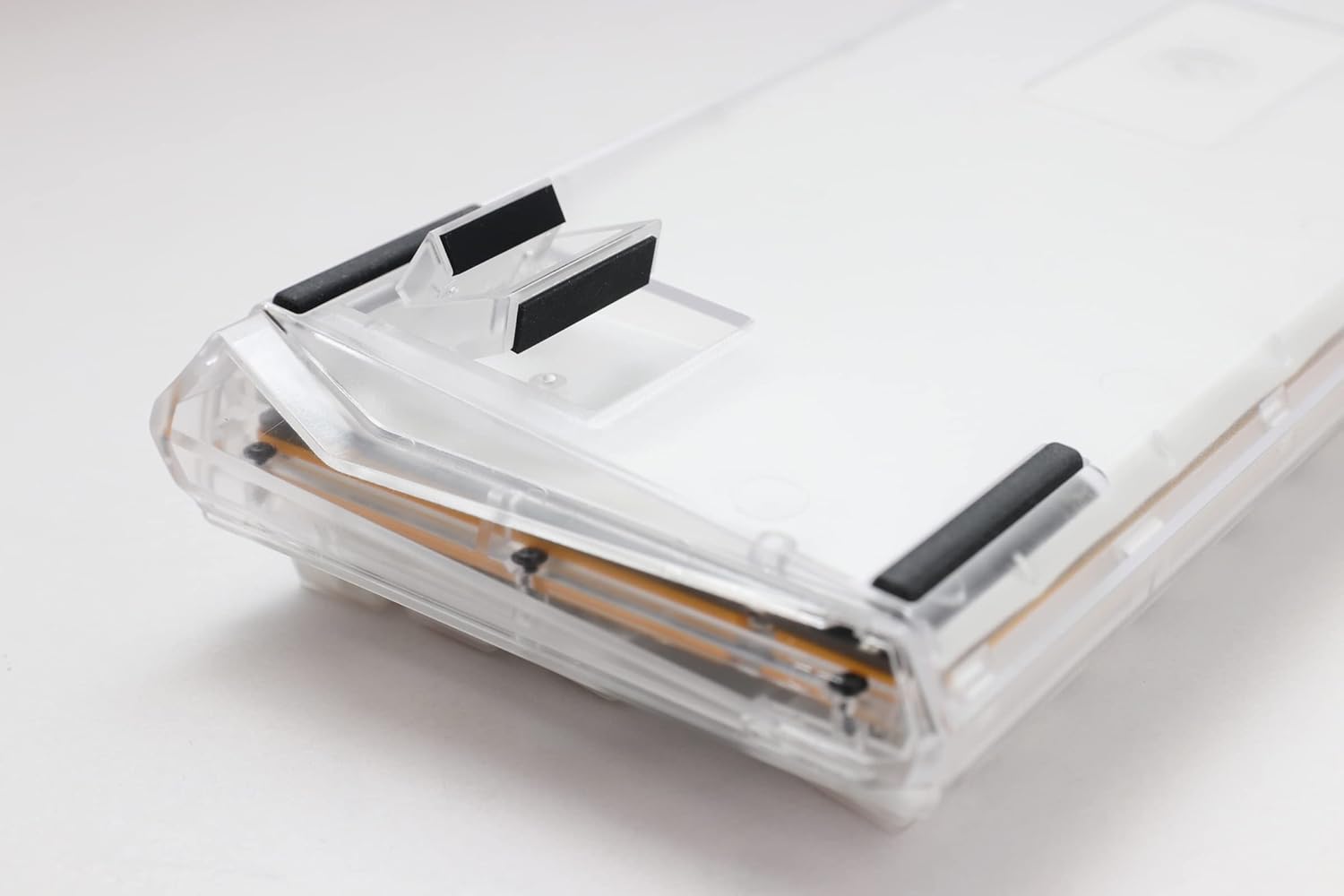
Image: The underside of the Ducky One 3 Mini Aura keyboard, highlighting the adjustable feet for ergonomic positioning.
操作手順
基本的なキーボード機能
The Ducky One 3 Mini Aura functions as a standard 60% mechanical keyboard. Refer to the keycap legends for primary functions. Secondary functions are typically accessed via the Fn key combination.

画像: トップダウン view of the Ducky One 3 Mini Aura 60% mechanical keyboard, showcasing its compact layout and white keycaps.
RGB照明
The keyboard features per-key programmable RGB lighting. Various lighting modes and customization options are available directly on the keyboard. Consult the official Ducky website or included quick guide for detailed instructions on changing lighting effects and colors.
マクロ関数
The Ducky One 3 Mini Aura supports a remapped macro layout, allowing users to program custom key sequences. Specific instructions for macro recording and assignment can be found in the comprehensive user guide available on the Ducky support page.
ホットスワップスイッチ
Your Ducky One 3 Mini Aura is equipped with a hot-swappable PCB and Kailh Yellow Sockets, allowing you to change mechanical switches without soldering. This feature enables customization of typing feel and sound.
- 電源を切る: Disconnect the keyboard from your computer before attempting to remove or install switches.
- キーキャップの取り外し: キーキャッププーラーを使用して、必要なキーキャップを慎重に取り外します。
- スイッチを削除: スイッチプーラーを使用して、スイッチの上部と下部のクリップを慎重につかみ、まっすぐ上に引きます。
- 新しいスイッチをインストールします: 新しいスイッチのピンをPCBの穴に合わせます。カチッと音がするまでスイッチを軽く押し下げます。ピンが曲がっていないことを確認してください。
- キーキャップの交換: キーキャップを新しいスイッチステムに戻します。
ビデオ: オーバーview of the Ducky One 3 series, demonstrating features like hot-swappable switches and the QUACK Mechanics design philosophy.
メンテナンス
キーボードの掃除
- キーボードをコンピューターから取り外します。
- 柔らかいブラシまたは圧縮空気を使用して、キーキャップ間のほこりやゴミを取り除きます。
- For stubborn dirt, gently remove keycaps using a keycap puller and clean the exposed switches and plate with a damp 布(水滴が垂れないように注意してください)。
- Clean keycaps with mild soap and water, then dry thoroughly before reattaching.
一般的なケア
Avoid exposing the keyboard to extreme temperatures, direct sunlight, or liquids. Do not attempt to disassemble the keyboard beyond switch and keycap removal, as this may void your warranty.
トラブルシューティング
キーボードが応答しない
- USB-C ケーブルがキーボードとコンピューターの両方にしっかりと接続されていることを確認します。
- キーボードをコンピューターの別の USB ポートに接続してみてください。
- システム固有の問題を排除するために、別のコンピューターでキーボードをテストします。
- USB ハブを使用している場合は、コンピューターに直接接続してみてください。
Incorrect Key Input or RGB Issues
- Perform a factory reset (refer to the official Ducky manual for specific key combinations).
- Ensure no switches are bent or improperly seated if you have recently hot-swapped them.
- 必要に応じて、コンピューターの USB ドライバーを更新してください。
仕様
| ブランド | ダッキー |
| モデル番号 | DKON2161ST-BUSPDAWWWWC1 |
| 製品寸法 | 12.2 x 4.33 x 1.57インチ |
| アイテム重量 | 2.09ポンド |
| キーボードの説明 | 機械 |
| 接続技術 | USB-C |
| 対応デバイス | PC |
| 特集 | バックライト(RGB) |
| スイッチタイプ | Cherry MX Brown (Hot-Swappable) |
| キーキャップ素材 | ポリブチレンテレフタレート(PBT) |
| スタイル | 60% ホワイト |
| 言語 | 英語 |
保証とサポート
製品保証
This Ducky keyboard comes with a manufacturer's warranty. Please refer to the warranty card included with your product for specific terms, conditions, and duration. Keep your proof of purchase for warranty claims.
オプションの保護プラン
拡張保護プランは別途購入できる場合があります。
- 3年間の保護プラン
- 4年間の保護プラン
- Asurion Complete Protect (monthly billing)
These plans offer additional coverage beyond the standard manufacturer's warranty. Review the terms of each plan for details.
カスタマーサポート
For technical assistance, troubleshooting, or warranty inquiries, please visit the official Ducky website or contact their customer support. You can often find FAQs, driver downloads, and detailed manuals on their support pages.